Got A Virus, Did A Windows Reinstall, Now Have An Error Message

musicabonita

New member
Hello Everyone, I'm new to the board and I just want to start off by saying thank you to any help you can give in advance.

Here are my computer stats:
Acer Aspire One 7741Z
17.3" Display
3GB of DDR3 Memory
250GB Hard Drive
Windows 7 64 bit

My issues started with me getting a trojan.agent. I had several trojans and viruses and I could only be in safe mode for any extended period of time. If I started in normal mode, I would get the BSOD in about 2 minutes.

I went through a number of steps to try and correct the problem under the supervision of another forum. We did combofix and a million other things it seemed the problem remained.

Finally, I just decided to reinstall windows. Everything went fine through the reinstall and I was really happy. But then when it restarted, it started normally and sounded good. But when it went to setup the computer I got this error message: to install windows, click ok to restart the computer and then restart the installation".

I restarted the computer and of course got the same message.

Also based on the research I've done, it seems like there are some changes that can be made in BIOS to help fix the problem. However, any of the changes they suggest, I can't find those settings (voltage, plug and play, etc.). It seems my options in BIOS are very limited.

Any help you give would be great. It could save me from buying a new laptop. Thanks.
 

My Computer

OS
Windows 7 64 Bit
Where did you get the Win7 installer? Try downloading the latest official ISO with SP1 from here: Win7 Home Premium x64 SP1 English Official ISO download

Burn to DVD or write to flash stick using Windows 7 USB-DVD Download Tool.

Unplug all peripherals, follow these steps to Clean Reinstall Windows 7 Factory OEM

You can also try running Acer factory recovery from its partition? Acer Support: Restoring a system to factory load . If this is what you did, then run Startup Repair from System Recovery Options

Next enter BIOS setup and reset to defaults. Then look for SATA controller setting and set to AHCI.

Next try wiping the HD with Diskpart Clean command: SSD - HDD Optimize for Windows Reinstallation

If install continues to fail during setup phase, try entering Device Manager during install to uninstall any device drivers which are showing in error, then when install completes update from desktop: Device Manager - Access During Windows 7 Installation

If error continues, report back or google the verbatim error message to find how others have solved it.
 
I suggest the following. Load your installation disc and find the Command Prompt (under the repair options). Then run these commands:

Diskpart
List disk


Select disk n(where n is the number that was given for your disk where you want to install)
Clean
Create partition primary
Assign Letter=T (you can choose any other letter, but it must be available)


Active
Exit

I always assign my own letter so that I can id the partition I just created.

Now install into this partition.
 

My Computer

Computer Manufacturer/Model Number
HP, Dell, Gateway, Toshiba - 4 laptops and 2 desktops
OS
Vista, Windows7, Mint Mate, Zorin, Windows 8
CPU
from 1.6GHz Duo to i7
Monitor(s) Displays
2x HP w2207
Hard Drives
5x HDD, 7x SSD, 12x Externals
Keyboard
with trackball - no mices
Mouse
Trackball mice
Internet Speed
DSL 6000
Wow such quick replies. Thanks!

I used the Acer eRecovery disc to reinstall. So should I still try that Windows 7 Dvd link and try and do it that way? Is that better than the Acer eRecovery disc?
 

My Computer

OS
Windows 7 64 Bit
It's a cleaner reinstall since it doesn't include the Acer bloatware and useless factory utilities which have better versions built into Win7.

The steps are all in Clean Reinstall Windows 7 Factory OEM including to put the Wireless LAN driver on a stick or CD so you can get online quickly after install to get the latest drivers from optional Windows Updates. Any other drivers then missing in Device Manager can be found on the Acer Support Downloads page here: http://support.acer.com/us/en/product/default.aspx?tab=1&modelId=2193

If you have access to a Win7 System Repair Disk you can boot it now to run Startup Repair a few times as it might yet start.

If you'd rather try again using the Recovery disks then I'd wipe the HD first using the steps given earlier. It's too bad you didn't run the Recovery Partition as it is a more stable method than the Disks. There's a possibility it might still run if you try it from the tutorial linked.

Let us know how it goes.
 
Last edited:
Okay I have another question and forgive me if this is said somewhere but in step number seven it says to enter the Product Key. I don't have a product key to enter. The computer came with windows seven on it so I never needed a product key. Where should I look for that? I've looked on the computer but I can't find it. Suggestions?
 

My Computer

OS
Windows 7 64 Bit

My Computer

Computer Manufacturer/Model Number
Toshiba Satelite P300D 13J (Short model No: PSPDCE)
OS
Windows 7 Enterprise x64 SP1 Version 6.1 Build 7601
CPU
x64bit AMD Turion(tm) X2 Ultra Dual-Core Mobile ZM-82
Memory
4096 (2048 + 2048) MB, DDR2 RAM (800 MHz), max 8,192 MB
Graphics Card(s)
ATI Mobility Radeon™ HD 3650+HyperMemory™(512MB VRAM+2302MB)
Sound Card
Manufacturer: harman/kardon
Monitor(s) Displays
Generic PnP Monitor (MONITOR\LPLA101)
Screen Resolution
1440 x 900 (19" LCD)
Hard Drives
HDD1: TOSHIBA MK3252GSX ATA Device (IDE 320 GB 5,400 o/min) ,
HDD2: Msft Virtual Disk SCSI Disk Device (Virtual Hard Drive),
HDD3: TOSHIBA MK3263GSX USB Device (USB Mobile HDD) (TakeMS MemLine)
PSU
Batery: technology : lithium-ion
Cooling
integrated cooler + 3x external cooler
Keyboard
USB Logitech S520
Mouse
USB Logitech S520
Internet Speed
WAN: 7,2 Mbit/sec, WLAN: 54 Mbit/sec + Bluetooth®
theog,
Thanks man :D
 

My Computer

Computer Manufacturer/Model Number
Toshiba Satelite P300D 13J (Short model No: PSPDCE)
OS
Windows 7 Enterprise x64 SP1 Version 6.1 Build 7601
CPU
x64bit AMD Turion(tm) X2 Ultra Dual-Core Mobile ZM-82
Memory
4096 (2048 + 2048) MB, DDR2 RAM (800 MHz), max 8,192 MB
Graphics Card(s)
ATI Mobility Radeon™ HD 3650+HyperMemory™(512MB VRAM+2302MB)
Sound Card
Manufacturer: harman/kardon
Monitor(s) Displays
Generic PnP Monitor (MONITOR\LPLA101)
Screen Resolution
1440 x 900 (19" LCD)
Hard Drives
HDD1: TOSHIBA MK3252GSX ATA Device (IDE 320 GB 5,400 o/min) ,
HDD2: Msft Virtual Disk SCSI Disk Device (Virtual Hard Drive),
HDD3: TOSHIBA MK3263GSX USB Device (USB Mobile HDD) (TakeMS MemLine)
PSU
Batery: technology : lithium-ion
Cooling
integrated cooler + 3x external cooler
Keyboard
USB Logitech S520
Mouse
USB Logitech S520
Internet Speed
WAN: 7,2 Mbit/sec, WLAN: 54 Mbit/sec + Bluetooth®
Thanks for the reply.

The issue is, if I have already tried to reinstall windows and the reinstall failed and the Product Key is not on the bottom of my computer (for some strange reason) then will I be able to find it on the computer once the reinstall works and I can get online to download a product key finder?

I have one of those stickers on the bottom of my computer but it doesn't have a product key on it. I don't even think it was rubbed off. I just don't think it's there.

Anyway, what do I do if I can't find the product key on the computer and I've already lost all of my info from my computer?
 

My Computer

OS
Windows 7 64 Bit
Thanks for the reply.

The issue is, if I have already tried to reinstall windows and the reinstall failed and the Product Key is not on the bottom of my computer (for some strange reason) then will I be able to find it on the computer once the reinstall works and I can get online to download a product key finder?

I have one of those stickers on the bottom of my computer but it doesn't have a product key on it. I don't even think it was rubbed off. I just don't think it's there.

Anyway, what do I do if I can't find the product key on the computer and I've already lost all of my info from my computer?

Since you are saying that you are not able to find/read the COA Key on your laptop, I would advise you to stick to ACER Recovery Disks to do the reinstall to preserve the OEM activation which was done off-line. The Acer Recovery disks will contain the necessary OEM-SLP key and the certificate required, will check the BIOS for the OEM SLIC and auto-activate.

If you do a reinstall with any other media, you will be required to use the COA Key and activate by phone. Without a COA Key, your Windows cannot be activated.

Contact ACER Support if you have problems installing with ACER Recovery Disks.
 
Last edited:

My Computer

OS
Windows 7 Home Premium 32 bit
Some many problems so little time. I'm about to throw my computer against the wall (although I doubt that would fix anything :))

Anyway, so I can't even get the DVD that I made with the Windows 7 to even load. It just keeps going to the same screens that it did before. I changed the boot order but that didn't seem to help. I'm at a loss right now. I'll try again.
 

My Computer

OS
Windows 7 64 Bit
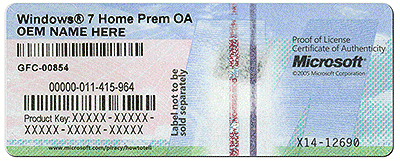
If Win7 came preinstalled on your Acer then it must have a COA sticker on the machine to prove it is genuine WIndows. The sticker looks something like this:

coa-stickers.gif

It is not even legal for Acer to sell the computer without a COA sticker.

I would contact them to ask for help locating the COA, then ask them to provide Recovery Disks if it isnt' found.

If the disks you used completed then you may be able to start WIn7 now by running Startup Repair.

Are you sure the ISO download completed? Did you burn DVD using the Win7 Download Tool provided? Have you set the DVD drive first to boot in BIOS setup? Are you prompted to "Press any key to boot DVD?"

If this fails, reboot and tap the F12 key vigorously every second to get a Boot Menu, select DVD drive.
 
If you cannot even load from a DVD despite the right boot order setting, then something is wrong with your BIOS settings. Go into the BIOS setup and see whether there is an option to reset the BIOS to default. If you found it, reset it to default and save the settings. Then try again.
 

My Computer

Computer Manufacturer/Model Number
HP, Dell, Gateway, Toshiba - 4 laptops and 2 desktops
OS
Vista, Windows7, Mint Mate, Zorin, Windows 8
CPU
from 1.6GHz Duo to i7
Monitor(s) Displays
2x HP w2207
Hard Drives
5x HDD, 7x SSD, 12x Externals
Keyboard
with trackball - no mices
Mouse
Trackball mice
Internet Speed
DSL 6000
Hello,
In regards to the sticker, I do have the sticker on the bottom but it doesn't have a product key on it. Maybe it rubbed off but it is not on there.

Okay I have another question (unrelated to the product key). This morning I realized something. In the BIOS settings there is a USB CD/DVD option and IDE CD\DVD Optiarc DVD RW AD-7580S. I am not certain but I am pretty sure that I did my reinstall booting from the USB CD/DVD option instead of the IDE CD/DVD Optiarc. I'm almost positive that's what I used because when I went back to change the boot order again after the reinstall, is when I noticed the IDE CD/DVD option.

Would this make a difference in how the reinstall went? Could that be causing the issue? Maybe if I reinstalled again (with the Acer cds) using that boot option, it would work? What do you guys think.

Also my SATA Mode is set to AHCI but my Hard drive and cd/dvd drive say IDE in front of them. Does that matter at all or is it completely unrelated?

Thanks guys!
 

My Computer

OS
Windows 7 64 Bit
If you cannot even load from a DVD despite the right boot order setting, then something is wrong with your BIOS settings. Go into the BIOS setup and see whether there is an option to reset the BIOS to default. If you found it, reset it to default and save the settings. Then try again.


It might be because my DVD drive is so hard to deal with. You have to shake the computer for it to work and start recognizing the CD/DVD and you have to turn the computer on its side to even get the drive to open.
 

My Computer

OS
Windows 7 64 Bit
If the disks you used completed then you may be able to start WIn7 now by running Startup Repair.

Are you sure the ISO download completed? Did you burn DVD using the Win7 Download Tool provided? Have you set the DVD drive first to boot in BIOS setup? Are you prompted to "Press any key to boot DVD?"

If this fails, reboot and tap the F12 key vigorously every second to get a Boot Menu, select DVD drive.

I might try the Startup Repair.

The download of the ISO said it was complete. It took a minute but it said it was done. I used the link provided in this thread. I never did see the press any key to boot. I did try the F12 key at start up but maybe it was meant to be because I don't have the product key and so maybe using the Acer Cds is best for me.
 

My Computer

OS
Windows 7 64 Bit
You can try booting the DVD into System Recovery Options to run Startup Repair repeatedly. If DVD will not boot, write the ISO to flash stick and boot under USB, Removable or HD's on F12 menu at boot.

If no installation is found to repair I would try running Factory Recovery from the link I provided you earlier - try it several times to see if it will work.

If Factory Recov will not run then wipe the HD with Clean command before running the Recovery Disks again: Diskpart Clean Command
DISKPART At PC Startup

If install fails again, post back or google the verbatim error text to find out how others solved it.

I would also call Acer Tech Support and ask them why you have no COA sticker. They need to answer this even if you are not within the one-year free Tech Support coverage. If you are, then they should help you with Recovery as well.

If Acer preinstalled Windows and failed to provide a COA sticker on machine (back or side of tower, bottom of laptop) then they need to make it good or be reported to MS Customer Service for possibly selling bootleg Windows. Tell them you are being asked about this in a Win7 forums. Be polite but firm - ask for their manager if your inquiry is brushed off.

You can also ask them for a new set of disks.
 
Back
Top