Solved Excel 2010 - Out of memory? Not enough resources.

lolalou

New member
When a user is opening a second Excel sheet the following error message appears: 'Excel cannot complete this task with available resources. Choose less data or close other applications.'

The files are saved on a network drive and I am able to open them fine on my PC which is the exact same spec and setup. I have deleted the files in C:\users\username\appdata\microsoft\excel and rebooted the PC but the error still appears. It is happening to all sheets, no matter their size or content, most don't have macros.

Don't know what else to try?!
 

My Computer

Computer Manufacturer/Model Number
HP 8100 Elite
OS
Windows 7 Professional 64 bit SP1
CPU
Intel Core i7 2.8GHz
Memory
4GB
Graphics Card(s)
ATI Radeon HD 4550
Monitor(s) Displays
HP 22"
The above fix did sort it, I just wasn't told!
 

My Computer

Computer Manufacturer/Model Number
HP 8100 Elite
OS
Windows 7 Professional 64 bit SP1
CPU
Intel Core i7 2.8GHz
Memory
4GB
Graphics Card(s)
ATI Radeon HD 4550
Monitor(s) Displays
HP 22"
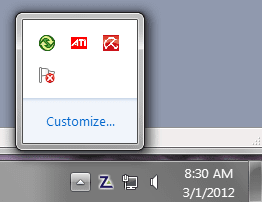
Take a look at what apps are loaded and running - see the lower right corner of the screen. If there is a bunch of "stuff" running that isn't required to do the job, close them (OneNote, Office Upload Center or whatever it's called, RSS feeds, manufacturer's "utilities" - you get the idea).

RunningApps.PNG

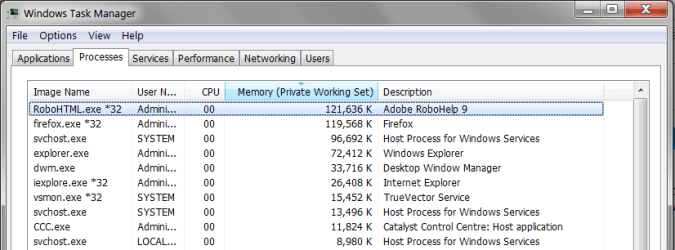
The open the Task Manager and look at the running processes. Click the Memory column header to sort by memory use - evaluate and take appropriate course of action.

MemoryUse.PNG

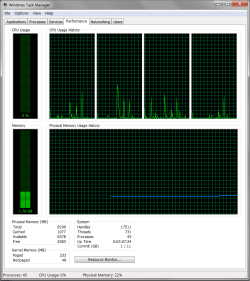
Next look at the Performance tab for more clues.

PerfCharts.PNG


Regards,
GEWB
 

My Computer

Computer type
PC/Desktop
Computer Manufacturer/Model Number
(7 different computers booting up to 10 systems)
OS
Linux Mint / XP / Win7 Home, Pro, Ultimate / Win8.1 / Win10
Other Info
Four desktops, two laptops, one notebook and one tablet
Our posts crossed in the ether - glad you got it fixed!

I'll leave my first reply as it may help someone else.

Regards,
GEWB
 

My Computer

Computer type
PC/Desktop
Computer Manufacturer/Model Number
(7 different computers booting up to 10 systems)
OS
Linux Mint / XP / Win7 Home, Pro, Ultimate / Win8.1 / Win10
Other Info
Four desktops, two laptops, one notebook and one tablet
Extreme Gratitude

I have been encountering this issue for quite a while, but every fix I found through MS Support did not help at all.

This fix worked on all affected machines (5 of them)

Thank you so MUCH!

Kudos
 

My Computer

OS
Windows 7 Professional x64
What is the fix?

I"m sorry maybe I'm missing something here, but what is the "fix" that is being referred to? I've been having this issue with Excel every time I open more than one document. But I don't see what solution is offered here?

Please advise, thanks.
 

My Computer

OS
Windows 7
Stopping unnecessary programs and services to free up memory (as I recall but my memory isn't what it used to be).

Regards,
GEWB
 

My Computer

Computer type
PC/Desktop
Computer Manufacturer/Model Number
(7 different computers booting up to 10 systems)
OS
Linux Mint / XP / Win7 Home, Pro, Ultimate / Win8.1 / Win10
Other Info
Four desktops, two laptops, one notebook and one tablet
Out of Memory Not Enough Resources

Interesting... thanks for the reply.

When looking at the thread here, it appears that it's out of sequence where yours follows the first two from lolalou who appeared to have it "fixed" before your suggestion appears. Thus, I didn't expect this was the solution.

Nonetheless, I wouldn't think the answer would be something this simple because I've actually seen tons of these issues in web searches and several suggestions but no real fix. My laptop, where this issue occurs, is newer and more advanced than my home PC. Yet my home PC never had this issue and I typically am running an equal amount of resources on both.

Just in case, I'll pay attention to that.

Thanks.
 

My Computer

OS
Windows 7
This Worked for us!!

I tried every fix on the internet for the "not enough resources" error in Excel 2010 with no luck:mad:. It wasn't until I started looking at the version of Excel that I had a break through:party:. By default Office is installed as 32-bit, but you can install a 64-bit version that allows Office to use all the resources that a work station has. 32 bit Excel only allows 2GB, whereas 64 uses all resources. This link explains how you should use 64 bit Office 2010 and how to install 64-bit editions of Office 2010 We have accountants that work with huge spread sheets and would always run into this issue after Office upgrade to 2010, once I switched them to Office 64-bit the problem stopped. I would only suggest to use 64-bit for users that work with large excel documents and/or get the memory error, keep 32-bit as default, this has worked great for us. BTW go to file>help in any Office 2010 program to see what version you are running, most likely it's 32-bit. Hope this helps someone out there because I know this error drove me nuts!!
 

My Computer

OS
Windows 7 Pro 64 bit
I know this thread is long since deceased, but I felt a great need to thank PC GURU for his/her extremely helpful answer. I, too, was driven up a wall with this error in my office - users with large amounts of RAM were still getting this error on 32-bit installations of Office 2010 and for the life of me I couldn't figure it out. Sometimes even single, simple workbooks generated the error.

My Google-fu failed to find any decent solution and took me only further into the weeds.

Now that I know it's a built-in "feature", management can/will purchase 64-bit editions for our numbers-loving accountants.

Thanks for saving me!
 

My Computer

Computer type
Laptop
OS
Windows 7 x64 Enterprise
I have a file that is displaying same symptoms

In my case this is with a small file (6.5 MB with no calculations)
This file also takes and extraordinarily long time to open (30-90 secs)
The problem is occurring on several computers that I have tried (including with Windows 8 & Excel 13)
I'm not even able to delete 1 row of data (30-40 columns with data)
I have other bigger files with pivot tables etc. and these have no problem.
This seems to be a file issue, but I have been unable to resolve it.

64 bit edition seems to be an overkill as the standard (recommended) version should do this easily.
"this additional capacity is needed only by those Microsoft Excel users who require Excel spreadsheets that are larger than 2 gigabytes (GB). "

The suggestions by Microsoft support don't have any effect

I have noticed over that last year or more that excel seems to struggle with memory, especially with bigger files.

Any help or suggestions would be appreciated
#evernoteContentClipperWait { FONT-FAMILY: arial, helvetica, sans-serif; PADDING-BOTTOM: 0px; PADDING-TOP: 0px; PADDING-LEFT: 0px; MARGIN: 0px; Z-INDEX: 2147483647; DISPLAY: block; PADDING-RIGHT: 0px; opacity: 1}#evernoteContentClipperWait * { DISPLAY: block !important; text-shadow: none}.quirk-mode-container#evernoteContentClipperWait { WIDTH: 160px}#evernoteContentClipperWait DIV.content-less-than-nine-container#evernoteContentClipperWaitContent { FILTER: progid:DXImageTransform.Microsoft.Alpha(opacity=80); BACKGROUND-COLOR: rgb(0,0,0)}DIV#evernoteContentClipperWaitContent { FONT-SIZE: 10pt; HEIGHT: 100%; FONT-FAMILY: arial, helvetica, sans-serif; BACKGROUND: black; COLOR: white; PADDING-BOTTOM: 9px; PADDING-TOP: 9px; PADDING-LEFT: 15px; PADDING-RIGHT: 15px; WIDTH: 100%; border-radius: 5px; opacity: .8}#evernoteContentClipperWaitText { FLOAT: none; PADDING-BOTTOM: 0px; PADDING-TOP: 0px; PADDING-LEFT: 0px; MARGIN: 0px; DISPLAY: inline; LETTER-SPACING: 1pt; LINE-HEIGHT: 18px; PADDING-RIGHT: 0px}#evernoteContentClipperWait IMG { BORDER-TOP: medium none; BORDER-RIGHT: medium none; BORDER-BOTTOM: medium none; FLOAT: left; PADDING-BOTTOM: 0px; PADDING-TOP: 0px; PADDING-LEFT: 0px; MARGIN: 0px 0px 0px 4px; BORDER-LEFT: medium none; DISPLAY: inline; PADDING-RIGHT: 0px}DIV#evernote-spinner-container { HEIGHT: 18px; FLOAT: left; WIDTH: 20px}' ; // get html // ======== var _html = _response; // normalize // ========= _html = _html.replace(//gi, '>'); _html = _html.replace(/\s+\/>/gi, '/>'); // remove // ====== _html = _html.replace(/#next_pages_container { POSITION: absolute; LEFT: -100px; Z-INDEX: 2147483647 !important; TOP: -100px; WIDTH: 5px; hight: 5px}

 

My Computer

Computer type
PC/Desktop
Computer Manufacturer/Model Number
Custom
OS
Windows 7 pro, SP1 64 bit
CPU
i5-2500 3.3GHz
Memory
8GB
UN-Check Preview pane and Details pane in all Office programs

Microsoft suggested workaround is to go to:

Windows Explorer --> Layout ---> uncheck preview pane and details pane.
OUTLOOK --> add attachment --> layout --> uncheck here too
Excel --> open document --> layout --> uncheck these here too.
 

My Computer

Computer Manufacturer/Model Number
Acer
OS
Windows 7
CPU
Turion 64x2
Motherboard
AMD
Memory
2056 DDR2
Graphics Card(s)
ATI 1250 Xpress
Hard Drives
160GB WD1600
Back
Top