hi all
ive just been reading online and came across a warning that running 1600mhz ram with an amd cpu that has a memory controller set for 1333mhz will damage the controller. eventhough everythin seems stable.
im runnin this ram XMS3 at its manufactures settings.(although my mobo defaulted it to 1066mhz) and i have a phenom 965 be c3 running @3.8 on stock voltage using the multiplier.
everythin has been stable n never given me reson to think anythin is wrong.
i did'nt realise the 965 be mem controller was only 1333mhz. id never even thought about it
is there any truth in the statement i read n is my cpu's me controller likely to get damaged?
would i be better off dropping to 1333 and tighter timmings?
thanks in advance folks. any help is always much apreciated
This sentence is probably the major reason behind this claim:
"Excessively increasing voltages to the RAM and/or CPU in an effort to improve system stability could cause the Memory Controller to fail."
I expect these motherboards auto voltage the memory higher @ 1600 MHz in auto mode and this causes the problem, but that is just my speculation based on my experience (and not with AMD) on how motherboards tend to overvolt on auto settings.
Since reduced RAM speed isn't very noticeable in the real world, if you meet the criteria in that article, I would just run it at 1333 MHz (though I still wouldn't be too happy!).
Samsung 850 Pro 256GB (OS), Samsung 2x 128GB 840 Pro SSD in RAID0, 3x WD Blue 6Gb/s 1TB RAID0, WD 2TB Black external USB 3.0, 2TB WD20EARS Green external USB 3.0, 2x 500GB Seagate and 1 750 GB external USB, 1x 350GB external USB3
I have a 965BE on a Gigabyte board with some GSkill Ripjaws 2x4GB running well at 1600MHz. What needs to be done to prevent the over volting is to set your RAM volts and timings manually to what ever your RAM specs are. I also use the unganged mode as suggested in the article.
I did manage to get this RAM to 1640MHz stable, anymore would not be stable for me. Even going to the 1333 will not slow your system so much that you'd see a difference except in a benchmark test.
My Computer
At a glance
Windows 7 Ultimate X64 SP1Intel i5-2550K, Differing ~4.4-4.8GHz No buil...16GB G.Skill Sniper 1866MHz @ 2133MHz 2x8GBASUS GTX650TIB-DC2OC-2GD5, (650TI Boost)
Computer type
PC/Desktop
Computer Manufacturer/Model Number
Home Built Desktop By DataTech
OS
Windows 7 Ultimate X64 SP1
CPU
Intel i5-2550K, Differing ~4.4-4.8GHz No built in GPU
Motherboard
ASUS P8Z68-V PRO/GEN3
Memory
16GB G.Skill Sniper 1866MHz @ 2133MHz 2x8GB
Graphics Card(s)
ASUS GTX650TIB-DC2OC-2GD5, (650TI Boost)
Sound Card
Onboard Realtek 5-1
Monitor(s) Displays
Samsung P2570HD
Screen Resolution
1920x1080
Hard Drives
Samsung 840 Pro 256GB SSD for OS, 500GB Seagate Constellation (Enterprise drive) for Data
PSU
Corsair HX650W
Case
Inwin Dragon Rider
Cooling
Hyper 212 EVO w/two Noctua fans, push-pull, @1300 RPM
Keyboard
E-Z Eyes, bright yellow keys with large characters
Mouse
steelseries SENSEI Laser Pro Gaming
Internet Speed
48-51Mbs Mbs down, 11 Mbs up Xfinity Cable
Antivirus
Norton Internet Security 2013
Browser
IE 10, Opera, Pale Moon if needed
Other Info
4 case fans, LG BluRay-RE, ASUS DVD-RW, Mr. Fusion power supply, 1.21 gigawatts.
ello
cheers 4 the reply. sorted! i did set all timmings n voltage manually to the manufacturers specs as my gigabyte board set my memory to 1066mhz when i installed it. at the time i had never really been in the bios so i gave someone on seven forums a right headache teachin me about memory
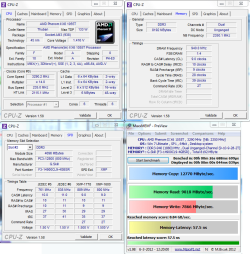
in cpu-z it shows that its running at 1600mhz but pc3-8500f (533). i know this is normal for cpu-z.
if i decide to drop it to 1333mhz should i use the cpu-z suggested timmings of 9,9,9,26,35 @1.50v or should i try tighter timmings?
Good job, glad to hear you have it set. CPUz shows you at 1607MHz.
The tested voltage and speed is what the RAM has been configured to run at and be stable. If you want to try it at 1333, you can see if 8-9-9-24T would work. With timing adjustments it sometimes takes some experimentation to find a good setting.
cheers! il try some tighter settings a bit later.
when i did change it to 1333 everythin seemed to run like shit but seems ok this mornin. i forgot to add the screenie to last msg..
everythin look ok? it does my head in why everythin sees my ram as 1066 eventhough it 1600. when i first installed it my mobo defaulted it to 1066.
Its normal for motherboards to automatically lower RAM timing according to the sorts of CPUs that go in the motherboards socket. My motherboard for example down clocks my Corsair Vengeance to 1333mhz by default, although I have overclocked it, I am on Intel so unfortunately I can not offer advice there. I can however comment that that is the ram I had previous to my vengeance and it is very nice ram good choice.
My Computer
At a glance
Windows 7 Professional 64bitIntel i7 3770k 3.5ghzCorsair Vengeance 16gb (4x4gb)Gigabyte G1 Gaming GTX970
Computer type
PC/Desktop
Computer Manufacturer/Model Number
Custom Build
OS
Windows 7 Professional 64bit
CPU
Intel i7 3770k 3.5ghz
Motherboard
Asus P8Z77-V Deluxe
Memory
Corsair Vengeance 16gb (4x4gb)
Graphics Card(s)
Gigabyte G1 Gaming GTX970
Sound Card
None
Monitor(s) Displays
3x AOC 12367fh 23"
Screen Resolution
1920x1080
Hard Drives
Western Digital Caviar Black 1TB - 64mb cache
Western Digital Caviar Green 1TB - 32mb cache
Samsung 830 SSD 128Gb Boot Drive
ive already got speccy installed aswell as aida64. i cant downlad maxxPI it keeps getting interupted as if my av was stoppin it but i disabled my av n still it gets interupted
OK, try this: View attachment MaxxMEM2_preview.zip
If your BIOS allows, try bumping yourNB Frequency to 2400MHz and keep the HT Link Frq as near to 2000MHz as possible. Set the NB Voltage to 1.4.
My Computer
At a glance
Windows 7 Ultimate X64 SP1Intel i5-2550K, Differing ~4.4-4.8GHz No buil...16GB G.Skill Sniper 1866MHz @ 2133MHz 2x8GBASUS GTX650TIB-DC2OC-2GD5, (650TI Boost)
Computer type
PC/Desktop
Computer Manufacturer/Model Number
Home Built Desktop By DataTech
OS
Windows 7 Ultimate X64 SP1
CPU
Intel i5-2550K, Differing ~4.4-4.8GHz No built in GPU
Motherboard
ASUS P8Z68-V PRO/GEN3
Memory
16GB G.Skill Sniper 1866MHz @ 2133MHz 2x8GB
Graphics Card(s)
ASUS GTX650TIB-DC2OC-2GD5, (650TI Boost)
Sound Card
Onboard Realtek 5-1
Monitor(s) Displays
Samsung P2570HD
Screen Resolution
1920x1080
Hard Drives
Samsung 840 Pro 256GB SSD for OS, 500GB Seagate Constellation (Enterprise drive) for Data
PSU
Corsair HX650W
Case
Inwin Dragon Rider
Cooling
Hyper 212 EVO w/two Noctua fans, push-pull, @1300 RPM
Keyboard
E-Z Eyes, bright yellow keys with large characters
Mouse
steelseries SENSEI Laser Pro Gaming
Internet Speed
48-51Mbs Mbs down, 11 Mbs up Xfinity Cable
Antivirus
Norton Internet Security 2013
Browser
IE 10, Opera, Pale Moon if needed
Other Info
4 case fans, LG BluRay-RE, ASUS DVD-RW, Mr. Fusion power supply, 1.21 gigawatts.
cheers! it worked once i disabled my av n added to eceptions
what what will uppin the northbridge frequency improve? as u may have guessed i have'nt done much overclocking
northbiridge clock is currently @2009MHz isnt takin it to 2400 a bit much?
i ran a bench at the 1333 stock settings n the result seems ok 2 me but ive never benched ram. wot do u think?
cheers
The NB clock will help the RAM run faster and 2400 isn't too much, I've had mine up to 2800 and was stable, your experience may be different. Looks ok.
My Computer
At a glance
Windows 7 Ultimate X64 SP1Intel i5-2550K, Differing ~4.4-4.8GHz No buil...16GB G.Skill Sniper 1866MHz @ 2133MHz 2x8GBASUS GTX650TIB-DC2OC-2GD5, (650TI Boost)
Computer type
PC/Desktop
Computer Manufacturer/Model Number
Home Built Desktop By DataTech
OS
Windows 7 Ultimate X64 SP1
CPU
Intel i5-2550K, Differing ~4.4-4.8GHz No built in GPU
Motherboard
ASUS P8Z68-V PRO/GEN3
Memory
16GB G.Skill Sniper 1866MHz @ 2133MHz 2x8GB
Graphics Card(s)
ASUS GTX650TIB-DC2OC-2GD5, (650TI Boost)
Sound Card
Onboard Realtek 5-1
Monitor(s) Displays
Samsung P2570HD
Screen Resolution
1920x1080
Hard Drives
Samsung 840 Pro 256GB SSD for OS, 500GB Seagate Constellation (Enterprise drive) for Data
PSU
Corsair HX650W
Case
Inwin Dragon Rider
Cooling
Hyper 212 EVO w/two Noctua fans, push-pull, @1300 RPM
Keyboard
E-Z Eyes, bright yellow keys with large characters
Mouse
steelseries SENSEI Laser Pro Gaming
Internet Speed
48-51Mbs Mbs down, 11 Mbs up Xfinity Cable
Antivirus
Norton Internet Security 2013
Browser
IE 10, Opera, Pale Moon if needed
Other Info
4 case fans, LG BluRay-RE, ASUS DVD-RW, Mr. Fusion power supply, 1.21 gigawatts.
ello chap.
that last reply was b4 the msg's n all the reading i did
i had it all stable with the ram @1333 but after more reading i found that the problem with 1600 memory and the 965be's memory controller was with the c2 stepping. i could'nt find any comments anout the c3 one. so i put my memory back to 1600 as i hadnt had any probs with it. northbridge freq@2400 nb vlt 1.26
7passes of memtest. standard intel burn test all good
I thought so but posted in case anyone else may benefit
Here's my Phenom II X6 1055T, 2.8GHz, GSKill Sniper 1866MHz on a ASRock Fatal1ty 990FX Pro board. You'll see the Maxxmem score isn't much different from yours and the copy is identical. My 965 is a C3 stepping.
My Computer
At a glance
Windows 7 Ultimate X64 SP1Intel i5-2550K, Differing ~4.4-4.8GHz No buil...16GB G.Skill Sniper 1866MHz @ 2133MHz 2x8GBASUS GTX650TIB-DC2OC-2GD5, (650TI Boost)
Computer type
PC/Desktop
Computer Manufacturer/Model Number
Home Built Desktop By DataTech
OS
Windows 7 Ultimate X64 SP1
CPU
Intel i5-2550K, Differing ~4.4-4.8GHz No built in GPU
Motherboard
ASUS P8Z68-V PRO/GEN3
Memory
16GB G.Skill Sniper 1866MHz @ 2133MHz 2x8GB
Graphics Card(s)
ASUS GTX650TIB-DC2OC-2GD5, (650TI Boost)
Sound Card
Onboard Realtek 5-1
Monitor(s) Displays
Samsung P2570HD
Screen Resolution
1920x1080
Hard Drives
Samsung 840 Pro 256GB SSD for OS, 500GB Seagate Constellation (Enterprise drive) for Data
PSU
Corsair HX650W
Case
Inwin Dragon Rider
Cooling
Hyper 212 EVO w/two Noctua fans, push-pull, @1300 RPM
Keyboard
E-Z Eyes, bright yellow keys with large characters
Mouse
steelseries SENSEI Laser Pro Gaming
Internet Speed
48-51Mbs Mbs down, 11 Mbs up Xfinity Cable
Antivirus
Norton Internet Security 2013
Browser
IE 10, Opera, Pale Moon if needed
Other Info
4 case fans, LG BluRay-RE, ASUS DVD-RW, Mr. Fusion power supply, 1.21 gigawatts.