Outlook Keyboard Key - Change ?

JerometheGiraff

New member
Member
VIP
Local time
11:57 AM
Messages
925
I have a Logitech keyboard that has a email button on it, many of you are probably aware of these keyboards. The key is pre-programmed for Outlook only, is there any way to change it, so it works with gMail or Hotmail ?
 

My Computer My Computer

At a glance

Windows 10 ProCore2Quad (2.6 Ghz)8 Gigs DDR2Geforce Titan Black
Computer type
PC/Desktop
Computer Manufacturer/Model Number
Custom Built
OS
Windows 10 Pro
CPU
Core2Quad (2.6 Ghz)
Motherboard
nVidia 775
Memory
8 Gigs DDR2
Graphics Card(s)
Geforce Titan Black
Sound Card
Motherboard Audio
Monitor(s) Displays
25" Asus LCD
Screen Resolution
1680x1050
Hard Drives
120 Gig SSD
60 Gig SSD
750 Gig HDD
PSU
850 Watts
Case
Mid-Size
Keyboard
Logitech
Mouse
Logitech - I love logitech mouses
Internet Speed
DSL 25Mbps - Although extremely expensive
Antivirus
Microsoft Anti-Virus
Browser
FireFox 36.x
I have a Logitech keyboard that has a email button on it, many of you are probably aware of these keyboards. The key is pre-programmed for Outlook only, is there any way to change it, so it works with gMail or Hotmail ?

Hello JerometheGiraff and welcome to the forums :party:

I don't think this is possible. When pressed, this button will run a macro to execute Outlook. As far as I'm aware, you would need to access the processor in the keyboard to change this macro, and even then, I have no idea how you could change the macro routine.

Do you use Outlook? It would be possible to make it open up something else if you don't use outlook :)

Tom

Edit: This post may sound a little contradicting, but my proposed solution is more of a workaround.
 

My Computer My Computer

At a glance

Windows 8.1 Pro x64Intel i7 3770K @4.5GHzCorsair Vengeance 2x4GB DDR3 1600MHz Low Prof...Gigabyte Radeon HD 7850 (2GB GDDR5)
Computer type
PC/Desktop
Computer Manufacturer/Model Number
Build #1
OS
Windows 8.1 Pro x64
CPU
Intel i7 3770K @4.5GHz
Motherboard
ASUS P8Z77-V PRO
Memory
Corsair Vengeance 2x4GB DDR3 1600MHz Low Profile (White)
Graphics Card(s)
Gigabyte Radeon HD 7850 (2GB GDDR5)
Sound Card
Integrated on motherboard
Monitor(s) Displays
23" LG LCD/LED IPS
Screen Resolution
1920*1080
Hard Drives
Samsung EVO 128GB SSD
Seagate Barracuda 2GB 7200rpm
2x Seagate FreeAgent [500gb]
PSU
Corsair TX650W V2 (80+ Bronze)
Case
NZXT Phantom 410 White
Cooling
Corsair H100 Water Cooler
Keyboard
Microsoft Desktop 2000 Wireless Keyboard
Mouse
Microsoft Desktop 2000 Wireless Mouse
Internet Speed
95 Mb/s Download 70 Mb/s Upload
Antivirus
MSE + MBAM Pro
Browser
Firefox
True, I'd have to access the keyboard macro, hrm :)
 

My Computer My Computer

At a glance

Windows 10 ProCore2Quad (2.6 Ghz)8 Gigs DDR2Geforce Titan Black
Computer type
PC/Desktop
Computer Manufacturer/Model Number
Custom Built
OS
Windows 10 Pro
CPU
Core2Quad (2.6 Ghz)
Motherboard
nVidia 775
Memory
8 Gigs DDR2
Graphics Card(s)
Geforce Titan Black
Sound Card
Motherboard Audio
Monitor(s) Displays
25" Asus LCD
Screen Resolution
1680x1050
Hard Drives
120 Gig SSD
60 Gig SSD
750 Gig HDD
PSU
850 Watts
Case
Mid-Size
Keyboard
Logitech
Mouse
Logitech - I love logitech mouses
Internet Speed
DSL 25Mbps - Although extremely expensive
Antivirus
Microsoft Anti-Virus
Browser
FireFox 36.x
Yeah :( Do you use Outlook? If not, we can create a program that launches another program, call it Outlook.exe and put it in the Outlook directory.

Tom
 

My Computer My Computer

At a glance

Windows 8.1 Pro x64Intel i7 3770K @4.5GHzCorsair Vengeance 2x4GB DDR3 1600MHz Low Prof...Gigabyte Radeon HD 7850 (2GB GDDR5)
Computer type
PC/Desktop
Computer Manufacturer/Model Number
Build #1
OS
Windows 8.1 Pro x64
CPU
Intel i7 3770K @4.5GHz
Motherboard
ASUS P8Z77-V PRO
Memory
Corsair Vengeance 2x4GB DDR3 1600MHz Low Profile (White)
Graphics Card(s)
Gigabyte Radeon HD 7850 (2GB GDDR5)
Sound Card
Integrated on motherboard
Monitor(s) Displays
23" LG LCD/LED IPS
Screen Resolution
1920*1080
Hard Drives
Samsung EVO 128GB SSD
Seagate Barracuda 2GB 7200rpm
2x Seagate FreeAgent [500gb]
PSU
Corsair TX650W V2 (80+ Bronze)
Case
NZXT Phantom 410 White
Cooling
Corsair H100 Water Cooler
Keyboard
Microsoft Desktop 2000 Wireless Keyboard
Mouse
Microsoft Desktop 2000 Wireless Mouse
Internet Speed
95 Mb/s Download 70 Mb/s Upload
Antivirus
MSE + MBAM Pro
Browser
Firefox
A web based email client, I want to launch.
 

My Computer My Computer

At a glance

Windows 10 ProCore2Quad (2.6 Ghz)8 Gigs DDR2Geforce Titan Black
Computer type
PC/Desktop
Computer Manufacturer/Model Number
Custom Built
OS
Windows 10 Pro
CPU
Core2Quad (2.6 Ghz)
Motherboard
nVidia 775
Memory
8 Gigs DDR2
Graphics Card(s)
Geforce Titan Black
Sound Card
Motherboard Audio
Monitor(s) Displays
25" Asus LCD
Screen Resolution
1680x1050
Hard Drives
120 Gig SSD
60 Gig SSD
750 Gig HDD
PSU
850 Watts
Case
Mid-Size
Keyboard
Logitech
Mouse
Logitech - I love logitech mouses
Internet Speed
DSL 25Mbps - Although extremely expensive
Antivirus
Microsoft Anti-Virus
Browser
FireFox 36.x
That's fine :) I can make it launch whatever site you want.

Tom
 

My Computer My Computer

At a glance

Windows 8.1 Pro x64Intel i7 3770K @4.5GHzCorsair Vengeance 2x4GB DDR3 1600MHz Low Prof...Gigabyte Radeon HD 7850 (2GB GDDR5)
Computer type
PC/Desktop
Computer Manufacturer/Model Number
Build #1
OS
Windows 8.1 Pro x64
CPU
Intel i7 3770K @4.5GHz
Motherboard
ASUS P8Z77-V PRO
Memory
Corsair Vengeance 2x4GB DDR3 1600MHz Low Profile (White)
Graphics Card(s)
Gigabyte Radeon HD 7850 (2GB GDDR5)
Sound Card
Integrated on motherboard
Monitor(s) Displays
23" LG LCD/LED IPS
Screen Resolution
1920*1080
Hard Drives
Samsung EVO 128GB SSD
Seagate Barracuda 2GB 7200rpm
2x Seagate FreeAgent [500gb]
PSU
Corsair TX650W V2 (80+ Bronze)
Case
NZXT Phantom 410 White
Cooling
Corsair H100 Water Cooler
Keyboard
Microsoft Desktop 2000 Wireless Keyboard
Mouse
Microsoft Desktop 2000 Wireless Mouse
Internet Speed
95 Mb/s Download 70 Mb/s Upload
Antivirus
MSE + MBAM Pro
Browser
Firefox
You can make the pre-programmed key launch that is currently tied with Outlook to launch into gMail, or Hotmail account ? If so, that would be great.
 

My Computer My Computer

At a glance

Windows 10 ProCore2Quad (2.6 Ghz)8 Gigs DDR2Geforce Titan Black
Computer type
PC/Desktop
Computer Manufacturer/Model Number
Custom Built
OS
Windows 10 Pro
CPU
Core2Quad (2.6 Ghz)
Motherboard
nVidia 775
Memory
8 Gigs DDR2
Graphics Card(s)
Geforce Titan Black
Sound Card
Motherboard Audio
Monitor(s) Displays
25" Asus LCD
Screen Resolution
1680x1050
Hard Drives
120 Gig SSD
60 Gig SSD
750 Gig HDD
PSU
850 Watts
Case
Mid-Size
Keyboard
Logitech
Mouse
Logitech - I love logitech mouses
Internet Speed
DSL 25Mbps - Although extremely expensive
Antivirus
Microsoft Anti-Virus
Browser
FireFox 36.x
Yeah, it shouldn't be too hard :) Do you use Outlook? My method will only work if you don't. This is because I'll be making my launcher and naming it Outlook.exe so your button thinks it's opening the real outlook.
 

My Computer My Computer

At a glance

Windows 8.1 Pro x64Intel i7 3770K @4.5GHzCorsair Vengeance 2x4GB DDR3 1600MHz Low Prof...Gigabyte Radeon HD 7850 (2GB GDDR5)
Computer type
PC/Desktop
Computer Manufacturer/Model Number
Build #1
OS
Windows 8.1 Pro x64
CPU
Intel i7 3770K @4.5GHz
Motherboard
ASUS P8Z77-V PRO
Memory
Corsair Vengeance 2x4GB DDR3 1600MHz Low Profile (White)
Graphics Card(s)
Gigabyte Radeon HD 7850 (2GB GDDR5)
Sound Card
Integrated on motherboard
Monitor(s) Displays
23" LG LCD/LED IPS
Screen Resolution
1920*1080
Hard Drives
Samsung EVO 128GB SSD
Seagate Barracuda 2GB 7200rpm
2x Seagate FreeAgent [500gb]
PSU
Corsair TX650W V2 (80+ Bronze)
Case
NZXT Phantom 410 White
Cooling
Corsair H100 Water Cooler
Keyboard
Microsoft Desktop 2000 Wireless Keyboard
Mouse
Microsoft Desktop 2000 Wireless Mouse
Internet Speed
95 Mb/s Download 70 Mb/s Upload
Antivirus
MSE + MBAM Pro
Browser
Firefox
I'm not using Outlook, tie it to Hotmail.com. Can you let me enter in a Hotmail account login, it's automatic ?
 

My Computer My Computer

At a glance

Windows 10 ProCore2Quad (2.6 Ghz)8 Gigs DDR2Geforce Titan Black
Computer type
PC/Desktop
Computer Manufacturer/Model Number
Custom Built
OS
Windows 10 Pro
CPU
Core2Quad (2.6 Ghz)
Motherboard
nVidia 775
Memory
8 Gigs DDR2
Graphics Card(s)
Geforce Titan Black
Sound Card
Motherboard Audio
Monitor(s) Displays
25" Asus LCD
Screen Resolution
1680x1050
Hard Drives
120 Gig SSD
60 Gig SSD
750 Gig HDD
PSU
850 Watts
Case
Mid-Size
Keyboard
Logitech
Mouse
Logitech - I love logitech mouses
Internet Speed
DSL 25Mbps - Although extremely expensive
Antivirus
Microsoft Anti-Virus
Browser
FireFox 36.x
I'm using a Logitech solar-powered keyboard and downloaded software from Logitech so that I could configure the keboard to my liking.

Key.PNG
 

My Computer My Computer

At a glance

Windows 7 Ultimate SP1 64-BitIntel Core i7 870 @ 2.93GHz8Gb Dual-Channel DDR3 @ 664MHznVidia GeForce GTX 460 1024MB dedicated RAM
Computer Manufacturer/Model Number
HP Pavilion Elite 495UK
OS
Windows 7 Ultimate SP1 64-Bit
CPU
Intel Core i7 870 @ 2.93GHz
Motherboard
MSI 2A9C (CPU1)
Memory
8Gb Dual-Channel DDR3 @ 664MHz
Graphics Card(s)
nVidia GeForce GTX 460 1024MB dedicated RAM
Sound Card
Realtek HD Audio
Monitor(s) Displays
HP2310i
Screen Resolution
1920 x 1080
Hard Drives
1x1954GB Hitachi HDS22020ALA 330 (RAID), 1x1954GB Hitachi External for backup and storage
PSU
460W
Case
HP Elite
Cooling
Air cooled
Keyboard
Logitech K750 solar-powered keyboard
Mouse
Logitech Wireless M180 mouse
Internet Speed
2Mb
Other Info
Pure Avanti Flow Internet Radio with iPod Dock, 64Gb iPod, HP USB Speakers, Sony MDR-V500 Headphones, Sony Vaio F-Series Laptop
As shown in the previous post The Logitech Setpoint software will let you reassign that key and any of the other Hot Keys
 

My Computer My Computer

At a glance

Windows 10 Education 64 bitAMD Phenom II X4 980 Black Edition Deneb 3.7GHz8GB 4GBx2 Kingston PC10600 DDR3 1333 MemoryZotac NVIDIA Geforce GT640 2 Gig DDR3 PCIe
Computer type
PC/Desktop
Computer Manufacturer/Model Number
Home Built
OS
Windows 10 Education 64 bit
CPU
AMD Phenom II X4 980 Black Edition Deneb 3.7GHz
Motherboard
Asus M4N68T-M V2 µATX Motherboard
Memory
8GB 4GBx2 Kingston PC10600 DDR3 1333 Memory
Graphics Card(s)
Zotac NVIDIA Geforce GT640 2 Gig DDR3 PCIe
Sound Card
VIA VT1708s High Definition Audio 8-channel Onboard
Monitor(s) Displays
22" LG E2242 1080p and 2 19" I-INC AG191D
Screen Resolution
1280x1024 - 1920x1080 - 1280x1024
Hard Drives
Crucial M100 256 GB SSD and 500 GB WD Blue SATA
PSU
Thermaltake TR 620
Case
Power Up Black ATX Mid-Tower Case
Cooling
Stock heatsink and fan
Keyboard
Logitech Wireless K350 Wave
Mouse
Logitech Wireless M570 Trackman Wheel
Internet Speed
80 Mbps Down 30 Mbps Up
Antivirus
Windows Defender
Browser
Internet Explorer 11
Other Info
HP DVD1040e Lightscribe - External USB2
I'm not using Outlook, tie it to Hotmail.com. Can you let me enter in a Hotmail account login, it's automatic ?

With my knowledge, I could only get it to take you to the website, I don't know how to make it enter credentials. But this is irrelevant now - seavixen has found a solution :) Let us know how it goes!

Tom
 

My Computer My Computer

At a glance

Windows 8.1 Pro x64Intel i7 3770K @4.5GHzCorsair Vengeance 2x4GB DDR3 1600MHz Low Prof...Gigabyte Radeon HD 7850 (2GB GDDR5)
Computer type
PC/Desktop
Computer Manufacturer/Model Number
Build #1
OS
Windows 8.1 Pro x64
CPU
Intel i7 3770K @4.5GHz
Motherboard
ASUS P8Z77-V PRO
Memory
Corsair Vengeance 2x4GB DDR3 1600MHz Low Profile (White)
Graphics Card(s)
Gigabyte Radeon HD 7850 (2GB GDDR5)
Sound Card
Integrated on motherboard
Monitor(s) Displays
23" LG LCD/LED IPS
Screen Resolution
1920*1080
Hard Drives
Samsung EVO 128GB SSD
Seagate Barracuda 2GB 7200rpm
2x Seagate FreeAgent [500gb]
PSU
Corsair TX650W V2 (80+ Bronze)
Case
NZXT Phantom 410 White
Cooling
Corsair H100 Water Cooler
Keyboard
Microsoft Desktop 2000 Wireless Keyboard
Mouse
Microsoft Desktop 2000 Wireless Mouse
Internet Speed
95 Mb/s Download 70 Mb/s Upload
Antivirus
MSE + MBAM Pro
Browser
Firefox
I don't have that option like the Solar Keyboard for my Logitech :(
 

My Computer My Computer

At a glance

Windows 10 ProCore2Quad (2.6 Ghz)8 Gigs DDR2Geforce Titan Black
Computer type
PC/Desktop
Computer Manufacturer/Model Number
Custom Built
OS
Windows 10 Pro
CPU
Core2Quad (2.6 Ghz)
Motherboard
nVidia 775
Memory
8 Gigs DDR2
Graphics Card(s)
Geforce Titan Black
Sound Card
Motherboard Audio
Monitor(s) Displays
25" Asus LCD
Screen Resolution
1680x1050
Hard Drives
120 Gig SSD
60 Gig SSD
750 Gig HDD
PSU
850 Watts
Case
Mid-Size
Keyboard
Logitech
Mouse
Logitech - I love logitech mouses
Internet Speed
DSL 25Mbps - Although extremely expensive
Antivirus
Microsoft Anti-Virus
Browser
FireFox 36.x
I don't have that option like the Solar Keyboard for my Logitech :(

Did you install the Setpoint software? On my Access Keyboard 600, those keys will work without Setpoint but the other Blue keys tied to the FMode function won't. Installing Setpoint will let you use all the custom keys and remap the Search, Mail, Home, etc keys.
 

My Computer My Computer

At a glance

Windows 10 Education 64 bitAMD Phenom II X4 980 Black Edition Deneb 3.7GHz8GB 4GBx2 Kingston PC10600 DDR3 1333 MemoryZotac NVIDIA Geforce GT640 2 Gig DDR3 PCIe
Computer type
PC/Desktop
Computer Manufacturer/Model Number
Home Built
OS
Windows 10 Education 64 bit
CPU
AMD Phenom II X4 980 Black Edition Deneb 3.7GHz
Motherboard
Asus M4N68T-M V2 µATX Motherboard
Memory
8GB 4GBx2 Kingston PC10600 DDR3 1333 Memory
Graphics Card(s)
Zotac NVIDIA Geforce GT640 2 Gig DDR3 PCIe
Sound Card
VIA VT1708s High Definition Audio 8-channel Onboard
Monitor(s) Displays
22" LG E2242 1080p and 2 19" I-INC AG191D
Screen Resolution
1280x1024 - 1920x1080 - 1280x1024
Hard Drives
Crucial M100 256 GB SSD and 500 GB WD Blue SATA
PSU
Thermaltake TR 620
Case
Power Up Black ATX Mid-Tower Case
Cooling
Stock heatsink and fan
Keyboard
Logitech Wireless K350 Wave
Mouse
Logitech Wireless M570 Trackman Wheel
Internet Speed
80 Mbps Down 30 Mbps Up
Antivirus
Windows Defender
Browser
Internet Explorer 11
Other Info
HP DVD1040e Lightscribe - External USB2
I don't have that option like the Solar Keyboard for my Logitech :(

Did you go to Logitech's support site and check what downloads are available for your keyboard?

To get the extras you need to download the Setpoint software and install it.
 

My Computer My Computer

At a glance

Windows 7 Ultimate SP1 64-BitIntel Core i7 870 @ 2.93GHz8Gb Dual-Channel DDR3 @ 664MHznVidia GeForce GTX 460 1024MB dedicated RAM
Computer Manufacturer/Model Number
HP Pavilion Elite 495UK
OS
Windows 7 Ultimate SP1 64-Bit
CPU
Intel Core i7 870 @ 2.93GHz
Motherboard
MSI 2A9C (CPU1)
Memory
8Gb Dual-Channel DDR3 @ 664MHz
Graphics Card(s)
nVidia GeForce GTX 460 1024MB dedicated RAM
Sound Card
Realtek HD Audio
Monitor(s) Displays
HP2310i
Screen Resolution
1920 x 1080
Hard Drives
1x1954GB Hitachi HDS22020ALA 330 (RAID), 1x1954GB Hitachi External for backup and storage
PSU
460W
Case
HP Elite
Cooling
Air cooled
Keyboard
Logitech K750 solar-powered keyboard
Mouse
Logitech Wireless M180 mouse
Internet Speed
2Mb
Other Info
Pure Avanti Flow Internet Radio with iPod Dock, 64Gb iPod, HP USB Speakers, Sony MDR-V500 Headphones, Sony Vaio F-Series Laptop
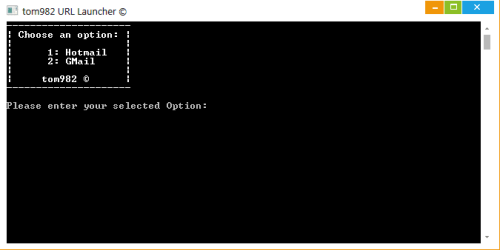
I decided to give your launcher a go, as a learning exercise :) I was initially going to do a batch file for you, but I've knocked something together in C#:

The code, should you want to inspect it:

Code:
using System;
using System.Collections.Generic;
using System.Linq;
using System.Text;

namespace ConsoleApplication2
{
    class Program
    {
        static void Main(string[] args)
        {
            Console.Title = "tom982 URL Launcher ©";
            Console.ForegroundColor = ConsoleColor.White;
            Console.Clear();
            
            bool exit = false;

            Console.WriteLine("---------------------");
            Console.WriteLine("| Choose an option: |");
            Console.WriteLine("|                   |");
            Console.WriteLine("|      1: Hotmail   |");
            Console.WriteLine("|      2: GMail     |");
            Console.WriteLine("|                   |");
            Console.WriteLine("|     tom982 ©      |");
            Console.WriteLine("---------------------");
            Console.WriteLine(" ");

            Console.ForegroundColor = ConsoleColor.Gray;

            while (!exit)
            {
                Console.WriteLine("Please enter your selected Option:");
                string options = Console.In.ReadLine();
                switch (options)
                {
                    case "1":
                        Console.WriteLine("You've select Option 1.");
                        System.Diagnostics.Process.Start("http://www.hotmail.com");
                        exit = true;
                        break;

                    case "2":
                        Console.WriteLine("You've select Option 2.");
                        System.Diagnostics.Process.Start("http://www.gmail.com");
                        exit = true;
                        break;

                    default:
                        Console.WriteLine("Error! Please select a valid option.");
                        Console.WriteLine(" ");
                        exit = false;
                        break;
                }
            }
        }
    }
}
This is what it looks like:
Launcher.png

As far as I'm aware, this is bug free. If you enter a number that isn't 1 or 2, it'll ask for another. I've attached a copy of it, named OUTLOOK.exe, so that my solution (well, workaround) is here should the above suggestions not work.

Here are the locations of the real OUTLOOK.exe:

Office 2003

C:\Program Files\Microsoft Office\Office11\OUTLOOK.exe

Office 2007

C:\Program Files\Microsoft Office\Office12\OUTLOOK.EXE

Office 2010

C:\Program Files\Microsoft Office\Office14\OUTLOOK.exe

   Note
In x64 (64 bit) computers, the program files folder will be Program Files (x86). E.g. "C:\Program Files (x86)\Microsoft Office\Office14\OUTLOOK.exe"


You will need to download the attached OUTLOOK.exe file, and copy and paste it into one of the above locations. I don't know which location this keyboard button is launching, so you may have to try all 3.

If you find any bugs or problems in this program, please let me know!

Tom

 

My Computer My Computer

At a glance

Windows 8.1 Pro x64Intel i7 3770K @4.5GHzCorsair Vengeance 2x4GB DDR3 1600MHz Low Prof...Gigabyte Radeon HD 7850 (2GB GDDR5)
Computer type
PC/Desktop
Computer Manufacturer/Model Number
Build #1
OS
Windows 8.1 Pro x64
CPU
Intel i7 3770K @4.5GHz
Motherboard
ASUS P8Z77-V PRO
Memory
Corsair Vengeance 2x4GB DDR3 1600MHz Low Profile (White)
Graphics Card(s)
Gigabyte Radeon HD 7850 (2GB GDDR5)
Sound Card
Integrated on motherboard
Monitor(s) Displays
23" LG LCD/LED IPS
Screen Resolution
1920*1080
Hard Drives
Samsung EVO 128GB SSD
Seagate Barracuda 2GB 7200rpm
2x Seagate FreeAgent [500gb]
PSU
Corsair TX650W V2 (80+ Bronze)
Case
NZXT Phantom 410 White
Cooling
Corsair H100 Water Cooler
Keyboard
Microsoft Desktop 2000 Wireless Keyboard
Mouse
Microsoft Desktop 2000 Wireless Mouse
Internet Speed
95 Mb/s Download 70 Mb/s Upload
Antivirus
MSE + MBAM Pro
Browser
Firefox
Tom982 - I copied the file to /Office14/ in Windows7 x64 within the ProgramFiles(x86) folder, triggered the keyboard button, nothing happens ?
 

My Computer My Computer

At a glance

Windows 10 ProCore2Quad (2.6 Ghz)8 Gigs DDR2Geforce Titan Black
Computer type
PC/Desktop
Computer Manufacturer/Model Number
Custom Built
OS
Windows 10 Pro
CPU
Core2Quad (2.6 Ghz)
Motherboard
nVidia 775
Memory
8 Gigs DDR2
Graphics Card(s)
Geforce Titan Black
Sound Card
Motherboard Audio
Monitor(s) Displays
25" Asus LCD
Screen Resolution
1680x1050
Hard Drives
120 Gig SSD
60 Gig SSD
750 Gig HDD
PSU
850 Watts
Case
Mid-Size
Keyboard
Logitech
Mouse
Logitech - I love logitech mouses
Internet Speed
DSL 25Mbps - Although extremely expensive
Antivirus
Microsoft Anti-Virus
Browser
FireFox 36.x
Tom982 - I copied the file to /Office14/ in Windows7 x64 within the ProgramFiles(x86) folder, triggered the keyboard button, nothing happens ?

That's strange. I'll have another look through my code, but I've tested it a lot on my computer and it's worked without a problem. Does it run if you run it by double clicking on it? I.e. is it a fault with the program or with the location?

Try copying it into all of these locations:

C:\Program Files (x86)\Microsoft Office\Office11\OUTLOOK.exe
C:\Program Files (x86)\Microsoft Office\Office12\OUTLOOK.exe
C:\Program Files (x86)\Microsoft Office\Office14\OUTLOOK.exe

In the mean time, I'll test it out on my sister's x64 laptop - mine is only x86.

Tom
 

My Computer My Computer

At a glance

Windows 8.1 Pro x64Intel i7 3770K @4.5GHzCorsair Vengeance 2x4GB DDR3 1600MHz Low Prof...Gigabyte Radeon HD 7850 (2GB GDDR5)
Computer type
PC/Desktop
Computer Manufacturer/Model Number
Build #1
OS
Windows 8.1 Pro x64
CPU
Intel i7 3770K @4.5GHz
Motherboard
ASUS P8Z77-V PRO
Memory
Corsair Vengeance 2x4GB DDR3 1600MHz Low Profile (White)
Graphics Card(s)
Gigabyte Radeon HD 7850 (2GB GDDR5)
Sound Card
Integrated on motherboard
Monitor(s) Displays
23" LG LCD/LED IPS
Screen Resolution
1920*1080
Hard Drives
Samsung EVO 128GB SSD
Seagate Barracuda 2GB 7200rpm
2x Seagate FreeAgent [500gb]
PSU
Corsair TX650W V2 (80+ Bronze)
Case
NZXT Phantom 410 White
Cooling
Corsair H100 Water Cooler
Keyboard
Microsoft Desktop 2000 Wireless Keyboard
Mouse
Microsoft Desktop 2000 Wireless Mouse
Internet Speed
95 Mb/s Download 70 Mb/s Upload
Antivirus
MSE + MBAM Pro
Browser
Firefox
Tom982 - I copied the file to /Office14/ in Windows7 x64 within the ProgramFiles(x86) folder, triggered the keyboard button, nothing happens ?

That's strange. I'll have another look through my code, but I've tested it a lot on my computer and it's worked without a problem. Does it run if you run it by double clicking on it? I.e. is it a fault with the program or with the location?

Try copying it into all of these locations:

C:\Program Files (x86)\Microsoft Office\Office11\OUTLOOK.exe
C:\Program Files (x86)\Microsoft Office\Office12\OUTLOOK.exe
C:\Program Files (x86)\Microsoft Office\Office14\OUTLOOK.exe

In the mean time, I'll test it out on my sister's x64 laptop - mine is only x86.

Tom

I copied the file to /Office 11, /Office12, /Office14 locations and the keyboard short-cut does not trigger the file. I can run the file on it's own.
 

My Computer My Computer

At a glance

Windows 10 ProCore2Quad (2.6 Ghz)8 Gigs DDR2Geforce Titan Black
Computer type
PC/Desktop
Computer Manufacturer/Model Number
Custom Built
OS
Windows 10 Pro
CPU
Core2Quad (2.6 Ghz)
Motherboard
nVidia 775
Memory
8 Gigs DDR2
Graphics Card(s)
Geforce Titan Black
Sound Card
Motherboard Audio
Monitor(s) Displays
25" Asus LCD
Screen Resolution
1680x1050
Hard Drives
120 Gig SSD
60 Gig SSD
750 Gig HDD
PSU
850 Watts
Case
Mid-Size
Keyboard
Logitech
Mouse
Logitech - I love logitech mouses
Internet Speed
DSL 25Mbps - Although extremely expensive
Antivirus
Microsoft Anti-Virus
Browser
FireFox 36.x
I don't have that option like the Solar Keyboard for my Logitech :(

Did you go to Logitech's support site and check what downloads are available for your keyboard?

To get the extras you need to download the Setpoint software and install it.

Have you looked to see if Setpoint software is available for your keyboard yet like the above quote suggested?
I also have a Logitech keyboard and Setpoint allows me to customize all my extra buttons and even allows me to open a website with them.

Do you know what keyboard model it is?
 

My Computer My Computer

At a glance

Windows 7 Ultimate x64Intel Pentium Dual Core E5200 2.5GHz (3.77GHz...Corsair 4GB DDR2 (4x1GB CM2X1024-6400C4)Palit GeForce GTS 250 (1024MB)
Computer Manufacturer/Model Number
Self built
OS
Windows 7 Ultimate x64
CPU
Intel Pentium Dual Core E5200 2.5GHz (3.77GHz OC)
Motherboard
Asus P5Q-E
Memory
Corsair 4GB DDR2 (4x1GB CM2X1024-6400C4)
Graphics Card(s)
Palit GeForce GTS 250 (1024MB)
Sound Card
On Board (ADI AD2000B 8ch HD)
Monitor(s) Displays
Samsung 32in LCD TV
Screen Resolution
1360x768
Hard Drives
2 x 1TB Samsung 103SJ (Raid0)
2 x External 500GB Samsung 502IJ (NexStar 3 HD Enclosures)
PSU
550W Antec Neo HE 550
Case
Antec P180
Cooling
Xigmatex Red Scorpion CPU Cooler. 3x120mm Fans
Keyboard
Logitech MX5000 Laser (Combo)
Mouse
Logitech MX5000 Laser (Combo)
Internet Speed
ADSL2+ (avg 10 Mbps Down, 0.80 Mbps up)
Other Info
Gigabyte GN-WP01GS 54g Wireless Lan Card
Back
Top