

Default user account in XP Mode is XPMUser. When adding other user accounts, if you choose account type as Computer Administrator you can use this account to log in.
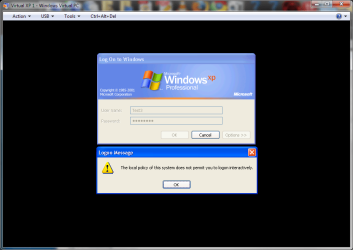
If you want to create a Limited user account with no administrative rights, you have to add it to a group called Remote Desktop Users before being able to log in to XP Mode. Limited users not belonging to this group can't log in, instead they get an error dialog telling they have no permission every time they try to do this:
Here's how to give permissions to new users:
Kari
EDIT: Please notice XP Mode does not allow user accounts without passwords.
If you want to create a Limited user account with no administrative rights, you have to add it to a group called Remote Desktop Users before being able to log in to XP Mode. Limited users not belonging to this group can't log in, instead they get an error dialog telling they have no permission every time they try to do this:
Here's how to give permissions to new users:
- Create limited user account(s) you want to using Control Panel > User Accounts
- Open Start Menu, right click My Computer and choose Manage
- Click and open Local Users and Groups on the left pane, click Users and double click the limited user account you want to grant right to log in
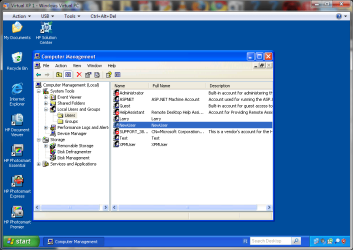
- Choose Member Of, click Add
- Write Remote Desktop Users to field Enter the object names to select, click OK twice
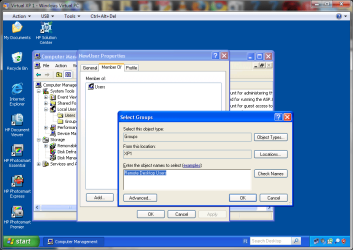
- Close Management Console
Kari
EDIT: Please notice XP Mode does not allow user accounts without passwords.
Last edited:
My Computer
At a glance
Windows 10 Pro x64 EN-GB1.6 GHz Intel Core i7-720QM Processor6 GBATI Mobility Radeon HD 5850 Graphics
- Computer type
- Laptop
- Computer Manufacturer/Model Number
- HP ENVY 17-1150eg
- OS
- Windows 10 Pro x64 EN-GB
- CPU
- 1.6 GHz Intel Core i7-720QM Processor
- Memory
- 6 GB
- Graphics Card(s)
- ATI Mobility Radeon HD 5850 Graphics
- Sound Card
- Beats sound system with integrated subwoofer
- Monitor(s) Displays
- 17" laptop display, 22" LED and 32" Full HD TV through HDMI
- Screen Resolution
- 1600*900 (1), 1920*1080 (2&3)
- Hard Drives
- Internal: 2 x 500 GB SATA Hard Disk Drive 7200 rpm
External: 2TB for backups, 3TB USB3 network drive for media
- Cooling
- As Envy runs a bit warm, I have it on a Cooler Master pad
- Keyboard
- Logitech diNovo Media Desktop Laser (bluetooth)
- Mouse
- Logitech Performance Mouse MX
- Internet Speed
- 50/10 Mbps VDSL
- Antivirus
- Windows Defender 4.3.9431.0
- Browser
- Maxthon 3.5.2., IE11


