
W7 HP 64bit clean install - sucess - but a few queries

IcarusII

New member
Power User
Local time
11:27 AM
Messages
108
Hi guys,

Finally got my new system build and POST'd ok (ok - it didnt to beging with but thats becasue I forgot to attach the 8 pin power connector to the mobo along with the 24pin which i did connect lol).

Anyhow, my opening setup was just my Crucial M4 SSD and my DVD drive connected. SSD on Sata 0. I did the clean install (following the tutorial) to that and it went without hitch. I currently have the 100mb partition but not worried about that right now.

I have a few queries about drivers and my HDD which ive just connected:

1) Now I have connected my 1TB HDD (which is just going to be for storage) it needs initializing. I get two options or styles: MBR or GPT. Which should I choose and why?

2) Windows has apparently finished getting all of its updates (although it did this across about 6 or 7 seperate boots abd just kept finding more - is this normal?). However I still have a few problems as seen below:
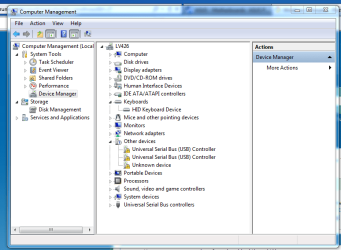
Device Manager snip.PNG

I admit that I struggled with my motherboard drivers. I have an ASUS P8Z68-V Gen3 motherboard and in typical asus style there are about 30 bits of software on the disk, with no explanation and most of which is bloatware. Anyone know what drivers I actually need to install for a motherboard to just work? Im trying to keep this install clean before i image it.

How do I resolve the issue in the snip with the USB controlers?

Thanks
Matt
 

My Computer My Computer

At a glance

W7 Home Prem, Vista home PremIntel E8600 3.3GHz dual core4 GbNvidia - GForce GTX 280 - 1Gb
Computer Manufacturer/Model Number
Manufacturer: Me
OS
W7 Home Prem, Vista home Prem
CPU
Intel E8600 3.3GHz dual core
Motherboard
Asus (need to find model)
Memory
4 Gb
Graphics Card(s)
Nvidia - GForce GTX 280 - 1Gb
Sound Card
Xonar Dx 5.1
Monitor(s) Displays
Hazro flatscreen
Screen Resolution
1920 x 1200
Hard Drives
1 x Samsung Spinpoint F1 300 gb
1 x Samsung Spinpoint F1 1 Tb
1 x Samsung Spinpoint F3 1 Tb
PSU
Later
Case
Infiniti Midi tower
Cooling
later
Keyboard
Logitech G11
Mouse
Logitech G9 Laser
Internet Speed
3mb/s - awful
Other Info
I built this three years ago. It was very fast at the time. Now it's about average but still runs any game I throw at it at max detail.

Currently
1. It depends how many primary partitions you need. MBR only lets you create up to four primary partitons on a hard drive and if you need more you'll have to create logical partitions as part of an extended primary partition. If you use GPT you can create up to 128 primary partitions on the hard drive. Have a look at this very useful article for more information: Windows and GPT FAQ

2. Windows Updates can take some time, and will require several reboots before you're fully up-to-date.

3. It looks like you need to download and install the chipset drivers for your motherboard, which ASUS support should have.
 

My Computer My Computer

At a glance

Windows 7 Ultimate SP1 64-BitIntel Core i7 870 @ 2.93GHz8Gb Dual-Channel DDR3 @ 664MHznVidia GeForce GTX 460 1024MB dedicated RAM
Computer Manufacturer/Model Number
HP Pavilion Elite 495UK
OS
Windows 7 Ultimate SP1 64-Bit
CPU
Intel Core i7 870 @ 2.93GHz
Motherboard
MSI 2A9C (CPU1)
Memory
8Gb Dual-Channel DDR3 @ 664MHz
Graphics Card(s)
nVidia GeForce GTX 460 1024MB dedicated RAM
Sound Card
Realtek HD Audio
Monitor(s) Displays
HP2310i
Screen Resolution
1920 x 1080
Hard Drives
1x1954GB Hitachi HDS22020ALA 330 (RAID), 1x1954GB Hitachi External for backup and storage
PSU
460W
Case
HP Elite
Cooling
Air cooled
Keyboard
Logitech K750 solar-powered keyboard
Mouse
Logitech Wireless M180 mouse
Internet Speed
2Mb
Other Info
Pure Avanti Flow Internet Radio with iPod Dock, 64Gb iPod, HP USB Speakers, Sony MDR-V500 Headphones, Sony Vaio F-Series Laptop
Thanks for the info Seavixen,

Ive now initialized the drive (after having a read at the link you kindly provided) i plugged for GPT rather than MBR. Ive now created two drives on my 1TB drive which are both primary partitions. this seems right.

View attachment 202251

I installed the USB 3.0 drivers on from the ASUS CD which came with the motherboard and that got rid of most, but not all of the problems.

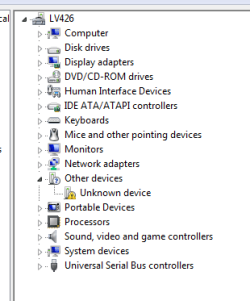
There is always one left that bugs you...but I am now stumped. I cant even understand how to figure out what piece of hardware the error relates to. Any ideas:

Capture.PNG

Any help welcome,
Meanwhile im watching WHS's tutorial on macrium so i can remember how to image again lol.

Matt
 

My Computer My Computer

At a glance

W7 Home Prem, Vista home PremIntel E8600 3.3GHz dual core4 GbNvidia - GForce GTX 280 - 1Gb
Computer Manufacturer/Model Number
Manufacturer: Me
OS
W7 Home Prem, Vista home Prem
CPU
Intel E8600 3.3GHz dual core
Motherboard
Asus (need to find model)
Memory
4 Gb
Graphics Card(s)
Nvidia - GForce GTX 280 - 1Gb
Sound Card
Xonar Dx 5.1
Monitor(s) Displays
Hazro flatscreen
Screen Resolution
1920 x 1200
Hard Drives
1 x Samsung Spinpoint F1 300 gb
1 x Samsung Spinpoint F1 1 Tb
1 x Samsung Spinpoint F3 1 Tb
PSU
Later
Case
Infiniti Midi tower
Cooling
later
Keyboard
Logitech G11
Mouse
Logitech G9 Laser
Internet Speed
3mb/s - awful
Other Info
I built this three years ago. It was very fast at the time. Now it's about average but still runs any game I throw at it at max detail.

Currently
Put the Asus mobo disk in the drive and browse to ti from the Devices missing drivers, clicking on each one's Update Driver tab. See if it picks up the driver.

You can trace unknown Device (often an SSD card, fax modem) if it doesn't pick up a mobo driver this way: Hardware Identification
 
Greg,

My thanks to you. It didnt pick it up via the method you suggested (browse to the DVD and subbfolders from device manager) but the vendor ID thing tipped me off to it being a bluetooth interface.

I then found and installed the blootooth drivers for the asus board and all is sweet. Repped ya (or at least i tried but apparently i need to spread it around some more first)

Cheers again,

Matt
 

My Computer My Computer

At a glance

W7 Home Prem, Vista home PremIntel E8600 3.3GHz dual core4 GbNvidia - GForce GTX 280 - 1Gb
Computer Manufacturer/Model Number
Manufacturer: Me
OS
W7 Home Prem, Vista home Prem
CPU
Intel E8600 3.3GHz dual core
Motherboard
Asus (need to find model)
Memory
4 Gb
Graphics Card(s)
Nvidia - GForce GTX 280 - 1Gb
Sound Card
Xonar Dx 5.1
Monitor(s) Displays
Hazro flatscreen
Screen Resolution
1920 x 1200
Hard Drives
1 x Samsung Spinpoint F1 300 gb
1 x Samsung Spinpoint F1 1 Tb
1 x Samsung Spinpoint F3 1 Tb
PSU
Later
Case
Infiniti Midi tower
Cooling
later
Keyboard
Logitech G11
Mouse
Logitech G9 Laser
Internet Speed
3mb/s - awful
Other Info
I built this three years ago. It was very fast at the time. Now it's about average but still runs any game I throw at it at max detail.

Currently
Nice to hear you got a result Icarus - you're in good hands with Greg. :)
 

My Computer My Computer

At a glance

Windows 7 Ultimate SP1 64-BitIntel Core i7 870 @ 2.93GHz8Gb Dual-Channel DDR3 @ 664MHznVidia GeForce GTX 460 1024MB dedicated RAM
Computer Manufacturer/Model Number
HP Pavilion Elite 495UK
OS
Windows 7 Ultimate SP1 64-Bit
CPU
Intel Core i7 870 @ 2.93GHz
Motherboard
MSI 2A9C (CPU1)
Memory
8Gb Dual-Channel DDR3 @ 664MHz
Graphics Card(s)
nVidia GeForce GTX 460 1024MB dedicated RAM
Sound Card
Realtek HD Audio
Monitor(s) Displays
HP2310i
Screen Resolution
1920 x 1080
Hard Drives
1x1954GB Hitachi HDS22020ALA 330 (RAID), 1x1954GB Hitachi External for backup and storage
PSU
460W
Case
HP Elite
Cooling
Air cooled
Keyboard
Logitech K750 solar-powered keyboard
Mouse
Logitech Wireless M180 mouse
Internet Speed
2Mb
Other Info
Pure Avanti Flow Internet Radio with iPod Dock, 64Gb iPod, HP USB Speakers, Sony MDR-V500 Headphones, Sony Vaio F-Series Laptop
By the way - where is barefootkid these days. He struck me as someone who would not be leaving a forum such as this anytime soon

Anyone know he was really nice to me when I took my fledgling steps into w7

Matt
 

My Computer My Computer

At a glance

W7 Home Prem, Vista home PremIntel E8600 3.3GHz dual core4 GbNvidia - GForce GTX 280 - 1Gb
Computer Manufacturer/Model Number
Manufacturer: Me
OS
W7 Home Prem, Vista home Prem
CPU
Intel E8600 3.3GHz dual core
Motherboard
Asus (need to find model)
Memory
4 Gb
Graphics Card(s)
Nvidia - GForce GTX 280 - 1Gb
Sound Card
Xonar Dx 5.1
Monitor(s) Displays
Hazro flatscreen
Screen Resolution
1920 x 1200
Hard Drives
1 x Samsung Spinpoint F1 300 gb
1 x Samsung Spinpoint F1 1 Tb
1 x Samsung Spinpoint F3 1 Tb
PSU
Later
Case
Infiniti Midi tower
Cooling
later
Keyboard
Logitech G11
Mouse
Logitech G9 Laser
Internet Speed
3mb/s - awful
Other Info
I built this three years ago. It was very fast at the time. Now it's about average but still runs any game I throw at it at max detail.

Currently
He's not around at the moment, but as far as we know he's keeping well. :)
 

My Computer My Computer

At a glance

Windows 7 Ultimate SP1 64-BitIntel Core i7 870 @ 2.93GHz8Gb Dual-Channel DDR3 @ 664MHznVidia GeForce GTX 460 1024MB dedicated RAM
Computer Manufacturer/Model Number
HP Pavilion Elite 495UK
OS
Windows 7 Ultimate SP1 64-Bit
CPU
Intel Core i7 870 @ 2.93GHz
Motherboard
MSI 2A9C (CPU1)
Memory
8Gb Dual-Channel DDR3 @ 664MHz
Graphics Card(s)
nVidia GeForce GTX 460 1024MB dedicated RAM
Sound Card
Realtek HD Audio
Monitor(s) Displays
HP2310i
Screen Resolution
1920 x 1080
Hard Drives
1x1954GB Hitachi HDS22020ALA 330 (RAID), 1x1954GB Hitachi External for backup and storage
PSU
460W
Case
HP Elite
Cooling
Air cooled
Keyboard
Logitech K750 solar-powered keyboard
Mouse
Logitech Wireless M180 mouse
Internet Speed
2Mb
Other Info
Pure Avanti Flow Internet Radio with iPod Dock, 64Gb iPod, HP USB Speakers, Sony MDR-V500 Headphones, Sony Vaio F-Series Laptop
Back
Top