Solved How do I disable the Windows "DING" sound when copy/paste or cutting?

Scott333

New member
How do I disable the Windows "DING" sound when copy/paste or cutting?

OS: Win7 64-bit


Problem: whenever I right-click to copy something (e.g., in Word or Excel), the computer makes a loud ringing "DING" sound, like the sound that accompanies the "idea lightbulb" going off over someone's head in a cartoon.

The sound is coming over the outboard stereo speakers, NOT the motherboard "beep" sound from inside the computer case. This "windows ding" noise is clearly audible over whatever else might be playing through the speakers (like music).

I'm copying and pasting hundreds of items to verify data, and the DINGING sound is more than a little aggravating. How can I turn this feature OFF?


Already tried:
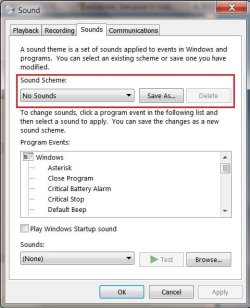
Control panel > Sound > Sounds Tab > highlight "default beep" > select "none" for sound from drop-down list > click "Apply"

This may have done something (or not?), but it did NOT stop the windows "DING" from sounding through the speakers every time I cut or copy something.


Thank you for any assistance,
Scott
 

My Computer

Computer Manufacturer/Model Number
custom
OS
Windows 7 Professional x64
CPU
Intel i7-920
Motherboard
EVGA Classified E760
Memory
Mushkin Redline 6GB
Graphics Card(s)
Sapphire Radeon HD 6670
Sound Card
whatever came on motherboard
Monitor(s) Displays
NEC 20WMGX2 and NEC 2490WUXI2
Hard Drives
Intel x25-M G2 160GB Solid State
Samsung Spinpoint F3 (1TB)
PSU
Seasonic X-750
You could try going to Control Panel - Personalization - Sounds and set the sound Scheme as None or manually go through each sound and selecting None, then Enable and so on to find out which one it is (in theory it is Move Menu Item or Start Navigation but I can not approve).
 

My Computer

Computer type
PC/Desktop
Computer Manufacturer/Model Number
Novatech iRush Pro
OS
Windows 7 Ultimate SP1 - 64 Bit
CPU
Intel Core i5 2500k
Motherboard
Foxconn H67M-S/H67M-V/H67
Memory
2x4GB DDR3 1333Hz
Graphics Card(s)
Ati Radeon 6770
Sound Card
None
Monitor(s) Displays
Samsung S22B150
Screen Resolution
1920x1080
Hard Drives
2x500GB
PSU
500W
Cooling
Fan
Keyboard
HP KU0316
Mouse
Wireless Logitech M185
Internet Speed
20MB/s
Antivirus
Avast Free
Browser
Google Chrome
Other Info
Logitech M185 Mouse
KU-M316 Keyboard
You could try going to Control Panel - Personalization - Sounds and set the sound Scheme as None or manually go through each sound and selecting None, then Enable and so on to find out which one it is (in theory it is Move Menu Item or Start Navigation but I can not approve).

Infinite,

Thanks very much for the reply.

I have tried what you suggested above, and set the Sound Scheme to "No Sounds", but it has no effect at all when I right-click to copy text (for example). I still get the resounding "DING!" through the speakers.

I then tried to manually go through the list (Personalization > Sounds > Sounds tab > list under "Program Events") to select "No Sound" for the copy/cut sound effect, but I do not see "copy/cut" (or anything similar) on the list. As I select or "highlight" each item in the list, it shows "(None)" for "Sounds:" in the lowest drop-down box.

The problem seems to be in finding the sound specifically associated with the "Cut/Copy" command (right-click, copy or cut).
 

My Computer

Computer Manufacturer/Model Number
custom
OS
Windows 7 Professional x64
CPU
Intel i7-920
Motherboard
EVGA Classified E760
Memory
Mushkin Redline 6GB
Graphics Card(s)
Sapphire Radeon HD 6670
Sound Card
whatever came on motherboard
Monitor(s) Displays
NEC 20WMGX2 and NEC 2490WUXI2
Hard Drives
Intel x25-M G2 160GB Solid State
Samsung Spinpoint F3 (1TB)
PSU
Seasonic X-750
Hi Scott333, welcome to 7F! :)

Its been ages since I used either Word or Excel, but check, and see if there is still a Provide feedback with sound setting at:
Tools >Preferences >General Tab, and uncheck the box or button.
 

My Computer

Computer type
PC/Desktop
Computer Manufacturer/Model Number
Gateway DX4831-01e (Mid-Tower Desktop)
OS
Originally Win 7 Hm Prem x64 Ver 6.1.7600 Build 7601-SP1 | Upgraded to Windows 10 December 14, 2019
CPU
Intel i3 530 2.93GHz, 2933MHz 2 Cores 4 Logical Processors
Motherboard
Gateway H57M01 133 megahertz
Memory
6GB of 1,333MHz DDR3 SDRAM
Graphics Card(s)
32MB Intel Graphics Media Accelerator HD IGChip
Sound Card
Realtek High Definition Audio
Monitor(s) Displays
Gateway HX2000 20inch TFT active matrix TN
Screen Resolution
1600 x 900 x 59 hertz
Hard Drives
WDC WD10EADS-00M2B0 [HDD] (1000.20 GB) -- drive 0,
HL-DT-ST DVDRAM GH41N [CD-ROM dr]
Four card readers, and Four USB 2.0
PSU
300watts.
Case
Mid-Tower Desktop
Cooling
Stock from Gateway
Keyboard
Natural Ergonomic Keyboard 4000, see Other Info
Mouse
Orig. Gateway wore out now using Insignia USB wired optical
Internet Speed
Vz FIOS 10ms png 57.64Mbps down 65.53Mbps up Speedtest.org
Antivirus
Zamana Anti-logger with Anti-malware, MSE, Windows Firewall,
Browser
IE11.0.9600.19399-Upd ver11.0.135, Firefox 68.0.1 x64
Other Info
System Specs by Belarc.

BIOS: American Megatrends Inc. P01-A0 11/17/2009

Replaced the MS 'Natural' Standard PS/2 Enhanced 101-102 Keyboard with a new Natural Ergonomic Keyboard 4000 on August 1st 2014.

Canon Pixma MG3222 Printer.

Updated to IE11 on 12102015 | Fios Quantum Router g1100

Additional AV: SpywareBlaster, manual Mbam, SAS
Look in your Excel Options for "Provide feedback with sound".

I have Office 2010 and it's in Advanced Options, under the "General section".

If it's checked, un-check it and see how that works.

Anak beat me to it :)
 
Last edited:

My Computer

Computer type
PC/Desktop
Computer Manufacturer/Model Number
home built
OS
Multi-Boot W7_Pro_x64 W8.1_Pro_x64 W10_Pro_x64 +Linux_VMs +Chromium_VM
CPU
AMD Athlon II x4 620
Motherboard
Gigabyte GA-MA785G-UD3H
Memory
6GB GSkill DDR2 800
Graphics Card(s)
AMD 4670 GPU + AMD 4200 IGP
Sound Card
on board Realtek ALC889A
Monitor(s) Displays
RCA 40" LCD TV, Insignia 32" LCD TV, HP 15" LCD monitor
Screen Resolution
1680 x 1050
Hard Drives
OCZ Vertex 3 120GB,
Samsung F3 1TB (3),
Several others - WD, Seagate, Hitachi, ...
PSU
Corsair 500 W
Case
Rosewill mid tower
Cooling
CM 90mm rifle
Keyboard
Gyration wireless, Logitech wireless, Dell USB wired
Mouse
Gyration wireless, Logitech wireless, V7 USB wired
Internet Speed
Spectrum - 100Mbps D / 10Mbps U
Antivirus
Avast, MBAM3, EMET, WinPatrol
Browser
Pale Moon, Firefox, IE
Other Info
2 multi-boot PC's
Mainly HTPC/Office/Gen purpose (no gaming).
Trendnet USB KVM.
LG DVD burner/Blue Ray Player.
Tray system for removable SATA backup drives.

Not currently OCd, under-volted.
I use Hybrid sleep, rarely re-boot or shutdown.

Hauppauge HD-PVR, Avermedia PCIe TV Tuner, Hauppauge PCI TV Tuner.
Hi Scott333, welcome to 7F! :)

Its been ages since I used either Word or Excel, but check, and see if there is still a Provide feedback with sound setting at:
Tools >Preferences >General Tab, and uncheck the box or button.

I should have mentioned that I'm using the Microsoft Office 2010 version of WORD, but I'm using the older Excel 2003 for spreadsheets.

In Excel, I did the following:
Tools > Options > General tab > "Provide feedback with sound" was NOT checked

When I checked the box to turn it on (thinking to sort of "reset" it, by turning it "on" and then "off" again), it gives me a pop-up window saying:

"In order to enable feeback with soun, you need to install the Microsoft Office Sounds add-in. Would you like to visit the Microsoft Office Web site to learn more about this add-in and download it?"

(I clicked "NO")

So, it appears that I do not have "feedback with sound" enabled. I think this is something systemic to Windows, because it makes the "DING!" sound on ANYTHING that I attempt to right-click and copy (internet, Adobe Acrobat Standard, Notepad, etc., etc.).
 

My Computer

Computer Manufacturer/Model Number
custom
OS
Windows 7 Professional x64
CPU
Intel i7-920
Motherboard
EVGA Classified E760
Memory
Mushkin Redline 6GB
Graphics Card(s)
Sapphire Radeon HD 6670
Sound Card
whatever came on motherboard
Monitor(s) Displays
NEC 20WMGX2 and NEC 2490WUXI2
Hard Drives
Intel x25-M G2 160GB Solid State
Samsung Spinpoint F3 (1TB)
PSU
Seasonic X-750
Look in your Excel Options for "Provide feedback with sound".

I have Office 2010 and it's in Advanced Options, under the "General section".

If it's checked, un-check it and see how that works.

Anak beat me to it :)

DavidW7ncus,

I found the following file path in Microsoft Word 2010:

File > Options > Advanced
I scrolled down to "General" and found "Provide feedback with sound", but the box was already UNCHECKED.

I'm not sure, but I think this "DING" function seems to be a system feature of Windows, not program-specific.
 

My Computer

Computer Manufacturer/Model Number
custom
OS
Windows 7 Professional x64
CPU
Intel i7-920
Motherboard
EVGA Classified E760
Memory
Mushkin Redline 6GB
Graphics Card(s)
Sapphire Radeon HD 6670
Sound Card
whatever came on motherboard
Monitor(s) Displays
NEC 20WMGX2 and NEC 2490WUXI2
Hard Drives
Intel x25-M G2 160GB Solid State
Samsung Spinpoint F3 (1TB)
PSU
Seasonic X-750
I don't get all the ding sounds like you do.

Could you maybe have installed some program that is causing this?

Look in your msconfig startup programs and see if find something that might cause this ?
 

My Computer

Computer type
PC/Desktop
Computer Manufacturer/Model Number
home built
OS
Multi-Boot W7_Pro_x64 W8.1_Pro_x64 W10_Pro_x64 +Linux_VMs +Chromium_VM
CPU
AMD Athlon II x4 620
Motherboard
Gigabyte GA-MA785G-UD3H
Memory
6GB GSkill DDR2 800
Graphics Card(s)
AMD 4670 GPU + AMD 4200 IGP
Sound Card
on board Realtek ALC889A
Monitor(s) Displays
RCA 40" LCD TV, Insignia 32" LCD TV, HP 15" LCD monitor
Screen Resolution
1680 x 1050
Hard Drives
OCZ Vertex 3 120GB,
Samsung F3 1TB (3),
Several others - WD, Seagate, Hitachi, ...
PSU
Corsair 500 W
Case
Rosewill mid tower
Cooling
CM 90mm rifle
Keyboard
Gyration wireless, Logitech wireless, Dell USB wired
Mouse
Gyration wireless, Logitech wireless, V7 USB wired
Internet Speed
Spectrum - 100Mbps D / 10Mbps U
Antivirus
Avast, MBAM3, EMET, WinPatrol
Browser
Pale Moon, Firefox, IE
Other Info
2 multi-boot PC's
Mainly HTPC/Office/Gen purpose (no gaming).
Trendnet USB KVM.
LG DVD burner/Blue Ray Player.
Tray system for removable SATA backup drives.

Not currently OCd, under-volted.
I use Hybrid sleep, rarely re-boot or shutdown.

Hauppauge HD-PVR, Avermedia PCIe TV Tuner, Hauppauge PCI TV Tuner.
For now I have only two more suggestions, when you were here:
Already tried:
Control panel > Sound > Sounds Tab > highlight "default beep" > select "none" for sound from drop-down list > click "Apply"
Did you also set the Sound Scheme to No Sounds?
Sounds.jpg

You will still get sounds like music or playback from a CD or DVD. This setting just takes care of System Sounds.

The only other setting I would know of would be your on-board sound, but that would effectively kill all sound.

It would be in your BIOS, see page 55 here: http://www.evga.com/support/manuals/files/141-BL-E759.pdf
On the Integrated Peripherals Menu >Onboard Device, disable the High Definition Audio setting. Shown on page 57.
 

My Computer

Computer type
PC/Desktop
Computer Manufacturer/Model Number
Gateway DX4831-01e (Mid-Tower Desktop)
OS
Originally Win 7 Hm Prem x64 Ver 6.1.7600 Build 7601-SP1 | Upgraded to Windows 10 December 14, 2019
CPU
Intel i3 530 2.93GHz, 2933MHz 2 Cores 4 Logical Processors
Motherboard
Gateway H57M01 133 megahertz
Memory
6GB of 1,333MHz DDR3 SDRAM
Graphics Card(s)
32MB Intel Graphics Media Accelerator HD IGChip
Sound Card
Realtek High Definition Audio
Monitor(s) Displays
Gateway HX2000 20inch TFT active matrix TN
Screen Resolution
1600 x 900 x 59 hertz
Hard Drives
WDC WD10EADS-00M2B0 [HDD] (1000.20 GB) -- drive 0,
HL-DT-ST DVDRAM GH41N [CD-ROM dr]
Four card readers, and Four USB 2.0
PSU
300watts.
Case
Mid-Tower Desktop
Cooling
Stock from Gateway
Keyboard
Natural Ergonomic Keyboard 4000, see Other Info
Mouse
Orig. Gateway wore out now using Insignia USB wired optical
Internet Speed
Vz FIOS 10ms png 57.64Mbps down 65.53Mbps up Speedtest.org
Antivirus
Zamana Anti-logger with Anti-malware, MSE, Windows Firewall,
Browser
IE11.0.9600.19399-Upd ver11.0.135, Firefox 68.0.1 x64
Other Info
System Specs by Belarc.

BIOS: American Megatrends Inc. P01-A0 11/17/2009

Replaced the MS 'Natural' Standard PS/2 Enhanced 101-102 Keyboard with a new Natural Ergonomic Keyboard 4000 on August 1st 2014.

Canon Pixma MG3222 Printer.

Updated to IE11 on 12102015 | Fios Quantum Router g1100

Additional AV: SpywareBlaster, manual Mbam, SAS
I'm not sure, but I think this "DING" function seems to be a system feature of Windows, not program-specific.

I am unsure what the "ding" sound sounds like, could you please be more precise or post a link to the actual sound file.
 

My Computer

Computer type
PC/Desktop
Computer Manufacturer/Model Number
Novatech iRush Pro
OS
Windows 7 Ultimate SP1 - 64 Bit
CPU
Intel Core i5 2500k
Motherboard
Foxconn H67M-S/H67M-V/H67
Memory
2x4GB DDR3 1333Hz
Graphics Card(s)
Ati Radeon 6770
Sound Card
None
Monitor(s) Displays
Samsung S22B150
Screen Resolution
1920x1080
Hard Drives
2x500GB
PSU
500W
Cooling
Fan
Keyboard
HP KU0316
Mouse
Wireless Logitech M185
Internet Speed
20MB/s
Antivirus
Avast Free
Browser
Google Chrome
Other Info
Logitech M185 Mouse
KU-M316 Keyboard
filename = windows ding.wav

look for the default beep event in the windows default sound scheme

you can test it there to hear it
 

My Computer

Computer type
PC/Desktop
Computer Manufacturer/Model Number
home built
OS
Multi-Boot W7_Pro_x64 W8.1_Pro_x64 W10_Pro_x64 +Linux_VMs +Chromium_VM
CPU
AMD Athlon II x4 620
Motherboard
Gigabyte GA-MA785G-UD3H
Memory
6GB GSkill DDR2 800
Graphics Card(s)
AMD 4670 GPU + AMD 4200 IGP
Sound Card
on board Realtek ALC889A
Monitor(s) Displays
RCA 40" LCD TV, Insignia 32" LCD TV, HP 15" LCD monitor
Screen Resolution
1680 x 1050
Hard Drives
OCZ Vertex 3 120GB,
Samsung F3 1TB (3),
Several others - WD, Seagate, Hitachi, ...
PSU
Corsair 500 W
Case
Rosewill mid tower
Cooling
CM 90mm rifle
Keyboard
Gyration wireless, Logitech wireless, Dell USB wired
Mouse
Gyration wireless, Logitech wireless, V7 USB wired
Internet Speed
Spectrum - 100Mbps D / 10Mbps U
Antivirus
Avast, MBAM3, EMET, WinPatrol
Browser
Pale Moon, Firefox, IE
Other Info
2 multi-boot PC's
Mainly HTPC/Office/Gen purpose (no gaming).
Trendnet USB KVM.
LG DVD burner/Blue Ray Player.
Tray system for removable SATA backup drives.

Not currently OCd, under-volted.
I use Hybrid sleep, rarely re-boot or shutdown.

Hauppauge HD-PVR, Avermedia PCIe TV Tuner, Hauppauge PCI TV Tuner.
filename = windows ding.wav

look for the default beep event in the windows default sound scheme

you can test it there to hear it

David,

I heard the windowsding.wav file, it's similar to what I've been describing, but definitely not the same sound recording.

I think the "ding" I'm describing has always been there in Windows, whenever I right-click and select "copy" or "cut", I think it was always in Windows XP too.
 

My Computer

Computer Manufacturer/Model Number
custom
OS
Windows 7 Professional x64
CPU
Intel i7-920
Motherboard
EVGA Classified E760
Memory
Mushkin Redline 6GB
Graphics Card(s)
Sapphire Radeon HD 6670
Sound Card
whatever came on motherboard
Monitor(s) Displays
NEC 20WMGX2 and NEC 2490WUXI2
Hard Drives
Intel x25-M G2 160GB Solid State
Samsung Spinpoint F3 (1TB)
PSU
Seasonic X-750
Interesting... then it's not the default windows ding...

did you check for any programs that might be causing this?

You can check in the Events log to make sure you are not getting some kind of error/warning with this sound.
 

My Computer

Computer type
PC/Desktop
Computer Manufacturer/Model Number
home built
OS
Multi-Boot W7_Pro_x64 W8.1_Pro_x64 W10_Pro_x64 +Linux_VMs +Chromium_VM
CPU
AMD Athlon II x4 620
Motherboard
Gigabyte GA-MA785G-UD3H
Memory
6GB GSkill DDR2 800
Graphics Card(s)
AMD 4670 GPU + AMD 4200 IGP
Sound Card
on board Realtek ALC889A
Monitor(s) Displays
RCA 40" LCD TV, Insignia 32" LCD TV, HP 15" LCD monitor
Screen Resolution
1680 x 1050
Hard Drives
OCZ Vertex 3 120GB,
Samsung F3 1TB (3),
Several others - WD, Seagate, Hitachi, ...
PSU
Corsair 500 W
Case
Rosewill mid tower
Cooling
CM 90mm rifle
Keyboard
Gyration wireless, Logitech wireless, Dell USB wired
Mouse
Gyration wireless, Logitech wireless, V7 USB wired
Internet Speed
Spectrum - 100Mbps D / 10Mbps U
Antivirus
Avast, MBAM3, EMET, WinPatrol
Browser
Pale Moon, Firefox, IE
Other Info
2 multi-boot PC's
Mainly HTPC/Office/Gen purpose (no gaming).
Trendnet USB KVM.
LG DVD burner/Blue Ray Player.
Tray system for removable SATA backup drives.

Not currently OCd, under-volted.
I use Hybrid sleep, rarely re-boot or shutdown.

Hauppauge HD-PVR, Avermedia PCIe TV Tuner, Hauppauge PCI TV Tuner.
I'm not sure, but I think this "DING" function seems to be a system feature of Windows, not program-specific.

I am unsure what the "ding" sound sounds like, could you please be more precise or post a link to the actual sound file.

Infinite,

I hooked up a USB microphone, set it next to my speaker and used an application called "Sound Recorder" to record a Windows Media File. The first three "dings" are from pressing the "Test" button under the "Sounds" tab for "Default Beep", with the sound set to "Windows Ding". This is NOT the sound I am having the problem with, I have only heard this particular sound when pressing the "Test" button, I've never heard it before or since.

I recorded it first, to demonstrate the difference between what you guys have been describing and the "Ding" sound that I get when using the right-click and "copy" function.

The second set of three consecutive "dings" is what I'm trying to stop, which occurs when right-clicking and selecting "copy" (or using the keys "ctrl-c" to copy) for text or anything else that Clipboard is able to copy.


When I tried to upload the file, it says "invalid file" :confused:
 

My Computer

Computer Manufacturer/Model Number
custom
OS
Windows 7 Professional x64
CPU
Intel i7-920
Motherboard
EVGA Classified E760
Memory
Mushkin Redline 6GB
Graphics Card(s)
Sapphire Radeon HD 6670
Sound Card
whatever came on motherboard
Monitor(s) Displays
NEC 20WMGX2 and NEC 2490WUXI2
Hard Drives
Intel x25-M G2 160GB Solid State
Samsung Spinpoint F3 (1TB)
PSU
Seasonic X-750
What type of file extension is it, try uploading it to YouTube?

You could also try attaching it to a zip and upload the zip here or mediafire and share us the mediafire link.
 

My Computer

Computer type
PC/Desktop
Computer Manufacturer/Model Number
Novatech iRush Pro
OS
Windows 7 Ultimate SP1 - 64 Bit
CPU
Intel Core i5 2500k
Motherboard
Foxconn H67M-S/H67M-V/H67
Memory
2x4GB DDR3 1333Hz
Graphics Card(s)
Ati Radeon 6770
Sound Card
None
Monitor(s) Displays
Samsung S22B150
Screen Resolution
1920x1080
Hard Drives
2x500GB
PSU
500W
Cooling
Fan
Keyboard
HP KU0316
Mouse
Wireless Logitech M185
Internet Speed
20MB/s
Antivirus
Avast Free
Browser
Google Chrome
Other Info
Logitech M185 Mouse
KU-M316 Keyboard
wav files are allowed (up to 1.50MB), but you may not have enough posts, usually 10 to upload them.
 

My Computer

Computer type
PC/Desktop
Computer Manufacturer/Model Number
Gateway DX4831-01e (Mid-Tower Desktop)
OS
Originally Win 7 Hm Prem x64 Ver 6.1.7600 Build 7601-SP1 | Upgraded to Windows 10 December 14, 2019
CPU
Intel i3 530 2.93GHz, 2933MHz 2 Cores 4 Logical Processors
Motherboard
Gateway H57M01 133 megahertz
Memory
6GB of 1,333MHz DDR3 SDRAM
Graphics Card(s)
32MB Intel Graphics Media Accelerator HD IGChip
Sound Card
Realtek High Definition Audio
Monitor(s) Displays
Gateway HX2000 20inch TFT active matrix TN
Screen Resolution
1600 x 900 x 59 hertz
Hard Drives
WDC WD10EADS-00M2B0 [HDD] (1000.20 GB) -- drive 0,
HL-DT-ST DVDRAM GH41N [CD-ROM dr]
Four card readers, and Four USB 2.0
PSU
300watts.
Case
Mid-Tower Desktop
Cooling
Stock from Gateway
Keyboard
Natural Ergonomic Keyboard 4000, see Other Info
Mouse
Orig. Gateway wore out now using Insignia USB wired optical
Internet Speed
Vz FIOS 10ms png 57.64Mbps down 65.53Mbps up Speedtest.org
Antivirus
Zamana Anti-logger with Anti-malware, MSE, Windows Firewall,
Browser
IE11.0.9600.19399-Upd ver11.0.135, Firefox 68.0.1 x64
Other Info
System Specs by Belarc.

BIOS: American Megatrends Inc. P01-A0 11/17/2009

Replaced the MS 'Natural' Standard PS/2 Enhanced 101-102 Keyboard with a new Natural Ergonomic Keyboard 4000 on August 1st 2014.

Canon Pixma MG3222 Printer.

Updated to IE11 on 12102015 | Fios Quantum Router g1100

Additional AV: SpywareBlaster, manual Mbam, SAS
What type of file extension is it, try uploading it to YouTube?

You could also try attaching it to a zip and upload the zip here or mediafire and share us the mediafire link.


Anak, David, Infinite,

Thanks very much for your patience with me, I'm not a computer wiz, so it was something of an accomplishment just for me to figure out how to record the sound in the first place :D

I broke the sound down into two separate clips (one long clip was too large of a .wav file). I found an online converter, saved the clips, and will upload each individually.

This first clip is the sound called "Windowsding", when you go into the "Sound Scheme" settings we discussed above. This is NOT the sound I'm having the problem with, I only recorded it to distinguish between the "official" windowsding sound and the one I can't seem to make stop.

First up, the one I'm not having a problem with (attached .wav file below, if I did this correctly)
 

Attachments

My Computer

Computer Manufacturer/Model Number
custom
OS
Windows 7 Professional x64
CPU
Intel i7-920
Motherboard
EVGA Classified E760
Memory
Mushkin Redline 6GB
Graphics Card(s)
Sapphire Radeon HD 6670
Sound Card
whatever came on motherboard
Monitor(s) Displays
NEC 20WMGX2 and NEC 2490WUXI2
Hard Drives
Intel x25-M G2 160GB Solid State
Samsung Spinpoint F3 (1TB)
PSU
Seasonic X-750
Here is the recording of the "ding" sound that happens whenever I either right-click and select "copy" or do the same thing with the keyboard ("ctrl-c") to copy text or anything else that can be copied to the Clipboard.

It is similar to the "ding" sound in the previous post, but definitely not the same:
 

Attachments

My Computer

Computer Manufacturer/Model Number
custom
OS
Windows 7 Professional x64
CPU
Intel i7-920
Motherboard
EVGA Classified E760
Memory
Mushkin Redline 6GB
Graphics Card(s)
Sapphire Radeon HD 6670
Sound Card
whatever came on motherboard
Monitor(s) Displays
NEC 20WMGX2 and NEC 2490WUXI2
Hard Drives
Intel x25-M G2 160GB Solid State
Samsung Spinpoint F3 (1TB)
PSU
Seasonic X-750
Your welcome! Take your time, at one point in time we all started out as noobs. If you are unsure just ask.

Strange, when I went to play your file I heard no Sounds. :confused:

I also checked, and I could not find any type of post limit.
 

My Computer

Computer type
PC/Desktop
Computer Manufacturer/Model Number
Gateway DX4831-01e (Mid-Tower Desktop)
OS
Originally Win 7 Hm Prem x64 Ver 6.1.7600 Build 7601-SP1 | Upgraded to Windows 10 December 14, 2019
CPU
Intel i3 530 2.93GHz, 2933MHz 2 Cores 4 Logical Processors
Motherboard
Gateway H57M01 133 megahertz
Memory
6GB of 1,333MHz DDR3 SDRAM
Graphics Card(s)
32MB Intel Graphics Media Accelerator HD IGChip
Sound Card
Realtek High Definition Audio
Monitor(s) Displays
Gateway HX2000 20inch TFT active matrix TN
Screen Resolution
1600 x 900 x 59 hertz
Hard Drives
WDC WD10EADS-00M2B0 [HDD] (1000.20 GB) -- drive 0,
HL-DT-ST DVDRAM GH41N [CD-ROM dr]
Four card readers, and Four USB 2.0
PSU
300watts.
Case
Mid-Tower Desktop
Cooling
Stock from Gateway
Keyboard
Natural Ergonomic Keyboard 4000, see Other Info
Mouse
Orig. Gateway wore out now using Insignia USB wired optical
Internet Speed
Vz FIOS 10ms png 57.64Mbps down 65.53Mbps up Speedtest.org
Antivirus
Zamana Anti-logger with Anti-malware, MSE, Windows Firewall,
Browser
IE11.0.9600.19399-Upd ver11.0.135, Firefox 68.0.1 x64
Other Info
System Specs by Belarc.

BIOS: American Megatrends Inc. P01-A0 11/17/2009

Replaced the MS 'Natural' Standard PS/2 Enhanced 101-102 Keyboard with a new Natural Ergonomic Keyboard 4000 on August 1st 2014.

Canon Pixma MG3222 Printer.

Updated to IE11 on 12102015 | Fios Quantum Router g1100

Additional AV: SpywareBlaster, manual Mbam, SAS
I hear the second file, it doesn't have the body of a normal ding.wav it sounds tinny.
Do you hear the three dings when you copy/paste or did you record it that way?
 

My Computer

Computer type
PC/Desktop
Computer Manufacturer/Model Number
Gateway DX4831-01e (Mid-Tower Desktop)
OS
Originally Win 7 Hm Prem x64 Ver 6.1.7600 Build 7601-SP1 | Upgraded to Windows 10 December 14, 2019
CPU
Intel i3 530 2.93GHz, 2933MHz 2 Cores 4 Logical Processors
Motherboard
Gateway H57M01 133 megahertz
Memory
6GB of 1,333MHz DDR3 SDRAM
Graphics Card(s)
32MB Intel Graphics Media Accelerator HD IGChip
Sound Card
Realtek High Definition Audio
Monitor(s) Displays
Gateway HX2000 20inch TFT active matrix TN
Screen Resolution
1600 x 900 x 59 hertz
Hard Drives
WDC WD10EADS-00M2B0 [HDD] (1000.20 GB) -- drive 0,
HL-DT-ST DVDRAM GH41N [CD-ROM dr]
Four card readers, and Four USB 2.0
PSU
300watts.
Case
Mid-Tower Desktop
Cooling
Stock from Gateway
Keyboard
Natural Ergonomic Keyboard 4000, see Other Info
Mouse
Orig. Gateway wore out now using Insignia USB wired optical
Internet Speed
Vz FIOS 10ms png 57.64Mbps down 65.53Mbps up Speedtest.org
Antivirus
Zamana Anti-logger with Anti-malware, MSE, Windows Firewall,
Browser
IE11.0.9600.19399-Upd ver11.0.135, Firefox 68.0.1 x64
Other Info
System Specs by Belarc.

BIOS: American Megatrends Inc. P01-A0 11/17/2009

Replaced the MS 'Natural' Standard PS/2 Enhanced 101-102 Keyboard with a new Natural Ergonomic Keyboard 4000 on August 1st 2014.

Canon Pixma MG3222 Printer.

Updated to IE11 on 12102015 | Fios Quantum Router g1100

Additional AV: SpywareBlaster, manual Mbam, SAS
Back
Top