Solved Drive partition no longer has delete option available - it WAS there

CatchUp

New member
Local time
12:40 AM
Messages
9
Hi there

I really need some help.
My laptop hard drive arrived with it's disk partitioned left to right as per below :

1) no name - primary
16GB

2) C: drive - system,boot, active, crash dump,primary
approx 80GB and now has 3.16 GB free

3) D: drive - page file, logical
approx 207GB and now has 172 GB free

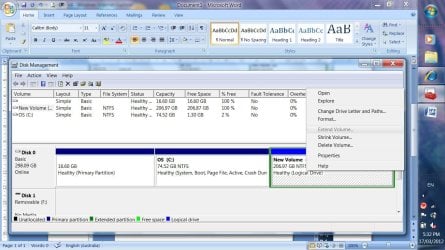
The other day I was able to see that the "delete partition" option for the D: drive was available.

The C: drive then got VERY low on disk space (down to 100's of MBs) after an auto update so I ran the Windows disk cleanup which came up and regained 3GB. Since then - in preparation for deleting the D: drive partition and expanding the C: drive partition - I have backed up the D: drive, made a Windows image of the C: drive and created a repair disk.

Now the "delete partition" is not available on the D: drive .:cry:
I only have "shrink volume" available.

Does anyone know why this has happened ? Has the page file got anything to do with it, and if so, how do I fix ?

Thanks in advance.
 

My Computer My Computer

At a glance

Windows 7 Home Premium 64biti5-430M2GBVGA
Computer Manufacturer/Model Number
ASUS K52F
OS
Windows 7 Home Premium 64bit
CPU
i5-430M
Memory
2GB
Graphics Card(s)
VGA
Welcome to Seven Forums, Catchup.

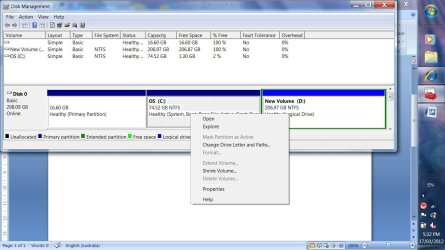
Presumably you are seeing the Drives in Disk Management. Could you please post a screenshot of the Hard Disk.

To my mind there are several issues. The No Name Primary Partition is way too large for System Reserved Partition. Looks more like a partition to restore Windows. The C drive has filled up to 77 gigabytes with what. 80 gigabytes should be adequate for system volume with all the other programs when you have the D drive to store your data. Why do you want to delete the D partition? Normally resizing it to a smaller size and merging the resultant space in C Drive should serve the purpose.

At present please don't tinker with the partitions in a hurry unless you are very sure of what you are doing.
 

My Computer My Computer

At a glance

Windows 7 Pro with SP1 32bit2 gigs of RAMIntel(R) 82845G/GL/GE/PE/GV Graphics Controller
Computer Manufacturer/Model Number
Custom Built
OS
Windows 7 Pro with SP1 32bit
Motherboard
Intel D845GVS1 X86-based PC
Memory
2 gigs of RAM
Graphics Card(s)
Intel(R) 82845G/GL/GE/PE/GV Graphics Controller
Sound Card
Realtek AC'97 Audio
Monitor(s) Displays
Samsung SyncMaster 931BF Black 19" LCD Monitor
Screen Resolution
1280X960
Hard Drives
1. SAMSUNG SP0822N ATA Device ~ 80 GigaBytes

2. Seagate FreeAgent Go USB Device ~ 500 GigaBytes
Keyboard
COMPAQ Standard PS/2 Keyboard
Mouse
iBall Laser Precise Speedster
Internet Speed
4 mb/sec
Hi Wanchoo
I'll post a screenshot when I find out how - and I have partly solved my problem but come up with another.
The fact that the pagefile.sys was on the D: drive partition was the reason the "delete partition" option was greyed out when I tried to delete the D: drive partition. I have since moved the pagefile.sys back to the C: drive partition and I was then able to delete the D: drive partition. I didn't reboot (should I have ?).

Then I find out that I cannot extend the C: drive partition - that option is greyed out.

The D: drive partition had another "Delete Partition" available but when I selected it, the message I got was that that area of disk would become UNavailable so I have simply recreated the D: drive partition again using the wizrd until I get some better information about what to do.

FYI - I checked some of the other discussions and it seemed like "merging" was not an option ? My understanding was that you had to delete the partition to the right and then extend into it from the left.

I'm back to square one I think.

Cheers

image1.jpg

image2.jpg
 
Last edited by a moderator:

My Computer My Computer

At a glance

Windows 7 Home Premium 64biti5-430M2GBVGA
Computer Manufacturer/Model Number
ASUS K52F
OS
Windows 7 Home Premium 64bit
CPU
i5-430M
Memory
2GB
Graphics Card(s)
VGA
Last edited:

My Computer My Computer

At a glance

W7 Ultimate SP1, LM19.2 MATE, W10 Home 1703, ...AMD Phenom II x6 1100T, 3.3 GHz12GB DDR3 1333 G-Skill (4GB x 2), G-Skill (2G...NVIDIA GeForce GTX 660
Computer type
PC/Desktop
Computer Manufacturer/Model Number
n/a
OS
W7 Ultimate SP1, LM19.2 MATE, W10 Home 1703, W10 Pro 1703 VM, #All 64 bit
CPU
AMD Phenom II x6 1100T, 3.3 GHz
Motherboard
ASUS M4A88T-M/USB3 (AM3)
Memory
12GB DDR3 1333 G-Skill (4GB x 2), G-Skill (2GB x 2)
Graphics Card(s)
NVIDIA GeForce GTX 660
Sound Card
Realtek?
Monitor(s) Displays
Samsung S23B350
Screen Resolution
1920x1080
Hard Drives
WD Green 2TB (SATA), WD Green 3TB (SATA), WD Blue 4TB (SATA), WD Blue 6TB (SATA)
PSU
Cooler Master
Case
Antec GX300 Tower
Cooling
3x Antec TRICOOL 120mm Fans
Mouse
Wired Optical
Internet Speed
DSL
Antivirus
Avast
Browser
Pale Moon (64 bit)
Other Info
2018-12-27 Upgraded HDDs
2015-12-10 Upgraded case, graphics card, storage
2015-08-15 Upgraded motherboard & RAM
2015-07-15 Upgraded LM17.1 to LM17.2
Hello Catchup,

From the screenshot it is seen that the No Name Partition is totally empty. You should be able to delete it and then merge it with the C Drive. C Drive shall then become 74.52+16.60=91.12 gigabytes. This should tide you over the difficulty of having very little free space in C drive. Once you have done this we shall have a look at D Drive for more space.

But before you do this please use a third party partitioning tool like Partition Wizard (free) or Acronis Disk Director Suite (shareware) and get out of Windows Disk Management Tool. You can read all about the Partition Wizard in this Forums' Tutorials at http://www.sevenforums.com/tutorials/93322-partition-wizard-use-bootable-cd.html.

Best of luck,

Amarnath Wanchoo
 

My Computer My Computer

At a glance

Windows 7 Pro with SP1 32bit2 gigs of RAMIntel(R) 82845G/GL/GE/PE/GV Graphics Controller
Computer Manufacturer/Model Number
Custom Built
OS
Windows 7 Pro with SP1 32bit
Motherboard
Intel D845GVS1 X86-based PC
Memory
2 gigs of RAM
Graphics Card(s)
Intel(R) 82845G/GL/GE/PE/GV Graphics Controller
Sound Card
Realtek AC'97 Audio
Monitor(s) Displays
Samsung SyncMaster 931BF Black 19" LCD Monitor
Screen Resolution
1280X960
Hard Drives
1. SAMSUNG SP0822N ATA Device ~ 80 GigaBytes

2. Seagate FreeAgent Go USB Device ~ 500 GigaBytes
Keyboard
COMPAQ Standard PS/2 Keyboard
Mouse
iBall Laser Precise Speedster
Internet Speed
4 mb/sec
Wait a minute ...

Hello Catchup,

From the screenshot it is seen that the No Name Partition is totally empty.

I think that it might be saying "empty", because it doesn't recognise the file system. :eek:

It doesn't recognise Ubuntu on my PC and reports the partition as "empty".
 

My Computer My Computer

At a glance

W7 Ultimate SP1, LM19.2 MATE, W10 Home 1703, ...AMD Phenom II x6 1100T, 3.3 GHz12GB DDR3 1333 G-Skill (4GB x 2), G-Skill (2G...NVIDIA GeForce GTX 660
Computer type
PC/Desktop
Computer Manufacturer/Model Number
n/a
OS
W7 Ultimate SP1, LM19.2 MATE, W10 Home 1703, W10 Pro 1703 VM, #All 64 bit
CPU
AMD Phenom II x6 1100T, 3.3 GHz
Motherboard
ASUS M4A88T-M/USB3 (AM3)
Memory
12GB DDR3 1333 G-Skill (4GB x 2), G-Skill (2GB x 2)
Graphics Card(s)
NVIDIA GeForce GTX 660
Sound Card
Realtek?
Monitor(s) Displays
Samsung S23B350
Screen Resolution
1920x1080
Hard Drives
WD Green 2TB (SATA), WD Green 3TB (SATA), WD Blue 4TB (SATA), WD Blue 6TB (SATA)
PSU
Cooler Master
Case
Antec GX300 Tower
Cooling
3x Antec TRICOOL 120mm Fans
Mouse
Wired Optical
Internet Speed
DSL
Antivirus
Avast
Browser
Pale Moon (64 bit)
Other Info
2018-12-27 Upgraded HDDs
2015-12-10 Upgraded case, graphics card, storage
2015-08-15 Upgraded motherboard & RAM
2015-07-15 Upgraded LM17.1 to LM17.2
3) D: drive - page file, logical
approx 207GB and now has 172 GB free

How did that page file get there. My guess is that this is the impediment.
 

My Computer My Computer

At a glance

Vista, Windows7, Mint Mate, Zorin, Windows 8from 1.6GHz Duo to i7
Computer Manufacturer/Model Number
HP, Dell, Gateway, Toshiba - 4 laptops and 2 desktops
OS
Vista, Windows7, Mint Mate, Zorin, Windows 8
CPU
from 1.6GHz Duo to i7
Monitor(s) Displays
2x HP w2207
Hard Drives
5x HDD, 7x SSD, 12x Externals
Keyboard
with trackball - no mices
Mouse
Trackball mice
Internet Speed
DSL 6000
I think OP would have mentioned in the original message if there was something there. Anyway the OP should know what is there. Apparently he is not using whatever that is there.
 

My Computer My Computer

At a glance

Windows 7 Pro with SP1 32bit2 gigs of RAMIntel(R) 82845G/GL/GE/PE/GV Graphics Controller
Computer Manufacturer/Model Number
Custom Built
OS
Windows 7 Pro with SP1 32bit
Motherboard
Intel D845GVS1 X86-based PC
Memory
2 gigs of RAM
Graphics Card(s)
Intel(R) 82845G/GL/GE/PE/GV Graphics Controller
Sound Card
Realtek AC'97 Audio
Monitor(s) Displays
Samsung SyncMaster 931BF Black 19" LCD Monitor
Screen Resolution
1280X960
Hard Drives
1. SAMSUNG SP0822N ATA Device ~ 80 GigaBytes

2. Seagate FreeAgent Go USB Device ~ 500 GigaBytes
Keyboard
COMPAQ Standard PS/2 Keyboard
Mouse
iBall Laser Precise Speedster
Internet Speed
4 mb/sec
I think OP would have mentioned in the original message if there was something there. Anyway the OP should know what is there. Apparently he is not using whatever that is there.
This 16.6GB partition is the recovery partition. It can be deleted once the recovery DVDs have been burnt. But I would anyhow make images as backup.
 

My Computer My Computer

At a glance

Vista, Windows7, Mint Mate, Zorin, Windows 8from 1.6GHz Duo to i7
Computer Manufacturer/Model Number
HP, Dell, Gateway, Toshiba - 4 laptops and 2 desktops
OS
Vista, Windows7, Mint Mate, Zorin, Windows 8
CPU
from 1.6GHz Duo to i7
Monitor(s) Displays
2x HP w2207
Hard Drives
5x HDD, 7x SSD, 12x Externals
Keyboard
with trackball - no mices
Mouse
Trackball mice
Internet Speed
DSL 6000
Just wondering why this partition is No Name because in all the computers that I have come across so far, Recovery Partitions have carried a drive letter and Windows is able to see how much the partition is occupied and the files contained therein. To me there seems to be more than meets the eye.

This 16.6GB partition is the recovery partition. It can be deleted once the recovery DVDs have been burnt. But I would anyhow make images as backup.
 

My Computer My Computer

At a glance

Windows 7 Pro with SP1 32bit2 gigs of RAMIntel(R) 82845G/GL/GE/PE/GV Graphics Controller
Computer Manufacturer/Model Number
Custom Built
OS
Windows 7 Pro with SP1 32bit
Motherboard
Intel D845GVS1 X86-based PC
Memory
2 gigs of RAM
Graphics Card(s)
Intel(R) 82845G/GL/GE/PE/GV Graphics Controller
Sound Card
Realtek AC'97 Audio
Monitor(s) Displays
Samsung SyncMaster 931BF Black 19" LCD Monitor
Screen Resolution
1280X960
Hard Drives
1. SAMSUNG SP0822N ATA Device ~ 80 GigaBytes

2. Seagate FreeAgent Go USB Device ~ 500 GigaBytes
Keyboard
COMPAQ Standard PS/2 Keyboard
Mouse
iBall Laser Precise Speedster
Internet Speed
4 mb/sec
Pagefile.sys was sus

3) D: drive - page file, logical
approx 207GB and now has 172 GB free

How did that page file get there. My guess is that this is the impediment.

-----------------------------
Correct - the location pagefile prevented D: partition delete. Once I relocated it back to the C: drive (after I got some space back) - I could get to the D: drive "delete partition" option. I suspect W7 did the "right" thing and moved the pagefile when the C: drive partition ran out of space. "automatically manage paging file size for all drives" was orginally checked.
 

My Computer My Computer

At a glance

Windows 7 Home Premium 64biti5-430M2GBVGA
Computer Manufacturer/Model Number
ASUS K52F
OS
Windows 7 Home Premium 64bit
CPU
i5-430M
Memory
2GB
Graphics Card(s)
VGA
No partition name

Just wondering why this partition is No Name because in all the computers that I have come across so far, Recovery Partitions have carried a drive letter and Windows is able to see how much the partition is occupied and the files contained therein. To me there seems to be more than meets the eye.

This 16.6GB partition is the recovery partition. It can be deleted once the recovery DVDs have been burnt. But I would anyhow make images as backup.

-----------------------------
I'm not sure - it was some time ago now - but I wonder if the "No Name" partition was created way back when I first got the pc and had to create my own W7 recovery files. It's possible I was asked to name it and didn't ?
 

My Computer My Computer

At a glance

Windows 7 Home Premium 64biti5-430M2GBVGA
Computer Manufacturer/Model Number
ASUS K52F
OS
Windows 7 Home Premium 64bit
CPU
i5-430M
Memory
2GB
Graphics Card(s)
VGA
Can't expand C

:eek: Create a HDD image BEFORE proceeding. :eek:
Some tutorial links:
http://www.sevenforums.com/tutorials/663-backup-complete-computer-create-image-backup.html
http://www.sevenforums.com/tutorials/73828-imaging-free-macrium.html

If you have backed up everything, you should be able to:

  • Delete D:
  • Expand C:
  • Recreate D:
----------------------
Hmmm .... that is the problem I can't expand C - the option is greyed out.

I'll check the tutorials out when I get some time - thanks !
 

My Computer My Computer

At a glance

Windows 7 Home Premium 64biti5-430M2GBVGA
Computer Manufacturer/Model Number
ASUS K52F
OS
Windows 7 Home Premium 64bit
CPU
i5-430M
Memory
2GB
Graphics Card(s)
VGA
third party software ?

Hello Catchup,

From the screenshot it is seen that the No Name Partition is totally empty. You should be able to delete it and then merge it with the C Drive. C Drive shall then become 74.52+16.60=91.12 gigabytes. This should tide you over the difficulty of having very little free space in C drive. Once you have done this we shall have a look at D Drive for more space.

But before you do this please use a third party partitioning tool like Partition Wizard (free) or Acronis Disk Director Suite (shareware) and get out of Windows Disk Management Tool. You can read all about the Partition Wizard in this Forums' Tutorials at http://www.sevenforums.com/tutorials/93322-partition-wizard-use-bootable-cd.html.

Best of luck,

Amarnath Wanchoo

---------------------

Thanks for the tips. Why are you suggesting I get out of Disk Mgmt Tool ? I thought this was what is was designed for ?

For the moment I am going to have to put everything back the way it was so I can work with the laptop for a bit longer. Hopefully I can find a few extra GB on the C: drive.

I'm not keen on trying to merge "no name" with the C: drive. Some of the reading I've been doing suggests this is not a good thing to do and I could lose my C: drive ?
 

My Computer My Computer

At a glance

Windows 7 Home Premium 64biti5-430M2GBVGA
Computer Manufacturer/Model Number
ASUS K52F
OS
Windows 7 Home Premium 64bit
CPU
i5-430M
Memory
2GB
Graphics Card(s)
VGA
I think ...

:eek: Create a HDD image BEFORE proceeding. :eek:

Some tutorial links:
http://www.sevenforums.com/tutorials/663-backup-complete-computer-create-image-backup.html
http://www.sevenforums.com/tutorials/73828-imaging-free-macrium.html

If you have backed up everything, you should be able to:

  • Delete D:
  • Expand C:
  • Recreate D:
----------------------
Hmmm .... that is the problem I can't expand C - the option is greyed out.

I'll check the tutorials out when I get some time - thanks !

I think that you have to delete D: first.
Windows Disk Manager is awful.

I use GParted (Linux Live CD) for my partitioning operations.
 
Last edited:

My Computer My Computer

At a glance

W7 Ultimate SP1, LM19.2 MATE, W10 Home 1703, ...AMD Phenom II x6 1100T, 3.3 GHz12GB DDR3 1333 G-Skill (4GB x 2), G-Skill (2G...NVIDIA GeForce GTX 660
Computer type
PC/Desktop
Computer Manufacturer/Model Number
n/a
OS
W7 Ultimate SP1, LM19.2 MATE, W10 Home 1703, W10 Pro 1703 VM, #All 64 bit
CPU
AMD Phenom II x6 1100T, 3.3 GHz
Motherboard
ASUS M4A88T-M/USB3 (AM3)
Memory
12GB DDR3 1333 G-Skill (4GB x 2), G-Skill (2GB x 2)
Graphics Card(s)
NVIDIA GeForce GTX 660
Sound Card
Realtek?
Monitor(s) Displays
Samsung S23B350
Screen Resolution
1920x1080
Hard Drives
WD Green 2TB (SATA), WD Green 3TB (SATA), WD Blue 4TB (SATA), WD Blue 6TB (SATA)
PSU
Cooler Master
Case
Antec GX300 Tower
Cooling
3x Antec TRICOOL 120mm Fans
Mouse
Wired Optical
Internet Speed
DSL
Antivirus
Avast
Browser
Pale Moon (64 bit)
Other Info
2018-12-27 Upgraded HDDs
2015-12-10 Upgraded case, graphics card, storage
2015-08-15 Upgraded motherboard & RAM
2015-07-15 Upgraded LM17.1 to LM17.2
Please refer to the support page for ASUS K52F. ( I presume you got the replacement HDD from ASUS for that K52F.) ASUSTeK Computer Inc. -Support- Troubleshooting K52F

It shows the first 'No Name" Recovery partition, the C system Partition and D a logical partition.

The ASUS Recovery procedure enables you to create two partitions the C (25%) and D (75%)

If what I have stated above is correct,

1. Stop meddling with any of the partitions further. (In particular do not delete the first Recovery partition )

2. If you want to keep your ASUS K52F in its original state, contact ASUS support and confirm from them whether you can carryout the Recovery procedure to recreate the C and D partitions. Just tell them that you want to make sure the Recovery works and you are not left in the lurch on a later date trying Recovery. Let them walk you through and in case of any problems it will be their responsibilty. ( I think you have already meddled with those partitions but do not tell ASUS anything about it as such meddling may void warranty service and may not be taken kindly by ASUS. )

Get back to the original state and then come back if you want to modify the C and D partitions.
 

My Computer My Computer

At a glance

Windows 7 Home Premium 32 bit
OS
Windows 7 Home Premium 32 bit
Please refer to the support page for ASUS K52F. ( I presume you got the replacement HDD from ASUS for that K52F.) ASUSTeK Computer Inc. -Support- Troubleshooting K52F

It shows the first 'No Name" Recovery partition, the C system Partition and D a logical partition.

The ASUS Recovery procedure enables you to create two partitions the C (25%) and D (75%)

If what I have stated above is correct,

1. Stop meddling with any of the partitions further. (In particular do not delete the first Recovery partition )


2. If you want to keep your ASUS K52F in its original state, contact ASUS support and confirm from them whether you can carryout the Recovery procedure to recreate the C and D partitions. Just tell them that you want to make sure the Recovery works and you are not left in the lurch on a later date trying Recovery. Let them walk you through and in case of any problems it will be their responsibilty. ( I think you have already meddled with those partitions but do not tell ASUS anything about it as such meddling may void warranty service and may not be taken kindly by ASUS. )

Get back to the original state and then come back if you want to modify the C and D partitions.


---------------------

The laptop was bought new - and there has been no "replacement HDD".
This IS the original state as far as I know. I certainly didn't create the 2/3 logical drives.

Not sure what you mean by "meddling" - why would there be disk managament Thanks for the comments though.
 

My Computer My Computer

At a glance

Windows 7 Home Premium 64biti5-430M2GBVGA
Computer Manufacturer/Model Number
ASUS K52F
OS
Windows 7 Home Premium 64bit
CPU
i5-430M
Memory
2GB
Graphics Card(s)
VGA
Partitions - WDM vs Macrium

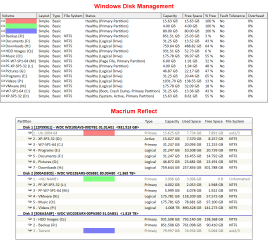
This picture shows you that Windows "Disk Management" won't tell you any information about other file systems.
Partitions - WDM vs Macrium.png
As you can see, WDM claims that there is nothing on several partitions (i.e. 100% of capacity is available).
Macrium Reflect shows you that there are actually Linux file systems present (and most of the total capacity is used).

I don't know what file system Recovery partitions use.
 

My Computer My Computer

At a glance

W7 Ultimate SP1, LM19.2 MATE, W10 Home 1703, ...AMD Phenom II x6 1100T, 3.3 GHz12GB DDR3 1333 G-Skill (4GB x 2), G-Skill (2G...NVIDIA GeForce GTX 660
Computer type
PC/Desktop
Computer Manufacturer/Model Number
n/a
OS
W7 Ultimate SP1, LM19.2 MATE, W10 Home 1703, W10 Pro 1703 VM, #All 64 bit
CPU
AMD Phenom II x6 1100T, 3.3 GHz
Motherboard
ASUS M4A88T-M/USB3 (AM3)
Memory
12GB DDR3 1333 G-Skill (4GB x 2), G-Skill (2GB x 2)
Graphics Card(s)
NVIDIA GeForce GTX 660
Sound Card
Realtek?
Monitor(s) Displays
Samsung S23B350
Screen Resolution
1920x1080
Hard Drives
WD Green 2TB (SATA), WD Green 3TB (SATA), WD Blue 4TB (SATA), WD Blue 6TB (SATA)
PSU
Cooler Master
Case
Antec GX300 Tower
Cooling
3x Antec TRICOOL 120mm Fans
Mouse
Wired Optical
Internet Speed
DSL
Antivirus
Avast
Browser
Pale Moon (64 bit)
Other Info
2018-12-27 Upgraded HDDs
2015-12-10 Upgraded case, graphics card, storage
2015-08-15 Upgraded motherboard & RAM
2015-07-15 Upgraded LM17.1 to LM17.2
OK, :) your first post read "My laptop hard drive arrived with it's disk partitioned left to right as per below :" Had it been "My laptop arrived with it's hard disk partitioned left to right as per below :" there would have been no misunderstanding.

If without knowing what is what you want to use Disk Management or any other feature just because it is there it is upto you.

whs rightly pointed out and queried how come the page file came on D drive/partition.

Wanchoo thought the first partition is empty and recommended that it be annexed.

If only you had stated that you received a brand new ASUS/HP/Dell /any other laptop with the model no. you would have perhaps put all others on the right track to help you better.

Atleast I gave you the possibilty that by using the recovery option you can get back to the original condition undoing all the ............ - sorry, all the right operations you did just because these are and were there.

Good luck.:)
 

My Computer My Computer

At a glance

Windows 7 Home Premium 32 bit
OS
Windows 7 Home Premium 32 bit

My Computer My Computer

At a glance

Windows 10 Pro x64Intel Core i7 6700KGSkill TridentZ RGB 16GB 3600 16-16-16-36EVGA GTX 980 Ti SC x2
Computer type
PC/Desktop
Computer Manufacturer/Model Number
Skylake Special #666
OS
Windows 10 Pro x64
CPU
Intel Core i7 6700K
Motherboard
Asus Sabertooth Z170 Mark 1
Memory
GSkill TridentZ RGB 16GB 3600 16-16-16-36
Graphics Card(s)
EVGA GTX 980 Ti SC x2
Sound Card
Realtek High Definition
Monitor(s) Displays
AOC G2460PG
Screen Resolution
1920 x 1080 144Hz
Hard Drives
Samsung 860 Pro 256GB, Seagate Barracuda 4TB x2
PSU
EVGA 1000 P2, EVGA White Custom Braided Cables
Case
Corsair Vengeance C70 Gunmetal Black
Cooling
Corsair H100i v2, Corsair ML120 x2, Thermal Grizzly Kryonaut
Keyboard
Logitech G910 Orion Spectrum
Mouse
Logitech G700s
Internet Speed
Verizon Fios Quantum Gateway 75/75
Antivirus
Windows Defender, Malwarebytes Free 3.8.3
Browser
Chrome
Other Info
Corsair SP120 x4, LG Blu-ray Drive, Durabrand HT-395 100 Watt Dolby Digital Amp, Corsair H2100 Wireless 7.1 Headset
Back
Top