Touch Control

ancient11

New member
Local time
5:59 PM
Messages
9
Every day whether I log off, shut down or just leave running, I have to reinstall touch control. I am getting a little frustrated at this point but have tried everything from reinstalling windows to using windows fix it and several other apps.

I would appreciate any help I can get on this matter for it is driving me crazy!
 

My Computer My Computer

At a glance

Windows 7Phenom II X616 gigATI 1800
Computer Manufacturer/Model Number
Custom
OS
Windows 7
CPU
Phenom II X6
Motherboard
Asus is
Memory
16 gig
Graphics Card(s)
ATI 1800
Sound Card
on board or.
Monitor(s) Displays
Acer T238
Hard Drives
sata
PSU
Corsair Gold 1000
Case
Corsair
Cooling
Corsair watercooling
Keyboard
Saetek
Mouse
Logitech G700
Internet Speed
T3
Every day whether I log off, shut down or just leave running, I have to reinstall touch control. I am getting a little frustrated at this point but have tried everything from reinstalling windows to using windows fix it and several other apps.

I would appreciate any help I can get on this matter for it is driving me crazy!

What do you mean by Touch Control? Is it a software? The apple-related software? What problems are you having?
 

My Computer My Computer

At a glance

Win7 Ultimate x64 SP1 / WCP x64 / Ubuntu 11 x64
OS
Win7 Ultimate x64 SP1 / WCP x64 / Ubuntu 11 x64
Every day whether I log off, shut down or just leave running, I have to reinstall touch control. I am getting a little frustrated at this point but have tried everything from reinstalling windows to using windows fix it and several other apps.

I would appreciate any help I can get on this matter for it is driving me crazy!

What do you mean by Touch Control? Is it a software? The apple-related software? What problems are you having?

Windows 7 has native touch control drivers built into it and if you have a touch control monitor it enables you to have to control to control anything you want. I have my monitor on a swing arm and I can bring it forward and tilt it down into my lap and I can draw, or do anything else I desire by using touch control. I don't know if it's a USB problem or Windows just keeps dropping the drivers (which is my suspicion) or not. I am hoping to get some help on this.
Thank you very much
ancient
 

My Computer My Computer

At a glance

Windows 7Phenom II X616 gigATI 1800
Computer Manufacturer/Model Number
Custom
OS
Windows 7
CPU
Phenom II X6
Motherboard
Asus is
Memory
16 gig
Graphics Card(s)
ATI 1800
Sound Card
on board or.
Monitor(s) Displays
Acer T238
Hard Drives
sata
PSU
Corsair Gold 1000
Case
Corsair
Cooling
Corsair watercooling
Keyboard
Saetek
Mouse
Logitech G700
Internet Speed
T3
Now I know I am getting old and no longer the sharpest tack in the box. I just unplugged my Usb cable from my monitor and re plugged--and Whala touch is back. Another reason to not pass 70 yrs. Why does windows keep dropping the Usb connection?
 

My Computer My Computer

At a glance

Windows 7Phenom II X616 gigATI 1800
Computer Manufacturer/Model Number
Custom
OS
Windows 7
CPU
Phenom II X6
Motherboard
Asus is
Memory
16 gig
Graphics Card(s)
ATI 1800
Sound Card
on board or.
Monitor(s) Displays
Acer T238
Hard Drives
sata
PSU
Corsair Gold 1000
Case
Corsair
Cooling
Corsair watercooling
Keyboard
Saetek
Mouse
Logitech G700
Internet Speed
T3
Is it possible the USB port is not reawakening after the computer sleeps or idles?
 

My Computer My Computer

At a glance

Main - Windows 7 Pro SP1 64-Bit; 2nd - Window...Main - Core i7 2600K; 2nd - Core i7 920Main - 16GB Corsair Vengeance; 2nd - 12GB Cor...Main - XFX Radeon 6870 1GB; 2nd - XFX Radeon ...
Computer Manufacturer/Model Number
Self
OS
Main - Windows 7 Pro SP1 64-Bit; 2nd - Windows Server 2008 R2
CPU
Main - Core i7 2600K; 2nd - Core i7 920
Motherboard
Main - Asus P8Z68-V Pro/Gen3; 2nd - Gigabyte GA-EX58-UDR3
Memory
Main - 16GB Corsair Vengeance; 2nd - 12GB Corsair Vengeance
Graphics Card(s)
Main - XFX Radeon 6870 1GB; 2nd - XFX Radeon 4870 1GB
Sound Card
Both: Onboard Realtek Azalia
Monitor(s) Displays
Main - Hann 25" + I-INC 25" + Acer 23"; 2nd - Upgrading Soon
Screen Resolution
Main - 1920x1080 (All Three Monitors); 2nd - Upgrading Soon
Hard Drives
Main - (1) Crucial M4 128GB (Boot)
Main - (1) Seagate 2TB 64MB Cache (Data)
Main - (1) Seagate 2TB 64MB Cache (Data Backup)
2nd - (1) Intel X25-M SSD 80GB (Boot)
2nd - (3) Seagate 1TB 32MB Cache (Data Backup)
2nd - (1) Seagate 320GB (Because)
PSU
Main - OCZ 600W Modular; 2nd - OCZ 600W
Case
Main - Thermaltake Element G; 2nd - NZXT something or other
Cooling
Main - Corsair H80; 2nd - Prolimatech Megahalems
Keyboard
Main - Razer Reclusa; 2nd - Old MS Keyboard
Mouse
Main - Logitech MX Revolution; 2nd - Old MS Mouse
Internet Speed
20Mbps Time-Warner Cable
Try this (echoing what profdlp said above).

Start> In search box type device manager> Enter

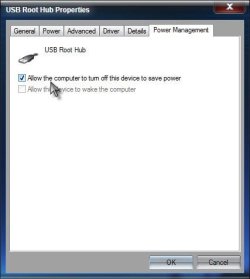
Expand Universal Serial Bus Controllers> For each controller named USB Root Hub, right click the listing and choose Properties> Click on the Power management tab> See if Allow the computer to turn off this device to save power is checked

USB.jpg

If so, try unchecking it and see if your PC will now keep the monitor connected.

A Guy
 

My Computer My Computer

At a glance

Windows 10 Home x64INTEL Core i5-750 Quad-Core 3.37GHzHyperX Fury Black Series 8GB (2 x 4GB) 1866MhzEVGA GeForce GTX 750 Superclocked 1GB 128-Bit...
Computer type
PC/Desktop
OS
Windows 10 Home x64
CPU
INTEL Core i5-750 Quad-Core 3.37GHz
Motherboard
ASUS P7P55D
Memory
HyperX Fury Black Series 8GB (2 x 4GB) 1866Mhz
Graphics Card(s)
EVGA GeForce GTX 750 Superclocked 1GB 128-Bit GDDR5
Monitor(s) Displays
LG 32MA68HY 32" IPS
Screen Resolution
1920 x 1080
Hard Drives
Samsung 840 Evo 120GB, SEAGATE 500GB Barracuda® 7200.12, SATA 3 Gb/s, 7200 RPM, 16MB cache
PSU
ANTEC TruePower New TP-550, 80 PLUS, 550W
Case
ANTEC Three Hundred Illusion
Cooling
COOLER MASTER Hyper 212 Plus, 4 x 120mm 1 x 140mm Noctua's
Internet Speed
85 + Mbps
Antivirus
Avast
Browser
Vivaldi
Now I know I am getting old and no longer the sharpest tack in the box. I just unplugged my Usb cable from my monitor and re plugged--and Whala touch is back. Another reason to not pass 70 yrs. Why does windows keep dropping the Usb connection?

Perhaps that particular USB port is bad. Have your tried other ports?
 

My Computer My Computer

At a glance

Win 7 Pro 64-bitIntel i5 2.4 Ghz8GB DDR3Intel HD 3000
Computer type
Laptop
Computer Manufacturer/Model Number
Sony Vaio VPCEB47GM Laptop
OS
Win 7 Pro 64-bit
CPU
Intel i5 2.4 Ghz
Memory
8GB DDR3
Graphics Card(s)
Intel HD 3000
Sound Card
IDT High Definition
Monitor(s) Displays
15.6 WGXA Anti-Glare LED
Screen Resolution
1280x800
Hard Drives
640Gb 7200rpm
Antivirus
MSE
Browser
Opera (primary) with IE9 backup
Back
Top