Yeah I been thinking and want to oc to atleast 3.4. I was reading on the net that my processor can oc to 3.8 but anything after that it's unstable. Been reading on about oc and what it effects and ways to test if it is stable(more info on this is appreciated if you want to share with me ) Anyways I want to learn on over clocking and wish to go from 3.0 to at least 3.4 ghz and be stable with no heat issues. My specs are down in the tag and my cooler is listed there to so it's not a stock cooler and my psu is a corsair cx600 so it should have juice for a bit of overclocking. Also if anyone can help me who has had a asus mobo similar to mine to do this correctly it would all be appreciated. Again i just want to go around 3.4ghz maybe 3.6 if it's stable and doesn't over heat when idle or under pressure. My cpu cooler is cool master hyper TX3 cpu cooler link to the cooler i'm currently using.>>>> http://www.newegg.com/Product/Product.aspx?Item=N82E16835103064
My Computer
At a glance
Windows 10 64bitAMD Phenom II X4 925 (Deneb)(2.8GHz) OC 3.4GHzCorsair Vengeance DDR3 4GBX2 (8192MB)XFX HD 6870 1GB (OC)- 940MHz core, mem 1150MHz
Computer type
PC/Desktop
Computer Manufacturer/Model Number
custom build
OS
Windows 10 64bit
CPU
AMD Phenom II X4 925 (Deneb)(2.8GHz) OC 3.4GHz
Motherboard
M5A78L-MLX Plus
Memory
Corsair Vengeance DDR3 4GBX2 (8192MB)
Graphics Card(s)
XFX HD 6870 1GB (OC)- 940MHz core, mem 1150MHz
Monitor(s) Displays
Vizio 26' 1920x1080 / Acer 1336x768
Screen Resolution
1920x1080 60Hz /1336x768
Hard Drives
Kingston Digital 60GB SSDNow V300/500gb HDD Western Digital 7200rpm (/WD 160GB HDD 7200rpm
The only way you are going to be able to overclock that CPU is by raising the FSB/HT, as the multiplier is locked; it can go down due to Cool and Quiet and power saving features, but is locked from going higher than the default 15.
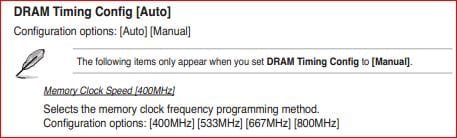
It also means that you will likely have to run the memory at a lower speed as its speed will also go up at the same time as the FSB/HT as they are linked. Best is to set it to the lowest value in the bios,
until you find the max speed for the CPU, and then you can raise it up to the closest speed the ram is rated for.
My Computer
At a glance
Win 7 Ultimate x64FX-8350 @ 4.6 GHz so farADATA XPG V1 Series Black 8GB DDR3 1600Sapphire R9 270x Dual-X
eh i have to lower ram speed idk now anyways only reason i felt like oc it a bit was because it kind of bottlenecks my gpu in gta iv sometimes since i believe my gpu should work alot faster but is hold back by my cpu. I've seen people run with the same card higher fps then me but then again have a better cpu so that's probably my problem since they are using phenoms and with that they get like 20-30 more fps and caps at 60 and im around 30-45 (mainly 40)but feels a little weird because sometimes it randomly dips to 26 then goes back to 40 on some parts so i had to put down reflections to medium and shadows to high instead of very high since i heard that is more intensive on the cpu to stop the random dips that happened once in a while.Anyways if it gives a significant boost then i'm willing to give up a bit of ram speed i guess until i can afford a better cpu.
My Computer
At a glance
Windows 10 64bitAMD Phenom II X4 925 (Deneb)(2.8GHz) OC 3.4GHzCorsair Vengeance DDR3 4GBX2 (8192MB)XFX HD 6870 1GB (OC)- 940MHz core, mem 1150MHz
Computer type
PC/Desktop
Computer Manufacturer/Model Number
custom build
OS
Windows 10 64bit
CPU
AMD Phenom II X4 925 (Deneb)(2.8GHz) OC 3.4GHz
Motherboard
M5A78L-MLX Plus
Memory
Corsair Vengeance DDR3 4GBX2 (8192MB)
Graphics Card(s)
XFX HD 6870 1GB (OC)- 940MHz core, mem 1150MHz
Monitor(s) Displays
Vizio 26' 1920x1080 / Acer 1336x768
Screen Resolution
1920x1080 60Hz /1336x768
Hard Drives
Kingston Digital 60GB SSDNow V300/500gb HDD Western Digital 7200rpm (/WD 160GB HDD 7200rpm
I know this is late and all but I have a question and wanted to know if there's a guide to show me how to change those settings on a ASUS board because i've seen some videos of ASUS boards settings being changed but they look kind of different from the one my board has.
My Computer
At a glance
Windows 10 64bitAMD Phenom II X4 925 (Deneb)(2.8GHz) OC 3.4GHzCorsair Vengeance DDR3 4GBX2 (8192MB)XFX HD 6870 1GB (OC)- 940MHz core, mem 1150MHz
Computer type
PC/Desktop
Computer Manufacturer/Model Number
custom build
OS
Windows 10 64bit
CPU
AMD Phenom II X4 925 (Deneb)(2.8GHz) OC 3.4GHz
Motherboard
M5A78L-MLX Plus
Memory
Corsair Vengeance DDR3 4GBX2 (8192MB)
Graphics Card(s)
XFX HD 6870 1GB (OC)- 940MHz core, mem 1150MHz
Monitor(s) Displays
Vizio 26' 1920x1080 / Acer 1336x768
Screen Resolution
1920x1080 60Hz /1336x768
Hard Drives
Kingston Digital 60GB SSDNow V300/500gb HDD Western Digital 7200rpm (/WD 160GB HDD 7200rpm
Changed my clocks to 3450.0 which is 3.4GHz and cpu z and core temp seem to read that been when i did the WEI test it still says 3.0ghz but cpu-z and core temp state other wise so i'm guessing I got my new clocks but wei wont see it.How can I get windows to see it in the wei tab?
Attachments
111111111111.png
185 KB
· Views: 19
My Computer
At a glance
Windows 10 64bitAMD Phenom II X4 925 (Deneb)(2.8GHz) OC 3.4GHzCorsair Vengeance DDR3 4GBX2 (8192MB)XFX HD 6870 1GB (OC)- 940MHz core, mem 1150MHz
Computer type
PC/Desktop
Computer Manufacturer/Model Number
custom build
OS
Windows 10 64bit
CPU
AMD Phenom II X4 925 (Deneb)(2.8GHz) OC 3.4GHz
Motherboard
M5A78L-MLX Plus
Memory
Corsair Vengeance DDR3 4GBX2 (8192MB)
Graphics Card(s)
XFX HD 6870 1GB (OC)- 940MHz core, mem 1150MHz
Monitor(s) Displays
Vizio 26' 1920x1080 / Acer 1336x768
Screen Resolution
1920x1080 60Hz /1336x768
Hard Drives
Kingston Digital 60GB SSDNow V300/500gb HDD Western Digital 7200rpm (/WD 160GB HDD 7200rpm


 ) Anyways I want to learn on over clocking and wish to go from 3.0 to at least 3.4 ghz and be stable with no heat issues. My specs are down in the tag and my cooler is listed there to so it's not a stock cooler and my psu is a corsair cx600 so it should have juice for a bit of overclocking. Also if anyone can help me who has had a asus mobo similar to mine to do this correctly it would all be appreciated. Again i just want to go around 3.4ghz maybe 3.6 if it's stable and doesn't over heat when idle or under pressure. My cpu cooler is cool master hyper TX3 cpu cooler link to the cooler i'm currently using.>>>> http://www.newegg.com/Product/Product.aspx?Item=N82E16835103064
 idk now anyways only reason i felt like oc it a bit was because it kind of bottlenecks my gpu in gta iv sometimes since i believe my gpu should work alot faster but is hold back by my cpu. I've seen people run with the same card higher fps then me but then again have a better cpu so that's probably my problem since they are using phenoms and with that they get like 20-30 more fps and caps at 60 and im around 30-45 (mainly 40)but feels a little weird because sometimes it randomly dips to 26 then goes back to 40 on some parts so i had to put down reflections to medium and shadows to high instead of very high since i heard that is more intensive on the cpu to stop the random dips that happened once in a while.Anyways if it gives a significant boost then i'm willing to give up a bit of ram speed i guess until i can afford a better cpu.
