
Solved WD My passport essential Not initialized

sk0t0s

on vacation
Hi guys, I have a problem on my WD My Passport Essential 500gb.

It is working on my other PC(Windows XP)

But here in my Windows 7 Ultimate it will not initialized. I also tried to change the Drive letter but the options is disabled. Maybe because it is not initialized right?

Here's my screen shot of Computer Management:
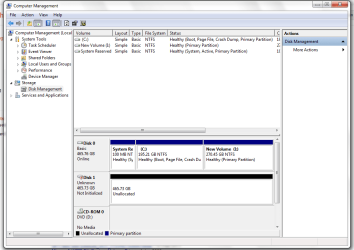
WD My passport essential.png

Thanks guys
 

My Computer

Computer type
PC/Desktop
Computer Manufacturer/Model Number
Gigabyte Technology Co. Ltd.
OS
Windows 10 Pro 64-Bit
CPU
Intel(R) Core(TM) i5-4460 CPU @ 3.20 GHz(4CPU's), ~3.2GHz
Motherboard
Gigabyte B85M-HD3-A
Memory
8192 RAM
Graphics Card(s)
NVIDIA GeForce 710
Sound Card
Integrated High Definition audio with Realtek ALC888 codec
Monitor(s) Displays
Acer V183HV Ab 18.5" LCD Display
Screen Resolution
1366 x 768
Keyboard
HP
Mouse
HP
Internet Speed
100mbps
Antivirus
Microsoft Security Essentials
Browser
Chrome, Firefox
anyone?
 

My Computer

Computer type
PC/Desktop
Computer Manufacturer/Model Number
Gigabyte Technology Co. Ltd.
OS
Windows 10 Pro 64-Bit
CPU
Intel(R) Core(TM) i5-4460 CPU @ 3.20 GHz(4CPU's), ~3.2GHz
Motherboard
Gigabyte B85M-HD3-A
Memory
8192 RAM
Graphics Card(s)
NVIDIA GeForce 710
Sound Card
Integrated High Definition audio with Realtek ALC888 codec
Monitor(s) Displays
Acer V183HV Ab 18.5" LCD Display
Screen Resolution
1366 x 768
Keyboard
HP
Mouse
HP
Internet Speed
100mbps
Antivirus
Microsoft Security Essentials
Browser
Chrome, Firefox
Is this on a Notebook computer? If it is your WD Passport is a USB powered device and your notebook is not putting out enough power to full power the drive. You may need a Y USB cable to connect it to 2 separate USB ports at the same time to supply enough power to full power it up. It should then be seen by the computer. No initializing required at that. As long as it is formatted NTFS, FAT32 or exFAT.
 

My Computer

OS
7 x64
It didnt work both on laptop and PC. But on my XP pc it is working.
 

My Computer

Computer type
PC/Desktop
Computer Manufacturer/Model Number
Gigabyte Technology Co. Ltd.
OS
Windows 10 Pro 64-Bit
CPU
Intel(R) Core(TM) i5-4460 CPU @ 3.20 GHz(4CPU's), ~3.2GHz
Motherboard
Gigabyte B85M-HD3-A
Memory
8192 RAM
Graphics Card(s)
NVIDIA GeForce 710
Sound Card
Integrated High Definition audio with Realtek ALC888 codec
Monitor(s) Displays
Acer V183HV Ab 18.5" LCD Display
Screen Resolution
1366 x 768
Keyboard
HP
Mouse
HP
Internet Speed
100mbps
Antivirus
Microsoft Security Essentials
Browser
Chrome, Firefox
I don't know whether you're aware, but a drive is not initialized until it has a formatted partition on it.

Have you tried to create a new partition on it?

Just right-click the drive and choose simple volume, quick format and assign a drive letter.

If disk management won't play ball you may want to use something like Partition Wizard.

http://www.sevenforums.com/tutorials/93322-partition-wizard-use-bootable-cd.html
 

My Computer

Computer Manufacturer/Model Number
HP Pavilion Elite 495UK
OS
Windows 7 Ultimate SP1 64-Bit
CPU
Intel Core i7 870 @ 2.93GHz
Motherboard
MSI 2A9C (CPU1)
Memory
8Gb Dual-Channel DDR3 @ 664MHz
Graphics Card(s)
nVidia GeForce GTX 460 1024MB dedicated RAM
Sound Card
Realtek HD Audio
Monitor(s) Displays
HP2310i
Screen Resolution
1920 x 1080
Hard Drives
1x1954GB Hitachi HDS22020ALA 330 (RAID), 1x1954GB Hitachi External for backup and storage
PSU
460W
Case
HP Elite
Cooling
Air cooled
Keyboard
Logitech K750 solar-powered keyboard
Mouse
Logitech Wireless M180 mouse
Internet Speed
2Mb
Other Info
Pure Avanti Flow Internet Radio with iPod Dock, 64Gb iPod, HP USB Speakers, Sony MDR-V500 Headphones, Sony Vaio F-Series Laptop
Your drive is readable on your Windows XP PC. Copy all your files into it or any other external HDD/pendrive.

Download HP USB Disk Storage Format Tool 2.2.3 from Download HP USB Disk Storage Format Tool 2.2.3 Free - Windows-based Format Utility for HP Drive Key or DiskOnKey USB Device - Softpedia

Run it as an administrator and format your WD external HDD.

Check whether it is readable now on your Windows 7 PC.

Note: If you have installed Smartware, uninstall it. It is known to create a lot of problems.
 

My Computer

OS
Windows 7 Home Premium 32 bit
@Seavixen32 & jumanji

Im happy to do those step you both pointed out but incidentally, my friend dropped it and now its not working. Im just hearing a ticking sounds inside and the windows is not detecting it right now.

So I guess I have to buy a new one :) Thanks anyway and sorry for the late reply.
 

My Computer

Computer type
PC/Desktop
Computer Manufacturer/Model Number
Gigabyte Technology Co. Ltd.
OS
Windows 10 Pro 64-Bit
CPU
Intel(R) Core(TM) i5-4460 CPU @ 3.20 GHz(4CPU's), ~3.2GHz
Motherboard
Gigabyte B85M-HD3-A
Memory
8192 RAM
Graphics Card(s)
NVIDIA GeForce 710
Sound Card
Integrated High Definition audio with Realtek ALC888 codec
Monitor(s) Displays
Acer V183HV Ab 18.5" LCD Display
Screen Resolution
1366 x 768
Keyboard
HP
Mouse
HP
Internet Speed
100mbps
Antivirus
Microsoft Security Essentials
Browser
Chrome, Firefox
I'm too late to the party, but did you try right clicking on it and choosing Initialize? If I see that on any of my systems, I always have the option, on the small box where it says Disk 1, to Initialize from there.
 

My Computer

OS
Windows 7 Ultimate x64 SP1
CPU
Intel Core i7-2600
Motherboard
Gigabyte GA-P67A-UD3P-B3
Memory
12 GB Patriot Extreme DDR3-1333
Graphics Card(s)
Nvidia GTX 470
Monitor(s) Displays
Dell UltraSharp 2209WA
Hard Drives
OCZ Agility3 240 GB, WD5001AALS, WD7501AALS
PSU
OCZ ModStream 700W
Case
CoolerMaster HAF 912 Advanced
Cooling
CoolerMaster Hyper 212 Plus
@Seavixen32 & jumanji

Im happy to do those step you both pointed out but incidentally, my friend dropped it and now its not working. Im just hearing a ticking sounds inside and the windows is not detecting it right now.

So I guess I have to buy a new one :) Thanks anyway and sorry for the late reply.

You're welcome.

Pity it's come to that, but if needs must, you don't have a lot of choice.
 

My Computer

Computer Manufacturer/Model Number
HP Pavilion Elite 495UK
OS
Windows 7 Ultimate SP1 64-Bit
CPU
Intel Core i7 870 @ 2.93GHz
Motherboard
MSI 2A9C (CPU1)
Memory
8Gb Dual-Channel DDR3 @ 664MHz
Graphics Card(s)
nVidia GeForce GTX 460 1024MB dedicated RAM
Sound Card
Realtek HD Audio
Monitor(s) Displays
HP2310i
Screen Resolution
1920 x 1080
Hard Drives
1x1954GB Hitachi HDS22020ALA 330 (RAID), 1x1954GB Hitachi External for backup and storage
PSU
460W
Case
HP Elite
Cooling
Air cooled
Keyboard
Logitech K750 solar-powered keyboard
Mouse
Logitech Wireless M180 mouse
Internet Speed
2Mb
Other Info
Pure Avanti Flow Internet Radio with iPod Dock, 64Gb iPod, HP USB Speakers, Sony MDR-V500 Headphones, Sony Vaio F-Series Laptop
Back
Top