Intel 4 Chipset not working...Does not support my version of windows.

narutochats

New member
Local time
12:03 PM
Messages
1
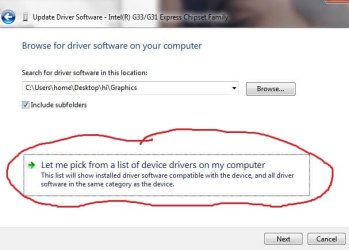
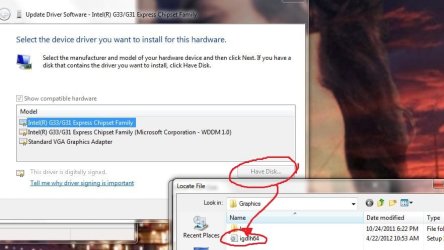
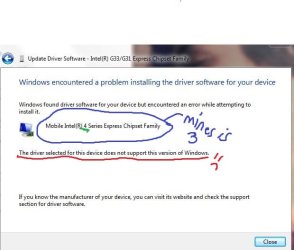
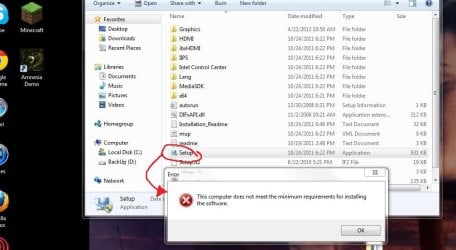
Hello Everyone. I'm new here, and I've been trying at this "Graphics" stuff for about a week now, reading forum after forum, and visiting link after link. I wanted to play a game, but the OpenGL was only version 1.4, and required 2.0 . After tons of research, I realized that I needed to update my drivers. I tried using NVidia, and after tons and tons of errors, that didn't work...After more research, I figured out that my Display Adapters is Intel G33/G31 Express Chipset Family.... so I tried downloading an Intel Media Accelerator, which would give me OpenGL 2.0, but when I tried to use Setup.exe, I would get "This computer does not meet the minimum requirements for installing the software", so after MORE research, :drool: I tried to use Device Manager>Display adapters>Upgrade Driver Software>Install Manually>Let Me pick>Have Disk> and then i used the ".inf folder". But then it says, "The driver selected for this device does not support this version of windows"......So, needless to say...I'm stuck....My computer is Windows 7 Home Premium x64. My Vendor I.D. is 0x8086 and my Device I.D. is 0x29C2....what can I do to make this work? Is there something I have to buy? I hope someone can help because I've been at this for a while.
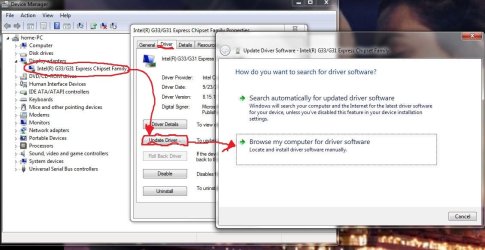
1.JPG 2.JPG
3.JPG 4.JPG 5.JPG
 

My Computer My Computer

At a glance

Windows 7 Home Premium x64
OS
Windows 7 Home Premium x64
According to this page...
Desktop graphics controllers — OpenGL* compatibility

It might not support OpenGL 2.0... I'm not really sure, the wording is weird.
You might also try to run in Vista SP2 compatibility mode. Because, as I see, this chipset is pretty old (2007) and the last drivers for the G31/G33 were for Vista. Vista drivers works with Windows 7. (oh and, try compatibility mode with the .exe)

Try it like that. And give us feedback

EDIT

Duuuuuuurp. The driver does exist for Windows 7. Just be sure to pick the right version for your oprating system. What you are probably trying to do is that you are trying to install the 32-bit driver for 64-bit Windows.
 

My Computer My Computer

At a glance

Windows 10 Professional 64-bitRyzen 9 5900XG.Skill 3600Mhz CL16 16GB × 4EVGA GeForce RTX 3070 Ti FTW3 Ultra Gaming
Computer type
PC/Desktop
Computer Manufacturer/Model Number
Custom build
OS
Windows 10 Professional 64-bit
CPU
Ryzen 9 5900X
Motherboard
Gigabyte X570 Aorus Master
Memory
G.Skill 3600Mhz CL16 16GB × 4
Graphics Card(s)
EVGA GeForce RTX 3070 Ti FTW3 Ultra Gaming
Sound Card
On-board
Monitor(s) Displays
Dell Alienware AW3418DW
Screen Resolution
3440x1440
Hard Drives
1×Sabrent Rocket 4 Plus 2TB nvme SSD (System, internal)
2x4TB Western Digital Blue (Internal)
1x4TB HDST 7200RPM (Internal)
PSU
Seasonic Focus Plus 850W Platinum
Case
Corsair 680X
Cooling
Stock fans + 3× Corsair QL120, Corsair H100i Platinum
Keyboard
Logitech K350
Mouse
Logitech M510
Internet Speed
120Mbits dl - 20Mbits up
Antivirus
ESET NOD32 Antivirus
Browser
Firefox (latest version)
Other Info
Headphones : Audio-Technica ATH-M50x
Scanner : Canon Canoscan LiDE 220 + Plustek OptiBook 4800
Back
Top