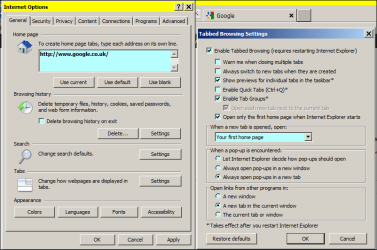
Solved click new tab and it comes up blank page rather than first home page

chas53

New member
Member
VIP
Local time
4:33 AM
Messages
173
would someone please help me with this problem?

I click on a new tab and it comes up as a blank page rather than your first home page.

so I change the setting in: tools > internet options > tabs > settings > when a new tab is opened, open..... ok ok).

It works fine during the current session, however after a shutdown and restart, new tab opens as a blank page again.

any help greatly appreciated.

the problem started after I uninstalled and then reinstalled avg free antivirus (trying to see if that was messing up fios media manage).

I have windows 7 home premium 64 bit.

thanks,
Chas
 

My Computer My Computer

At a glance

Microsoft Windows 7 Home Premium 64-bit 7601 ...Intel(R) Core(TM) i5-2430M CPU @ 2.40GHz6.00 GBIntel(R) HD Graphics Family
Computer Manufacturer/Model Number
sony vaio vpcsc31fm
OS
Microsoft Windows 7 Home Premium 64-bit 7601 Multiprocessor Free Service Pack 1
CPU
Intel(R) Core(TM) i5-2430M CPU @ 2.40GHz
Motherboard
Sony Corporation VAIO
Memory
6.00 GB
Graphics Card(s)
Intel(R) HD Graphics Family
Sound Card
(1) High Definition Audio Device (2) Bluetooth Hands-free
Screen Resolution
1366 x 768 x 32 bits (4294967296 colors) @ 59 Hz
Hard Drives
ST95005620AS
Does pressing Ctrl+T keys help?
 

My Computer My Computer

At a glance

Windows 7 Ultimate 32bit SP1Intel(R) Core(TM)2 Quad CPU @ 2.40GHz, 2400 MHz4 GBATI Radeon HD 2600 Pro
Computer type
PC/Desktop
Computer Manufacturer/Model Number
Bruce ... somewhere in his 40's
OS
Windows 7 Ultimate 32bit SP1
CPU
Intel(R) Core(TM)2 Quad CPU @ 2.40GHz, 2400 MHz
Motherboard
INTEL/D975XBX2
Memory
4 GB
Graphics Card(s)
ATI Radeon HD 2600 Pro
Monitor(s) Displays
Samsung SyncMaster 914v
Screen Resolution
1280 x 1024
Hard Drives
2/500GB each ... ST3500630AS ATA Device.
One is not connected
PSU
Rocketfish 700 W
Case
G.Skill Gigabyte Chassis
Keyboard
Standard PS/2 Keyboard
Mouse
Microsoft PS/2 Mouse
Internet Speed
DSL
Antivirus
Avira Internet Security
Browser
IE 11
Other Info
ATI HDMI Audio
thank you for your reply. not sure I understand. I have not tried that.

when should I press Ctrl + T ????
 

My Computer My Computer

At a glance

Microsoft Windows 7 Home Premium 64-bit 7601 ...Intel(R) Core(TM) i5-2430M CPU @ 2.40GHz6.00 GBIntel(R) HD Graphics Family
Computer Manufacturer/Model Number
sony vaio vpcsc31fm
OS
Microsoft Windows 7 Home Premium 64-bit 7601 Multiprocessor Free Service Pack 1
CPU
Intel(R) Core(TM) i5-2430M CPU @ 2.40GHz
Motherboard
Sony Corporation VAIO
Memory
6.00 GB
Graphics Card(s)
Intel(R) HD Graphics Family
Sound Card
(1) High Definition Audio Device (2) Bluetooth Hands-free
Screen Resolution
1366 x 768 x 32 bits (4294967296 colors) @ 59 Hz
Hard Drives
ST95005620AS
after restarting computer, the problem is exactly the same.

that is to say that when I press Ctrl + T, the exact thing happens as before.

the new tab page is a blank page.

I want the new tab page to be my your first home page (which I have as google) or the new tab page.

do you have any other ideas??

or does anyone?

here is something I found googling online. I am afraid of doing it because it is beyond my comfort zone for what I know how to do with computers:


Re: New tab reverts to "blank page" after restarting
04-23-2012 11:44 PM
Please try the following, it has to do with modifying the registry so be careful:

DISCLAIMER:

Modifying REGISTRY settings incorrectly can cause serious problems that may prevent your computer from booting properly. However we cannot guarantee that any problems resulting from the configuring of REGISTRY settings can be solved. Modifications of these settings are at your own risk.

1. Click Start

2. In ‘Start Search’ type regedit, press Enter (provide administrative credentials if prompted)

3. Navigate to the following key:

HKEY_LOCAL_MACHINE\SOFTWARE\Microsoft\Internet Explorer\AboutURLs

4. Right-click Tabs, then click Modify…

5. Change the “Value data:” to:

res://ieframe.dll/tabswelcome.htm

6. Click OK

Now go back into Internet Explorer and make sure that under Tabs settings and under the category “When a new tab is opened, open:” you have it set for “The new tab page”. This should resolve the issue.

Please also make sure u have disabled any unused addon.
I am a HP employee
Make it easier for other people to find solutions, by marking my answer “Accept as Solution” if it solves your problem.
 

My Computer My Computer

At a glance

Microsoft Windows 7 Home Premium 64-bit 7601 ...Intel(R) Core(TM) i5-2430M CPU @ 2.40GHz6.00 GBIntel(R) HD Graphics Family
Computer Manufacturer/Model Number
sony vaio vpcsc31fm
OS
Microsoft Windows 7 Home Premium 64-bit 7601 Multiprocessor Free Service Pack 1
CPU
Intel(R) Core(TM) i5-2430M CPU @ 2.40GHz
Motherboard
Sony Corporation VAIO
Memory
6.00 GB
Graphics Card(s)
Intel(R) HD Graphics Family
Sound Card
(1) High Definition Audio Device (2) Bluetooth Hands-free
Screen Resolution
1366 x 768 x 32 bits (4294967296 colors) @ 59 Hz
Hard Drives
ST95005620AS
Press the scroll wheel on the home icon.
 

My Computer My Computer

At a glance

Win7 H.Prem. 32bit+SP1
Computer Manufacturer/Model Number
Look in my Signature.
OS
Win7 H.Prem. 32bit+SP1
I did. and nothin happened.

I see 2 home icons. I tried it on both of them. nothing happened.
 

My Computer My Computer

At a glance

Microsoft Windows 7 Home Premium 64-bit 7601 ...Intel(R) Core(TM) i5-2430M CPU @ 2.40GHz6.00 GBIntel(R) HD Graphics Family
Computer Manufacturer/Model Number
sony vaio vpcsc31fm
OS
Microsoft Windows 7 Home Premium 64-bit 7601 Multiprocessor Free Service Pack 1
CPU
Intel(R) Core(TM) i5-2430M CPU @ 2.40GHz
Motherboard
Sony Corporation VAIO
Memory
6.00 GB
Graphics Card(s)
Intel(R) HD Graphics Family
Sound Card
(1) High Definition Audio Device (2) Bluetooth Hands-free
Screen Resolution
1366 x 768 x 32 bits (4294967296 colors) @ 59 Hz
Hard Drives
ST95005620AS
What browser do you use ?
 

My Computer My Computer

At a glance

Win7 H.Prem. 32bit+SP1
Computer Manufacturer/Model Number
Look in my Signature.
OS
Win7 H.Prem. 32bit+SP1
internet explorer 8
 

My Computer My Computer

At a glance

Microsoft Windows 7 Home Premium 64-bit 7601 ...Intel(R) Core(TM) i5-2430M CPU @ 2.40GHz6.00 GBIntel(R) HD Graphics Family
Computer Manufacturer/Model Number
sony vaio vpcsc31fm
OS
Microsoft Windows 7 Home Premium 64-bit 7601 Multiprocessor Free Service Pack 1
CPU
Intel(R) Core(TM) i5-2430M CPU @ 2.40GHz
Motherboard
Sony Corporation VAIO
Memory
6.00 GB
Graphics Card(s)
Intel(R) HD Graphics Family
Sound Card
(1) High Definition Audio Device (2) Bluetooth Hands-free
Screen Resolution
1366 x 768 x 32 bits (4294967296 colors) @ 59 Hz
Hard Drives
ST95005620AS
You should have IE9.
 

My Computer My Computer

At a glance

Win7 H.Prem. 32bit+SP1
Computer Manufacturer/Model Number
Look in my Signature.
OS
Win7 H.Prem. 32bit+SP1
just checked.

I do have and am using IE9.

(I thought my computer guy said he put on IE8.)

do you have any ideas how I can fix my problem?
 

My Computer My Computer

At a glance

Microsoft Windows 7 Home Premium 64-bit 7601 ...Intel(R) Core(TM) i5-2430M CPU @ 2.40GHz6.00 GBIntel(R) HD Graphics Family
Computer Manufacturer/Model Number
sony vaio vpcsc31fm
OS
Microsoft Windows 7 Home Premium 64-bit 7601 Multiprocessor Free Service Pack 1
CPU
Intel(R) Core(TM) i5-2430M CPU @ 2.40GHz
Motherboard
Sony Corporation VAIO
Memory
6.00 GB
Graphics Card(s)
Intel(R) HD Graphics Family
Sound Card
(1) High Definition Audio Device (2) Bluetooth Hands-free
Screen Resolution
1366 x 768 x 32 bits (4294967296 colors) @ 59 Hz
Hard Drives
ST95005620AS
Here's how to:-

RR.PNG
 

My Computer My Computer

At a glance

Win7 H.Prem. 32bit+SP1
Computer Manufacturer/Model Number
Look in my Signature.
OS
Win7 H.Prem. 32bit+SP1
Roderunner is right but he didn't include any explanation.

Follow steps below. 1, 2, 3 then 4 in yellow.

#1 Click Tab settings.
#2 just be sure it is checked.
#3 is a drop curtain with 3 choices. For you select what is shown "Your first Homepage".
#4 click OK.
 

Attachments

  • Home page tabs.PNG
    Home page tabs.PNG
    37 KB · Views: 78

My Computer My Computer

At a glance

Windows7 Pro 64bit SP-1; Windows XP Pro 32bitIntel Core i7-870 Lynnfield 2.93GHz LGA 1156 ...8GB@1400MHz Crucial Ballistix DDR3-1600 4x2GBASUS ENGTX460 DirectCU/2DI/1GD5 1GB 256-bit G...
Computer Manufacturer/Model Number
Hopalong/ Godzilla
OS
Windows7 Pro 64bit SP-1; Windows XP Pro 32bit
CPU
Intel Core i7-870 Lynnfield 2.93GHz LGA 1156 95W Quad-Core
Motherboard
ASUS P7P55D-E PRO
Memory
8GB@1400MHz Crucial Ballistix DDR3-1600 4x2GB
Graphics Card(s)
ASUS ENGTX460 DirectCU/2DI/1GD5 1GB 256-bit GDDR5
Sound Card
VIA Onboard
Monitor(s) Displays
Asus VS248H-P 24"; Samsung SyncMaster 941BW 19"ws
Screen Resolution
1920x1080; 1440x900
Hard Drives
Samsung 830 120GB SSD
Intel 320 120GB SSD
Western Digital Caviar Black WD7501AALS 750GB 7200 RPM SATA 3.0Gb/s
Western Digital Caviar Black WD6401AALS 640GB 7200 RPM SATA 3.0Gb/s
PSU
COOLER MASTER Silent Pro RS850-AMBAJ3-US 850W Modular
Case
COOLER MASTER HAF 932 RC-932-KKN5-GP Black
Cooling
Scythe "Mugen-2 Rev.B" (2 ScytheKaze-Jyuni PWM fans)
Keyboard
Logitech K-320
Mouse
Kensington
Antivirus
Avast Inernet Suite
Browser
IE 9 ; Chrome
thank you for your reply.

I have tried that many many times.

it always reverts to blank page when I click new tab after I shut down and start my laptop back up again.

do you have any idea how I can fix this problem?? please???
 

My Computer My Computer

At a glance

Microsoft Windows 7 Home Premium 64-bit 7601 ...Intel(R) Core(TM) i5-2430M CPU @ 2.40GHz6.00 GBIntel(R) HD Graphics Family
Computer Manufacturer/Model Number
sony vaio vpcsc31fm
OS
Microsoft Windows 7 Home Premium 64-bit 7601 Multiprocessor Free Service Pack 1
CPU
Intel(R) Core(TM) i5-2430M CPU @ 2.40GHz
Motherboard
Sony Corporation VAIO
Memory
6.00 GB
Graphics Card(s)
Intel(R) HD Graphics Family
Sound Card
(1) High Definition Audio Device (2) Bluetooth Hands-free
Screen Resolution
1366 x 768 x 32 bits (4294967296 colors) @ 59 Hz
Hard Drives
ST95005620AS
It might be worth trying resetting Internet Explorer to its defaults. You would have to set the toolbar preferences, homepage etc. up again but it could clear the fault and therefore be worth the trouble.

Internet Options > Advanced tab > Reset button.
 

My Computer My Computer

At a glance

Windows 7 Home Premium 64-bit SP1Intel Quad Core 2.5 Ghz4 GB DDR2ATI Radeon 3800 HD
OS
Windows 7 Home Premium 64-bit SP1
CPU
Intel Quad Core 2.5 Ghz
Motherboard
Asus P5Q-EM
Memory
4 GB DDR2
Graphics Card(s)
ATI Radeon 3800 HD
Monitor(s) Displays
BenQG2222HDL
Screen Resolution
1920x1080
Hard Drives
2 X 500GB Western Digital
Internet Speed
30 MB
thank you . I'll try it.
 

My Computer My Computer

At a glance

Microsoft Windows 7 Home Premium 64-bit 7601 ...Intel(R) Core(TM) i5-2430M CPU @ 2.40GHz6.00 GBIntel(R) HD Graphics Family
Computer Manufacturer/Model Number
sony vaio vpcsc31fm
OS
Microsoft Windows 7 Home Premium 64-bit 7601 Multiprocessor Free Service Pack 1
CPU
Intel(R) Core(TM) i5-2430M CPU @ 2.40GHz
Motherboard
Sony Corporation VAIO
Memory
6.00 GB
Graphics Card(s)
Intel(R) HD Graphics Family
Sound Card
(1) High Definition Audio Device (2) Bluetooth Hands-free
Screen Resolution
1366 x 768 x 32 bits (4294967296 colors) @ 59 Hz
Hard Drives
ST95005620AS
that reset button has a note that says "you should use this only if your browser is in an unuseable state".


am wondering if I should not do it.

any more thoughts?????
 

My Computer My Computer

At a glance

Microsoft Windows 7 Home Premium 64-bit 7601 ...Intel(R) Core(TM) i5-2430M CPU @ 2.40GHz6.00 GBIntel(R) HD Graphics Family
Computer Manufacturer/Model Number
sony vaio vpcsc31fm
OS
Microsoft Windows 7 Home Premium 64-bit 7601 Multiprocessor Free Service Pack 1
CPU
Intel(R) Core(TM) i5-2430M CPU @ 2.40GHz
Motherboard
Sony Corporation VAIO
Memory
6.00 GB
Graphics Card(s)
Intel(R) HD Graphics Family
Sound Card
(1) High Definition Audio Device (2) Bluetooth Hands-free
Screen Resolution
1366 x 768 x 32 bits (4294967296 colors) @ 59 Hz
Hard Drives
ST95005620AS
Part of the browser isn't behaving properly. I personally would reset since other remedies haven't worked so far. Resetting will cause a bit of work in putting your toolbar customisations etc back in place. It basically puts IE back to how it was when first installed. You could try it without opting to 'Delete personal settings' first. I'd maybe even delete those on the second try if resetting without deleting them didn't work.

This may not cure the fault but if nothing else has worked, I think you perhaps need to explore other avenues, even it it does mean some bother. Think about backing up your bookmarks just in case, although resetting has always left the bookmarks intact in my experience.
 

My Computer My Computer

At a glance

Windows 7 Home Premium 64-bit SP1Intel Quad Core 2.5 Ghz4 GB DDR2ATI Radeon 3800 HD
OS
Windows 7 Home Premium 64-bit SP1
CPU
Intel Quad Core 2.5 Ghz
Motherboard
Asus P5Q-EM
Memory
4 GB DDR2
Graphics Card(s)
ATI Radeon 3800 HD
Monitor(s) Displays
BenQG2222HDL
Screen Resolution
1920x1080
Hard Drives
2 X 500GB Western Digital
Internet Speed
30 MB
It sounds like your problem is the New Tab setting change does not "stick" after a re-boot.
Run System File Checker.
http://www.sevenforums.com/tutorials/1538-sfc-scannow-command-system-file-checker.html

If that doesn't help you could try "uninstalling IE" at Control Panel > Programs and Features > Turn Windows features on or off
Turn Off IE
Re-boot
If your OS came with IE8 and was updated to IE9, you should now have IE8 - test that.

If you don't have any IE, Go back to Turn Windows features on or off, and Turn IE back on.
Re-boot
You should now have a "reset" IE9.
Also, in post #4 you mentioned a registry edit, and your concern/comfort zone.
Understood...but that fix may be the answer.
I suggest learning how to backup/restore your registry and System (OS) partition.
Some of the SF tutorials for help with this:
http://www.sevenforums.com/tutorials/4230-registry-backup-restore.html
http://www.sevenforums.com/tutorials/663-backup-complete-computer-create-image-backup.html
http://www.sevenforums.com/tutorials/73828-imaging-free-macrium.html
 

My Computer My Computer

At a glance

Multi-Boot W7_Pro_x64 W8.1_Pro_x64 W10_Pro_x6...AMD Athlon II x4 6206GB GSkill DDR2 800AMD 4670 GPU + AMD 4200 IGP
Computer type
PC/Desktop
Computer Manufacturer/Model Number
home built
OS
Multi-Boot W7_Pro_x64 W8.1_Pro_x64 W10_Pro_x64 +Linux_VMs +Chromium_VM
CPU
AMD Athlon II x4 620
Motherboard
Gigabyte GA-MA785G-UD3H
Memory
6GB GSkill DDR2 800
Graphics Card(s)
AMD 4670 GPU + AMD 4200 IGP
Sound Card
on board Realtek ALC889A
Monitor(s) Displays
RCA 40" LCD TV, Insignia 32" LCD TV, HP 15" LCD monitor
Screen Resolution
1680 x 1050
Hard Drives
OCZ Vertex 3 120GB,
Samsung F3 1TB (3),
Several others - WD, Seagate, Hitachi, ...
PSU
Corsair 500 W
Case
Rosewill mid tower
Cooling
CM 90mm rifle
Keyboard
Gyration wireless, Logitech wireless, Dell USB wired
Mouse
Gyration wireless, Logitech wireless, V7 USB wired
Internet Speed
Spectrum - 100Mbps D / 10Mbps U
Antivirus
Avast, MBAM3, EMET, WinPatrol
Browser
Pale Moon, Firefox, IE
Other Info
2 multi-boot PC's
Mainly HTPC/Office/Gen purpose (no gaming).
Trendnet USB KVM.
LG DVD burner/Blue Ray Player.
Tray system for removable SATA backup drives.

Not currently OCd, under-volted.
I use Hybrid sleep, rarely re-boot or shutdown.

Hauppauge HD-PVR, Avermedia PCIe TV Tuner, Hauppauge PCI TV Tuner.
holy smokes!!

thanks for your excellent replies you guys.

DavidW7ncus I must say that looks so far above my head. I would have to go really slow. and asume I know nothing. if this is not precise step by step, one wrong move and I would be lost and stuck.

my computer guy told me to never do restore because it messes stuff up.

but maybe you know better than him. I know that he is not right about everything. (I consider him to be my dear friend and he is brilliant. he's right about a lot of stuff. but not everything.)
 

My Computer My Computer

At a glance

Microsoft Windows 7 Home Premium 64-bit 7601 ...Intel(R) Core(TM) i5-2430M CPU @ 2.40GHz6.00 GBIntel(R) HD Graphics Family
Computer Manufacturer/Model Number
sony vaio vpcsc31fm
OS
Microsoft Windows 7 Home Premium 64-bit 7601 Multiprocessor Free Service Pack 1
CPU
Intel(R) Core(TM) i5-2430M CPU @ 2.40GHz
Motherboard
Sony Corporation VAIO
Memory
6.00 GB
Graphics Card(s)
Intel(R) HD Graphics Family
Sound Card
(1) High Definition Audio Device (2) Bluetooth Hands-free
Screen Resolution
1366 x 768 x 32 bits (4294967296 colors) @ 59 Hz
Hard Drives
ST95005620AS
chas53, I apologize if my post was too confusing or didn't come across right.

I DO suggest doing the System File Check, and then, if needed the "re-install" IE steps I gave you.
I've never seen a problem with these.

Before doing a registry edit, I DO suggest making sure you have a backup plan.
If you prefer, wait until other SF experts agree with me, or give you better advice.

Beyond that:

You are "right on" in your concerns and questions...
It's great you question before doing something you're not sure of, and make matters worse.

"DavidW7ncus I must say that looks so far above my head. I would have to go really slow. and assume I know nothing. if this is not precise step by step, one wrong move and I would be lost and stuck."
Understood. We all start learning somewhere, and it never ends...

In my opinion the SF tutorials are very detailed, thought out, tested, and thourogh.
If you have any questions or issues with them you can post questions.
The "Tutorial Owner/Author", and other members will reply and help...

"my computer guy told me to never do restore because it messes stuff up."
He probably has a reason for saying this, but "restore" can mean many different things...
Is it a "Restore Point", "System Image", "Registry restore", "Data restore",...
Why does he say this?

My "comfort" is knowing restoring a system image works!
Guess i should spend more time testing restore points so I can have confidence in them.

"but maybe you know better than him. I know that he is not right about everything."
I certainly don't know everything, and may be wrong about anything.
I don't know your "computer guy" and don't want to come across as a "know it all", sounding like he is wrong and I AM RIGHT.
There are a many others on this forum with a lot more knowledge than me...
We are all human...
 

My Computer My Computer

At a glance

Multi-Boot W7_Pro_x64 W8.1_Pro_x64 W10_Pro_x6...AMD Athlon II x4 6206GB GSkill DDR2 800AMD 4670 GPU + AMD 4200 IGP
Computer type
PC/Desktop
Computer Manufacturer/Model Number
home built
OS
Multi-Boot W7_Pro_x64 W8.1_Pro_x64 W10_Pro_x64 +Linux_VMs +Chromium_VM
CPU
AMD Athlon II x4 620
Motherboard
Gigabyte GA-MA785G-UD3H
Memory
6GB GSkill DDR2 800
Graphics Card(s)
AMD 4670 GPU + AMD 4200 IGP
Sound Card
on board Realtek ALC889A
Monitor(s) Displays
RCA 40" LCD TV, Insignia 32" LCD TV, HP 15" LCD monitor
Screen Resolution
1680 x 1050
Hard Drives
OCZ Vertex 3 120GB,
Samsung F3 1TB (3),
Several others - WD, Seagate, Hitachi, ...
PSU
Corsair 500 W
Case
Rosewill mid tower
Cooling
CM 90mm rifle
Keyboard
Gyration wireless, Logitech wireless, Dell USB wired
Mouse
Gyration wireless, Logitech wireless, V7 USB wired
Internet Speed
Spectrum - 100Mbps D / 10Mbps U
Antivirus
Avast, MBAM3, EMET, WinPatrol
Browser
Pale Moon, Firefox, IE
Other Info
2 multi-boot PC's
Mainly HTPC/Office/Gen purpose (no gaming).
Trendnet USB KVM.
LG DVD burner/Blue Ray Player.
Tray system for removable SATA backup drives.

Not currently OCd, under-volted.
I use Hybrid sleep, rarely re-boot or shutdown.

Hauppauge HD-PVR, Avermedia PCIe TV Tuner, Hauppauge PCI TV Tuner.
Back
Top