
How do I restor my PC to factory settings and is that even what I need

TheCause

New member
Local time
1:11 PM
Messages
13
I have formatted about 6 times. I changed a setting in msconfig to make my startup faster, but I accidentally checked a box that the guy didnt check on the tutorial.

This is what I did that caused all of these problems.
iiHg.gif

I accidentally checked the box that said "Maximum Memory."
Thats when all this crap started happening.


Ever since then, Everytime I start my pc I get this error.

mem.png picture by AlmostArtafact - Photobucket

I have formatted tons of times and the error is still there.
Also it jacked up something in my ram. I cant have like skype and msn open at the same time, photoshop and msn, vmware open at all, anything like that. My screen resolution will go from the highest (1920x1200 for a tv which is what I use) to like 480x whatever. My pc is super unstable now. Chrome crashes atleast 10 times a day.

A guy had me turn the pc off, take out the ram, turn it back on and wait for an error. Then turn it off, put the ram back in and see what happens. This actually worked, he said it flushes something or something idk. But it worked and I could have vmware,skype,msn and ,photoshop open all at the same time and it wouldnt crash lol. But anyway, after I restart my PC or it goes to sleep, same crap happens again, crash after crash :\.

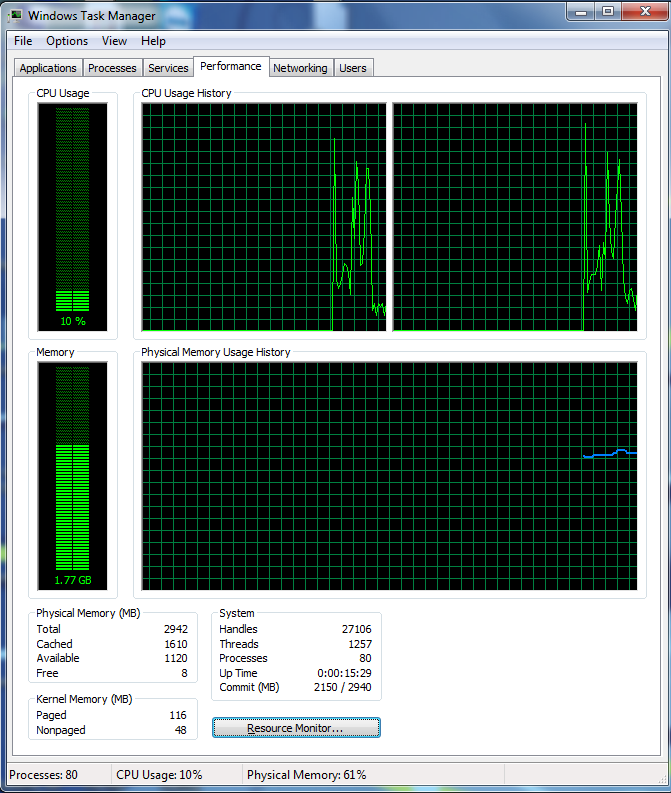
Also, I have pretty much nothing the startup and when I turn my pc on, it idles out at about 3/4 memory usage.

I have tried resetting my bios, and formatting.

Anything else you suggest, like a super format 3000 or something I dont know about?

Also, I tried creating a system managed page file, it worked a little, not much though.


I thought if I formatted and reset my bios to factory settings it would fix it. Like I said nothing works.

Also, here is about where my Memory idles out at as soon as I turn it on.
Like I said everything was perfectly fine until I changed that setting.
IF2Hw.png
 
Last edited:

My Computer My Computer

At a glance

32 Bit Windows 7 Ultimate
OS
32 Bit Windows 7 Ultimate

My Computer My Computer

At a glance

Windows 7 Ultimate SP1 64-BitIntel Core i7 870 @ 2.93GHz8Gb Dual-Channel DDR3 @ 664MHznVidia GeForce GTX 460 1024MB dedicated RAM
Computer Manufacturer/Model Number
HP Pavilion Elite 495UK
OS
Windows 7 Ultimate SP1 64-Bit
CPU
Intel Core i7 870 @ 2.93GHz
Motherboard
MSI 2A9C (CPU1)
Memory
8Gb Dual-Channel DDR3 @ 664MHz
Graphics Card(s)
nVidia GeForce GTX 460 1024MB dedicated RAM
Sound Card
Realtek HD Audio
Monitor(s) Displays
HP2310i
Screen Resolution
1920 x 1080
Hard Drives
1x1954GB Hitachi HDS22020ALA 330 (RAID), 1x1954GB Hitachi External for backup and storage
PSU
460W
Case
HP Elite
Cooling
Air cooled
Keyboard
Logitech K750 solar-powered keyboard
Mouse
Logitech Wireless M180 mouse
Internet Speed
2Mb
Other Info
Pure Avanti Flow Internet Radio with iPod Dock, 64Gb iPod, HP USB Speakers, Sony MDR-V500 Headphones, Sony Vaio F-Series Laptop
I have an Emachine. I do not have the "Emachine version of Windows" that came with my pc, because it was old and I wanted to upgrade. So I borrowed a burnt Windows 7 CD from a friend. That is what I am currently using.

Also, what is the difference between a clean install and just formatting, deleting all your partitions and reinstalling Windows again? I have done that about 6 times =X
 

My Computer My Computer

At a glance

32 Bit Windows 7 Ultimate
OS
32 Bit Windows 7 Ultimate
Have you tried deselecting Maximum Memory then click OK to confirm the change?

A clean install wipes your hard drive and installs Windows without all the bloatware that manufacturers put on their system before they ship it to you.

You say you borrowed a Windows DVD. How have you activated it? If you are using pirated or non-licensed software you are bound to get problems when Microsoft's validation server cottons on to the fact you're not using legal software.
 

My Computer My Computer

At a glance

Windows 7 Ultimate SP1 64-BitIntel Core i7 870 @ 2.93GHz8Gb Dual-Channel DDR3 @ 664MHznVidia GeForce GTX 460 1024MB dedicated RAM
Computer Manufacturer/Model Number
HP Pavilion Elite 495UK
OS
Windows 7 Ultimate SP1 64-Bit
CPU
Intel Core i7 870 @ 2.93GHz
Motherboard
MSI 2A9C (CPU1)
Memory
8Gb Dual-Channel DDR3 @ 664MHz
Graphics Card(s)
nVidia GeForce GTX 460 1024MB dedicated RAM
Sound Card
Realtek HD Audio
Monitor(s) Displays
HP2310i
Screen Resolution
1920 x 1080
Hard Drives
1x1954GB Hitachi HDS22020ALA 330 (RAID), 1x1954GB Hitachi External for backup and storage
PSU
460W
Case
HP Elite
Cooling
Air cooled
Keyboard
Logitech K750 solar-powered keyboard
Mouse
Logitech Wireless M180 mouse
Internet Speed
2Mb
Other Info
Pure Avanti Flow Internet Radio with iPod Dock, 64Gb iPod, HP USB Speakers, Sony MDR-V500 Headphones, Sony Vaio F-Series Laptop
Yea I deselected Maximum Memory.
And as for a clean install, as mentioned I have formatted 6 times and re installed Windows after deleting all of the partitions.
 

My Computer My Computer

At a glance

32 Bit Windows 7 Ultimate
OS
32 Bit Windows 7 Ultimate
Can you confirm you are using a legal Windows DVD?
 

My Computer My Computer

At a glance

Windows 7 Ultimate SP1 64-BitIntel Core i7 870 @ 2.93GHz8Gb Dual-Channel DDR3 @ 664MHznVidia GeForce GTX 460 1024MB dedicated RAM
Computer Manufacturer/Model Number
HP Pavilion Elite 495UK
OS
Windows 7 Ultimate SP1 64-Bit
CPU
Intel Core i7 870 @ 2.93GHz
Motherboard
MSI 2A9C (CPU1)
Memory
8Gb Dual-Channel DDR3 @ 664MHz
Graphics Card(s)
nVidia GeForce GTX 460 1024MB dedicated RAM
Sound Card
Realtek HD Audio
Monitor(s) Displays
HP2310i
Screen Resolution
1920 x 1080
Hard Drives
1x1954GB Hitachi HDS22020ALA 330 (RAID), 1x1954GB Hitachi External for backup and storage
PSU
460W
Case
HP Elite
Cooling
Air cooled
Keyboard
Logitech K750 solar-powered keyboard
Mouse
Logitech Wireless M180 mouse
Internet Speed
2Mb
Other Info
Pure Avanti Flow Internet Radio with iPod Dock, 64Gb iPod, HP USB Speakers, Sony MDR-V500 Headphones, Sony Vaio F-Series Laptop
I'm not sure what's going on. In the first screen shot it shows that you have no swap file. Then below it has some dialog box about starting the conversation. Is that popping up when you log on or what?

Also try setting the system to let Windows control the swap and see if it makes any difference.

btw you can use a Windows install DVD legally for an evaluation period. Just don't put in any product code when you install. Don't use your friend's product code or he might find his activation wiped. Just use a blank product key. You have at least 90 days evaluation period before you have to activate. When it asks you if you want to activate now just click NO until you decide to buy it. If fact if you search the Tutorial section there's an article how to extend the evaluation by another 30 days.
 

My Computer My Computer

At a glance

Windows 7 32 bitAMD 5200+ dual core2 GBNVidia GeForce 6150SE 128 MB
Computer Manufacturer/Model Number
HP Media Center
OS
Windows 7 32 bit
CPU
AMD 5200+ dual core
Memory
2 GB
Graphics Card(s)
NVidia GeForce 6150SE 128 MB
Monitor(s) Displays
CRT
Screen Resolution
1280x1024
Hard Drives
500 GB Sata internal :

SIIG USB 3.0 docking stations w/WD Caviar Black 6 Gb/s drives
Keyboard
PS/2
Mouse
PS/2 Wheel Mouse
Other Info
SIIG USB 3.0 PCIexpress card.
I'm not sure what's going on. In the first screen shot it shows that you have no swap file. Then below it has some dialog box about starting the conversation. Is that popping up when you log on or what?

Also try setting the system to let Windows control the swap and see if it makes any difference.

btw you can use a Windows install DVD legally for an evaluation period. Just don't put in any product code when you install. Don't use your friend's product code or he might find his activation wiped. Just use a blank product key. You have at least 90 days evaluation period before you have to activate. When it asks you if you want to activate now just click NO until you decide to buy it. If fact if you search the Tutorial section there's an article how to extend the evaluation by another 30 days.

I edited my original post so it is a little more legible. What happened is I changed the setting in msnconfig. Rebooted and now I get the error about a paging file etc. Even after formatting my PC 6 times and re installing Windows 6 times, the paging file thing always pops up EVERYTIME Windows loads. Also, yes, I have set the paging file to a System Managed size. It works a little bit, but I still cant have multiple programs open at the same time. That is the main problem, not the fact that Windows asks me to create a paging file every time it starts, but the fact that I cant have many programs open at all. The computer works fine for the first hour or so that its on, but the more stuff I do on it the more unstable it becomes.

Im guessing re formatting, and re installing Windows would be the closest to factory settings I can get? I was just wondering what kind of file might have been changed when I accidentally left that box checked on msconfig, seems how I have re formatted so many times and it never goes away. As mentioned I have also restored my bios to default.
 

My Computer My Computer

At a glance

32 Bit Windows 7 Ultimate
OS
32 Bit Windows 7 Ultimate
I have an Emachine. I do not have the "Emachine version of Windows" that came with my pc, because it was old and I wanted to upgrade. So I borrowed a burnt Windows 7 CD from a friend. That is what I am currently using.

Also, what is the difference between a clean install and just formatting, deleting all your partitions and reinstalling Windows again? I have done that about 6 times =X

What exactly is "the Emachine version of Windows"?? I've never heard of it and would expect an ordinary version of Windows to work. You could download it.

A clean install typically means booting from the Windows installation disc and then choosing "drive options, advanced" at the partition screen, at which point you delete all partitions and continue. Is that what you did?
 

My Computer My Computer

At a glance

Windows 7 Home Premium SP1, 64-bitIntel Skylake i5-6600K, not overclocked8 GB HyperX DDR4-2666 (2 x 4 GB)none; graphics are integrated on CPU
Computer type
PC/Desktop
Computer Manufacturer/Model Number
Ignatz Special; 4 speed manual gearbox; factory air conditioning; one of one
OS
Windows 7 Home Premium SP1, 64-bit
CPU
Intel Skylake i5-6600K, not overclocked
Motherboard
AsRock Z170M Extreme 4, micro ATX
Memory
8 GB HyperX DDR4-2666 (2 x 4 GB)
Graphics Card(s)
none; graphics are integrated on CPU
Sound Card
onboard: Realtek ALC1150; external: USB Behringer UF0-202
Monitor(s) Displays
Dell S2340M 23 inch IPS
Screen Resolution
1600 x 900
Hard Drives
System: Crucial MX100 series SSD, 128 GB;
Data: Samsung Spinpoint 103SJ, 1 TB;
Backup: WD Caviar Green WD30EZRX-00D8PB0, 3 TB
PSU
Rosewill SilentNight 500 watt fanless, semi-modular
Case
Antec Solo II
Cooling
Noctua NH-U12S; Noctua F12 intake, Noctua S12A exhaust
Keyboard
Microsoft 200 6JH-00001 USB
Mouse
Dell or Microsoft optical wired; USB
Antivirus
Microsoft Security Essentials and Malwarebytes Premium
Browser
Pale Moon
Other Info
All fans PWM; speeds at idle: CPU circa 500 rpm; intake circa 600 rpm; exhaust circa 600 rpm; CPU temps 27 idle and 47 C load in a warm room (27 C/81 F) when running Intel Extreme Tuning Utility stress test.
I have an Emachine. I do not have the "Emachine version of Windows" that came with my pc, because it was old and I wanted to upgrade. So I borrowed a burnt Windows 7 CD from a friend. That is what I am currently using.

Also, what is the difference between a clean install and just formatting, deleting all your partitions and reinstalling Windows again? I have done that about 6 times =X

What exactly is "the Emachine version of Windows"?? I've never heard of it and would expect an ordinary version of Windows to work. You could download it.

A clean install typically means booting from the Windows installation disc and then choosing "drive options, advanced" at the partition screen, at which point you delete all partitions and continue. Is that what you did?

Yes sir, that is exactly what I did. By eMachine version of Windows I mean the one that comes with all of the eMachine software on it.
 

My Computer My Computer

At a glance

32 Bit Windows 7 Ultimate
OS
32 Bit Windows 7 Ultimate
If you have a valid product key, you can download, burn, install, and activate a legit Windows ISO file. There might be something goofy about your friend's burned DVD.
 

My Computer My Computer

At a glance

Windows 7 Home Premium SP1, 64-bitIntel Skylake i5-6600K, not overclocked8 GB HyperX DDR4-2666 (2 x 4 GB)none; graphics are integrated on CPU
Computer type
PC/Desktop
Computer Manufacturer/Model Number
Ignatz Special; 4 speed manual gearbox; factory air conditioning; one of one
OS
Windows 7 Home Premium SP1, 64-bit
CPU
Intel Skylake i5-6600K, not overclocked
Motherboard
AsRock Z170M Extreme 4, micro ATX
Memory
8 GB HyperX DDR4-2666 (2 x 4 GB)
Graphics Card(s)
none; graphics are integrated on CPU
Sound Card
onboard: Realtek ALC1150; external: USB Behringer UF0-202
Monitor(s) Displays
Dell S2340M 23 inch IPS
Screen Resolution
1600 x 900
Hard Drives
System: Crucial MX100 series SSD, 128 GB;
Data: Samsung Spinpoint 103SJ, 1 TB;
Backup: WD Caviar Green WD30EZRX-00D8PB0, 3 TB
PSU
Rosewill SilentNight 500 watt fanless, semi-modular
Case
Antec Solo II
Cooling
Noctua NH-U12S; Noctua F12 intake, Noctua S12A exhaust
Keyboard
Microsoft 200 6JH-00001 USB
Mouse
Dell or Microsoft optical wired; USB
Antivirus
Microsoft Security Essentials and Malwarebytes Premium
Browser
Pale Moon
Other Info
All fans PWM; speeds at idle: CPU circa 500 rpm; intake circa 600 rpm; exhaust circa 600 rpm; CPU temps 27 idle and 47 C load in a warm room (27 C/81 F) when running Intel Extreme Tuning Utility stress test.
If you have a valid product key, you can download, burn, install, and activate a legit Windows ISO file. There might be something goofy about your friend's burned DVD.

Yea it just happened after I changed that setting, and it had been fine for over a year.
Any idea what file that setting might have altered?

Do you know where I can download a clean ISO?
 

My Computer My Computer

At a glance

32 Bit Windows 7 Ultimate
OS
32 Bit Windows 7 Ultimate
If you have a valid product key, you can download, burn, install, and activate a legit Windows ISO file. There might be something goofy about your friend's burned DVD.

Yea it just happened after I changed that setting, and it had been fine for over a year.
Any idea what file that setting might have altered?

Do you know where I can download a clean ISO?

Mydigitallife.info has the Windows 7 ISOs, BUT you cannot activate with your existing Product Key unless your eMachines shipped with Windows 7.

Your post number 3 said your Windows was "old" and you wanted to upgrade. So did the eMachines originally have Vista or what?
 

My Computer My Computer

At a glance

Windows 7 Home Premium SP1, 64-bitIntel Skylake i5-6600K, not overclocked8 GB HyperX DDR4-2666 (2 x 4 GB)none; graphics are integrated on CPU
Computer type
PC/Desktop
Computer Manufacturer/Model Number
Ignatz Special; 4 speed manual gearbox; factory air conditioning; one of one
OS
Windows 7 Home Premium SP1, 64-bit
CPU
Intel Skylake i5-6600K, not overclocked
Motherboard
AsRock Z170M Extreme 4, micro ATX
Memory
8 GB HyperX DDR4-2666 (2 x 4 GB)
Graphics Card(s)
none; graphics are integrated on CPU
Sound Card
onboard: Realtek ALC1150; external: USB Behringer UF0-202
Monitor(s) Displays
Dell S2340M 23 inch IPS
Screen Resolution
1600 x 900
Hard Drives
System: Crucial MX100 series SSD, 128 GB;
Data: Samsung Spinpoint 103SJ, 1 TB;
Backup: WD Caviar Green WD30EZRX-00D8PB0, 3 TB
PSU
Rosewill SilentNight 500 watt fanless, semi-modular
Case
Antec Solo II
Cooling
Noctua NH-U12S; Noctua F12 intake, Noctua S12A exhaust
Keyboard
Microsoft 200 6JH-00001 USB
Mouse
Dell or Microsoft optical wired; USB
Antivirus
Microsoft Security Essentials and Malwarebytes Premium
Browser
Pale Moon
Other Info
All fans PWM; speeds at idle: CPU circa 500 rpm; intake circa 600 rpm; exhaust circa 600 rpm; CPU temps 27 idle and 47 C load in a warm room (27 C/81 F) when running Intel Extreme Tuning Utility stress test.
I would put the original software package on that came with the machine. If all seems normal, then I'd install with no product key to make sure the new OS works without problems. If it evaluates ok, then activate. Sounds like you are going around in circles. If the OS is on with an invalid product key, there's no telling what happens when Windows "calls home" to tell on you. :)
 

My Computer My Computer

At a glance

Windows 7 32 bitAMD 5200+ dual core2 GBNVidia GeForce 6150SE 128 MB
Computer Manufacturer/Model Number
HP Media Center
OS
Windows 7 32 bit
CPU
AMD 5200+ dual core
Memory
2 GB
Graphics Card(s)
NVidia GeForce 6150SE 128 MB
Monitor(s) Displays
CRT
Screen Resolution
1280x1024
Hard Drives
500 GB Sata internal :

SIIG USB 3.0 docking stations w/WD Caviar Black 6 Gb/s drives
Keyboard
PS/2
Mouse
PS/2 Wheel Mouse
Other Info
SIIG USB 3.0 PCIexpress card.
Back
Top