Windows Live Mail forever "Connecting..." CPU usage shoots up

LizardKing

New member
Windows Live Mail forever "Connecting..." CPU usage shoots up

I have been using Windows Live Mail, along with Live Messenger, for quite some time. I loved it, because even though it wasn't the fastest of applications, it simply worked. I have Windows 7 Home Premium

Now, for absolutely no reason I can point out (I did start using Visual Styles, but I can't see the connection), it won't connect anymore. Basically on the bottom left corner it displays "Connecting...". That's it, it doesn't ever connect at all. I can't send or receive e-mails. When that window with the tasks show up, the bar that is supposed to indicate progress doesn't do anything. And my CPU usage is insane, I have a desktop mini-app to monitor the performance and I never have it that high. Not even when WLM worked fine did it ever reach that high.

I started using Mozilla Thunderbird, but it sucks just slightly less than WLM. I can see my e-mails, but I can't properly download documents, at least powerpoints. I'm working on a presentation, and tried downloading it, and it said the file was corrupt and couldn't be repaired. I have to open the file, then save it, like a god damn animal.

I have a feeling someone is going to ask me something about my anti-virus... So yeah I tried disabling avast! and Zonealarm's firewall and WLM is still counting to potato.
 

My Computer

OS
Windows 7 Home Premium 64-bit
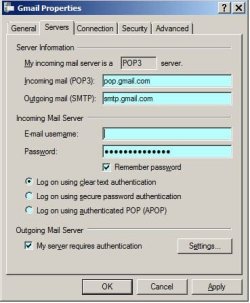
can you post an image for each account your using of it's properties on the Servers tab. Remember to hide your mail address.
Like this.

RR.JPG
 

My Computer

Computer Manufacturer/Model Number
Look in my Signature.
OS
Win7 H.Prem. 32bit+SP1
Here you go:
Gqogl.png

I didn't think it was a connection issue because it's very specific for powerpoint files.
 

My Computer

OS
Windows 7 Home Premium 64-bit
Sorry if I confused you. I was asking for the WLM settings.

Read this.
 
Last edited:

My Computer

Computer Manufacturer/Model Number
Look in my Signature.
OS
Win7 H.Prem. 32bit+SP1
I don't have any window like that. I'm using the latest version of WLM. I can go to the Accounts tab, Properties, Sever and I just have a few fields with my e-mail and password.

I reinstalled it and it worked once, now it's back at Connecting.
 

My Computer

OS
Windows 7 Home Premium 64-bit
I don't have any window like that. I'm using the latest version of WLM...
The Account Properties window would look like the one A Guy posted if you had set up the account as POP3/SMTP. However it would look much simpler if you had it set up as an HTTP acccount. (At the top of the Server tab window it would say "My account is an HTTP server.")
 

My Computer

Computer type
PC/Desktop
Computer Manufacturer/Model Number
OQO 2+
OS
Windows 8 Pro w/MC 32-bit
CPU
Intel Atom 1.86 GHz
Motherboard
OQO 2+
Memory
2 GB
Graphics Card(s)
Intel GMA 500
Sound Card
IDT
Monitor(s) Displays
LCD
Screen Resolution
800 x 480 (portable) 1280 x 1024 (docked)
Hard Drives
64 GB SSD
PSU
9 Ah Battery (portable) or OQO Brick (docked)
Case
Shirt Pocket Sized
Cooling
Tiny Fan
Keyboard
Slide out (portable) DiNovo Edge (docked)
Mouse
Eraser head (portable) Logitech Bluetooth (docked)
Internet Speed
WWAN or 802.11G (portable) T1 (docked)
Browser
IE 10
Other Info
DVD-RW OQO Docking Station
Sorry for taking so long to post.
Yes, it says it's a HTTP e-mail. I don't know what the difference between a HTTP and a POP3/SMTP account are, and I don't know how they relate to my case. I suppose my account has always been HTTP and I was once able to connect, now I can't.

I tried it now, I can connect, it downloads my e-mail, all perfect. I sent a test e-mail to another account of mine and it worked, which before made it crash. However this issue started randomly and I'm assuming it will happen again without any visible cause.
 

My Computer

OS
Windows 7 Home Premium 64-bit
Sorry for taking so long to post.
Yes, it says it's a HTTP e-mail. I don't know what the difference between a HTTP and a POP3/SMTP account are, and I don't know how they relate to my case. I suppose my account has always been HTTP and I was once able to connect, now I can't...
In your screen shot of Thunderbird from 6 days ago, you had set it up as as a POP3/SMTP account. Whichever method of access you use, it must be set up properly for that method. Here are some links explaining WLM (using http with "delta sync"):
Windows Live Mail - Wikipedia, the free encyclopedia
"Support for DeltaSync, a proprietary protocol for access to Windows Live Hotmail email accounts, was added in Windows Live Mail". If Thunderbird's POP/SMTP meets all your needs, you could just use that exact same setup in WLM; just start by setting up a new POP3 account in WLM and delete the HTTP account in WLM.
 

My Computer

Computer type
PC/Desktop
Computer Manufacturer/Model Number
OQO 2+
OS
Windows 8 Pro w/MC 32-bit
CPU
Intel Atom 1.86 GHz
Motherboard
OQO 2+
Memory
2 GB
Graphics Card(s)
Intel GMA 500
Sound Card
IDT
Monitor(s) Displays
LCD
Screen Resolution
800 x 480 (portable) 1280 x 1024 (docked)
Hard Drives
64 GB SSD
PSU
9 Ah Battery (portable) or OQO Brick (docked)
Case
Shirt Pocket Sized
Cooling
Tiny Fan
Keyboard
Slide out (portable) DiNovo Edge (docked)
Mouse
Eraser head (portable) Logitech Bluetooth (docked)
Internet Speed
WWAN or 802.11G (portable) T1 (docked)
Browser
IE 10
Other Info
DVD-RW OQO Docking Station
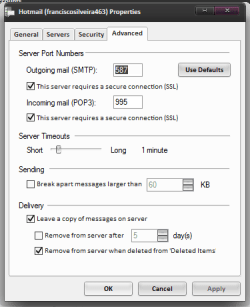
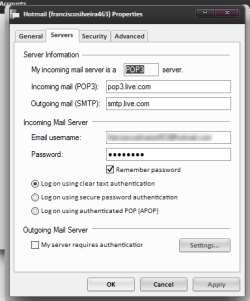
This program is pathetic. I erased my account, uninstalled, reinstalled it, set it up to use a POP account with the same servers and ports as Thunderbird. It downloaded 8 old e-mails and has been forever "Receiving e-mail". Then it displayed a window saying the POP server hasn't responded in 60 seconds, I clicked "wait another 60 seconds", same thing. I'm starting to give up, I'm just tired of having problems with everything in my computer. It just takes forever or doesn't work at all.

I don't know why people with next to no knowledge of computers never have these issues, but with me it's almost a daily thing. I just want to see my e-mail, something that it allowed me to do for months without any kind of problem. And now it's braindead even though I've reinstalled it twice.

advanced.png

server settings2.png
 

My Computer

OS
Windows 7 Home Premium 64-bit
Also it won't even close normally anymore. It has a progress bar showing how much until a task is done. It finished downloading an e-mail (after a few minutes) which I have already read, the bar is full, but it still hasn't completed the task. I click "Stop" since it's basically not working anymore, and it says "Finishing last message". So it's not only braindead, it won't go away either. At last I kill it in blissful joy with Task Manager. And then suddenly my internet connection isn't slowed down to a halt - yes, because even though it takes 15 minutes to download 1 e-mail (Thunderbird does about 4 e-mails in 20 seconds), it completely hogs my connection, making browsing impossible. If you're wondering why I don't just switch to Thunderbird, it's because 1) it doesn't make the messages I already saw show up as "Read" on my Hotmail account and 2) it has that issue with downloading Powerpoints. If it wasn't for this and I would have long given up on WLM.
 

My Computer

OS
Windows 7 Home Premium 64-bit
...I just want to see my e-mail, something that it allowed me to do for months without any kind of problem...
I noticed you have the box checked to leave a copy of mail on server. If you just want to see your mail and respond to it while leaving it on the server, you don't have to download it or save it on your PC. You could have no email client at all and simply go to the Hotmail/Live website in your browser and deal with it there.

I use WLM because it has the functionality of the older free programs (OE and WM). The problem is that it's sometimes hard to find the old funtionality hidden behind the newer optional features like deltasync for hotmail, photo email, syncing of calendar, contacts, and rss feeds and the new ribbon interface (which I avoided by sticking with the 2009 version). The 2009 version also seems to have fewer bugs although this is the first time I've heard anyone complain about slow downloading or not being able to browse the internet while it's receiving mail. Those two problems sound like ISP, Internet, or Hotmail Website problems, but I suppose they could be due to WLM trying to sync the other stuff while receiving mail at the same time.
 
Last edited:

My Computer

Computer type
PC/Desktop
Computer Manufacturer/Model Number
OQO 2+
OS
Windows 8 Pro w/MC 32-bit
CPU
Intel Atom 1.86 GHz
Motherboard
OQO 2+
Memory
2 GB
Graphics Card(s)
Intel GMA 500
Sound Card
IDT
Monitor(s) Displays
LCD
Screen Resolution
800 x 480 (portable) 1280 x 1024 (docked)
Hard Drives
64 GB SSD
PSU
9 Ah Battery (portable) or OQO Brick (docked)
Case
Shirt Pocket Sized
Cooling
Tiny Fan
Keyboard
Slide out (portable) DiNovo Edge (docked)
Mouse
Eraser head (portable) Logitech Bluetooth (docked)
Internet Speed
WWAN or 802.11G (portable) T1 (docked)
Browser
IE 10
Other Info
DVD-RW OQO Docking Station
Setting it up as a POP account seems to have worked. It still had some issues sending mail because it couldn't autheticate. I had to allow it to authenticate as log-in or something like that. It seems to work ok now, however it didn't download all of my e-mail (I prefer having it on my computer, yes), and I can't find a way to download past e-mails. It's another flaw, but I can live with it. It seems like a really good program, but bugged like crazy.

Thanks everyone for your help. I'll post back if this issue pops up again.
 

My Computer

OS
Windows 7 Home Premium 64-bit
I was wondering if somebody could help me, as I started having the same problem.

I've added nothing new to my system. Nothing's changed.

But now, when I open Windows Live Mail, it says 'Connecting' in the bottom right hand corner, the cursor changes to the little circle to show the computer's operating, and that's it. It just stays like that. I've left it twenty minutes and nothing happens. It just keeps saying 'Connecting' and the cursor remains the little blue circle.

It has nothing to do with the internet connection, as I can still browse the net through Mozilla.

Otherwise, I've changed nothing at all, so am unsure why this has begun to occur.

It happens pretty much every other time I turn on my system.
 

My Computer

OS
Windows 7 32 Bit
Back
Top