Saving to a library location that is NOT the default save location

benj123

New member
OK, I've googled and searched for this as much as I can. I'm a new Windows 7 user. I have a library (Documents) with three folders included. Call them folders A, B, and C. I understand how to set the default save location. Let's say I've set it to Folder A. Now, I want to save a file in *Folder B* by using the convenient Libraries button. Let's further say that Folder B is the location "C:\FolderB". It seems that IF there is a subfolder, say "C:\FolderB\test", I can save it there by clicking Libraries, expanding FolderB, and double clicking on "test". HOWEVER, if C:\FolderB has no subfolders, I can't seem to save there by using Libraries.

That is to say: IF you have a folder in your Library that is not the default save location AND that folder has no subfolders, there's no way to save there by starting from the Libraries button. Is this correct? (If so, it is rather disappointing and seems to undermine the idea of Libraries so I hope I'm missing something...)
 

My Computer

OS
win 7 x64 Home
I might be missing your intended idea, but if you name the folder, such as "Test B", then you should be able to save the .ext (if named) to that particular folder by clicking on the "C" drive... wait for it (the drive) to show up, then save.

If you name a .txt file (or another extention) and save it to your desktop, you can also move it to that named folder on "C" drive.

Just curious as to why you want to have different named folders on "C" drive when you can use the Documents folder?
 

My Computer

Computer type
PC/Desktop
Computer Manufacturer/Model Number
Bruce ... somewhere in his 40's
OS
Windows 7 Ultimate 32bit SP1
CPU
Intel(R) Core(TM)2 Quad CPU @ 2.40GHz, 2400 MHz
Motherboard
INTEL/D975XBX2
Memory
4 GB
Graphics Card(s)
ATI Radeon HD 2600 Pro
Monitor(s) Displays
Samsung SyncMaster 914v
Screen Resolution
1280 x 1024
Hard Drives
2/500GB each ... ST3500630AS ATA Device.
One is not connected
PSU
Rocketfish 700 W
Case
G.Skill Gigabyte Chassis
Keyboard
Standard PS/2 Keyboard
Mouse
Microsoft PS/2 Mouse
Internet Speed
DSL
Antivirus
Avira Internet Security
Browser
IE 11
Other Info
ATI HDMI Audio
@Jacee: yes, I know how to save to C:\FolderB. The point is, if I'm going to use the Libraries paradigm, it would be nice if I could use Libraries to save there.


Anyway, since it doesn't seem that I overlooked anything obvious, it looks like Libraries will not suit my needs. Oh well!
 
Last edited by a moderator:

My Computer

OS
win 7 x64 Home
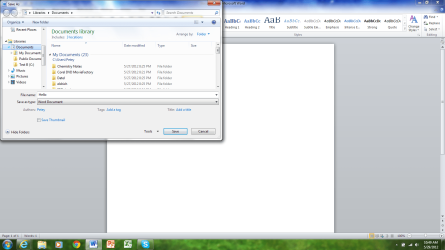
Let's say you are trying to save a picture online to your computer, or save a Word document. When you go to save the file it should take you to the appropriate library. On the left had side of the save window, you should see a jump list for going to other libraries and other folders. If you move the cursor over top of the different library names, you should see arrows (triangles) appear next to the different libraries. Click the arrow and all folders included should be there. In the picture below, while saving a file in word, I clicked the arrow next to the documents library. I also made a folder on my desktop called "Test B" and added to the Documents library, which you can clearly see.

Untitled.png
 

My Computer

Computer type
Laptop
Computer Manufacturer/Model Number
Toshiba P775-S7100
OS
Windows 7 Professional SP1 64-bit
CPU
Intel Core i5-2450M @2.5 GHz
Memory
6 GB DDR3 1333MHz
Graphics Card(s)
Intel HD 3000
Monitor(s) Displays
Built-in 17.3" LED; 22" Insignia NS-L22Q-10A
Screen Resolution
1600x900; 1360x768
Hard Drives
750 GB Hitachi
1TB Seagate FreeAgent External
Internet Speed
Verizon DSL Speed(Down/Up): 3360 Kbps / 800 Kbps
Antivirus
MSE and MBAM Pro
Browser
IE10
Back
Top