Uncle Roger
New member
Just got "upgraded" to Win7 from XP at work and have been trying to recreate/replace functionality from the old system. One item I haven't been able to figure out is a panel or window of shortcuts that is always there, just an alt-tab away.
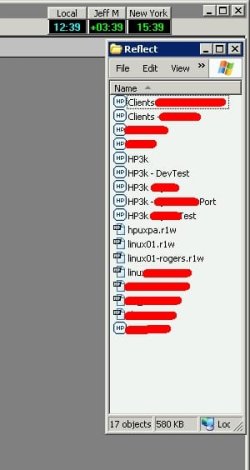
Under XP, I opened the folder containing the shortcuts in explorer, set it to just list the names, and made it as small as possible. I added it to the startup menu and voila -- there's my little list all the time (it's shortcuts to various config files for a terminal pgm to connect to different servers and such.)
So, I tried setting it up in Explorer, but it doesn't remember the settings or location or anything, and nothing else I've tried works. What I want is just a little list of shortcuts so that I can click on the one I want have have it run the program with the appropriate config file -- something like this:
Server 01 -- Test
Server 01 -- Support
Client 01
Client 02
...etc...
Any suggestions on how to accomplish this? Perhaps a gadget? Or some freeware utility? What I don't want is for it to take up a lot of space and I don't really want icons and I'd like to be able to get to it using the keyboard... I'm open to any ideas. Thanks!
Under XP, I opened the folder containing the shortcuts in explorer, set it to just list the names, and made it as small as possible. I added it to the startup menu and voila -- there's my little list all the time (it's shortcuts to various config files for a terminal pgm to connect to different servers and such.)
So, I tried setting it up in Explorer, but it doesn't remember the settings or location or anything, and nothing else I've tried works. What I want is just a little list of shortcuts so that I can click on the one I want have have it run the program with the appropriate config file -- something like this:
Server 01 -- Test
Server 01 -- Support
Client 01
Client 02
...etc...
Any suggestions on how to accomplish this? Perhaps a gadget? Or some freeware utility? What I don't want is for it to take up a lot of space and I don't really want icons and I'd like to be able to get to it using the keyboard... I'm open to any ideas. Thanks!
My Computer
- OS
- Win 7 Pro 64bit