No safe mode - repair loop

ebuzz

New member
Local time
12:06 PM
Messages
35
Hi:
Noob to the forum here! I have a Win 7 64 bit pc that's I'm having an odd issue with.
The system will boot and load windows normally, but I can't get to safe mode. When I hit F8, I get the options for safe mode and repair, etc., but if I try safe mode it loads some stuff, then just stops and a get a black screen with "safe mode" in all 4 corners, a mouse, but nothing else.
When I hit "repair" it gets stuck in a repair loop. I've read the tutorial on how to get out of that loop, but was wondering if that's what I should try or if there's some other problem.
I'll need to ask a question later about why I need to get to "safe mode" but for now, anyone help on this issue?
thanks!
 

My Computer My Computer

At a glance

Microsoft Windows 7 Professional 64-bit 7601 ...Intel(R) Core(TM) i7-2600 CPU @ 3.40GHz16.00 GBNVIDIA GeForce GTX 560 Ti
Computer type
PC/Desktop
Computer Manufacturer/Model Number
Home made
OS
Microsoft Windows 7 Professional 64-bit 7601 Multiprocessor Free Service Pack 1
CPU
Intel(R) Core(TM) i7-2600 CPU @ 3.40GHz
Motherboard
ASUSTeK Computer INC. P8P67 EVO
Memory
16.00 GB
Graphics Card(s)
NVIDIA GeForce GTX 560 Ti
Sound Card
(1) NVIDIA High Definition Audio (2) NVIDIA High Definitio
Monitor(s) Displays
BenQ
Screen Resolution
2560 x 1440 x 32 bits (4294967296 colors) @ 59 Hz
Hard Drives
(1) Maxtor 6Y120P0 ATA Device (2) OCZ-AGILITY3 ATA Device (3) OCZ-VERTEX3 ATA Device (4) WDC WD1002FAEX-00Z3A0 ATA Device (5) ST310005 24AS SCSI Disk Device (6) Generic- SD/MMC/MS/MSPRO USB Device (7) Lexar CF USB_3_0 Read USB Device (
PSU
PC Power Silencer MkII 950W
Case
Corsair
Cooling
Corsair H60
Keyboard
Logitec
Mouse
Logitec
Antivirus
AVG
Browser
IE
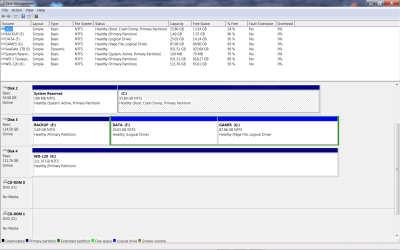
screen.PNGIs this what you mean?
 

My Computer My Computer

At a glance

Microsoft Windows 7 Professional 64-bit 7601 ...Intel(R) Core(TM) i7-2600 CPU @ 3.40GHz16.00 GBNVIDIA GeForce GTX 560 Ti
Computer type
PC/Desktop
Computer Manufacturer/Model Number
Home made
OS
Microsoft Windows 7 Professional 64-bit 7601 Multiprocessor Free Service Pack 1
CPU
Intel(R) Core(TM) i7-2600 CPU @ 3.40GHz
Motherboard
ASUSTeK Computer INC. P8P67 EVO
Memory
16.00 GB
Graphics Card(s)
NVIDIA GeForce GTX 560 Ti
Sound Card
(1) NVIDIA High Definition Audio (2) NVIDIA High Definitio
Monitor(s) Displays
BenQ
Screen Resolution
2560 x 1440 x 32 bits (4294967296 colors) @ 59 Hz
Hard Drives
(1) Maxtor 6Y120P0 ATA Device (2) OCZ-AGILITY3 ATA Device (3) OCZ-VERTEX3 ATA Device (4) WDC WD1002FAEX-00Z3A0 ATA Device (5) ST310005 24AS SCSI Disk Device (6) Generic- SD/MMC/MS/MSPRO USB Device (7) Lexar CF USB_3_0 Read USB Device (
PSU
PC Power Silencer MkII 950W
Case
Corsair
Cooling
Corsair H60
Keyboard
Logitec
Mouse
Logitec
Antivirus
AVG
Browser
IE
Your flags are all set correctly. Try running Startup Repair - Run 3 Separate Times to see if it will repair the System boot files which write the Windows Repair link to F8 tools menu.

If not it may require a Repair Install.

There are more advanced methods to repair these links which are known to our colleague SIW2 if you want to message him to help: Link WinRE to F8 Advanced Boot Tools menu
Great, I'll give this a try tonight and let you know. Any idea as to why this happens?
 

My Computer My Computer

At a glance

Microsoft Windows 7 Professional 64-bit 7601 ...Intel(R) Core(TM) i7-2600 CPU @ 3.40GHz16.00 GBNVIDIA GeForce GTX 560 Ti
Computer type
PC/Desktop
Computer Manufacturer/Model Number
Home made
OS
Microsoft Windows 7 Professional 64-bit 7601 Multiprocessor Free Service Pack 1
CPU
Intel(R) Core(TM) i7-2600 CPU @ 3.40GHz
Motherboard
ASUSTeK Computer INC. P8P67 EVO
Memory
16.00 GB
Graphics Card(s)
NVIDIA GeForce GTX 560 Ti
Sound Card
(1) NVIDIA High Definition Audio (2) NVIDIA High Definitio
Monitor(s) Displays
BenQ
Screen Resolution
2560 x 1440 x 32 bits (4294967296 colors) @ 59 Hz
Hard Drives
(1) Maxtor 6Y120P0 ATA Device (2) OCZ-AGILITY3 ATA Device (3) OCZ-VERTEX3 ATA Device (4) WDC WD1002FAEX-00Z3A0 ATA Device (5) ST310005 24AS SCSI Disk Device (6) Generic- SD/MMC/MS/MSPRO USB Device (7) Lexar CF USB_3_0 Read USB Device (
PSU
PC Power Silencer MkII 950W
Case
Corsair
Cooling
Corsair H60
Keyboard
Logitec
Mouse
Logitec
Antivirus
AVG
Browser
IE
It appears the links are corrupted somehow. Those links can be repaired by Startup Repair, or if necessary can be reinstalled along with the entire OS during an in-place Upgrade known as Repair Install.

As stated you can also try rewriting the links manually which is a specialty of our colleague SIW2.
 
Ok, so I started this fix, got to the point where it says "press any key to boot from cd" then it said windows is loading files. Now, after about 40 minutes and still counting, I have the Starting windows screen up with the four colored flag just sitting there! And I don't think any thing is happening. No option to select repair.
Any thoughts? Oops, sorry to panic, after over an hour the repai option showed up. I selected it an now there's a blue screen with flowers.
I'll advise
 
Last edited:

My Computer My Computer

At a glance

Microsoft Windows 7 Professional 64-bit 7601 ...Intel(R) Core(TM) i7-2600 CPU @ 3.40GHz16.00 GBNVIDIA GeForce GTX 560 Ti
Computer type
PC/Desktop
Computer Manufacturer/Model Number
Home made
OS
Microsoft Windows 7 Professional 64-bit 7601 Multiprocessor Free Service Pack 1
CPU
Intel(R) Core(TM) i7-2600 CPU @ 3.40GHz
Motherboard
ASUSTeK Computer INC. P8P67 EVO
Memory
16.00 GB
Graphics Card(s)
NVIDIA GeForce GTX 560 Ti
Sound Card
(1) NVIDIA High Definition Audio (2) NVIDIA High Definitio
Monitor(s) Displays
BenQ
Screen Resolution
2560 x 1440 x 32 bits (4294967296 colors) @ 59 Hz
Hard Drives
(1) Maxtor 6Y120P0 ATA Device (2) OCZ-AGILITY3 ATA Device (3) OCZ-VERTEX3 ATA Device (4) WDC WD1002FAEX-00Z3A0 ATA Device (5) ST310005 24AS SCSI Disk Device (6) Generic- SD/MMC/MS/MSPRO USB Device (7) Lexar CF USB_3_0 Read USB Device (
PSU
PC Power Silencer MkII 950W
Case
Corsair
Cooling
Corsair H60
Keyboard
Logitec
Mouse
Logitec
Antivirus
AVG
Browser
IE
Ok I was able to get through the repair. At the end it said if repairs we're successful windows would start normally, it did.
I did a restart and tried to get into safe mode but with no luck, same black screen, mouse and "safe mode" in all 4 corners, but nothing else. Are you saying that I need to do the repair 3 times, even when windows says that it will restart normally if the repairs worked?
 

My Computer My Computer

At a glance

Microsoft Windows 7 Professional 64-bit 7601 ...Intel(R) Core(TM) i7-2600 CPU @ 3.40GHz16.00 GBNVIDIA GeForce GTX 560 Ti
Computer type
PC/Desktop
Computer Manufacturer/Model Number
Home made
OS
Microsoft Windows 7 Professional 64-bit 7601 Multiprocessor Free Service Pack 1
CPU
Intel(R) Core(TM) i7-2600 CPU @ 3.40GHz
Motherboard
ASUSTeK Computer INC. P8P67 EVO
Memory
16.00 GB
Graphics Card(s)
NVIDIA GeForce GTX 560 Ti
Sound Card
(1) NVIDIA High Definition Audio (2) NVIDIA High Definitio
Monitor(s) Displays
BenQ
Screen Resolution
2560 x 1440 x 32 bits (4294967296 colors) @ 59 Hz
Hard Drives
(1) Maxtor 6Y120P0 ATA Device (2) OCZ-AGILITY3 ATA Device (3) OCZ-VERTEX3 ATA Device (4) WDC WD1002FAEX-00Z3A0 ATA Device (5) ST310005 24AS SCSI Disk Device (6) Generic- SD/MMC/MS/MSPRO USB Device (7) Lexar CF USB_3_0 Read USB Device (
PSU
PC Power Silencer MkII 950W
Case
Corsair
Cooling
Corsair H60
Keyboard
Logitec
Mouse
Logitec
Antivirus
AVG
Browser
IE
That behavior in boot mode can mean something is wrong with hardware or the BIOS is corrupted.

Start by resetting your BIOS to defaults: Clear CMOS - 3 Ways to Clear the CMOS - Reset BIOS .

Test your RAM - Test with Memtest86+ for 5-6 passes or overnight. Swap RAM sticks taking care to touch case while touching electronics to avoid static shock, check slots for debris.

Test your HD with maker's HD Diagnostic extended CD scan, followed by Disk Check on all partitions.

Run SFC -SCANNOW Command

Work through these other Troubleshooting Steps for Windows 7 .
 
OK, so I'm going to give up on the "set up repair" option and go straight to the "BIOS reset" method and see what happens there, right?
 

My Computer My Computer

At a glance

Microsoft Windows 7 Professional 64-bit 7601 ...Intel(R) Core(TM) i7-2600 CPU @ 3.40GHz16.00 GBNVIDIA GeForce GTX 560 Ti
Computer type
PC/Desktop
Computer Manufacturer/Model Number
Home made
OS
Microsoft Windows 7 Professional 64-bit 7601 Multiprocessor Free Service Pack 1
CPU
Intel(R) Core(TM) i7-2600 CPU @ 3.40GHz
Motherboard
ASUSTeK Computer INC. P8P67 EVO
Memory
16.00 GB
Graphics Card(s)
NVIDIA GeForce GTX 560 Ti
Sound Card
(1) NVIDIA High Definition Audio (2) NVIDIA High Definitio
Monitor(s) Displays
BenQ
Screen Resolution
2560 x 1440 x 32 bits (4294967296 colors) @ 59 Hz
Hard Drives
(1) Maxtor 6Y120P0 ATA Device (2) OCZ-AGILITY3 ATA Device (3) OCZ-VERTEX3 ATA Device (4) WDC WD1002FAEX-00Z3A0 ATA Device (5) ST310005 24AS SCSI Disk Device (6) Generic- SD/MMC/MS/MSPRO USB Device (7) Lexar CF USB_3_0 Read USB Device (
PSU
PC Power Silencer MkII 950W
Case
Corsair
Cooling
Corsair H60
Keyboard
Logitec
Mouse
Logitec
Antivirus
AVG
Browser
IE
Right, I would check the hardware to see what's hanging Startup Repair so badly. It shouldn't normally hang like that for so long.

Have you made any changes recently to your system or hardware that might have affected it?
 
Have you made any changes recently to your system or hardware that might have affected it?

Nah, I don't think I've done anything like that. I was going to wait and bring this up after I fixed the start up problem (I wanted to get to safe mode and run virus and maleware tests), but maybe I should do it here b/c it's probably related to the trouble I'm having.
This all started because I had some files (photos etc.,) that were mysteriously deleted from a backup hard drive. First it was a backup, external HD where I had placed photos, ebooks and apps. One day they were there and the next day - gone. I thought it was simply a bad drive. When I ran a test on the drive with a forensic computer (law enforcement!) I found the files there, but corrupted & for some reason deleted. I then got another external HD and used that.
I ran all kinds of virus, etc., tests, but found nothing.
Then, I had some more files go missing from one of the internal drives.
So, that's when I decided to try to detect any potential virus, etc., by going into safe mode - and that's where we are today!
thanks
 

My Computer My Computer

At a glance

Microsoft Windows 7 Professional 64-bit 7601 ...Intel(R) Core(TM) i7-2600 CPU @ 3.40GHz16.00 GBNVIDIA GeForce GTX 560 Ti
Computer type
PC/Desktop
Computer Manufacturer/Model Number
Home made
OS
Microsoft Windows 7 Professional 64-bit 7601 Multiprocessor Free Service Pack 1
CPU
Intel(R) Core(TM) i7-2600 CPU @ 3.40GHz
Motherboard
ASUSTeK Computer INC. P8P67 EVO
Memory
16.00 GB
Graphics Card(s)
NVIDIA GeForce GTX 560 Ti
Sound Card
(1) NVIDIA High Definition Audio (2) NVIDIA High Definitio
Monitor(s) Displays
BenQ
Screen Resolution
2560 x 1440 x 32 bits (4294967296 colors) @ 59 Hz
Hard Drives
(1) Maxtor 6Y120P0 ATA Device (2) OCZ-AGILITY3 ATA Device (3) OCZ-VERTEX3 ATA Device (4) WDC WD1002FAEX-00Z3A0 ATA Device (5) ST310005 24AS SCSI Disk Device (6) Generic- SD/MMC/MS/MSPRO USB Device (7) Lexar CF USB_3_0 Read USB Device (
PSU
PC Power Silencer MkII 950W
Case
Corsair
Cooling
Corsair H60
Keyboard
Logitec
Mouse
Logitec
Antivirus
AVG
Browser
IE
You can try to run Startup Repair again to see if it will run three times, however if it hangs as badly then something is likely wrong at the BIOS or hardware level.
 
Well, I tried the set up repair again and the same thing happened: it spent a long time on the loading windows screen, then ran the repair, but still no safe mode.I tried to run the repair twice, but the second time found nothing either. The only old thing is that when it found the OS to repair it said windows was on drive: D. But wibrows is on my C drive, not D.
I guess I'll have to work on the hardware method next.
 

My Computer My Computer

At a glance

Microsoft Windows 7 Professional 64-bit 7601 ...Intel(R) Core(TM) i7-2600 CPU @ 3.40GHz16.00 GBNVIDIA GeForce GTX 560 Ti
Computer type
PC/Desktop
Computer Manufacturer/Model Number
Home made
OS
Microsoft Windows 7 Professional 64-bit 7601 Multiprocessor Free Service Pack 1
CPU
Intel(R) Core(TM) i7-2600 CPU @ 3.40GHz
Motherboard
ASUSTeK Computer INC. P8P67 EVO
Memory
16.00 GB
Graphics Card(s)
NVIDIA GeForce GTX 560 Ti
Sound Card
(1) NVIDIA High Definition Audio (2) NVIDIA High Definitio
Monitor(s) Displays
BenQ
Screen Resolution
2560 x 1440 x 32 bits (4294967296 colors) @ 59 Hz
Hard Drives
(1) Maxtor 6Y120P0 ATA Device (2) OCZ-AGILITY3 ATA Device (3) OCZ-VERTEX3 ATA Device (4) WDC WD1002FAEX-00Z3A0 ATA Device (5) ST310005 24AS SCSI Disk Device (6) Generic- SD/MMC/MS/MSPRO USB Device (7) Lexar CF USB_3_0 Read USB Device (
PSU
PC Power Silencer MkII 950W
Case
Corsair
Cooling
Corsair H60
Keyboard
Logitec
Mouse
Logitec
Antivirus
AVG
Browser
IE

My Computer My Computer

At a glance

Microsoft Windows 7 Professional 64-bit 7601 ...Intel(R) Core(TM) i7-2600 CPU @ 3.40GHz16.00 GBNVIDIA GeForce GTX 560 Ti
Computer type
PC/Desktop
Computer Manufacturer/Model Number
Home made
OS
Microsoft Windows 7 Professional 64-bit 7601 Multiprocessor Free Service Pack 1
CPU
Intel(R) Core(TM) i7-2600 CPU @ 3.40GHz
Motherboard
ASUSTeK Computer INC. P8P67 EVO
Memory
16.00 GB
Graphics Card(s)
NVIDIA GeForce GTX 560 Ti
Sound Card
(1) NVIDIA High Definition Audio (2) NVIDIA High Definitio
Monitor(s) Displays
BenQ
Screen Resolution
2560 x 1440 x 32 bits (4294967296 colors) @ 59 Hz
Hard Drives
(1) Maxtor 6Y120P0 ATA Device (2) OCZ-AGILITY3 ATA Device (3) OCZ-VERTEX3 ATA Device (4) WDC WD1002FAEX-00Z3A0 ATA Device (5) ST310005 24AS SCSI Disk Device (6) Generic- SD/MMC/MS/MSPRO USB Device (7) Lexar CF USB_3_0 Read USB Device (
PSU
PC Power Silencer MkII 950W
Case
Corsair
Cooling
Corsair H60
Keyboard
Logitec
Mouse
Logitec
Antivirus
AVG
Browser
IE
You know that the screen is supposed to be black in Safe Mode, right?

There's also reduced functionality but try navigating in Explorer and the Start menu.
 
Well, didn't I always have a black screen but still icons? I know about limited functionality, but always still had some icons on the screen. Color me embarrassed if that was XP and not 7. I'll go recheck...
No, I knew i wasn't crazy, I don't have a start menu. Just a black screen and a mouse pointer.
 

My Computer My Computer

At a glance

Microsoft Windows 7 Professional 64-bit 7601 ...Intel(R) Core(TM) i7-2600 CPU @ 3.40GHz16.00 GBNVIDIA GeForce GTX 560 Ti
Computer type
PC/Desktop
Computer Manufacturer/Model Number
Home made
OS
Microsoft Windows 7 Professional 64-bit 7601 Multiprocessor Free Service Pack 1
CPU
Intel(R) Core(TM) i7-2600 CPU @ 3.40GHz
Motherboard
ASUSTeK Computer INC. P8P67 EVO
Memory
16.00 GB
Graphics Card(s)
NVIDIA GeForce GTX 560 Ti
Sound Card
(1) NVIDIA High Definition Audio (2) NVIDIA High Definitio
Monitor(s) Displays
BenQ
Screen Resolution
2560 x 1440 x 32 bits (4294967296 colors) @ 59 Hz
Hard Drives
(1) Maxtor 6Y120P0 ATA Device (2) OCZ-AGILITY3 ATA Device (3) OCZ-VERTEX3 ATA Device (4) WDC WD1002FAEX-00Z3A0 ATA Device (5) ST310005 24AS SCSI Disk Device (6) Generic- SD/MMC/MS/MSPRO USB Device (7) Lexar CF USB_3_0 Read USB Device (
PSU
PC Power Silencer MkII 950W
Case
Corsair
Cooling
Corsair H60
Keyboard
Logitec
Mouse
Logitec
Antivirus
AVG
Browser
IE
I've never heard of this before. Are there any other problems with your install at all?

I don't know if you consider this grounds to Clean Reinstall - Factory OEM Windows 7 but I would.

I know of no other issues, windows runs fine. I may have to do a clean reinstall, but of course would rather not. As I said in earlier post, this all stems from the fact that some files have been deleted from drives without me doing it and as a result I wanted to get into safe mode to run checks because all checks so far have shown nothing.
 

My Computer My Computer

At a glance

Microsoft Windows 7 Professional 64-bit 7601 ...Intel(R) Core(TM) i7-2600 CPU @ 3.40GHz16.00 GBNVIDIA GeForce GTX 560 Ti
Computer type
PC/Desktop
Computer Manufacturer/Model Number
Home made
OS
Microsoft Windows 7 Professional 64-bit 7601 Multiprocessor Free Service Pack 1
CPU
Intel(R) Core(TM) i7-2600 CPU @ 3.40GHz
Motherboard
ASUSTeK Computer INC. P8P67 EVO
Memory
16.00 GB
Graphics Card(s)
NVIDIA GeForce GTX 560 Ti
Sound Card
(1) NVIDIA High Definition Audio (2) NVIDIA High Definitio
Monitor(s) Displays
BenQ
Screen Resolution
2560 x 1440 x 32 bits (4294967296 colors) @ 59 Hz
Hard Drives
(1) Maxtor 6Y120P0 ATA Device (2) OCZ-AGILITY3 ATA Device (3) OCZ-VERTEX3 ATA Device (4) WDC WD1002FAEX-00Z3A0 ATA Device (5) ST310005 24AS SCSI Disk Device (6) Generic- SD/MMC/MS/MSPRO USB Device (7) Lexar CF USB_3_0 Read USB Device (
PSU
PC Power Silencer MkII 950W
Case
Corsair
Cooling
Corsair H60
Keyboard
Logitec
Mouse
Logitec
Antivirus
AVG
Browser
IE
Back
Top