
Hi!
I've installed xp next to Windows 7 onto an other partition. I tried to use EasyBCD to enable OS selection at starting but none of the two OS booted in. So I used Win7 Installation disk to repair errors and now windows 7 boots in but xp doesn't. I want to uninstall XP from the computer but I can't see xp's partition even at disk management in the list so I can't do anything with it.
How could I uninstall Windows Xp completely from my computer?
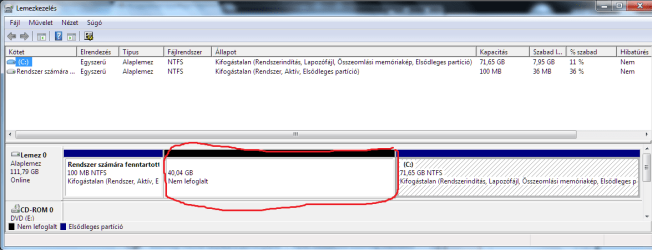
I've installed xp next to Windows 7 onto an other partition. I tried to use EasyBCD to enable OS selection at starting but none of the two OS booted in. So I used Win7 Installation disk to repair errors and now windows 7 boots in but xp doesn't. I want to uninstall XP from the computer but I can't see xp's partition even at disk management in the list so I can't do anything with it.
How could I uninstall Windows Xp completely from my computer?
My Computer
At a glance
Windows 7 Professional 32bitAMD Sempron, 1800 MHz 3000+1535 MBNVIDIA GeForce 6200
- OS
- Windows 7 Professional 32bit
- CPU
- AMD Sempron, 1800 MHz 3000+
- Motherboard
- MSI K8N Neo (MS-7030)
- Memory
- 1535 MB
- Graphics Card(s)
- NVIDIA GeForce 6200
- Monitor(s) Displays
- SAM0180
- Screen Resolution
- 1176*664
