How to put the computer to out of the box state

birupesh

New member
Local time
10:02 AM
Messages
3
hey

I did this in windows xp a while back, when you are building a pc for someone you install windows, install all the drivers and install all of the important software for it then you can
put the computer to "out of the box" state so when it is turned on the next time it will ask the next user for usernames and initial setup configurations.

Is there a way to do something like that on windows 7 or am i just dreaming again?

Please help!!

Thanks in advance.
 

My Computer My Computer

At a glance

windows 7 home premium 64bit
OS
windows 7 home premium 64bit

My Computer My Computer

At a glance

Windows 10 Pro x64 EN-GB1.6 GHz Intel Core i7-720QM Processor6 GBATI Mobility Radeon HD 5850 Graphics
Computer type
Laptop
Computer Manufacturer/Model Number
HP ENVY 17-1150eg
OS
Windows 10 Pro x64 EN-GB
CPU
1.6 GHz Intel Core i7-720QM Processor
Memory
6 GB
Graphics Card(s)
ATI Mobility Radeon HD 5850 Graphics
Sound Card
Beats sound system with integrated subwoofer
Monitor(s) Displays
17" laptop display, 22" LED and 32" Full HD TV through HDMI
Screen Resolution
1600*900 (1), 1920*1080 (2&3)
Hard Drives
Internal: 2 x 500 GB SATA Hard Disk Drive 7200 rpm
External: 2TB for backups, 3TB USB3 network drive for media
Cooling
As Envy runs a bit warm, I have it on a Cooler Master pad
Keyboard
Logitech diNovo Media Desktop Laser (bluetooth)
Mouse
Logitech Performance Mouse MX
Internet Speed
50/10 Mbps VDSL
Antivirus
Windows Defender 4.3.9431.0
Browser
Maxthon 3.5.2., IE11
Thank you bud. If you were in new zealand i would buy you a beer.

However is it possible to invoke the out of box experience without installing a clean windows again? I bougt a samsung laptop for a friend. I dont know whether if it is because the laptop is old or because samsung is "weird" when i restore the laptop to factory settings it already has a username called "user" on it. I have already installed all the latest update to it so i would rather not install windows again.

So is it possible or am i just trying to be too nice to my friend?

Thanks again though. You a legend.
 

My Computer My Computer

At a glance

windows 7 home premium 64bit
OS
windows 7 home premium 64bit
Let me check the flights, a beer is worth some efforts ;)

Yes, it's possible. Do like this:

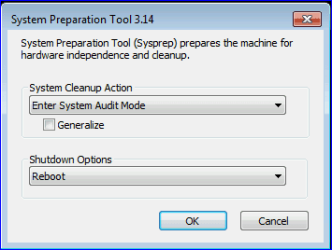
Start SysPrep as told in that tutorial step 9. Boot to Audit Mode by selecting Enter System Audit Mode and Reboot and then clicking OK as shown in this image:

Boot_Audit_1.PNG

PC reboots now, entering a so called Audit Mode. Delete everything you want to, for instance that account called User.

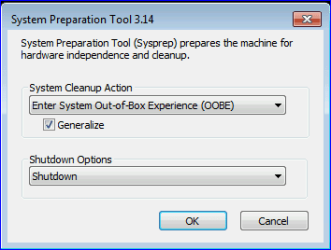
Again, start SysPrep. This time select Enter System out-of-Box Experience (OOBE) and Shut Down, check the box Generalize as shown in this image:

OOBE_Generalize.PNG

This syspreps your PC, generalizing it:

   Note
What does Sysprep generalizing do to my Windows 7 setup?
  • All system specific information is removed or uninstalled
  • Security ID (SID) of your hardware setup is reseted
  • All system restore points are deleted
  • All event logs are deleted
  • All personalization is removed (taskbar, toolbars, folder options, start orb etc.)
  • Built-in administrator account is disabled (if it was enabled) and needs to be later re-enabled if again needed

What happens when booting first time after sysprep generalizing?
  • First boot configuration (OOBE) is run
  • New SID is created
  • Re-arm counter is reseted if not already re-armed three times
  • Windows 7 is booted using first boot default drivers and settings

That's it.

Additional reading: Understanding Audit Mode http://technet.microsoft.com/en-us/library/dd744337(WS.10).aspx

Kari
 

My Computer My Computer

At a glance

Windows 10 Pro x64 EN-GB1.6 GHz Intel Core i7-720QM Processor6 GBATI Mobility Radeon HD 5850 Graphics
Computer type
Laptop
Computer Manufacturer/Model Number
HP ENVY 17-1150eg
OS
Windows 10 Pro x64 EN-GB
CPU
1.6 GHz Intel Core i7-720QM Processor
Memory
6 GB
Graphics Card(s)
ATI Mobility Radeon HD 5850 Graphics
Sound Card
Beats sound system with integrated subwoofer
Monitor(s) Displays
17" laptop display, 22" LED and 32" Full HD TV through HDMI
Screen Resolution
1600*900 (1), 1920*1080 (2&3)
Hard Drives
Internal: 2 x 500 GB SATA Hard Disk Drive 7200 rpm
External: 2TB for backups, 3TB USB3 network drive for media
Cooling
As Envy runs a bit warm, I have it on a Cooler Master pad
Keyboard
Logitech diNovo Media Desktop Laser (bluetooth)
Mouse
Logitech Performance Mouse MX
Internet Speed
50/10 Mbps VDSL
Antivirus
Windows Defender 4.3.9431.0
Browser
Maxthon 3.5.2., IE11
Thank you bud.

2 beers from me if you wake up one day and find yourself in New Zealand.
 

My Computer My Computer

At a glance

windows 7 home premium 64bit
OS
windows 7 home premium 64bit
Back
Top