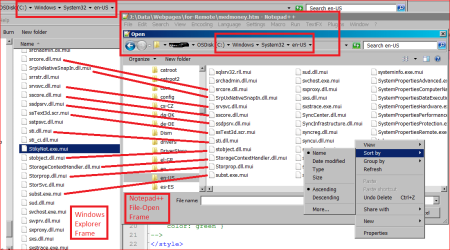
Background: The Win7 StickyNote application has crappy fonts, but on the web, I found a suggestion to use NotePad++ to edit a config file of some sort, (an .mui file. It was suggested that Notepad might corrupt the file, because it has binary components, but NP++ should handle it.)
The file is:
"C:\Windows\System32\en-US\StikyNot.exe.mui"
When I look for the file, NP++ does not have the file in its File-Open list. Several other .MUI file types are missing. Notepad opens this file fine, but why is this file not showing on my NP++ File Open menu? Does it show on yours? I have sort of lost interest in the StickyNote problem, but would really like to know why I cant even see this (and some other .mui) file in NP++.
The file is:
"C:\Windows\System32\en-US\StikyNot.exe.mui"
When I look for the file, NP++ does not have the file in its File-Open list. Several other .MUI file types are missing. Notepad opens this file fine, but why is this file not showing on my NP++ File Open menu? Does it show on yours? I have sort of lost interest in the StickyNote problem, but would really like to know why I cant even see this (and some other .mui) file in NP++.
My Computer
At a glance
Windows 7 Pro 64i7 2760QM 2.4GHz8GBIntel HD/Nvidia GeForce 555M
- Computer Manufacturer/Model Number
- Dell XPS17 laptop
- OS
- Windows 7 Pro 64
- CPU
- i7 2760QM 2.4GHz
- Memory
- 8GB
- Graphics Card(s)
- Intel HD/Nvidia GeForce 555M
- Sound Card
- RealTek
- Monitor(s) Displays
- Ntrig DuoSense digitzer, touchscreen
- Hard Drives
- 750GB
- Mouse
- Synaptics touchpad