How can I arrange files and folders alphabetically (Windows Explorer)

Mattb18

New member
Local time
7:44 AM
Messages
2
Hi,

This issue has been irritating me for a while, and I just can't seem to find a solution. What I'd like to do is; sort files AND folders within a folder (My documents for example) by 'name'. But currently it is sorting folders and then files alphabetically individually. This is not sorting by name, this is sorting by type, and then name.

Any help on this would be greatly appreciated, here is what I mean.

How it is being sorted:

1003.folder
1001.jpg
1002.jpg
1004.jpg

How I'd like it to be sorted:

1001.jpg
1002.jpg
1003.folder
1004.jpg


Thank you.
 

My Computer My Computer

At a glance

Windows 7 64bit
OS
Windows 7 64bit
Can't mix folders and files. Folders first, then files.
 

My Computer My Computer

At a glance

Vista, Windows7, Mint Mate, Zorin, Windows 8from 1.6GHz Duo to i7
Computer Manufacturer/Model Number
HP, Dell, Gateway, Toshiba - 4 laptops and 2 desktops
OS
Vista, Windows7, Mint Mate, Zorin, Windows 8
CPU
from 1.6GHz Duo to i7
Monitor(s) Displays
2x HP w2207
Hard Drives
5x HDD, 7x SSD, 12x Externals
Keyboard
with trackball - no mices
Mouse
Trackball mice
Internet Speed
DSL 6000
Thats annoying :(
 

My Computer My Computer

At a glance

Windows 7 64bit
OS
Windows 7 64bit
Matter of opinion. Makes sense to me.
 

My Computer My Computer

At a glance

Vista, Windows7, Mint Mate, Zorin, Windows 8from 1.6GHz Duo to i7
Computer Manufacturer/Model Number
HP, Dell, Gateway, Toshiba - 4 laptops and 2 desktops
OS
Vista, Windows7, Mint Mate, Zorin, Windows 8
CPU
from 1.6GHz Duo to i7
Monitor(s) Displays
2x HP w2207
Hard Drives
5x HDD, 7x SSD, 12x Externals
Keyboard
with trackball - no mices
Mouse
Trackball mice
Internet Speed
DSL 6000
Definitely an opinion, but it really does make sense to keep files and folders separated. I can't recall a time when it wasn't this way.

That would annoy the crap out of me to have files and folders mixed.
 

My Computer My Computer

At a glance

Windows 7 Ultimate x64 SP1Intel Core i7-260012 GB Patriot Extreme DDR3-1333Nvidia GTX 470
OS
Windows 7 Ultimate x64 SP1
CPU
Intel Core i7-2600
Motherboard
Gigabyte GA-P67A-UD3P-B3
Memory
12 GB Patriot Extreme DDR3-1333
Graphics Card(s)
Nvidia GTX 470
Monitor(s) Displays
Dell UltraSharp 2209WA
Hard Drives
OCZ Agility3 240 GB, WD5001AALS, WD7501AALS
PSU
OCZ ModStream 700W
Case
CoolerMaster HAF 912 Advanced
Cooling
CoolerMaster Hyper 212 Plus

My Computer My Computer

At a glance

Microsoft Windows 7 Home Premium 64-bit 7600IIx4 amd athelon 635 processor2x2gbati radeon HD 5450
Computer Manufacturer/Model Number
Hewlett packard/p6512uk
OS
Microsoft Windows 7 Home Premium 64-bit 7600
CPU
IIx4 amd athelon 635 processor
Motherboard
FOXCONN 2AA9
Memory
2x2gb
Graphics Card(s)
ati radeon HD 5450
Sound Card
(1) Realtek High Definition Audio (2) AMD High Definition
Monitor(s) Displays
samsung lcd tv 32"
Screen Resolution
1360x 768
Hard Drives
(1) WDC WD10 01FAES-60Z2A0 SATA Disk Device (2) Maxtor OneTouch USB Device (3) ST310003 33AS USB Device (4) WD My Book 1111 USB Device
PSU
?
Cooling
air!
Keyboard
wireless hp
Mouse
wireless Hp,optical
Internet Speed
1.10mb/s
Antivirus
MSE
Browser
Firefox

Attachments

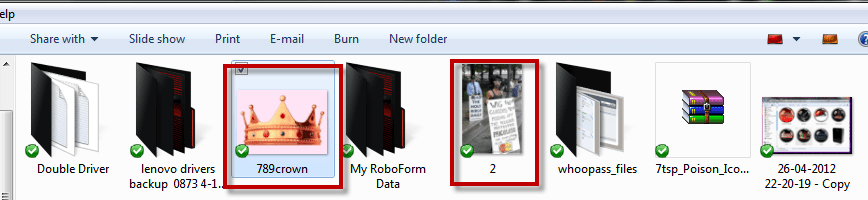
  • alfasort.PNG
    alfasort.PNG
    24.8 KB · Views: 45

My Computer My Computer

At a glance

W7, W8.1
Computer type
Laptop
Computer Manufacturer/Model Number
Dell \ Lenovo\ HP \ Toshiba
OS
W7, W8.1
Antivirus
MSE, Malwarebytes
Browser
FF
I've only tested this in Win7. In the Explorer search field (upper right). Use the "folder:" filter and then use the full path to the target folder in double quotes. By target folder, I mean the one that you would like to view with folders mixed with files. i.e. Your current directory.

Code:
folder: "<full path to target folder>"

e.g.
Code:
folder: "C:\Users\bgrupczy\Downloads"

You can then sort by name or even date modified and they will be mixed.
 

My Computer My Computer

At a glance

Windows 7 Professional
Computer type
PC/Desktop
OS
Windows 7 Professional
Back
Top