My Monitor is only using the very middle of my screen how do I fix?

shelley999

New member
Local time
10:06 AM
Messages
6
I pretty much said it in the title. However my screen is not full only the middle part has picture the rest is black. I have been in the control panel played with some stuff there, I do find it wierd that it looks as though the laptop thinks I have multiple screens but I do not. Please help this is really irritating.
 

My Computer My Computer

At a glance

Windows 7 home 64 bitAMD A8750 gigRadeon Graphics
Computer Manufacturer/Model Number
Toshiba L855D Satellite
OS
Windows 7 home 64 bit
CPU
AMD A8
Memory
750 gig
Graphics Card(s)
Radeon Graphics

My Computer My Computer

At a glance

Windows 7 x64 Professional SP1Intel C2D T9550 2.66 GHz @ 2.793 GHz (Thanks ...8 GB DDR3ATI MOBILITY RADEON 4670
Computer Manufacturer/Model Number
DELL SXPS 1640
OS
Windows 7 x64 Professional SP1
CPU
Intel C2D T9550 2.66 GHz @ 2.793 GHz (Thanks ThrottleStop!!)
Motherboard
Intel PM45
Memory
8 GB DDR3
Graphics Card(s)
ATI MOBILITY RADEON 4670
Sound Card
CREATIVE XFI AUDIO NOTEBOOK
Monitor(s) Displays
16.1 WLED
Screen Resolution
1920x1080
Hard Drives
Seagate ST9500420AS 500GB (465GiBi) 7200 RPM Drive

External Drives:-
2 TB WD Essentials x 3
1 TB WD Mybook Gen 1
1 TB WD Mybook Gen 2
1 TB Seagate
1 TB Seagate
320 GB WD Scorpio Black (enclosed)
PSU
90W Dell Power Brick
Case
Dell Chassis
Cooling
Coolermaster Cooling Pad
Keyboard
Built-in backlighted Keyboard
Mouse
Logitech Wireless Mini Mouse
Internet Speed
4/0.5
I do not know much lol I will try my best
 

My Computer My Computer

At a glance

Windows 7 home 64 bitAMD A8750 gigRadeon Graphics
Computer Manufacturer/Model Number
Toshiba L855D Satellite
OS
Windows 7 home 64 bit
CPU
AMD A8
Memory
750 gig
Graphics Card(s)
Radeon Graphics
I updated

Hi I put in what know on my profile. Thanks for being so quick I would like it fixed for tmw tried googling and I am getting no where
 

My Computer My Computer

At a glance

Windows 7 home 64 bitAMD A8750 gigRadeon Graphics
Computer Manufacturer/Model Number
Toshiba L855D Satellite
OS
Windows 7 home 64 bit
CPU
AMD A8
Memory
750 gig
Graphics Card(s)
Radeon Graphics
Okay, did you follow the tutorial that I linked to exactly in my previous post? It offers a step by step guide on how to fill up your specifications.

Anyway, based on the preliminary data you've filled up and your Laptop model, it seems like it's using an AMD Graphics Chipset...and it has a native screen resolution of 1366x768

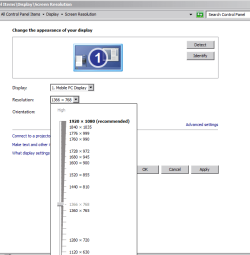
Have you tried checking whether your Desktop Resolution matches the native resolution of your screen?

1. Right click on your Desktop

2. Click on Screen Resolution

3. In the next panel, select the dropdown box next to Resolution and select 1366 x 768

Capture3.PNG

4. Click Apply, then OK.
 

My Computer My Computer

At a glance

Windows 7 x64 Professional SP1Intel C2D T9550 2.66 GHz @ 2.793 GHz (Thanks ...8 GB DDR3ATI MOBILITY RADEON 4670
Computer Manufacturer/Model Number
DELL SXPS 1640
OS
Windows 7 x64 Professional SP1
CPU
Intel C2D T9550 2.66 GHz @ 2.793 GHz (Thanks ThrottleStop!!)
Motherboard
Intel PM45
Memory
8 GB DDR3
Graphics Card(s)
ATI MOBILITY RADEON 4670
Sound Card
CREATIVE XFI AUDIO NOTEBOOK
Monitor(s) Displays
16.1 WLED
Screen Resolution
1920x1080
Hard Drives
Seagate ST9500420AS 500GB (465GiBi) 7200 RPM Drive

External Drives:-
2 TB WD Essentials x 3
1 TB WD Mybook Gen 1
1 TB WD Mybook Gen 2
1 TB Seagate
1 TB Seagate
320 GB WD Scorpio Black (enclosed)
PSU
90W Dell Power Brick
Case
Dell Chassis
Cooling
Coolermaster Cooling Pad
Keyboard
Built-in backlighted Keyboard
Mouse
Logitech Wireless Mini Mouse
Internet Speed
4/0.5
I do find it wierd that it looks as though the laptop thinks I have multiple screens but I do not.

Did you ever plug in an external monitor, projector etc?

Adjusting your resolution like SM has outlined should return your screen to 'full size'
 

My Computer My Computer

At a glance

8 Pro x64i7 3770K 4.6GHz16GB G.Skill Trident X 2666mhzx2 EVGA 780 Ti Superclocked SLI
Computer type
PC/Desktop
Computer Manufacturer/Model Number
Systems by SmartEyeball
OS
8 Pro x64
CPU
i7 3770K 4.6GHz
Motherboard
ASUS P8Z77 WS
Memory
16GB G.Skill Trident X 2666mhz
Graphics Card(s)
x2 EVGA 780 Ti Superclocked SLI
Sound Card
SB X-FI Surround 5.1 PRO USB / ATH-AD900 Headphones
Monitor(s) Displays
x3 Dell U2410 / 58" Samsung
Screen Resolution
5760*1200/ 1920*1200
Hard Drives
2x Intel 520 240GB (RAID 0) * 2x WD Caviar Blacks 2TB (RAID 0) * 2TB WD Caviar Black * Sony Optirac DVD
PSU
Silverstone Strider Evolution 1200W
Case
Thermaltake Level 10 GT Snow Edition
Cooling
Noctua NH-D14
Keyboard
Topre Realforce // Ducky Shine MX Black // Filco Ninja TKL
Mouse
Thermaltake Theron (Highly Recommended) + Razer Imperator
Antivirus
MSE
Browser
IE, FF, WaterFox
Other Info
GT Extreme V2 Sim Racing Cockpit + 40" LCD and K/B Mouse stand ▼
Fanatec CSR Elite Wheel + Clubsport V1 Pedals + CSR shifter/7G-H ▼Saitek X52 Pro ▼ TrackIR 5 Pro
Buttkicker v2 Seat Rumbler with Dedicated 5.1 and Sub Woofer attached to frame ▼
=
Bloody Big Grin
Thank you for your help with my limited knowledge of what I am doing. I was looking for the screen shot button on the keyboard to show you what it said and I touched a button on the keyboard that filled the screen lol you inadverdantly helped me! Thank you
 

My Computer My Computer

At a glance

Windows 7 home 64 bitAMD A8750 gigRadeon Graphics
Computer Manufacturer/Model Number
Toshiba L855D Satellite
OS
Windows 7 home 64 bit
CPU
AMD A8
Memory
750 gig
Graphics Card(s)
Radeon Graphics
smarteyeball...I literally just took this thing out of the box I had never attached anything to it, super wierd but it is fixed so it's all good thank you all
 

My Computer My Computer

At a glance

Windows 7 home 64 bitAMD A8750 gigRadeon Graphics
Computer Manufacturer/Model Number
Toshiba L855D Satellite
OS
Windows 7 home 64 bit
CPU
AMD A8
Memory
750 gig
Graphics Card(s)
Radeon Graphics
Thank you for your help with my limited knowledge of what I am doing. I was looking for the screen shot button on the keyboard to show you what it said and I touched a button on the keyboard that filled the screen lol you inadverdantly helped me! Thank you

That's rather serendipitous to say the least! Which button was it, was it a button with a picture of laptop|monitor side by side on it next to the insert button on your keyboard?
 

My Computer My Computer

At a glance

Windows 7 x64 Professional SP1Intel C2D T9550 2.66 GHz @ 2.793 GHz (Thanks ...8 GB DDR3ATI MOBILITY RADEON 4670
Computer Manufacturer/Model Number
DELL SXPS 1640
OS
Windows 7 x64 Professional SP1
CPU
Intel C2D T9550 2.66 GHz @ 2.793 GHz (Thanks ThrottleStop!!)
Motherboard
Intel PM45
Memory
8 GB DDR3
Graphics Card(s)
ATI MOBILITY RADEON 4670
Sound Card
CREATIVE XFI AUDIO NOTEBOOK
Monitor(s) Displays
16.1 WLED
Screen Resolution
1920x1080
Hard Drives
Seagate ST9500420AS 500GB (465GiBi) 7200 RPM Drive

External Drives:-
2 TB WD Essentials x 3
1 TB WD Mybook Gen 1
1 TB WD Mybook Gen 2
1 TB Seagate
1 TB Seagate
320 GB WD Scorpio Black (enclosed)
PSU
90W Dell Power Brick
Case
Dell Chassis
Cooling
Coolermaster Cooling Pad
Keyboard
Built-in backlighted Keyboard
Mouse
Logitech Wireless Mini Mouse
Internet Speed
4/0.5
It is a button of laptop and monitor.. closer to esc though on mine then insert lol
 

My Computer My Computer

At a glance

Windows 7 home 64 bitAMD A8750 gigRadeon Graphics
Computer Manufacturer/Model Number
Toshiba L855D Satellite
OS
Windows 7 home 64 bit
CPU
AMD A8
Memory
750 gig
Graphics Card(s)
Radeon Graphics
smarteyeball...I literally just took this thing out of the box I had never attached anything to it, super wierd but it is fixed so it's all good thank you all

Ahh, you must have the hit the external screen :)

At least you know what it does now :D
 

My Computer My Computer

At a glance

8 Pro x64i7 3770K 4.6GHz16GB G.Skill Trident X 2666mhzx2 EVGA 780 Ti Superclocked SLI
Computer type
PC/Desktop
Computer Manufacturer/Model Number
Systems by SmartEyeball
OS
8 Pro x64
CPU
i7 3770K 4.6GHz
Motherboard
ASUS P8Z77 WS
Memory
16GB G.Skill Trident X 2666mhz
Graphics Card(s)
x2 EVGA 780 Ti Superclocked SLI
Sound Card
SB X-FI Surround 5.1 PRO USB / ATH-AD900 Headphones
Monitor(s) Displays
x3 Dell U2410 / 58" Samsung
Screen Resolution
5760*1200/ 1920*1200
Hard Drives
2x Intel 520 240GB (RAID 0) * 2x WD Caviar Blacks 2TB (RAID 0) * 2TB WD Caviar Black * Sony Optirac DVD
PSU
Silverstone Strider Evolution 1200W
Case
Thermaltake Level 10 GT Snow Edition
Cooling
Noctua NH-D14
Keyboard
Topre Realforce // Ducky Shine MX Black // Filco Ninja TKL
Mouse
Thermaltake Theron (Highly Recommended) + Razer Imperator
Antivirus
MSE
Browser
IE, FF, WaterFox
Other Info
GT Extreme V2 Sim Racing Cockpit + 40" LCD and K/B Mouse stand ▼
Fanatec CSR Elite Wheel + Clubsport V1 Pedals + CSR shifter/7G-H ▼Saitek X52 Pro ▼ TrackIR 5 Pro
Buttkicker v2 Seat Rumbler with Dedicated 5.1 and Sub Woofer attached to frame ▼
=
Bloody Big Grin
Back
Top