ATI Radeon AMD HD 6670 2GB Won't Go Past 1920x1080 Resolution

DavidAllenNeron

New member
I used to have a GeForce GTS 250 made by BFG Tech and when I was playing Diablo3 my entire system just shut off and it turned out that my graphics card died.

So I used my onboard graphics card and forgot about removing the old NVIDIA drivers from my GeForce GTS 250.

I purchased a ATI Radeon AMD HD 6670 2GB card off of EBAY and shut down my system and installed the card, needless to say my computer wouldn't go past the "Starting Windows" screen so I restored the computer to a previous date, and a bunch of other stuff and finally got my system to boot with the Radeon AMD HD 6670 and the drivers actually installed and I can see the Radeon AMD HD 6670 in my device manager.

My problem is ... it won't go past 1920x1080 .. I've tried the DVI cable, the HDMI cable, I've tried changing it in the Windows 7 Resolution Settings and the Catalyst settings but it won't go past 1920x1080 ....

I know something isn't working correctly but I don't know how to fix it ...
is there anyone out there that might know how to fix this so my card will display it's advertised resolution?

The advertised resolutions are:
3d Resolutions 2560x1600
Max Resolution Analog 2048x1536
Max Resolution Digital 2560x1600

and the max it is showing me is 1920x1080 in windows 7 and using Catalyst.

This is the card I'm talking about:
Diamond 6670PE32G
DIAMOND AMD Radeon™ HD 6670 PCIE 2GB GDDR3
Diamond Multimedia AMD HD 6670 | Buy Latest AMD HD 6670 Video Card | PCI Express x16 2GB GDDR3
 
Last edited:

My Computer

Computer Manufacturer/Model Number
Gateway DX4831
OS
Windows 7 Home Premium 64-bit
CPU
Intel Core i3 CPU 530 @ 2.93GHz 2.93GHz
Motherboard
Unsure
Memory
6.00 GB
Graphics Card(s)
ATI Radeon AMD HD 6670 2GB
Sound Card
USB - Bose Sound System
Monitor(s) Displays
LG Flatron w2253V
It's going to be whatever the max resolution of your monitor.
If your monitor is 1920x1080, then that will be the max resolution.

If you want to run at 2560x1600, you will need to purchase a monitor that has that resolution.
The Dell 30" Monitor as well as other 30" monitors from LG and Samsung do that high resolution.

Only problem you are going to have is games aren't going to run that great at that high resolution since your video card isn't powerful enough.

http://accessories.us.dell.com/sna/productdetail.aspx?c=us&cs=19&l=en&sku=224-9949
 

My Computer

Computer Manufacturer/Model Number
HAL-9000
OS
Windows 7 Ultimate 64bit
CPU
Intel i7 3770K
Motherboard
Asus Sabertooth Z77
Memory
16GB DDR3 1333 Corsair XMS3
Graphics Card(s)
XFX HD6950 2GB EyeFinity
Sound Card
Logitech G35 & Sennheiser PC135 & VIA HD
Monitor(s) Displays
23" HP 2310e, 23" Samsung B2230, 21.5" Viewsonic
Screen Resolution
5760x1080
Hard Drives
16TB of Storage
128GB & 256GB Crucial M4 SSD's, 2X 1TB WD Black, 3x 2TB WD, 3x 2TB Samsung F4, 1.5TB Seagate, WD 500GB,
PSU
Antec True Power New 650watt
Case
Cooler Master HAF-932
Cooling
Corsair H60 Hydro Cooler, 3x 230mm Fans, 2x120mm Fan
Keyboard
Logitech G15 and G13
Mouse
Logitech G700 Gaming Mouse
Internet Speed
50/10 Mbit
Other Info
Speakers : Alesis M1 Active Mk2 Studio Monitors , APC RS 1200 UPS, HP 4500DN Color Laser, HP P1006 mono Laser, Kodak 8500 Dye-Sub, Epson 1280 inkjet, Epson Worforce 610 MFC
Well I have a LG Flatron W2253V ... but when I was running the GeForce GTS 250 I was able to get a better resolution despite my monitor.. why is that?
 

My Computer

Computer Manufacturer/Model Number
Gateway DX4831
OS
Windows 7 Home Premium 64-bit
CPU
Intel Core i3 CPU 530 @ 2.93GHz 2.93GHz
Motherboard
Unsure
Memory
6.00 GB
Graphics Card(s)
ATI Radeon AMD HD 6670 2GB
Sound Card
USB - Bose Sound System
Monitor(s) Displays
LG Flatron w2253V
Hello and welcome to the forums, DavidAllenNeron!

Checking the specifications of your card from this AMD website has revealed that your card does not support resolutions beyond 1920x1200 using the HDMI 1.4a (HDMI cable) specification and only outputs 2560x1600 via Dual Link DVI from your monitor.

AMD Radeon

Cutting-edge integrated display support
  • DisplayPort 1.2
    • Max resolution: 2560x1600 per display
    • Multi-Stream Transport
    • 21.6 Gbps bandwidth
    • High bit-rate audio
  • HDMI 1.4a with Stereoscopic 3D Frame Packing Format, Deep Color, xvYCC wide gamut support, and high bit-rate audio
    • Max resolution: 1920x1200
  • Dual-link DVI with HDCP
    • Max resolution: 2560x1600
  • VGA
    • Max resolution: 2048x1536
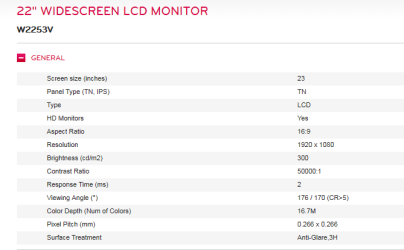
What is the native (highest supported) resolution of your monitor ?

EDIT: Seems like your monitors native resolution is 1920x1080p.. it's no wonder you can't select a higher resolution than that

Capture5.PNG

http://www.lg.com/uk/monitors/lg-W2253V-lcd-monitor/technical-specifications
 

My Computer

Computer Manufacturer/Model Number
DELL SXPS 1640
OS
Windows 7 x64 Professional SP1
CPU
Intel C2D T9550 2.66 GHz @ 2.793 GHz (Thanks ThrottleStop!!)
Motherboard
Intel PM45
Memory
8 GB DDR3
Graphics Card(s)
ATI MOBILITY RADEON 4670
Sound Card
CREATIVE XFI AUDIO NOTEBOOK
Monitor(s) Displays
16.1 WLED
Screen Resolution
1920x1080
Hard Drives
Seagate ST9500420AS 500GB (465GiBi) 7200 RPM Drive

External Drives:-
2 TB WD Essentials x 3
1 TB WD Mybook Gen 1
1 TB WD Mybook Gen 2
1 TB Seagate
1 TB Seagate
320 GB WD Scorpio Black (enclosed)
PSU
90W Dell Power Brick
Case
Dell Chassis
Cooling
Coolermaster Cooling Pad
Keyboard
Built-in backlighted Keyboard
Mouse
Logitech Wireless Mini Mouse
Internet Speed
4/0.5
Unfortunately my monitors resolution is 1920 x 1080 but I still wonder why my other card allowed a higher resolution despite my monitor?
 

My Computer

Computer Manufacturer/Model Number
Gateway DX4831
OS
Windows 7 Home Premium 64-bit
CPU
Intel Core i3 CPU 530 @ 2.93GHz 2.93GHz
Motherboard
Unsure
Memory
6.00 GB
Graphics Card(s)
ATI Radeon AMD HD 6670 2GB
Sound Card
USB - Bose Sound System
Monitor(s) Displays
LG Flatron w2253V
is there any way I can achieve a higher resolution with my current setup ?
 

My Computer

Computer Manufacturer/Model Number
Gateway DX4831
OS
Windows 7 Home Premium 64-bit
CPU
Intel Core i3 CPU 530 @ 2.93GHz 2.93GHz
Motherboard
Unsure
Memory
6.00 GB
Graphics Card(s)
ATI Radeon AMD HD 6670 2GB
Sound Card
USB - Bose Sound System
Monitor(s) Displays
LG Flatron w2253V
is there any way I can achieve a higher resolution with my current setup ?

Sigh...

If you really want to, at the risk of damaging your own hardware, try using this software to make custom resolutions for your monitor.

Disclaimer:- I bear no responsibility for what may or may not happen to your computer from using this program. Increasing the resolution of your monitor beyond its native defaults could permanently damage your monitor. I use this program myself (fully registered) to make custom resolutions, but those that are lower than my native resolution for gaming (since my laptop's card can't support quite a large number of modern games at my native 1080p resolution)

EnTech Taiwan | Utilities | PowerStrip
 
Last edited:

My Computer

Computer Manufacturer/Model Number
DELL SXPS 1640
OS
Windows 7 x64 Professional SP1
CPU
Intel C2D T9550 2.66 GHz @ 2.793 GHz (Thanks ThrottleStop!!)
Motherboard
Intel PM45
Memory
8 GB DDR3
Graphics Card(s)
ATI MOBILITY RADEON 4670
Sound Card
CREATIVE XFI AUDIO NOTEBOOK
Monitor(s) Displays
16.1 WLED
Screen Resolution
1920x1080
Hard Drives
Seagate ST9500420AS 500GB (465GiBi) 7200 RPM Drive

External Drives:-
2 TB WD Essentials x 3
1 TB WD Mybook Gen 1
1 TB WD Mybook Gen 2
1 TB Seagate
1 TB Seagate
320 GB WD Scorpio Black (enclosed)
PSU
90W Dell Power Brick
Case
Dell Chassis
Cooling
Coolermaster Cooling Pad
Keyboard
Built-in backlighted Keyboard
Mouse
Logitech Wireless Mini Mouse
Internet Speed
4/0.5
It just seems odd to me that my old GeForce card was able to display 2560 x 1600 on this same monitor but this newer Radeon HD 6670 won't display past 1920x1080..
 

My Computer

Computer Manufacturer/Model Number
Gateway DX4831
OS
Windows 7 Home Premium 64-bit
CPU
Intel Core i3 CPU 530 @ 2.93GHz 2.93GHz
Motherboard
Unsure
Memory
6.00 GB
Graphics Card(s)
ATI Radeon AMD HD 6670 2GB
Sound Card
USB - Bose Sound System
Monitor(s) Displays
LG Flatron w2253V
It just seems odd to me that my old GeForce card was able to display 2560 x 1600 on this same monitor but this newer Radeon HD 6670 won't display past 1920x1080..

Was your desktop icons and taskbar really really tiny?
At 2560x1600 on a 22" screen, everything is going to be really small, if your card was letting you use that res and scaling to to 1920x1080 output.
The monitor you have can only accept a max 1080P input signal.

I've included an desktop at 2560 scaled to 1920.
 

Attachments

  • 2560-1920.jpg
    2560-1920.jpg
    240 KB · Views: 104

My Computer

Computer Manufacturer/Model Number
HAL-9000
OS
Windows 7 Ultimate 64bit
CPU
Intel i7 3770K
Motherboard
Asus Sabertooth Z77
Memory
16GB DDR3 1333 Corsair XMS3
Graphics Card(s)
XFX HD6950 2GB EyeFinity
Sound Card
Logitech G35 & Sennheiser PC135 & VIA HD
Monitor(s) Displays
23" HP 2310e, 23" Samsung B2230, 21.5" Viewsonic
Screen Resolution
5760x1080
Hard Drives
16TB of Storage
128GB & 256GB Crucial M4 SSD's, 2X 1TB WD Black, 3x 2TB WD, 3x 2TB Samsung F4, 1.5TB Seagate, WD 500GB,
PSU
Antec True Power New 650watt
Case
Cooler Master HAF-932
Cooling
Corsair H60 Hydro Cooler, 3x 230mm Fans, 2x120mm Fan
Keyboard
Logitech G15 and G13
Mouse
Logitech G700 Gaming Mouse
Internet Speed
50/10 Mbit
Other Info
Speakers : Alesis M1 Active Mk2 Studio Monitors , APC RS 1200 UPS, HP 4500DN Color Laser, HP P1006 mono Laser, Kodak 8500 Dye-Sub, Epson 1280 inkjet, Epson Worforce 610 MFC
Yeh that looks closer to what I had than what I have now..
I guess I'll just have to make due with what I have . .
what's better for a connection HDMI or DVI?
 

My Computer

Computer Manufacturer/Model Number
Gateway DX4831
OS
Windows 7 Home Premium 64-bit
CPU
Intel Core i3 CPU 530 @ 2.93GHz 2.93GHz
Motherboard
Unsure
Memory
6.00 GB
Graphics Card(s)
ATI Radeon AMD HD 6670 2GB
Sound Card
USB - Bose Sound System
Monitor(s) Displays
LG Flatron w2253V
HDMI, if your monitor has built in audio/speakers and you wish to view DRM protected media using your graphics card's built in support, otherwise just use DVI for resolution flexibility during gaming..
 

My Computer

Computer Manufacturer/Model Number
DELL SXPS 1640
OS
Windows 7 x64 Professional SP1
CPU
Intel C2D T9550 2.66 GHz @ 2.793 GHz (Thanks ThrottleStop!!)
Motherboard
Intel PM45
Memory
8 GB DDR3
Graphics Card(s)
ATI MOBILITY RADEON 4670
Sound Card
CREATIVE XFI AUDIO NOTEBOOK
Monitor(s) Displays
16.1 WLED
Screen Resolution
1920x1080
Hard Drives
Seagate ST9500420AS 500GB (465GiBi) 7200 RPM Drive

External Drives:-
2 TB WD Essentials x 3
1 TB WD Mybook Gen 1
1 TB WD Mybook Gen 2
1 TB Seagate
1 TB Seagate
320 GB WD Scorpio Black (enclosed)
PSU
90W Dell Power Brick
Case
Dell Chassis
Cooling
Coolermaster Cooling Pad
Keyboard
Built-in backlighted Keyboard
Mouse
Logitech Wireless Mini Mouse
Internet Speed
4/0.5
Yeh that looks closer to what I had than what I have now..
I guess I'll just have to make due with what I have . .
what's better for a connection HDMI or DVI?

HDMI,works better and looks more clear when i connect my computer to the living room tv on 1080p and the audio is in the same connection so that's a big plus.
 

My Computer

Computer type
PC/Desktop
Computer Manufacturer/Model Number
custom build
OS
Windows 10 64bit
CPU
AMD Phenom II X4 925 (Deneb)(2.8GHz) OC 3.4GHz
Motherboard
M5A78L-MLX Plus
Memory
Corsair Vengeance DDR3 4GBX2 (8192MB)
Graphics Card(s)
XFX HD 6870 1GB (OC)- 940MHz core, mem 1150MHz
Monitor(s) Displays
Vizio 26' 1920x1080 / Acer 1336x768
Screen Resolution
1920x1080 60Hz /1336x768
Hard Drives
Kingston Digital 60GB SSDNow V300/500gb HDD Western Digital 7200rpm (/WD 160GB HDD 7200rpm
PSU
CORSAIR CX600 600w
Case
AZZA Orion 202 EVO
Cooling
cooler master hyper TX3 cpu cooler
Keyboard
Razer DeathStalker
Mouse
Logitech Optical Gaming Mouse G400
Antivirus
Defualt on win 10
Browser
Firefox
Other Info
cpu is overclocked in bios
HDMI, if your monitor has built in audio/speakers and you wish to view DRM protected media using your graphics card's built in support, otherwise just use DVI for resolution flexibility during gaming..

Yeh that looks closer to what I had than what I have now..
I guess I'll just have to make due with what I have . .
what's better for a connection HDMI or DVI?

HDMI,works better and looks more clear when i connect my computer to the living room tv on 1080p and the audio is in the same connection so that's a big plus.

Dvi and hdmi are the same, just hdmi carries audio, if you need it.
Hdcp has been included on pretty much every monitor made in the last 4 or so years.

I have an older Samsung 19" LCD that doesn't have hdcp and won't play a bluray using the dvi port, but does play using VGA. I use this monitor when I build computers and found out it doesn't have hdcp last week when I put a bd rw in a friends machine and was testing it with a bluray movie.
 

My Computer

Computer Manufacturer/Model Number
HAL-9000
OS
Windows 7 Ultimate 64bit
CPU
Intel i7 3770K
Motherboard
Asus Sabertooth Z77
Memory
16GB DDR3 1333 Corsair XMS3
Graphics Card(s)
XFX HD6950 2GB EyeFinity
Sound Card
Logitech G35 & Sennheiser PC135 & VIA HD
Monitor(s) Displays
23" HP 2310e, 23" Samsung B2230, 21.5" Viewsonic
Screen Resolution
5760x1080
Hard Drives
16TB of Storage
128GB & 256GB Crucial M4 SSD's, 2X 1TB WD Black, 3x 2TB WD, 3x 2TB Samsung F4, 1.5TB Seagate, WD 500GB,
PSU
Antec True Power New 650watt
Case
Cooler Master HAF-932
Cooling
Corsair H60 Hydro Cooler, 3x 230mm Fans, 2x120mm Fan
Keyboard
Logitech G15 and G13
Mouse
Logitech G700 Gaming Mouse
Internet Speed
50/10 Mbit
Other Info
Speakers : Alesis M1 Active Mk2 Studio Monitors , APC RS 1200 UPS, HP 4500DN Color Laser, HP P1006 mono Laser, Kodak 8500 Dye-Sub, Epson 1280 inkjet, Epson Worforce 610 MFC
HDMI, if your monitor has built in audio/speakers and you wish to view DRM protected media using your graphics card's built in support, otherwise just use DVI for resolution flexibility during gaming..

Yeh that looks closer to what I had than what I have now..
I guess I'll just have to make due with what I have . .
what's better for a connection HDMI or DVI?

HDMI,works better and looks more clear when i connect my computer to the living room tv on 1080p and the audio is in the same connection so that's a big plus.

Dvi and hdmi are the same, just hdmi carries audio, if you need it.
Hdcp has been included on pretty much every monitor made in the last 4 or so years.

I have an older Samsung 19" LCD that doesn't have hdcp and won't play a bluray using the dvi port, but does play using VGA. I use this monitor when I build computers and found out it doesn't have hdcp last week when I put a bd rw in a friends machine and was testing it with a bluray movie.

Does HDMI 1.4a support resolutions like 2560x1600p though? I've always thought you needed either Dual Link DVI or Displayport to achieve those resolutions...
 

My Computer

Computer Manufacturer/Model Number
DELL SXPS 1640
OS
Windows 7 x64 Professional SP1
CPU
Intel C2D T9550 2.66 GHz @ 2.793 GHz (Thanks ThrottleStop!!)
Motherboard
Intel PM45
Memory
8 GB DDR3
Graphics Card(s)
ATI MOBILITY RADEON 4670
Sound Card
CREATIVE XFI AUDIO NOTEBOOK
Monitor(s) Displays
16.1 WLED
Screen Resolution
1920x1080
Hard Drives
Seagate ST9500420AS 500GB (465GiBi) 7200 RPM Drive

External Drives:-
2 TB WD Essentials x 3
1 TB WD Mybook Gen 1
1 TB WD Mybook Gen 2
1 TB Seagate
1 TB Seagate
320 GB WD Scorpio Black (enclosed)
PSU
90W Dell Power Brick
Case
Dell Chassis
Cooling
Coolermaster Cooling Pad
Keyboard
Built-in backlighted Keyboard
Mouse
Logitech Wireless Mini Mouse
Internet Speed
4/0.5
HDMI, if your monitor has built in audio/speakers and you wish to view DRM protected media using your graphics card's built in support, otherwise just use DVI for resolution flexibility during gaming..

HDMI,works better and looks more clear when i connect my computer to the living room tv on 1080p and the audio is in the same connection so that's a big plus.

Dvi and hdmi are the same, just hdmi carries audio, if you need it.
Hdcp has been included on pretty much every monitor made in the last 4 or so years.

I have an older Samsung 19" LCD that doesn't have hdcp and won't play a bluray using the dvi port, but does play using VGA. I use this monitor when I build computers and found out it doesn't have hdcp last week when I put a bd rw in a friends machine and was testing it with a bluray movie.

Does HDMI 1.4a support resolutions like 2560x1600p though? I've always thought you needed either Dual Link DVI or Displayport to achieve those resolutions...

I believe they are upping the specs for hdmi resolutions, but not sure if they are in effect yet.
I should have said that Current hdmi and dvi are the same at 1200p and lower.
The video signals in both cables are the same. You can use a straight dvi to hdmi cable if you didn't have hdmi on your video card.
Some video cards had audio support on one of the dvi ports, my old ati3650 had audio included on the yellow dvi port, white dvi port was only video.

Oh, I just remembered that our HD Editor is using an ati 3870 and we are using a pair of dvi to hdmi cables since the 24" 1920x1200 monitors only have VGA and hdmi ports.
 

My Computer

Computer Manufacturer/Model Number
HAL-9000
OS
Windows 7 Ultimate 64bit
CPU
Intel i7 3770K
Motherboard
Asus Sabertooth Z77
Memory
16GB DDR3 1333 Corsair XMS3
Graphics Card(s)
XFX HD6950 2GB EyeFinity
Sound Card
Logitech G35 & Sennheiser PC135 & VIA HD
Monitor(s) Displays
23" HP 2310e, 23" Samsung B2230, 21.5" Viewsonic
Screen Resolution
5760x1080
Hard Drives
16TB of Storage
128GB & 256GB Crucial M4 SSD's, 2X 1TB WD Black, 3x 2TB WD, 3x 2TB Samsung F4, 1.5TB Seagate, WD 500GB,
PSU
Antec True Power New 650watt
Case
Cooler Master HAF-932
Cooling
Corsair H60 Hydro Cooler, 3x 230mm Fans, 2x120mm Fan
Keyboard
Logitech G15 and G13
Mouse
Logitech G700 Gaming Mouse
Internet Speed
50/10 Mbit
Other Info
Speakers : Alesis M1 Active Mk2 Studio Monitors , APC RS 1200 UPS, HP 4500DN Color Laser, HP P1006 mono Laser, Kodak 8500 Dye-Sub, Epson 1280 inkjet, Epson Worforce 610 MFC
Problem Full screen 16:10 1920x1200

Hi,
I'm facing quite similar problem but this solution doesn't work, I'm already at max scaling option !

I've HD Radeon 6950 and a pc monitor 16:10 1920x1200.
Last AMD drivers and Catalyst suite installed.

Using the HDMI output I can't have fullscreen there is black borders up and down : I just can choose 1920x1080 maximum.

Using DVI output with VGA adaptater, I can choose 1920x1200 and I've fullscreen.

I'm wondering if a HDMI cable has specs for ratios or resolution ? It's written : Aspect Ration 21:9 and Resolution 3840x2160 4096x2160 ...

My Card and Windows Seven see my 16:10 monitor as a HDTV ! but it's not.

And moreover for this card it is said that the max output resolution for HDMI is 1920x1200, but I can't figure out.

What is the reality ?

Thanks for your answer !
 

My Computer

Computer type
PC/Desktop
OS
7 64bits
Graphics Card(s)
hd radeon 6950
Back
Top