I have searched for this but never found an answer.
I have used Remote Desktop for years with XP and Vista and was always able to work in visual studio(or any other program) stop work go home RD to my work computer and keep working. Then Disconnect and the next morning come back to my work computer and continue right were I left off. But in Windows 7 when ever I disconnect from a Remote Desktop It logs me off closing all my open programs. Anyone know how to have the same behavior as RDP for Vista or XP where I can continue working back and forth from work to home without logging off?
I am using RTM and have not had this problem but something I have noticed is when I sit down in front of my w7 machine after disconnecting it is not locked. There is no indication that my session is still running and any user can logon. If I logon my session and programs are still up and running. fast user switching...
2x 320gb Seagate Barracuda's - SATA 3Gbit/s - RAID-0 array
PSU
650 watt
Case
Antec
Cooling
Cool Master
Keyboard
Logitech diNovo Media Desktop
Mouse
see keyboard
Internet Speed
comcast cable
Other Info
7 Ultimate and 7 Pro twice each at home - Gigabit on the Network - Tomato on the Linksys - I freely share my wireless with my neighbors (8-10 additional devices)
Perhaps the RC did not include fast User Switching and that is my problem. I will wait to purchase the RTM in Oct so I dont have to do a reinstall this month and another next month
I can give this a try - running Windows 7 RTM 32bit on my laptop and w7 RTM 64bit on my desktop.
I have been searching for a way to force W7 to wake up / stay awake during morning hours and only sleep at night - I finally found SetPower (see my newest thread in this forum) and hopefully that will solve all sorts of issues that I was having....
Grabbing my laptop now to verify if it is locking / logging off. I'll try it both ways (from 32 to 64 bit and from 64 to 32 bit) to see if it makes a difference.
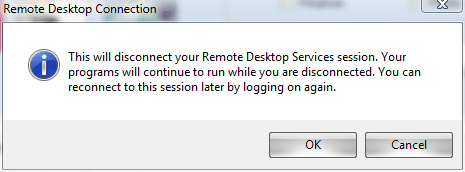
Confirmed. RTM is handling disconnects correctly - whether you go to the start orb --> > --> Disconnect or you simply click the X on the RD bar at the top.
In fact, it even tells you this:
Since this is solved in the RTM, I am marking this thread solved as well.
For my money I reckon UltraPlanet has the right answer. I came across this thread because I have the exact same issue with my work box on win XP - and the thing in common? No fast user switching enabled.
MiddleTommy what happens if you disconnect and then reconnect in 5 - 10 mins? I can reconnect in this time and still log into the same session. If I wait over an hour my old session is gone and I'm logging into a new session.
Turning on fast user switching is not an option because the XP box is on a domain...
I will keep searching...
A.
Ps. JohnGalt yeah I get the "This will disconnect ...your programs will continue to run..." dialog in XP too but it still darn destroys the session just the same...
I don't know if this help
But when i connect by RDP i make a run: mstsc / v: ip /admin ( admin log you on console, like you logon locally) i hope this help
I just installed the RTM of windows 7 and used the remote desktop for the first time last night. This morning my computer was logged off and all my programs closed. I did a quick search and found Remote Desktop Logs Off User After Disconnect
"I had similar issues when I upgraded to Windows 7. Check your active directory for user properties, under sessions make sure End a disconnected session, Active session limit, and Idle session limit are all set to never."
Sure enough my User in Active Directory at work was set to log off after 2 hours when I Disconnect.
I sure hope this solves the issue. Perhaps this was never a windows 7 issue? I think this was a server 2008 issue where the defaults are different from server 2003
[FONT="]I had this same issue, had nothing to do with AD settings. Steps to resolve - you will need admin rights to the machine you are RDPing to
[/FONT]
[FONT="]Open gpedit.msc [/FONT]
[FONT="]Browse to Computer Configuration --> Administrative Templates --> Windows Components --> Remote Desktop Services --> Remote Desktop Session Host --> Session Time Limits. [/FONT]
[FONT="]Enable the "Set time limit for disconnected sessions" and set it to Never [/FONT]
I know this fix for me. Ensure that only the original client can reconnect, edit the following registry key: HKLM:Software\Policies\Microsoft\Windows NT\Terminal Services\fReconnectSame = 1
You can temporarily disconnect from a session by clicking the Close button
on the connection bar (the horizontal bar at the top of your screen). This leaves your programs running so that, next time you connect, you can continue where you left off.