
Solved How to burn a Pana_DVD.frm firmware update file in .iso... format?

scottls59901

New member
Member
VIP
Local time
10:37 PM
Messages
114
I need to do a firmware update for my Panasonic Blu-Ray player-

Several coasters later?- I can't figure out how to force W7 to do anything but copy it in data format (not readable on my Pany).
The Pana_DVD.frm file, needs to be burned in .iso... format?

I tried right clicking on the blank CD/DVD in Explorer/Format, but Create an MS-DOS startup disk is greyed out? :confused:
 

My Computer My Computer

At a glance

Windows 7 Pro (32)i7/26004gb512mg (add on card was less buggy than Intel ...
Computer Manufacturer/Model Number
ZT Desktop
OS
Windows 7 Pro (32)
CPU
i7/2600
Motherboard
Intel
Memory
4gb
Graphics Card(s)
512mg (add on card was less buggy than Intel direct driver)
Sound Card
Internal
Monitor(s) Displays
19" DELL Ultra Sharp
Hard Drives
C:= WD Raptor Sata6 10k rpm
D:/E:= WD Black Sata 3.0
Case
ZT Full
Cooling
ZT
Internet Speed
8000kbps cable
Other Info
Free Outpost Pro Internet Security, and no other active anti-malware.
Free On-Demand- SpyWareBlaster, MBAM, Emsisoft-Kit, and Kaspersky Anti-rootkit utility TDSSKiller.
What instructions are provided at the Panasonic web site? Can you give us a link to where you downloaded the firmware update from?
 

My Computer My Computer

At a glance

Windows 10 Pro X64Intel Quad Core i7-4770 @ 3.4Ghz16.0GB PC3-12800 DDR3 SDRAM 1600 MHzIntel Integrated HD Graphics
Computer type
PC/Desktop
Computer Manufacturer/Model Number
Lenovo IdeaCenter 450
OS
Windows 10 Pro X64
CPU
Intel Quad Core i7-4770 @ 3.4Ghz
Memory
16.0GB PC3-12800 DDR3 SDRAM 1600 MHz
Graphics Card(s)
Intel Integrated HD Graphics
Sound Card
Realtek HD Audio
Monitor(s) Displays
HP 22" LCD
Screen Resolution
1680 x 1050
Hard Drives
250GB Samsung EVO SATA-3 SSD
2TB Seagate ST2000DM001 SATA-2
1.5TB Seagate ST3150041AS SATA
Keyboard
Dell USB
Mouse
Lenovo USB
Internet Speed
Cable via Road Runner 3MB Upload, 30MB Download
Antivirus
Windows Defender, MBAM Pro, MBAE
Browser
Seamonkey
Other Info
UEFI/GPT
PLDS DVD-RW DH16AERSH
I update my Panasonic through the internet, I guess that's not an option for you?

If it's similar to these instructions, SC-BTT370/770 Firmware Download (North America) | Download | Blu-ray Disc Player/Recorder | Digital AV | Consumer Products | Support | Panasonic Global

You need to make it an ISO file first.

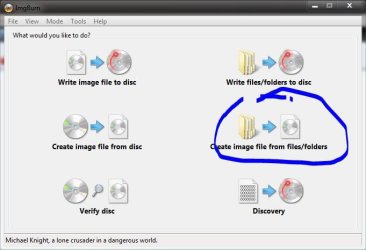
The Official ImgBurn Website will do that, First, in easy mode, select Create image file from Files/Folders,

Capture.JPG

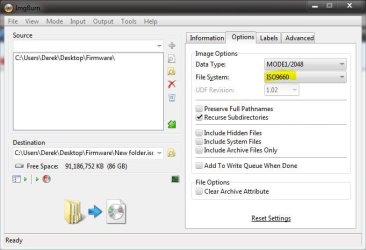
Then select your source (put the PANA_DVD.FRM in an empty folder) and destination folders, and under the options tab change the file type to ISO9660 (Stated in the instructions from Panasonic)

options.JPG

It will ask you if you just want the contents of the folder in the image file, yes.

It only takes a few seconds to create the ISO, then you can burn that to a CD with imgburn or windows.
 

My Computer My Computer

At a glance

Win 10 Pro x64Intel I5-2500K @3.3GHz16GB G.Skill Ripjaws X (4x4GB)EVGA GeForce 750 Ti SC 2GB
Computer type
PC/Desktop
Computer Manufacturer/Model Number
Self Built
OS
Win 10 Pro x64
CPU
Intel I5-2500K @3.3GHz
Motherboard
Asrock P67 Extreme4
Memory
16GB G.Skill Ripjaws X (4x4GB)
Graphics Card(s)
EVGA GeForce 750 Ti SC 2GB
Sound Card
ASUS Xonar DG 5.1 Channels 24-bit 96KHz PCI Interface Sound
Monitor(s) Displays
auria eq2367
Screen Resolution
1920 x 1080
Hard Drives
250GB Samsung 850 EVO SSD
1TB WD Blue
1TB Hitachi
PSU
SeaSonic X 650W 80 Plus Gold
Case
Corsair Obsidian 750D
Cooling
Corsair H60, Three 140mm case fans
Keyboard
Logitech Wireless Keyboard K520
Mouse
Logitech Wireless Mouse M310
Internet Speed
Wave Broadband ~ 100 dn 5 up
Antivirus
Windows Defender, Malwarebytes Premium
Browser
Edge, IE11, Chrome
Other Info
Laptop specs: HP g7-1365dx /
CPU: AMD A6-3420M APU with Radeon(tm) HD Graphics /
RAM: Crucial 8Gb (2x4Gb) /
SSD: Crucial M4-CT128M4SSD2 ATA Device/ FW 000F /
GFX: AMD Radeon HD 6520G /
OS: Windows 10 Pro x64
What instructions are provided at the Panasonic web site? Can you give us a link to where you downloaded the firmware update from?

This is the firmware link for my DMP-BDT210-
DMP-BDT110/111/210/215/310 Firmware Download | Download | Blu-ray Disc Player/Recorder | Digital AV | Consumer Products | Support | Panasonic Global

This the link for their installation .pdf-
http://panasonic.jp/support/global/cs/bd/download/bd10/ftp_v2/BD_Firmware_Update_Procedure.pdf
The problem here is that it deals mostly with XP...

I also tried calling Pany's Clueless Tech Support (5 times), and they were No help with Win 7?
 

My Computer My Computer

At a glance

Windows 7 Pro (32)i7/26004gb512mg (add on card was less buggy than Intel ...
Computer Manufacturer/Model Number
ZT Desktop
OS
Windows 7 Pro (32)
CPU
i7/2600
Motherboard
Intel
Memory
4gb
Graphics Card(s)
512mg (add on card was less buggy than Intel direct driver)
Sound Card
Internal
Monitor(s) Displays
19" DELL Ultra Sharp
Hard Drives
C:= WD Raptor Sata6 10k rpm
D:/E:= WD Black Sata 3.0
Case
ZT Full
Cooling
ZT
Internet Speed
8000kbps cable
Other Info
Free Outpost Pro Internet Security, and no other active anti-malware.
Free On-Demand- SpyWareBlaster, MBAM, Emsisoft-Kit, and Kaspersky Anti-rootkit utility TDSSKiller.
The same method I posted above will work for the link you just posted.

I made the ISO twice while I was posting above.
 

My Computer My Computer

At a glance

Win 10 Pro x64Intel I5-2500K @3.3GHz16GB G.Skill Ripjaws X (4x4GB)EVGA GeForce 750 Ti SC 2GB
Computer type
PC/Desktop
Computer Manufacturer/Model Number
Self Built
OS
Win 10 Pro x64
CPU
Intel I5-2500K @3.3GHz
Motherboard
Asrock P67 Extreme4
Memory
16GB G.Skill Ripjaws X (4x4GB)
Graphics Card(s)
EVGA GeForce 750 Ti SC 2GB
Sound Card
ASUS Xonar DG 5.1 Channels 24-bit 96KHz PCI Interface Sound
Monitor(s) Displays
auria eq2367
Screen Resolution
1920 x 1080
Hard Drives
250GB Samsung 850 EVO SSD
1TB WD Blue
1TB Hitachi
PSU
SeaSonic X 650W 80 Plus Gold
Case
Corsair Obsidian 750D
Cooling
Corsair H60, Three 140mm case fans
Keyboard
Logitech Wireless Keyboard K520
Mouse
Logitech Wireless Mouse M310
Internet Speed
Wave Broadband ~ 100 dn 5 up
Antivirus
Windows Defender, Malwarebytes Premium
Browser
Edge, IE11, Chrome
Other Info
Laptop specs: HP g7-1365dx /
CPU: AMD A6-3420M APU with Radeon(tm) HD Graphics /
RAM: Crucial 8Gb (2x4Gb) /
SSD: Crucial M4-CT128M4SSD2 ATA Device/ FW 000F /
GFX: AMD Radeon HD 6520G /
OS: Windows 10 Pro x64
Updated without making it ISO...!

This time I downloaded the .exe file from, Panasonic North America Support (instead of Global compressed file), and saved it to Desktop (instead of a Desktop Folder) -
Pansonic Product Support - DMP-BDT210

I then burned the .ini & .RAR file"s" to my blank CD (No ISO, and Close when Finished ticked), per the NA .pdf instructions...-
http://shop.panasonic.com/docs/firm...210-dmp-bdt310/BDT110_210_310-FRM-INSTALL.pdf

Installed in about 10min, and my Blu-Ray player is working Good! :D
 
Last edited:

My Computer My Computer

At a glance

Windows 7 Pro (32)i7/26004gb512mg (add on card was less buggy than Intel ...
Computer Manufacturer/Model Number
ZT Desktop
OS
Windows 7 Pro (32)
CPU
i7/2600
Motherboard
Intel
Memory
4gb
Graphics Card(s)
512mg (add on card was less buggy than Intel direct driver)
Sound Card
Internal
Monitor(s) Displays
19" DELL Ultra Sharp
Hard Drives
C:= WD Raptor Sata6 10k rpm
D:/E:= WD Black Sata 3.0
Case
ZT Full
Cooling
ZT
Internet Speed
8000kbps cable
Other Info
Free Outpost Pro Internet Security, and no other active anti-malware.
Free On-Demand- SpyWareBlaster, MBAM, Emsisoft-Kit, and Kaspersky Anti-rootkit utility TDSSKiller.
Glad you got it, happy viewing. :)
 

My Computer My Computer

At a glance

Win 10 Pro x64Intel I5-2500K @3.3GHz16GB G.Skill Ripjaws X (4x4GB)EVGA GeForce 750 Ti SC 2GB
Computer type
PC/Desktop
Computer Manufacturer/Model Number
Self Built
OS
Win 10 Pro x64
CPU
Intel I5-2500K @3.3GHz
Motherboard
Asrock P67 Extreme4
Memory
16GB G.Skill Ripjaws X (4x4GB)
Graphics Card(s)
EVGA GeForce 750 Ti SC 2GB
Sound Card
ASUS Xonar DG 5.1 Channels 24-bit 96KHz PCI Interface Sound
Monitor(s) Displays
auria eq2367
Screen Resolution
1920 x 1080
Hard Drives
250GB Samsung 850 EVO SSD
1TB WD Blue
1TB Hitachi
PSU
SeaSonic X 650W 80 Plus Gold
Case
Corsair Obsidian 750D
Cooling
Corsair H60, Three 140mm case fans
Keyboard
Logitech Wireless Keyboard K520
Mouse
Logitech Wireless Mouse M310
Internet Speed
Wave Broadband ~ 100 dn 5 up
Antivirus
Windows Defender, Malwarebytes Premium
Browser
Edge, IE11, Chrome
Other Info
Laptop specs: HP g7-1365dx /
CPU: AMD A6-3420M APU with Radeon(tm) HD Graphics /
RAM: Crucial 8Gb (2x4Gb) /
SSD: Crucial M4-CT128M4SSD2 ATA Device/ FW 000F /
GFX: AMD Radeon HD 6520G /
OS: Windows 10 Pro x64
Back
Top