How do I repair my recovery HDD on my Toshiba Satellite

Ro82

New member
Local time
11:08 AM
Messages
10
Hello everyone,

I bought a used Lap top off of a former classmate of mine and after using it for about 6 months, I decided to do a complete factory restore on it to clean it up. I do not have any recovery disks so I need to do the factory restore using the HDD.

for some reason I can not run the factory restore. I follow the correct steps (FAQ :: How do I run a System Recovery? :: Support :: Toshiba :: Computers, Laptops/Notebooks, Tablets, Televisions, DVD and Blu-Ray Players, Camcorders, Storage, Accessories, and more) but it will not go into the restore mode. It just beeps and starts windows 7. Is my recovery driver corrupt? How can I repair it?

I have a Toshiba Satillite and it is running Windows 7. I think it might have originally been running Windows XP and the previous owner upgraded to Windows 7. I've lost contact with the guy I bought the lap-top from.

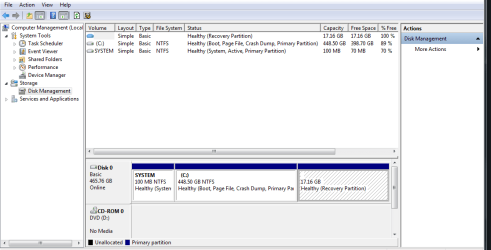
See attached for a screen shot of my drivers.

I hope someone can help me out!!


Thanks,

Ro82
 

Attachments

  • HDD.PNG
    HDD.PNG
    17.7 KB · Views: 18

My Computer My Computer

At a glance

Windows 7 64bit
OS
Windows 7 64bit
If he upgraded to win7 - the recovery partition would contain XP.

The upgrade proces would likely cause problems with accesing it.

If you need a win7 install disc, you can get the .iso files from links at my digital life.

Just google:

win 7 sp1 iso my digital life

You would need the windows 7 product key. get it from your existing installation , before you reinstall.

You can find that with any number of programs - http://www.nirsoft.net/utils/product_cd_key_viewer.html
 

My Computers My Computers

  • At a glance

    7 X64i5 84002x8gb 3200mhz
    Computer type
    PC/Desktop
    OS
    7 X64
    CPU
    i5 8400
    Motherboard
    gigabyte b365m ds3h
    Memory
    2x8gb 3200mhz
    Hard Drives
    various
    PSU
    pure power 11 400w cm
    Case
    Coolermaster
    Cooling
    cryorig m9i
  • At a glance

    7x64g54008gb ddr4 2400
    Computer type
    PC/Desktop
    OS
    7x64
    CPU
    g5400
    Motherboard
    ga b365m ds3h
    Memory
    8gb ddr4 2400
    PSU
    xfx pro 450w
The problem your having is do to the hidden partition is not there/available. It's missing all together. If it was there it would look like this (my laptop).

hard drive.PNG

You can order the recovery disc from you laptops manufacturer for a nominal fee. I've order several from HP and Dell for less than $20 each. For the money you can't beat it. You will need to download the drivers or they may send a driver disc with it...Dell does or used to, it's been awhile since I've ordered any for some of my clients.
 

My Computer My Computer

At a glance

Windows 7 Ultimate 64 bitAMD Phenom II X4 965 Black EditionGSkill 4 X 2 GB PC 8500XFX Radeon HD 6790 D
Computer Manufacturer/Model Number
Custom built
OS
Windows 7 Ultimate 64 bit
CPU
AMD Phenom II X4 965 Black Edition
Motherboard
Gigabyte GA-MA790X-DS4
Memory
GSkill 4 X 2 GB PC 8500
Graphics Card(s)
XFX Radeon HD 6790 D
Sound Card
On board RealTek HD
Monitor(s) Displays
Dual monitors:Samsung SyncMaster S20B300
Screen Resolution
1600 X 900
Hard Drives
Seagate Barracuda 1TB (primary)
Seagate Barracuda 2 X 320 GB
PSU
Ultra X4 750 watt fully modular
Case
Thermaltake Overseer RX 1 full tower
Cooling
Core-Contact 92 mm CPU Cooler
Keyboard
Logitech G510
Mouse
Razor DeathAdder
Internet Speed
50/5 Mbps UL/DL
Other Info
Optical: Super Muliti DVD burner w/lightscribe, Hauppauge WinTV HVR-1800

My Computer My Computer

At a glance

Windows 7 Ultimate 64 bitAMD Phenom II X4 965 Black EditionGSkill 4 X 2 GB PC 8500XFX Radeon HD 6790 D
Computer Manufacturer/Model Number
Custom built
OS
Windows 7 Ultimate 64 bit
CPU
AMD Phenom II X4 965 Black Edition
Motherboard
Gigabyte GA-MA790X-DS4
Memory
GSkill 4 X 2 GB PC 8500
Graphics Card(s)
XFX Radeon HD 6790 D
Sound Card
On board RealTek HD
Monitor(s) Displays
Dual monitors:Samsung SyncMaster S20B300
Screen Resolution
1600 X 900
Hard Drives
Seagate Barracuda 1TB (primary)
Seagate Barracuda 2 X 320 GB
PSU
Ultra X4 750 watt fully modular
Case
Thermaltake Overseer RX 1 full tower
Cooling
Core-Contact 92 mm CPU Cooler
Keyboard
Logitech G510
Mouse
Razor DeathAdder
Internet Speed
50/5 Mbps UL/DL
Other Info
Optical: Super Muliti DVD burner w/lightscribe, Hauppauge WinTV HVR-1800
If he upgraded to win7 - the recovery partition would contain XP.

The upgrade proces would likely cause problems with accesing it.

If you need a win7 install disc, you can get the .iso files from links at my digital life.

Just google:

win 7 sp1 iso my digital life

You would need the windows 7 product key. get it from your existing installation , before you reinstall.

You can find that with any number of programs - ProduKey - Recover lost product key (CD-Key) of Windows/MS-Office/SQL Server

I ran the ProduKey program and it gives me a Product ID number but for the Product Key it says " Product key was not found"
 

My Computer My Computer

At a glance

Windows 7 64bit
OS
Windows 7 64bit
Doesn't sound like a regular upgrade to me.

Maybe it came pre installed?

If that is the case, then you should have the product key on the laptop case ( sometimes under the battery .

It is on a funny looking sticker in very tiny writing.
 

My Computers My Computers

  • At a glance

    7 X64i5 84002x8gb 3200mhz
    Computer type
    PC/Desktop
    OS
    7 X64
    CPU
    i5 8400
    Motherboard
    gigabyte b365m ds3h
    Memory
    2x8gb 3200mhz
    Hard Drives
    various
    PSU
    pure power 11 400w cm
    Case
    Coolermaster
    Cooling
    cryorig m9i
  • At a glance

    7x64g54008gb ddr4 2400
    Computer type
    PC/Desktop
    OS
    7x64
    CPU
    g5400
    Motherboard
    ga b365m ds3h
    Memory
    8gb ddr4 2400
    PSU
    xfx pro 450w
Doesn't sound like a regular upgrade to me.

Maybe it came pre installed?

If that is the case, then you should have the product key on the laptop case ( sometimes under the battery .

It is on a funny looking sticker in very tiny writing.

is it one of the numbers that I took a picture of?

see attached for pic
 

Attachments

  • win.png
    win.png
    160.8 KB · Views: 18

My Computer My Computer

At a glance

Windows 7 64bit
OS
Windows 7 64bit
Yep, it is the 25 digit product key.

The one that goes TXXXX-CXXXX -and so on.

Looks like win7 key to me.

I expect win7 came preinstalled - there is a different product key and activation system for the one on your HD.

The key on your sticker is a regular one - that is in case you need to clean reinstall.

You should be ok with that.
 

My Computers My Computers

  • At a glance

    7 X64i5 84002x8gb 3200mhz
    Computer type
    PC/Desktop
    OS
    7 X64
    CPU
    i5 8400
    Motherboard
    gigabyte b365m ds3h
    Memory
    2x8gb 3200mhz
    Hard Drives
    various
    PSU
    pure power 11 400w cm
    Case
    Coolermaster
    Cooling
    cryorig m9i
  • At a glance

    7x64g54008gb ddr4 2400
    Computer type
    PC/Desktop
    OS
    7x64
    CPU
    g5400
    Motherboard
    ga b365m ds3h
    Memory
    8gb ddr4 2400
    PSU
    xfx pro 450w
Yep, it is the 25 digit product key.

The one that goes TXXXX-CXXXX -and so on.

Looks like win7 key to me.

I expect win7 came preinstalled - there is a different product key and activation system for the one on your HD.

The key on your sticker is a regular one - that is in case you need to clean reinstall.

You should be ok with that.

Awesome!! So now all I have to do is going to the website you provided earlier and download the Windows 7 Professional ISO? Do I have to burn it onto a disk or can I run it from my C: drive? Does this do a full clean up on my computer and delete all of the files, programs, user accounts, ect.?
 

My Computer My Computer

At a glance

Windows 7 64bit
OS
Windows 7 64bit
It is a very big download.

You would be best burning it to dvd , or flash drive.

Then you have it for the future.

If you boot the dvd you will get the usual installation options.

See here:

http://www.sevenforums.com/tutorials/1649-clean-install-windows-7-a.html

If you use that product key off the sticker, you may need to phone activate - depends on the oem .
 

My Computers My Computers

  • At a glance

    7 X64i5 84002x8gb 3200mhz
    Computer type
    PC/Desktop
    OS
    7 X64
    CPU
    i5 8400
    Motherboard
    gigabyte b365m ds3h
    Memory
    2x8gb 3200mhz
    Hard Drives
    various
    PSU
    pure power 11 400w cm
    Case
    Coolermaster
    Cooling
    cryorig m9i
  • At a glance

    7x64g54008gb ddr4 2400
    Computer type
    PC/Desktop
    OS
    7x64
    CPU
    g5400
    Motherboard
    ga b365m ds3h
    Memory
    8gb ddr4 2400
    PSU
    xfx pro 450w
It is a very big download.

You would be best burning it to dvd , or flash drive.

Then you have it for the future.

If you boot the dvd you will get the usual installation options.

See here:

http://www.sevenforums.com/tutorials/1649-clean-install-windows-7-a.html

If you use that product key off the sticker, you may need to phone activate - depends on the oem .

Thank you very much!!

I am going to download the ISO tonight and run it tomorrow when I get home from work. Ill let you know how it goes.
 

My Computer My Computer

At a glance

Windows 7 64bit
OS
Windows 7 64bit
Ok I did some more digging and this is what I found out:

The laptop came with Windows Vista.

The previous owner got a free version of windows 7 from our school acouple of years ago.

The previous owner can not find the product key or Windows 7 disk.

What should I do?? Can I simply microsoft and ask for a new product key?
 

My Computer My Computer

At a glance

Windows 7 64bit
OS
Windows 7 64bit
They will probably say those free keys are only for qualifying students - of course, they keep using it forever, but they will only give out new ones to students.

Something along those lines, probably. If you are still at school - that may do it.

Try another product key finder and see if that does the job - a lot of useful freebies here Josh Cell Softwares
 

My Computers My Computers

  • At a glance

    7 X64i5 84002x8gb 3200mhz
    Computer type
    PC/Desktop
    OS
    7 X64
    CPU
    i5 8400
    Motherboard
    gigabyte b365m ds3h
    Memory
    2x8gb 3200mhz
    Hard Drives
    various
    PSU
    pure power 11 400w cm
    Case
    Coolermaster
    Cooling
    cryorig m9i
  • At a glance

    7x64g54008gb ddr4 2400
    Computer type
    PC/Desktop
    OS
    7x64
    CPU
    g5400
    Motherboard
    ga b365m ds3h
    Memory
    8gb ddr4 2400
    PSU
    xfx pro 450w
They will probably say those free keys are only for qualifying students - of course, they keep using it forever, but they will only give out new ones to students.

Something along those lines, probably. If you are still at school - that may do it.

Try another product key finder and see if that does the job - a lot of useful freebies here Josh Cell Softwares


OK so I went onto the website that you provided and I installed and ran the Advanced Token Manager. I thought maybe I had some corrupt files that where causing my laptop to run slowly.

After running the program, I rebooted and ran the ProduKey program that I had installed a couple days ago. This time it gives me the Product Key for Windows 7 but it is giving me a different Product ID. So the next thing I did was go and see the basic info of the computer and the product ID has been changed here too. Also, there is a h-link saying I have 30 days to activate windows.

Is this a bad thing??
 

My Computer My Computer

At a glance

Windows 7 64bit
OS
Windows 7 64bit
Produkey program may be wrong - it didn't seem to work when you ran it?

Try running the other one - and see if that does it.

Not clear to me what you did - they only find the product key - they don't add any extraneous info - or at least they shouldn't.
 

My Computers My Computers

  • At a glance

    7 X64i5 84002x8gb 3200mhz
    Computer type
    PC/Desktop
    OS
    7 X64
    CPU
    i5 8400
    Motherboard
    gigabyte b365m ds3h
    Memory
    2x8gb 3200mhz
    Hard Drives
    various
    PSU
    pure power 11 400w cm
    Case
    Coolermaster
    Cooling
    cryorig m9i
  • At a glance

    7x64g54008gb ddr4 2400
    Computer type
    PC/Desktop
    OS
    7x64
    CPU
    g5400
    Motherboard
    ga b365m ds3h
    Memory
    8gb ddr4 2400
    PSU
    xfx pro 450w
Produkey program may be wrong - it didn't seem to work when you ran it?

Try running the other one - and see if that does it.

Not clear to me what you did - they only find the product key - they don't add any extraneous info - or at least they shouldn't.

I'm getting the same product ID number in my computer description and in the ProduKey program but it is different than the number I had before I ran the Advance Token Manager program. Is this normal? See attached for screen shots.

what other Product Key finder should I download? I looked through the website you provided a couple days ago and I couldn't find one. Maybe I was looking in the wrong page?
 

Attachments

  • product.PNG
    product.PNG
    3.6 KB · Views: 3
  • product2.PNG
    product2.PNG
    9.4 KB · Views: 2

My Computer My Computer

At a glance

Windows 7 64bit
OS
Windows 7 64bit
see attached for the program I downloaded from Josh Cell Softwares

After running this program and rebooting, My Laptop seemed to have a different Product ID number.
 

Attachments

  • download.PNG
    download.PNG
    41.7 KB · Views: 2

My Computer My Computer

At a glance

Windows 7 64bit
OS
Windows 7 64bit
That program that I ran must of messed up my version of Windows somehow because I just tried to active it and got the following message.
 

Attachments

  • ACTIVATION.PNG
    ACTIVATION.PNG
    8.2 KB · Views: 1

My Computer My Computer

At a glance

Windows 7 64bit
OS
Windows 7 64bit
That looks like the deafault win7 product- if so, it is the one already on the install dvd,

You then usually have 30 days to enter your purchased key.

I am not familiar with that program you used. In the screenshot it is called MBR Regenerator.

Isn't there a product key finder app on that site any more?

I will have a look.

It says
MBR Regenerator will help you to repair your OS after corrupted core files and activation problems

Not sure what that does tbh. Might be it just resets everything to default to try and fix any corruption there may have been. It doesn't seem to have done you any favours.

Did you use the Tokens manager before it ?- that looks like the product key program.

If so, and it found your key - it may be able to tell what it is, or restore it for you.


The key on laptop sticker is presumably for Vista as you have now discovered that was installed first.
 

My Computers My Computers

  • At a glance

    7 X64i5 84002x8gb 3200mhz
    Computer type
    PC/Desktop
    OS
    7 X64
    CPU
    i5 8400
    Motherboard
    gigabyte b365m ds3h
    Memory
    2x8gb 3200mhz
    Hard Drives
    various
    PSU
    pure power 11 400w cm
    Case
    Coolermaster
    Cooling
    cryorig m9i
  • At a glance

    7x64g54008gb ddr4 2400
    Computer type
    PC/Desktop
    OS
    7x64
    CPU
    g5400
    Motherboard
    ga b365m ds3h
    Memory
    8gb ddr4 2400
    PSU
    xfx pro 450w
Reading that, it seems a useful program :

MBR Regenerator, is a technology, to repair any system with bricked files caused by malware or other malicious programs who were able to damage the Activation System and Technologies, restoring the windows as a Fresh Install without format or lose any file

Will repair, recovery, and restore all activation system, restoring the Windows Activation Technologies [ KB971033 ] to
original state, install trial key, and able to clean boot code, rebuild tokens for full activation reset factory

What it does is fix/reset to defaults - useful if you had corruption - the author suggests possibly as a result of malware.

You can then put in your purchased product key. So you need to have that to hand first, of course.

Hopefully, one of the product key programs you used will have that for you?

You will need it now you have reset to default.
 

My Computers My Computers

  • At a glance

    7 X64i5 84002x8gb 3200mhz
    Computer type
    PC/Desktop
    OS
    7 X64
    CPU
    i5 8400
    Motherboard
    gigabyte b365m ds3h
    Memory
    2x8gb 3200mhz
    Hard Drives
    various
    PSU
    pure power 11 400w cm
    Case
    Coolermaster
    Cooling
    cryorig m9i
  • At a glance

    7x64g54008gb ddr4 2400
    Computer type
    PC/Desktop
    OS
    7x64
    CPU
    g5400
    Motherboard
    ga b365m ds3h
    Memory
    8gb ddr4 2400
    PSU
    xfx pro 450w
Back
Top