Hello and thank you,
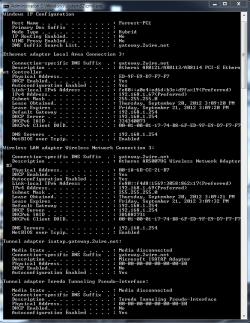
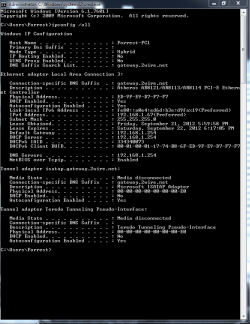
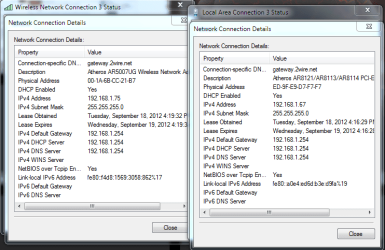
So it all started when i updated my bios, i then had the issue of unidentifiable network. Then i tried to do a clean install of Windows. Didn't help. I then connected the usb wireless adapter we have and had no problem. Then some how the network got connected and my LAN had the name of the wireless but worked. Then i was being retarded and tried to update the driver and it got messed up again. We got a new router from att so i know its not the router. When i go on the router page it shows my pc connected fine and when i go into details of the connection on my comp it shows all the correct information (ie. IP, default gateway, ect.). So i don't know what to do. Please help me figure this bugger out.
Thanks a million,
Forrest
So it all started when i updated my bios, i then had the issue of unidentifiable network. Then i tried to do a clean install of Windows. Didn't help. I then connected the usb wireless adapter we have and had no problem. Then some how the network got connected and my LAN had the name of the wireless but worked. Then i was being retarded and tried to update the driver and it got messed up again. We got a new router from att so i know its not the router. When i go on the router page it shows my pc connected fine and when i go into details of the connection on my comp it shows all the correct information (ie. IP, default gateway, ect.). So i don't know what to do. Please help me figure this bugger out.
Thanks a million,
Forrest
My Computer
- Computer Manufacturer/Model Number
- Started Asus CM5571 then customized
- OS
- Windows 7 Ultimate x64
- CPU
- Pentium Dual Core
- Motherboard
- ASUS CM5571
- Memory
- 6 GB
- Graphics Card(s)
- AMD Radeon HD 6670
- Sound Card
- AMD High Definition Audio Device
- Monitor(s) Displays
- Acer 20" LED (DVI) and Samsung 32" LCD TV (HDMI)
- Screen Resolution
- 1600x900 and 1280x720
- Hard Drives
- 1 Tb HDD
- PSU
- Consair GS600
- Case
- Antec nine hundered two
- Cooling
- case fans
- Mouse
- Logitec G500



 any other suggestions? Thank you again everyone.