Solved RTL8187 USB wifi antenna cannot connect to the internet

cynicalanddisgu

New member
I have an acer x3400 desktop - no wifi card. I installed a 6db gain usb wifi antenna. Everything looks good but...
I cannot connect to one of the local networks - It is WPA preshared key TKIP/AES
The realtek wireless lan utility never gets an IP address despite excellent signal strength. I have an acer netbook running xp with built in wireless connects perfectly.

There is a second local network that is not encrypted. I have connected to the system - acquired IP address, Subnet mask and gateway. Network and sharing show the connection PC to Network, but no connection to the internet. My netbook does not have enough gain to access that network but I am sure that it is working fine.

The initial firewall setup was using Mcafee. Mcafee wouldn't let me in without an internet connection. So I uninstalled Mcafee. I have disabled the windows 7 firewall.

I have tried to connect using the Realtek utility and with the windows 7 wireless network connection screen.

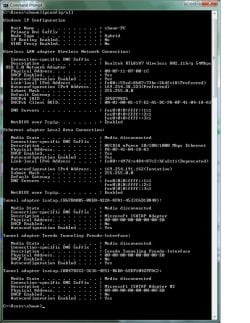
IPconfig
media state ... media disconnected
connection specific DNS suffix ... blank
description ... Realtek RTL8187 Wireless 802.11b/g 54MBPS USB 2.0 Network adapter
physical address ,,, 00-0F-11-07-00-1C
DHC enabled ... yes
autoconfiguration enabled ... yes

Device properties indicates that it is working properly.

such is life - Any ideas?
 

My Computer

OS
windows 7
Any more information from the ipconfig? You're not even showing as having an IP address unless you chose to leave that information out.
 

My Computer

Computer Manufacturer/Model Number
Custom
OS
Windows 7 Ultimate 64-bit
CPU
AMD Phenom II X4 955 Black OC'ed 4.0GHz
Motherboard
Asus M5A88-V EVO
Memory
8GB Mushkin Enhanced Silverline (2x4GB) 1333
Graphics Card(s)
XFX Radeon HD6870 1024MB GDDR5 OC'ed 945MHz; 1151MHz
Sound Card
Soundblaster X-Fi Xtreme PCIe
Monitor(s) Displays
32" Hannspree SE32LMNB
Screen Resolution
1920 x 1080
Hard Drives
250GB Hitachi Deskstar (OS); 2TB Western Digital Elements
PSU
650W XFX XXX Edition 80PLUS Bronze Modular
Case
Cougar 6GR1 Evolution
Cooling
Corsair H60 p/p 120mm; Zalman VF3000A; x4 120mm; x1 140mm
Keyboard
Logitech G510
Mouse
CM Storm Sentinel Advance Zero-G
Internet Speed
Not fast enough :I
Other Info
No matter what your specs, my PC is better.
That was the entirety of info for the Wireless LAN adapter Wireless network connection.

Under Windows IP configuration

Primary DNS sufix ... blank
Mode type hybrid
IP routing enabled ... no
VINS Proxy enabled ... no
 

My Computer

OS
windows 7
Very odd, it should look something more like this:

View attachment 232054

Can you take a screenshot and upload it please?
 

My Computer

Computer Manufacturer/Model Number
Custom
OS
Windows 7 Ultimate 64-bit
CPU
AMD Phenom II X4 955 Black OC'ed 4.0GHz
Motherboard
Asus M5A88-V EVO
Memory
8GB Mushkin Enhanced Silverline (2x4GB) 1333
Graphics Card(s)
XFX Radeon HD6870 1024MB GDDR5 OC'ed 945MHz; 1151MHz
Sound Card
Soundblaster X-Fi Xtreme PCIe
Monitor(s) Displays
32" Hannspree SE32LMNB
Screen Resolution
1920 x 1080
Hard Drives
250GB Hitachi Deskstar (OS); 2TB Western Digital Elements
PSU
650W XFX XXX Edition 80PLUS Bronze Modular
Case
Cougar 6GR1 Evolution
Cooling
Corsair H60 p/p 120mm; Zalman VF3000A; x4 120mm; x1 140mm
Keyboard
Logitech G510
Mouse
CM Storm Sentinel Advance Zero-G
Internet Speed
Not fast enough :I
Other Info
No matter what your specs, my PC is better.
I could not open your attachment - I got an invalid attachment link - but here is the ipconfig screenshot (hopefully)
screenshtjpg.jpg
 

My Computer

OS
windows 7
Looks like it almost can't even talk to the router properly; how much do you know about routers and networking? I've got a rather involved process I want to try.

Also, what brand of router is it?
 

My Computer

Computer Manufacturer/Model Number
Custom
OS
Windows 7 Ultimate 64-bit
CPU
AMD Phenom II X4 955 Black OC'ed 4.0GHz
Motherboard
Asus M5A88-V EVO
Memory
8GB Mushkin Enhanced Silverline (2x4GB) 1333
Graphics Card(s)
XFX Radeon HD6870 1024MB GDDR5 OC'ed 945MHz; 1151MHz
Sound Card
Soundblaster X-Fi Xtreme PCIe
Monitor(s) Displays
32" Hannspree SE32LMNB
Screen Resolution
1920 x 1080
Hard Drives
250GB Hitachi Deskstar (OS); 2TB Western Digital Elements
PSU
650W XFX XXX Edition 80PLUS Bronze Modular
Case
Cougar 6GR1 Evolution
Cooling
Corsair H60 p/p 120mm; Zalman VF3000A; x4 120mm; x1 140mm
Keyboard
Logitech G510
Mouse
CM Storm Sentinel Advance Zero-G
Internet Speed
Not fast enough :I
Other Info
No matter what your specs, my PC is better.
I know nothing of routers - and I don't have access to the router. The ones that I log into are semi-public domain supplied by the local hotels, libraries, bars etc.
 

My Computer

OS
windows 7
Well that scuppers the last fifteen minutes I've been typing up a guide for you.

Are you using McAfee by any chance?
 

My Computer

Computer Manufacturer/Model Number
Custom
OS
Windows 7 Ultimate 64-bit
CPU
AMD Phenom II X4 955 Black OC'ed 4.0GHz
Motherboard
Asus M5A88-V EVO
Memory
8GB Mushkin Enhanced Silverline (2x4GB) 1333
Graphics Card(s)
XFX Radeon HD6870 1024MB GDDR5 OC'ed 945MHz; 1151MHz
Sound Card
Soundblaster X-Fi Xtreme PCIe
Monitor(s) Displays
32" Hannspree SE32LMNB
Screen Resolution
1920 x 1080
Hard Drives
250GB Hitachi Deskstar (OS); 2TB Western Digital Elements
PSU
650W XFX XXX Edition 80PLUS Bronze Modular
Case
Cougar 6GR1 Evolution
Cooling
Corsair H60 p/p 120mm; Zalman VF3000A; x4 120mm; x1 140mm
Keyboard
Logitech G510
Mouse
CM Storm Sentinel Advance Zero-G
Internet Speed
Not fast enough :I
Other Info
No matter what your specs, my PC is better.
I uninstalled it and disabled the firewall. Since I wasn't getting onto the net in any case they just seemed like extra headaches I didn't want to worry about.
 

My Computer

OS
windows 7
You did right to uninstall it, McAfee is pretty bad at handling network connections.
McAfee - Resolving the recent update issues with McAfee Consumer Products

Or we can try another approach.

First thing to do is to open up Control Panel and then in to Network and Sharing. If your control panel has been left at the default view (Category) this will be in Network and Internet. The top option is Network and Sharing Center. Click it.
If you've set your control panel to either small or large icons though, then we can just head straight in to the N&S Center without delay.

In here we can view a whole slew of information about our current connection, but forget half of it because it's about as useful as hiring a dead hooker in a mafia den if the adapter can't talk to the router in the first place.

On the very left hand side you should see Change Adapter Settings. Click it and let me know any icons for network adapters it displays. Or screenshot it; either is good but pictures speak a thousand words per minute and type even faster.
 

My Computer

Computer Manufacturer/Model Number
Custom
OS
Windows 7 Ultimate 64-bit
CPU
AMD Phenom II X4 955 Black OC'ed 4.0GHz
Motherboard
Asus M5A88-V EVO
Memory
8GB Mushkin Enhanced Silverline (2x4GB) 1333
Graphics Card(s)
XFX Radeon HD6870 1024MB GDDR5 OC'ed 945MHz; 1151MHz
Sound Card
Soundblaster X-Fi Xtreme PCIe
Monitor(s) Displays
32" Hannspree SE32LMNB
Screen Resolution
1920 x 1080
Hard Drives
250GB Hitachi Deskstar (OS); 2TB Western Digital Elements
PSU
650W XFX XXX Edition 80PLUS Bronze Modular
Case
Cougar 6GR1 Evolution
Cooling
Corsair H60 p/p 120mm; Zalman VF3000A; x4 120mm; x1 140mm
Keyboard
Logitech G510
Mouse
CM Storm Sentinel Advance Zero-G
Internet Speed
Not fast enough :I
Other Info
No matter what your specs, my PC is better.
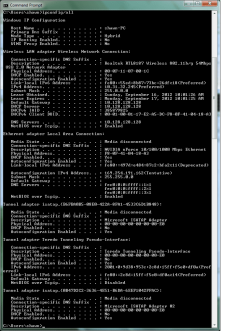
The first screenshot is when I had no connectivity. I connected to the unsecured site and got the following ipconfig screenshot
scrsht2.jpg
 

My Computer

OS
windows 7
So it is as I thought, the adapter can't talk to the router you want to connect to. But you say it's a public hotspot and thus you don't know what the actual model of router is?
You also mentioned it being pass-protected; you're using the correct passkey and observing case-sensitivity (capital letters and small letters)?
 

My Computer

Computer Manufacturer/Model Number
Custom
OS
Windows 7 Ultimate 64-bit
CPU
AMD Phenom II X4 955 Black OC'ed 4.0GHz
Motherboard
Asus M5A88-V EVO
Memory
8GB Mushkin Enhanced Silverline (2x4GB) 1333
Graphics Card(s)
XFX Radeon HD6870 1024MB GDDR5 OC'ed 945MHz; 1151MHz
Sound Card
Soundblaster X-Fi Xtreme PCIe
Monitor(s) Displays
32" Hannspree SE32LMNB
Screen Resolution
1920 x 1080
Hard Drives
250GB Hitachi Deskstar (OS); 2TB Western Digital Elements
PSU
650W XFX XXX Edition 80PLUS Bronze Modular
Case
Cougar 6GR1 Evolution
Cooling
Corsair H60 p/p 120mm; Zalman VF3000A; x4 120mm; x1 140mm
Keyboard
Logitech G510
Mouse
CM Storm Sentinel Advance Zero-G
Internet Speed
Not fast enough :I
Other Info
No matter what your specs, my PC is better.
One spot is pass protected - that one I cannot access at all. I am certain that I have the correct password - as I just recently used it to check out my tablet connectivity - and it is how I get to the internet right now with my netbook. One is unsecured - that one I can connect to - but still no internet access. In fact here is the ipconfig screenshot when it is connected to the unsecured one.

scsht3.png
 

My Computer

OS
windows 7
Weirdly enough it's not assigning an IP address to your computer that is the same as the default gateway. Here's where my steps from earlier come in. Luckily I saved it in Wordpad.


What we're going to try is to see if we can set up a network connection manually so that your wireless adapter knows what information to send to the router, before the router has even told it anything. Networking works in this way; your router will tell your adapter certain information like "Here I am and this is my number", but the adapter then has to provide the rest, like "Oh ok cool, I've got the password right here." Kind of like those shady underground bars you see in films.

Except what seems to be happening here is for some reason your adapter is trying to talk to the router to the effect of "Hey dude lemme connect to the internet yeah? I uh... Left the password at home but I know Vinnie. You know Vinnie Nine Toes?"
To which the router replies "..."

So we're going to cheat a little and tell your adapter the "password" so that it can get into the mafia den and access the sweet, sweet hookers inside. Let me know if my analogies become weird. They usually do.


First thing to do is to open up Control Panel and then in to Network and Sharing. If your control panel has been left at the default view (Category) this will be in Network and Internet. The top option is Network and Sharing Center. Click it.
If you've set your control panel to either small or large icons though, then we can just head straight in to the N&S Center without delay.

In here we can view a whole slew of information about our current connection, but forget half of it because it's about as useful as hiring a dead hooker in a mafia den if the adapter can't talk to the router in the first place.
Where it says View Your Active Networks it'll have on the left side the name of the network connection, and opposite this on the right side Access Type, HomeGroup and Connections. Go ahead and click on what it says next to Connections (this will most likely be "Wireless Network Connection" for you).

The new box that pops up has what we need at the bottom in the Properties button, so go ahead and give that little mofo a click. In the new Wireless Network Connection Properties box it should say Connect Using: and then in the text field display "Realtek RTL8187 Wireless 802.11b/g 54Mbps USB 2.0 Network Adapter", because sometimes hardware just sports an impromptu boner at the length of its own name and so forces said name on everything that will display it.
As long as this is displayed correctly, look on down to the box below which has a list of gumph, the only one of which we need being Internet Protocol Version 4.
Double-click that bad boy.

If it says Obtain IP Address Automatically, give it a pimp slap and select Use the following IP Address, then input:
IP Address: 192.168. .xx (where xx is a double-digit number of your choosing; this is your computer)
Subnet Mask: 255.255.255.0 (no one knows what this is)
Default Gateway: 192.168. .1 (this is your router)

In the field below, about DNS server, you have one of two options. You can either specify your router/default gateway, or if this gives you trouble (the majority of routers can automatically speak to your ISPs servers and work this out between them, but sometimes there's some bad blood in the water), find out the actual DNS of your ISP and input the numbers advised to you. I have actually had to do this.
If you input your router; use the same number (Default Gateway above) for both. if you use your ISP's DNS addresses, both should be different.
 

My Computer

Computer Manufacturer/Model Number
Custom
OS
Windows 7 Ultimate 64-bit
CPU
AMD Phenom II X4 955 Black OC'ed 4.0GHz
Motherboard
Asus M5A88-V EVO
Memory
8GB Mushkin Enhanced Silverline (2x4GB) 1333
Graphics Card(s)
XFX Radeon HD6870 1024MB GDDR5 OC'ed 945MHz; 1151MHz
Sound Card
Soundblaster X-Fi Xtreme PCIe
Monitor(s) Displays
32" Hannspree SE32LMNB
Screen Resolution
1920 x 1080
Hard Drives
250GB Hitachi Deskstar (OS); 2TB Western Digital Elements
PSU
650W XFX XXX Edition 80PLUS Bronze Modular
Case
Cougar 6GR1 Evolution
Cooling
Corsair H60 p/p 120mm; Zalman VF3000A; x4 120mm; x1 140mm
Keyboard
Logitech G510
Mouse
CM Storm Sentinel Advance Zero-G
Internet Speed
Not fast enough :I
Other Info
No matter what your specs, my PC is better.
Well, thanks for the time, advice and pleasant conversation - didn't work. I think that I have had just abouot enough fun with this. I am going to try a different usb wifi antenna or I might try using an etheernet crossover cable to this netbook and try using the wifi enabled in the netbook.

I'll leave this open for a while - in case someone realizes what sill mistake I am making.

shawn
 

My Computer

OS
windows 7
got a new usb wifi adapter - less than 5 bucks delivered. I logged into the secured public wifi no problem. The signal is a bit weak but sufficient. I no longer have the need of the 6db antenna so problem solved. Now I can update windows and install my hp1200 laserjet (it's amazing that the original windows 7 did not support that printer).
 

My Computer

OS
windows 7
Back
Top