Solved I can't OPEN Microsoft office starter 2010.

Holmes20

New member
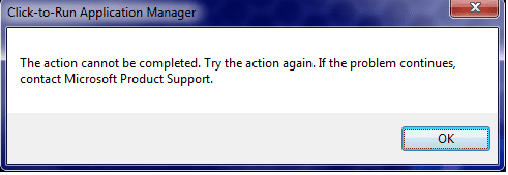
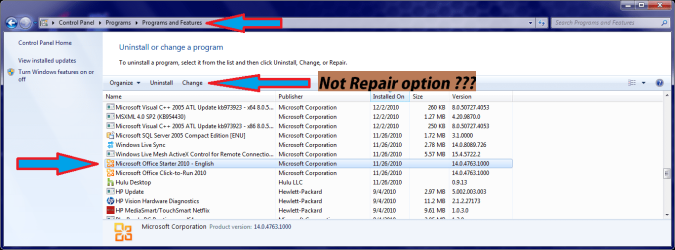
I had been using Office Starter 2010 for about a week, now suddenly when I try to open it I get a pop up message that it cannot be opened. Try again or repair the product in control panel. But I see no option in the control panel to repair such thing, and trying again is not working. What else can I do?
Untitled4.png

If i select CHANGE I get a error message:
Clik-to-run.png


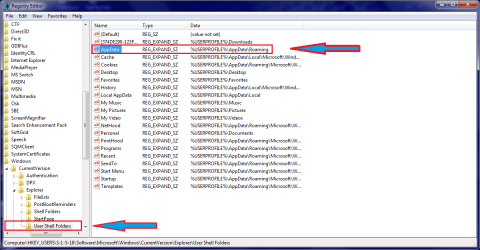
I went into REGEDIT and the values were already set to %USERPROFILE%...... and I noticed there wasn't really anything to do.
Untitled5.png

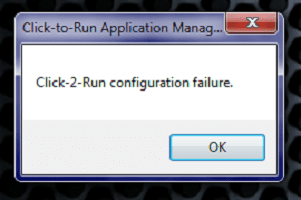
If I try to Uninstall I get this:
click-2-run3.png

CAN YOU PLEASE HELP ME OUT, THANKS
HAVE A WONDERFUL DAY!!!
 

My Computer

OS
windows 7 home premium 64 bit

My Computer

Computer type
PC/Desktop
Computer Manufacturer/Model Number
Packard Bell
OS
Windows 7 Home Premium 64bit
CPU
Intel(R) Core(TM) i3-2120 CPU @ 3.30GHz
Motherboard
Packard Bell IPISB-AG
Memory
3.00 GB
Graphics Card(s)
(1) Intel(R) HD Graphics (2) VNC Mirror Driver
Sound Card
Realtek High Definition Audio
Monitor(s) Displays
AIO LCD
Screen Resolution
1920 x 1080
Hard Drives
WDC WD10EADX-22TDHB0 ATA Device
Fixed hard disk media
4 partitions
931.51 GB
Keyboard
Wireless
Mouse
Wireless
Antivirus
Microsoft Security Essentials
Browser
IE; Firefox
Other Info
Also:
Samsung N220 Plus Netbook - Windows 7 Home
HP laptop
iPad 5
Thank you Irene for your replay, I followed instructions step by step until the 4th picture then i got this:
click-2-run6.png
What i noticed is that the little message box takes about a MINUTE to POP UP.​

NOW I have another Question, I have a program call COREL DRAW X5 and it STOPPED working, I searched and it was something call Protexis Licensing V2 That was disable on Services.
So my ? is: Can be any Service that helps Microsoft office to RUN, Disable or Stopped on Services? THANKS.
 

My Computer

OS
windows 7 home premium 64 bit

My Computer

Computer type
PC/Desktop
Computer Manufacturer/Model Number
Packard Bell
OS
Windows 7 Home Premium 64bit
CPU
Intel(R) Core(TM) i3-2120 CPU @ 3.30GHz
Motherboard
Packard Bell IPISB-AG
Memory
3.00 GB
Graphics Card(s)
(1) Intel(R) HD Graphics (2) VNC Mirror Driver
Sound Card
Realtek High Definition Audio
Monitor(s) Displays
AIO LCD
Screen Resolution
1920 x 1080
Hard Drives
WDC WD10EADX-22TDHB0 ATA Device
Fixed hard disk media
4 partitions
931.51 GB
Keyboard
Wireless
Mouse
Wireless
Antivirus
Microsoft Security Essentials
Browser
IE; Firefox
Other Info
Also:
Samsung N220 Plus Netbook - Windows 7 Home
HP laptop
iPad 5
Hello again Irene I just want to thank you for the BLOG information that you posted, My jaw droped when i saw how many people have had the same issue and dropped even more when i saw that Iolo System Mechanic is causing it.
Yes you guess it well, i do have Systeme Mechanic but thanks to SOLUTION: “Click2Run Configuration Failure” when Office 2010 Starter is launched | Triple-S Computers Blog – Louisville, KY computer repair specialist I fixed it.​


easy-to-follow instructions and it went like this:

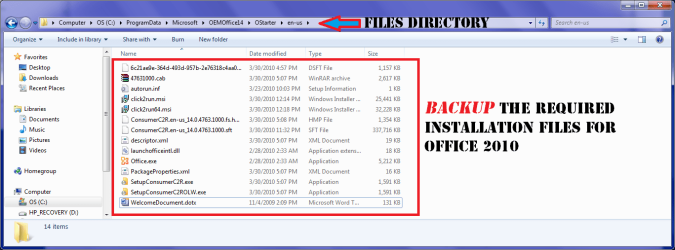
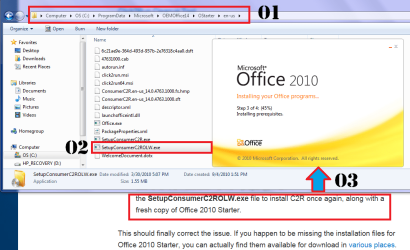
01- Make a backup of %PROGRAMDATA%\Microsoft\OEMOffice14\OStarter\en-us

Microsoft Directory 2010.png

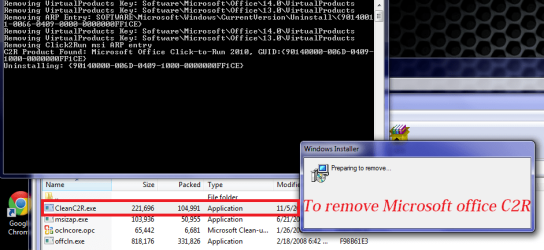
02- Execute the CleanC2R.exe file from the zip archive​

Untitled100.png

03- Reboot the PC, then execute the CleanC2R.exe tool a second time.​

Untitled100.png

04- Reboot once more, then execute the offcln.exe tool to completely remove Office 2010 Starter.​

Untitled101.png

05- Reboot yet again, then navigate to the ProgramData directory containing the Office Starter installation files. Run the SetupConsumerC2ROLW.exe file to install C2R once again, along with a fresh copy of Office 2010 Starter.​

Untitled103.png

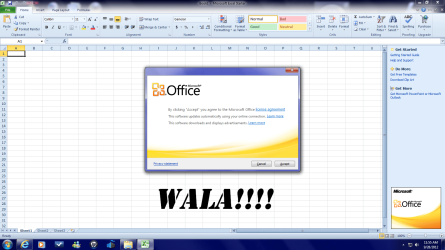
And after all that proces I did get this:​

Untitled104.png

Thank you Windows Seven Forum
You Rock!!!!!!
 
Last edited:

My Computer

OS
windows 7 home premium 64 bit
Good news, well done! :D
 

My Computer

Computer type
PC/Desktop
Computer Manufacturer/Model Number
Packard Bell
OS
Windows 7 Home Premium 64bit
CPU
Intel(R) Core(TM) i3-2120 CPU @ 3.30GHz
Motherboard
Packard Bell IPISB-AG
Memory
3.00 GB
Graphics Card(s)
(1) Intel(R) HD Graphics (2) VNC Mirror Driver
Sound Card
Realtek High Definition Audio
Monitor(s) Displays
AIO LCD
Screen Resolution
1920 x 1080
Hard Drives
WDC WD10EADX-22TDHB0 ATA Device
Fixed hard disk media
4 partitions
931.51 GB
Keyboard
Wireless
Mouse
Wireless
Antivirus
Microsoft Security Essentials
Browser
IE; Firefox
Other Info
Also:
Samsung N220 Plus Netbook - Windows 7 Home
HP laptop
iPad 5
Back
Top