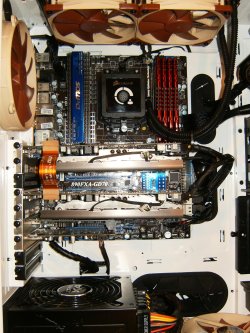
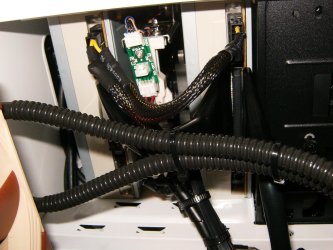
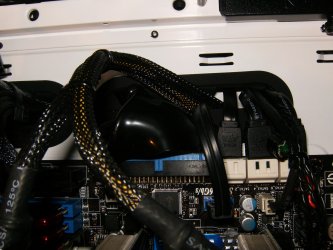
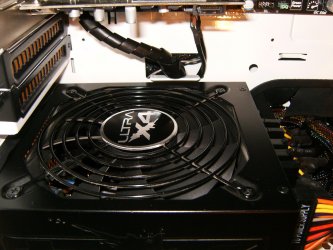
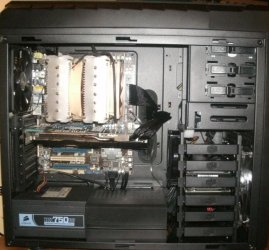
Although your case does not look the best for cable management, even without cable extensions you should at least be able to send a few cables from the PSU through the hole nearest to it and out again near to where they need to be. I would consider buying some cheap cable ties too and maybe tucking some of the sata cables away a little if possible.
Tape has a nasty way of transferring it's stick'um to the cable and case over time making removing and moving cables a major pain. Please the basic black zip tie is such and affordable builders tool you must use them to gather cables gently together and route them under around and away form sight where possible.
My Computer
Computer type
PC/Desktop
Computer Manufacturer/Model Number
A blend of brains, brawn and dumb luck.
OS
Windows 7 Ultimate 64
CPU
i7 3770k OC'd 4.6 @ 1.17v, also FX 8120 & i5 miniITX
Motherboard
MSI P67A-GD80 b3
Memory
32 gb G.Skill Sniper DDR3 10-12-12-31 @ 2133
Graphics Card(s)
XFX Radeon 7870 2GB DDR5
Sound Card
Sound Blaster Z Series Card
Monitor(s) Displays
(2) LG LED 23" 1920 x 1080 2ms Monitors via mini d-port
Screen Resolution
1680 X 1050 p
Hard Drives
Samsung 256 gb 830 SSD sata III
(1) 1 tb WD Black
(2) 1 tb Hitachi deskmates/sata II
(2) 1 tb WD green/sata II
(2) 3 tb Seagate Barracuda
(1) 120 gb OCZ Vertex SS
(1) Drobo 5N w/5 Seagate 3tb
PSU
EVGA modular 1000G2 80% gold rating & APC 1200 RS
Case
CoolerMaster Storm Styker
Cooling
7 case fans 140mm & 120mm, NZXT Kraken X60
Keyboard
(2) Logitech Illuminated Keyboards (1) usb (1) wireless
Mouse
Logitech G700 & T-BC21 - nano nx for the laptop
Internet Speed
Basic 120mbps down
Antivirus
Trend Micro Titanium Max Security & Malwarebytes Premium
Browser
Chrome and IE 10
Other Info
5 Noctua case fans + 3 Noctua in p/p on NZXT cooler
Integrated hot swap drive bays for 2.5" Drives
(2) Lite-on dvd/cd/Blu Ray optical 22X
Integrated fan controller and led on/off
HP Officejet Pro 8630 all-n-one
Hot-swappable 3.5" hard drive bay
Netgear Nighthawk router
Asus USB 3 & sata 6 PCIe card
Vantec IDE to sata adptr./Ultra sata adptr
Lenovo L420 i5 lappy with m sata
Drobo 5N advanced NAS
If you have space between the motherboard tray and the back cover, run as many there as you can. Depending on the brand of PSU you have they all should be long enough To come back inside the case right where they are needed. I use Corsair PSU's and the only cable I have to use an extension on ate the ATX 8 pin cables. You can buy one for a couple of dollars. The small slots in the board are for cable ties, which have already been mentioned. I can't imagine trying to do cable management without them.I use extensions, but just for looks with the sleeved cables. It is not necessary. But here is a build with decent cable management.

![IMG_0322[1].JPG](/data/attachments/129/129341-0c0a3398cda67f232d33da10f27e535f.jpg?hash=ttwQ7GEr_b)