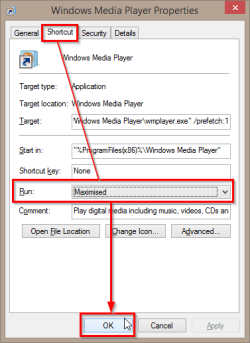
How can I have Media Player 12 open in full screen as default?

bill2reg

New member
I can't find a way to have Media Player 12 open in full screen every time I open a video, mp3, wmv or whatever. I don't want to mess with the registry. Is there a setting that I am missing somewhere?
System is Windows 7, Home edition 64bit, 12GB ram, Intel i7 6-core 3.2GHz, 2TB hard drive, ATI Radeon HD5570 graphics.
 

My Computer

Computer type
PC/Desktop
Computer Manufacturer/Model Number
HP Pavilion Elite HPE 490E
OS
Windows Home Premium 64bit
CPU
Intel Core i7 970 @ 3.2 GHz
Memory
12 GB
Graphics Card(s)
AMD

My Computer

Computer Manufacturer/Model Number
HP Pavilion Phoenix H9-1060sc
OS
Windows 8 Pro 64-Bit
CPU
Intel Core i7 (2nd Gen) 2600 / 3.4 GHz
Motherboard
IPISB-CH2 (Chicago)
Memory
16 GB
Graphics Card(s)
Nvidia GeForce GTX 580
Sound Card
Integrated IDT 92HD89E Audio
Monitor(s) Displays
Samsung 23" SyncMaster SA750D
Screen Resolution
1920 x 1080
Hard Drives
120 GB Solid State & 2 TB 7200 RPM 3.0 Gb/sec
PSU
Internal 600 Watt (100V-240V)
Case
HP Tower: Height: 41.3 cm Width: 17.3 cm
Keyboard
HP Wireless, Shipped with Computer
Mouse
Came with Keyboard as bundle
Internet Speed
Never Enough aka 8 mb/s
Almost! It's an improvement in that media player now opens maximized but still needs to be clicked on the full screen icon to get to full screen. It also seems to disable the double click to option to go from maximized to full screen. I have to actually scroll to the full screen icon and click on it to go to full screen.
Thanks for your effortss
 

My Computer

Computer type
PC/Desktop
OS
PA - Pennsylvania

My Computer

Computer type
Laptop
Computer Manufacturer/Model Number
HP ENVY 17-1150eg
OS
Windows 10 Pro x64 EN-GB
CPU
1.6 GHz Intel Core i7-720QM Processor
Memory
6 GB
Graphics Card(s)
ATI Mobility Radeon HD 5850 Graphics
Sound Card
Beats sound system with integrated subwoofer
Monitor(s) Displays
17" laptop display, 22" LED and 32" Full HD TV through HDMI
Screen Resolution
1600*900 (1), 1920*1080 (2&3)
Hard Drives
Internal: 2 x 500 GB SATA Hard Disk Drive 7200 rpm
External: 2TB for backups, 3TB USB3 network drive for media
Cooling
As Envy runs a bit warm, I have it on a Cooler Master pad
Keyboard
Logitech diNovo Media Desktop Laser (bluetooth)
Mouse
Logitech Performance Mouse MX
Internet Speed
50/10 Mbps VDSL
Antivirus
Windows Defender 4.3.9431.0
Browser
Maxthon 3.5.2., IE11
I'm with Kari,
I not a fan of using the Full screen box option it messes with the resolution or it seems to, the F11 key is a better option.
I do prefer using Normal window on the screen shot Kari provided,
Then just drag the window to the top/ left corner of your screen and diagonally drag the bottom/ right corner to fill the screen./ Close.
Windows should remember the size next time you open wmp.
If not your resolution might not be on the recommended settings or your video card driver might be out of date.
http://www.sevenforums.com/tutorials/255-screen-resolution-display-settings.html
 

My Computer

Computer type
PC/Desktop
Computer Manufacturer/Model Number
Custom assembled by me :}
OS
Win-7-Pro64bit 7-H-Prem-64bit
CPU
i7-5930K 2nd i9-9940x both water blocked VRM's too
Motherboard
ASUS SABERTOOTH X99 2nd ASUS x299 Apex
Memory
Trident-z 3200C14 2nd Trident-z 3600C16
Graphics Card(s)
EVGA 1080ti ftw3 2nd Titan Xp both water blocked
Sound Card
Built-in Realtek
Monitor(s) Displays
1-AOC G2460PG 24"G-Sync 144Hz/ 2nd 1-ASUS VG248QE 24" 144Hz
Screen Resolution
1920 x 1080 144Hz
Hard Drives
2-Samsung M.2 Evo & Evo Plus
2-Samsung 850 EVO 500GB SSD's/ 3-2.5 W.D. Black 1tb-&3-1tb/3-3.5 WD Black 1tb hdd's
PSU
EVGA SuperNOVA 1000-P2 2nd 1200-P2
Case
2-Corsair Obsidian Series 450D Black ATX Mid Tower
Cooling
Custom water loops
Keyboard
Logitech G710+/ 2nd Logitech G910
Mouse
2-RedDragon M901 Perdition 16400 dpi Gaming mouse = wired
Internet Speed
Comcast Ping 19ms 89.31mbps download speed 6.12mbps upload
Antivirus
Malwarebytes Pro/ Superantispyware Pro
Browser
FireFox & Pale moon
Other Info
2nd ASUS X299 Apex/Intel i9-9940x with Custom water loop/7H-Prem-x64/Corsair 450D case/Ram Trident-z 3600C16 4x8gb / Samsung970Evo plus 500gb SSD/Dual ssd EZ swap evo/PSU EVGA SuperNova 1200w-P2 80+Platinum/GPU Titan Xp /8-ML-140 on push-pull on 2-280GTX rads
Kari,
Two things.
I want to open in Full Screen(not maximized) because I link to video clips out of Powerpoint to save on PPT file size. I used to do this seamlessly in earlier versions of WMP which had a default player setting of full screen.
Second problem, the shortcut preferences doesn't seem to do anything. All video files will only open minimized. no matter what I choose in shortcut settings.
It just seems more professional when I don't have to noodle around adjusting screen each time I bring up a video clip.
 

My Computer

Computer type
PC/Desktop
OS
PA - Pennsylvania
Videos normally open in their original resolution. If you have a 1920*1080 screen but the video has oroginal resolution of 640*480, that's the size it opens.
 

My Computer

Computer type
Laptop
Computer Manufacturer/Model Number
HP ENVY 17-1150eg
OS
Windows 10 Pro x64 EN-GB
CPU
1.6 GHz Intel Core i7-720QM Processor
Memory
6 GB
Graphics Card(s)
ATI Mobility Radeon HD 5850 Graphics
Sound Card
Beats sound system with integrated subwoofer
Monitor(s) Displays
17" laptop display, 22" LED and 32" Full HD TV through HDMI
Screen Resolution
1600*900 (1), 1920*1080 (2&3)
Hard Drives
Internal: 2 x 500 GB SATA Hard Disk Drive 7200 rpm
External: 2TB for backups, 3TB USB3 network drive for media
Cooling
As Envy runs a bit warm, I have it on a Cooler Master pad
Keyboard
Logitech diNovo Media Desktop Laser (bluetooth)
Mouse
Logitech Performance Mouse MX
Internet Speed
50/10 Mbps VDSL
Antivirus
Windows Defender 4.3.9431.0
Browser
Maxthon 3.5.2., IE11
Kari,
Two things.
I want to open in Full Screen(not maximized) because I link to video clips out of Powerpoint to save on PPT file size. I used to do this seamlessly in earlier versions of WMP which had a default player setting of full screen.
Second problem, the shortcut preferences doesn't seem to do anything. All video files will only open minimized. no matter what I choose in shortcut settings.
It just seems more professional when I don't have to noodle around adjusting screen each time I bring up a video clip.

I found a working solution from here
It's a registry edit work in Windows 8.1 Media Player 12.
One caveat is you need to right click on LocalServer32 and change permission to full control, otherwise you can't change the registry on the right "error edit value".
How To Take Full Permissions Control To*Edit*Protected Registry Keys
VwhBykP.png

Good luck for anyone one still looking for this!

Btw, I found using PotPlayer, VLC, GOM player, Media classic can easily play in fullscreen by default with an option in setting.
 

My Computer

Computer type
Laptop
Computer Manufacturer/Model Number
Lenovo U330
OS
Windows 8.1 Professional x64
CPU
Core 2 Duo 2GHz
Memory
6GB
I had the same problem. I wanted WMP to open full screen when I played a video. Easy fix. Open your WMP, and at the top left, click on "View", then move your cursor down to where it says "Video size",then click just to the left of the phrase "Fit video to player on resize". Make sure that after you have done this there is a check mark to the left of that phrase. Try your WMP video and problem should be fixed!
 

My Computer

Computer type
PC/Desktop
Computer Manufacturer/Model Number
Cybertron
OS
Windows 7 Home Premium 64 bit
CPU
Intel Core i7 6700K 4.00 GHz
Motherboard
ASUS PRIME H270-PRO LGA1151 DDR4 DP HDMI DVI M.2 USB 3.1 H27
Memory
Corsair Vengeance 16GB (2x8GB) DDR4 3000 (PC4-24000) C15 for
Graphics Card(s)
EVGA GeForce GTX 1050 Ti SC GAMING, 4GB GDDR5, DX12 OSD
Sound Card
Realtek High Definition Audio Device
Monitor(s) Displays
ASUS VS 239
Screen Resolution
1920x 1080
Hard Drives
1TB SATA3 7200RPM 64MB Cache
PSU
EVGA SuperNOVA 650 G3, 80 Plus Gold 650W, Fully Modular
Back
Top