How to install windows 7 to usb external hard drive

coolecho

New member
Member
Local time
11:47 AM
Messages
38
Hello,
I am attempting to install Windows 7 to a external 1TB hard drive. I am following instruction at www.intowindows.com/how-to-install-windows-7-to-usb-external-hard-drive-must-read/
I have installed the windows automated install (WAIK), and copied the Windows 7 CD to a folder on the hard drive as instructed. I found and placed the Bcdboot.exe, Bootsect.exe and Imagex.exe files as instructed.
It next has an instruction to run "Installer.cmd" which I assume it's supposed to be located in the Windows 7 CD folder. I cannot find "Installer.cmd", and searched the entire drive. Does anyone know of where this file or proper file can be found?
Thanks
 

My Computer My Computer

At a glance

Windows 7 64bit
OS
Windows 7 64bit
That file should be listed under your WAIK directory according to the website.
 

My Computer My Computer

At a glance

Windows 7 Ultimate x64
OS
Windows 7 Ultimate x64
That is very old.

You can use mine if you don't pass it around.
run the RUNMEASADMIN.CMD - obviously, rt click and run as admin

Check your PM
 

My Computers My Computers

  • At a glance

    7 X64i5 84002x8gb 3200mhz
    Computer type
    PC/Desktop
    OS
    7 X64
    CPU
    i5 8400
    Motherboard
    gigabyte b365m ds3h
    Memory
    2x8gb 3200mhz
    Hard Drives
    various
    PSU
    pure power 11 400w cm
    Case
    Coolermaster
    Cooling
    cryorig m9i
  • At a glance

    7x64g54008gb ddr4 2400
    Computer type
    PC/Desktop
    OS
    7x64
    CPU
    g5400
    Motherboard
    ga b365m ds3h
    Memory
    8gb ddr4 2400
    PSU
    xfx pro 450w
It's not anywhere on the drive. I'll try RunMeAsAdmin, Thanks SIW2.
 

My Computer My Computer

At a glance

Windows 7 64bit
OS
Windows 7 64bit
Yep, just run it - browse to the wim - select the edition, select the partition to install to ( you must already have created a partition ) select the active partition, say yes when it asks if it is usb.

That's it.
 

My Computers My Computers

  • At a glance

    7 X64i5 84002x8gb 3200mhz
    Computer type
    PC/Desktop
    OS
    7 X64
    CPU
    i5 8400
    Motherboard
    gigabyte b365m ds3h
    Memory
    2x8gb 3200mhz
    Hard Drives
    various
    PSU
    pure power 11 400w cm
    Case
    Coolermaster
    Cooling
    cryorig m9i
  • At a glance

    7x64g54008gb ddr4 2400
    Computer type
    PC/Desktop
    OS
    7x64
    CPU
    g5400
    Motherboard
    ga b365m ds3h
    Memory
    8gb ddr4 2400
    PSU
    xfx pro 450w
I have a problem with the installer. It says it will overwrite boot files on C drive! I followed the instructions verbatim. I had the installer locate the Windows Files/Sources/install.wim file OK. Then pressed enter to continue. I selected the image number. Then I put in the External drive letter for OS partion in which mine is "E". Next screen I put the drive letter of the Active primary partition which is "C" in my case (Drive C of the laptop, of which I am also running the installer from and contains the Windows files folder). Then I get a warning: "Target drive letter is the same as this systems Windows drive letter! This will overwrite boot files on your C: drive!"
The external drive is partitioned and has 1st active.
I will try this again to see if I get the same thing.
 

My Computer My Computer

At a glance

Windows 7 64bit
OS
Windows 7 64bit
I must have misread the website instruction. It shows enter drive of partition to install windows "L" in their case, then enter drive of Active partition normally "C". I think in my case it should be "E" and then "E" again.
 

My Computer My Computer

At a glance

Windows 7 64bit
OS
Windows 7 64bit
Yes, that is ok - the warning tells you what you are doing.

They are win7 bootfiles that will be replacing your existing win7 bootfiles - so no problem .

If you were applying an earlier version - say Vista to the external HD - then you wouldn't want to to do it. ( I that case you would just install them to a partition on the usb drive )


It is fine - go ahead and let it overwrite your existing bootfiles - because they are both windows 7 - all it does is add a boot menu entry so you can boot your usb drive by selecting from the boot menu.

You need to know which your Active partition is.

If you look in disk management - one of them will say Active on it.

It might be a small 100mb partition with no drive letter. If that is the case - then rt click the 100mb partition and give it letter S.

Then you know your Active partition is S.

I have done this hundreds of times.
 

My Computers My Computers

  • At a glance

    7 X64i5 84002x8gb 3200mhz
    Computer type
    PC/Desktop
    OS
    7 X64
    CPU
    i5 8400
    Motherboard
    gigabyte b365m ds3h
    Memory
    2x8gb 3200mhz
    Hard Drives
    various
    PSU
    pure power 11 400w cm
    Case
    Coolermaster
    Cooling
    cryorig m9i
  • At a glance

    7x64g54008gb ddr4 2400
    Computer type
    PC/Desktop
    OS
    7x64
    CPU
    g5400
    Motherboard
    ga b365m ds3h
    Memory
    8gb ddr4 2400
    PSU
    xfx pro 450w
I think I'm almost there just being cautious. External is 200MB active as drive E. I'm up to ready to start, however --.
Partition to install to "E", Letter of Active is "E", installing to USB "Yes"
But it says "OS will assign itself drive C", and asks if I want to assign a different letter. ENTER YOUR CHOICE FOR OS DRIVE LETTER: . I guess I enter "C" ??
And you are saying it's going to mess with laptops boot files and have a menu every time I boot up? That's not OK on this laptop. I was under the opinion that when done with this, that I would select F12 at boot up to manually select the USB drive to boot off of. Thanks!
 

My Computer My Computer

At a glance

Windows 7 64bit
OS
Windows 7 64bit
It will be a normal boot menu entry.

If you want to select usb drive via F12 or whatever your oem key is - then you need to put the boot files on an Active partition on the USB connected drive instead.

So from your above post, select E as the Active partition.

That will work - but you will need to boot it that way as the installation completes - 3 times it tries to reboot as it completes installation - fine, you will just have to select it each of those 3 times.

After that - then just select it via F12 when you want to boot into it.

[You can select any drive letter from c to x. It's only for geeks - just press enter and it will default to c.]

It doesn't "mess with the boot files" - you normally add an extra entry to the bcd store for each os you want select. That's all.

If you would rather select it via a key - that's fine too.

Piece of cake to add and remove entries - that is what bcd is made for. I often have up to 40 entries on my boot menu.
 

My Computers My Computers

  • At a glance

    7 X64i5 84002x8gb 3200mhz
    Computer type
    PC/Desktop
    OS
    7 X64
    CPU
    i5 8400
    Motherboard
    gigabyte b365m ds3h
    Memory
    2x8gb 3200mhz
    Hard Drives
    various
    PSU
    pure power 11 400w cm
    Case
    Coolermaster
    Cooling
    cryorig m9i
  • At a glance

    7x64g54008gb ddr4 2400
    Computer type
    PC/Desktop
    OS
    7x64
    CPU
    g5400
    Motherboard
    ga b365m ds3h
    Memory
    8gb ddr4 2400
    PSU
    xfx pro 450w
Awesome! I will try it out.
 

My Computer My Computer

At a glance

Windows 7 64bit
OS
Windows 7 64bit
Well it seems like the IT gremlins got in the machine and won't allow boot off USB storage device when I select that option!.The install went fine then I rebooted to continue as instructed. When I Do F12 and select "USB" it goes to PXE boot trying to boot off the network. It fails and keeps retrying. I tried it twice same thing! I have a latitude E5420. :-(
 

My Computer My Computer

At a glance

Windows 7 64bit
OS
Windows 7 64bit
I went into BIOS and disabled PXE boot option. Now it boots to the USB (Tries). The activity light on the USB just flashes forever nothing happens nada. Arrgggh. Will start over and do it again. I have a suspicion about this Toshiba Canvio 1TB. Saw some bad comments about it, may be taking a return trip back to RadShak!
 

My Computer My Computer

At a glance

Windows 7 64bit
OS
Windows 7 64bit
Curious.

You might want to pop an entry on your current win7 boot menu - at least till you have got the thing on the usb hd to complete installation.

You can easily remove the extra boot menu entry at any time.

No biggie.
 

My Computers My Computers

  • At a glance

    7 X64i5 84002x8gb 3200mhz
    Computer type
    PC/Desktop
    OS
    7 X64
    CPU
    i5 8400
    Motherboard
    gigabyte b365m ds3h
    Memory
    2x8gb 3200mhz
    Hard Drives
    various
    PSU
    pure power 11 400w cm
    Case
    Coolermaster
    Cooling
    cryorig m9i
  • At a glance

    7x64g54008gb ddr4 2400
    Computer type
    PC/Desktop
    OS
    7x64
    CPU
    g5400
    Motherboard
    ga b365m ds3h
    Memory
    8gb ddr4 2400
    PSU
    xfx pro 450w
Well I ran the fixusb command file. I rebooted to the USB ans it still just flashes the activity light along with blank screen ( only a flashing cursor ). I'm inexperienced at the Win 7 boot menu tweak you mentioned. My thought is to start over from scratch. I guess I'd need to quick format the usb drive E active partition first. Thank You.
 

My Computer My Computer

At a glance

Windows 7 64bit
OS
Windows 7 64bit
I tried startingover from scratch erasing the active partition on Drive E: USB. It still just flashes and blinkingcursorss before. I'm stumped.
 

My Computer My Computer

At a glance

Windows 7 64bit
OS
Windows 7 64bit
OK - I will post you an adjusted version - that should allow enough time for windows to poll.

If it still doesn't work , then I am out of answers. It works fine here.

Give the new one a try.
 

My Computers My Computers

  • At a glance

    7 X64i5 84002x8gb 3200mhz
    Computer type
    PC/Desktop
    OS
    7 X64
    CPU
    i5 8400
    Motherboard
    gigabyte b365m ds3h
    Memory
    2x8gb 3200mhz
    Hard Drives
    various
    PSU
    pure power 11 400w cm
    Case
    Coolermaster
    Cooling
    cryorig m9i
  • At a glance

    7x64g54008gb ddr4 2400
    Computer type
    PC/Desktop
    OS
    7x64
    CPU
    g5400
    Motherboard
    ga b365m ds3h
    Memory
    8gb ddr4 2400
    PSU
    xfx pro 450w
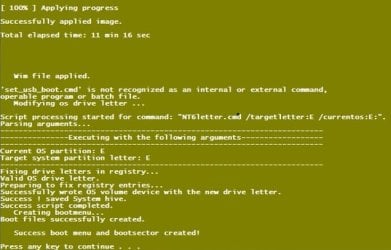
I exchanged the Canvio Ext USB for a WD 500MB ext USB drive since I was suspicious of it, plus it was slow. I created an active partition on the USB as I did before. I performed the whole WAIK process as before. However this time I noticed that during the end of the "RUN-ME-AS-ADMIN.CMD" (which was substituted for the "Installer.cmd") I get an error. After the "wim file applied" I get error: "set_usb_boot.cmd" is not recognized as an internal or external command. When I boot to the USB there is error "Invalid partition table".

Error.jpg
 

My Computer My Computer

At a glance

Windows 7 64bit
OS
Windows 7 64bit
So long ago now, I can't remember anything about it.

If set_usb_cmd did not run, then do it manually.

at command prompt <pathto set_usb_boot.cmd> installdriveletter:\windows

e.g. if set_usb_boot.cmd is directly on c:\ and your install usb drive letter is d

c:\set_usb_boot.cmd d:\windows

View attachment set_usb_boot.zip
 

My Computers My Computers

  • At a glance

    7 X64i5 84002x8gb 3200mhz
    Computer type
    PC/Desktop
    OS
    7 X64
    CPU
    i5 8400
    Motherboard
    gigabyte b365m ds3h
    Memory
    2x8gb 3200mhz
    Hard Drives
    various
    PSU
    pure power 11 400w cm
    Case
    Coolermaster
    Cooling
    cryorig m9i
  • At a glance

    7x64g54008gb ddr4 2400
    Computer type
    PC/Desktop
    OS
    7x64
    CPU
    g5400
    Motherboard
    ga b365m ds3h
    Memory
    8gb ddr4 2400
    PSU
    xfx pro 450w
Yes it has been a while.. Thanks.
I executed the set_usb_boot.cmd on E:\windows in my case and it processed normally. I tried to boot to the USB and I get the same message "Invalid partition table". I can browse to E: with explorer and windows (7) with all the usual folders are there. This is frustrating i'm doing all the right stuff. If I can't ultimately get Win 7 to boot I'll install a Ubuntu boot to USB on it. My desire was to get dual boot Win 7 and Ubuntu on this external USB.
 

My Computer My Computer

At a glance

Windows 7 64bit
OS
Windows 7 64bit
Back
Top