What should I install - Atheros Wifi Driver or the Intel one ?

minhvnqh

New member
Member
Local time
3:29 AM
Messages
10
I am using the laptop Asus K56CM and i found to wifi driver which is in the driver download website. So I don't know which should i install ?. If I install the both, will it be a conflict ?
This bluetooth driver also has this problem!
 

My Computer My Computer

At a glance

Windows 7 Professional 64bit
OS
Windows 7 Professional 64bit
Update your wifi driver from Device Manager, Network Adapters, right click on the correct adapter and see or update info and drivers...
 

My Computer My Computer

At a glance

Win7 Home Premium x64 W10Pro&HomeA12 9720p 4+8 TurionII M5206GB 8GBR7
Computer type
Laptop
Computer Manufacturer/Model Number
HP 17-ak0xx, dv7 3173nr
OS
Win7 Home Premium x64 W10Pro&Home
CPU
A12 9720p 4+8 TurionII M520
Motherboard
HP 3839
Memory
6GB 8GB
Graphics Card(s)
R7
Monitor(s) Displays
24" sa550
Screen Resolution
1600x900 1920x1080
Mouse
Logitechx2
Internet Speed
120Mb/s down 12up
Update your wifi driver from Device Manager, Network Adapters, right click on the correct adapter and see or update info and drivers...

The fact that if I istall 2 driver.It will display 2 icons of network adapter in device manager :(
 

My Computer My Computer

At a glance

Windows 7 Professional 64bit
OS
Windows 7 Professional 64bit
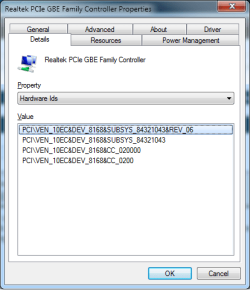
Open Device Manager and locate the wifi adapter, right click on it and select Properties. The3n click on the Detials tab and from the dropdown list find "Hardware Ids", will look something like this,

hardwareid.png

Make note of the "VEN" number and go here,

PCI Vendor and Device Lists

and enter it in the Vendor search box, and it will tell you whether it is the Intel or Atheros. Then download and install the appropriate driver from Asus,

ASUS - Notebooks- ASUS K56CM
 

My Computer My Computer

At a glance

Win 7 Ultimate x64FX-8350 @ 4.6 GHz so farADATA XPG V1 Series Black 8GB DDR3 1600Sapphire R9 270x Dual-X
Computer type
PC/Desktop
Computer Manufacturer/Model Number
Me
OS
Win 7 Ultimate x64
CPU
FX-8350 @ 4.6 GHz so far
Motherboard
Asus M5A97 EVO
Memory
ADATA XPG V1 Series Black 8GB DDR3 1600
Graphics Card(s)
Sapphire R9 270x Dual-X
Sound Card
Xonar DGX w/ Corsair Vengence 1300
Monitor(s) Displays
Acer S232HL Abid
Screen Resolution
1920x1080
Hard Drives
120 GB OCZ Vertex 3
500 GB Seagate 7200.12
PSU
Antec Earthwatts 650W Green
Case
Antec Three Hundred
Cooling
Cooler Master 212 EVO
Keyboard
Logitech G510
Mouse
Logitech G500s
Internet Speed
35000/3000
Open Device Manager and locate the wifi adapter, right click on it and select Properties. The3n click on the Detials tab and from the dropdown list find "Hardware Ids", will look something like this,

View attachment 240438

Make note of the "VEN" number and go here,

PCI Vendor and Device Lists

and enter it in the Vendor search box, and it will tell you whether it is the Intel or Atheros. Then download and install the appropriate driver from Asus,

ASUS - Notebooks- ASUS K56CM

I find this Hardware ID: PCI\VEN_168C&DEV_0032&SUBSYS_2C971A3B&REV_01

But i search it in your website and no result..Can u tell which is the "VEN" number in "PCI\VEN_168C&DEV_0032&SUBSYS_2C971A3B&REV_01"
 

My Computer My Computer

At a glance

Windows 7 Professional 64bit
OS
Windows 7 Professional 64bit
.Can u tell which is the "VEN" number in "PCI\VEN_168C&DEV_0032&SUBSYS_2C971A3B&REV_01"

The vendor ID is 168C, which according to the search is the Atheros,

PCI Vendor and Device Lists

The device ID which is 0032, brings up this,

PCI Vendor and Device Lists

which from the list of devices with the same ID (but will have a different vendor ID) is the "AR9485WB-EG Wireless Network Adapter".

Based on all that you want the latest Atheros driver from Asus.
 

My Computer My Computer

At a glance

Win 7 Ultimate x64FX-8350 @ 4.6 GHz so farADATA XPG V1 Series Black 8GB DDR3 1600Sapphire R9 270x Dual-X
Computer type
PC/Desktop
Computer Manufacturer/Model Number
Me
OS
Win 7 Ultimate x64
CPU
FX-8350 @ 4.6 GHz so far
Motherboard
Asus M5A97 EVO
Memory
ADATA XPG V1 Series Black 8GB DDR3 1600
Graphics Card(s)
Sapphire R9 270x Dual-X
Sound Card
Xonar DGX w/ Corsair Vengence 1300
Monitor(s) Displays
Acer S232HL Abid
Screen Resolution
1920x1080
Hard Drives
120 GB OCZ Vertex 3
500 GB Seagate 7200.12
PSU
Antec Earthwatts 650W Green
Case
Antec Three Hundred
Cooling
Cooler Master 212 EVO
Keyboard
Logitech G510
Mouse
Logitech G500s
Internet Speed
35000/3000
.Can u tell which is the "VEN" number in "PCI\VEN_168C&DEV_0032&SUBSYS_2C971A3B&REV_01"

The vendor ID is 168C, which according to the search is the Atheros,

PCI Vendor and Device Lists

The device ID which is 0032, brings up this,

PCI Vendor and Device Lists

which from the list of devices with the same ID (but will have a different vendor ID) is the "AR9485WB-EG Wireless Network Adapter".

Based on all that you want the latest Atheros driver from Asus.

Thank you very much !
 

My Computer My Computer

At a glance

Windows 7 Professional 64bit
OS
Windows 7 Professional 64bit
I still have a question, that is if my computer have atheros wifi device, why asus have also intel wifi driver in download driver website for this model ?
 

My Computer My Computer

At a glance

Windows 7 Professional 64bit
OS
Windows 7 Professional 64bit
Possibly different production runs of the computer/motherboard, with one having the Atheros and one the Intel.
 

My Computer My Computer

At a glance

Win 7 Ultimate x64FX-8350 @ 4.6 GHz so farADATA XPG V1 Series Black 8GB DDR3 1600Sapphire R9 270x Dual-X
Computer type
PC/Desktop
Computer Manufacturer/Model Number
Me
OS
Win 7 Ultimate x64
CPU
FX-8350 @ 4.6 GHz so far
Motherboard
Asus M5A97 EVO
Memory
ADATA XPG V1 Series Black 8GB DDR3 1600
Graphics Card(s)
Sapphire R9 270x Dual-X
Sound Card
Xonar DGX w/ Corsair Vengence 1300
Monitor(s) Displays
Acer S232HL Abid
Screen Resolution
1920x1080
Hard Drives
120 GB OCZ Vertex 3
500 GB Seagate 7200.12
PSU
Antec Earthwatts 650W Green
Case
Antec Three Hundred
Cooling
Cooler Master 212 EVO
Keyboard
Logitech G510
Mouse
Logitech G500s
Internet Speed
35000/3000
Back
Top