Any way to disable jump list arrows from pinned items on start menu?

liati

New member
Local time
6:07 AM
Messages
2
Hello,

I am looking to get rid of the jump lists from the pinned items in the Start menu completely. Already looked under "Taskbar and Start Menu Properties" and unchecked the "store and display recently..." boxes. However the jump list arrows still appear next to an icon. The jump lists are basically empty, it's just that I don't want them to appear at all.

I understand this is extraordinarily picky, but the whole jump list functionality seems like a way for the operating system to try to guess what you want instead of letting you pick out what you want.

I don't mind digging in the registry if that's what it takes.

Thanks!
 

My Computer My Computer

At a glance

Windows 7 32-bit
OS
Windows 7 32-bit
Welcome to the Seven Forums

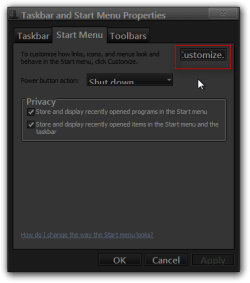
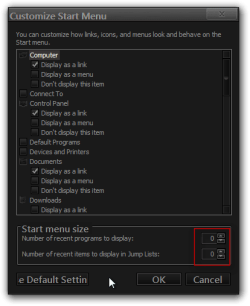
Go back into the Taskbar and Start menu properties and go to the Start menu tab and click on the Customize button in the next window that opens up in the lower right corner decrease the number of the bottom one to 0 that should do it.

Jerry

Taskbar and Start Menu Properties.pngCustomize Start Menu.png
 

My Computer My Computer

At a glance

Win 7 Pro x64 / Win 10 ProIntel(R) Core(TM) i7-3630QM CPU @ 2.40GHz12 GB(1) Intel(R) HD Graphics 4000 (2) NVIDIA GeFo...
Computer type
Laptop
Computer Manufacturer/Model Number
Sager NP9170
OS
Win 7 Pro x64 / Win 10 Pro
CPU
Intel(R) Core(TM) i7-3630QM CPU @ 2.40GHz
Motherboard
CLEVO P170EM
Memory
12 GB
Graphics Card(s)
(1) Intel(R) HD Graphics 4000 (2) NVIDIA GeForce GTX 675M
Sound Card
(1) Realtek High Definition Audio (2) Intel(R) Display Aud
Monitor(s) Displays
17.3
Screen Resolution
1920x1080
Hard Drives
(1) Samsung 860 EVO 500GB(OS) (1) Samsung 860 EVO 500GB(Data)
Keyboard
Backlite
Antivirus
MSE, Malwarebytes Pro
Browser
Firefox
Other Info
DESKTOP: Custom-built.
OS: Win 10 Pro x64.
CASE: Rosewill R5.
CPU: Intel I5 4670K CPU @ 3.40GHz.
CPU COOLER: Cool Master Hyper 212 EVO.
MOTHERBOARD: Asus Z87-A.
MEMORY: Kingston HyperX 2x4 GB.
GPU: Nvidia Geforce 650 TI.
PSU: Corsair TX750.
DRIVES: (1) Samsung 840 120 GB SSD (2) Western Digital blue 500 GB 7200 RPM.
Hello,

Unfortunately I don't believe that's what I'm looking for. Those items both already show zero, and are grayed out because I unchecked the "store and display recently..." boxes. The jump lists are empty, I want to get rid of the arrows completely.

Thanks!
 

My Computer My Computer

At a glance

Windows 7 32-bit
OS
Windows 7 32-bit

My Computer My Computer

At a glance

Win 7 Pro x64 / Win 10 ProIntel(R) Core(TM) i7-3630QM CPU @ 2.40GHz12 GB(1) Intel(R) HD Graphics 4000 (2) NVIDIA GeFo...
Computer type
Laptop
Computer Manufacturer/Model Number
Sager NP9170
OS
Win 7 Pro x64 / Win 10 Pro
CPU
Intel(R) Core(TM) i7-3630QM CPU @ 2.40GHz
Motherboard
CLEVO P170EM
Memory
12 GB
Graphics Card(s)
(1) Intel(R) HD Graphics 4000 (2) NVIDIA GeForce GTX 675M
Sound Card
(1) Realtek High Definition Audio (2) Intel(R) Display Aud
Monitor(s) Displays
17.3
Screen Resolution
1920x1080
Hard Drives
(1) Samsung 860 EVO 500GB(OS) (1) Samsung 860 EVO 500GB(Data)
Keyboard
Backlite
Antivirus
MSE, Malwarebytes Pro
Browser
Firefox
Other Info
DESKTOP: Custom-built.
OS: Win 10 Pro x64.
CASE: Rosewill R5.
CPU: Intel I5 4670K CPU @ 3.40GHz.
CPU COOLER: Cool Master Hyper 212 EVO.
MOTHERBOARD: Asus Z87-A.
MEMORY: Kingston HyperX 2x4 GB.
GPU: Nvidia Geforce 650 TI.
PSU: Corsair TX750.
DRIVES: (1) Samsung 840 120 GB SSD (2) Western Digital blue 500 GB 7200 RPM.
Great question liati!

I find this feature very annoying as well!


I like having a working, dedicated "Recent Items" menu in the start menu, and even retaining the ability to have recent jump lists in the task bar, but I never use and do not like the application jump arrows in the start menu! They expand to take over my entire start menu (it is fairly compact).

Sure would be nice if there was a "disable start menu jump lists" option!
 

My Computer My Computer

At a glance

7 64
OS
7 64
Back
Top