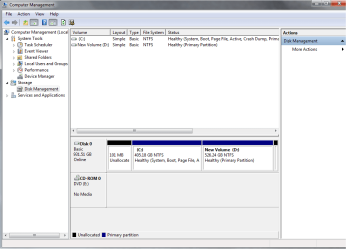
c: Health (Boot, Page File, Active, Crash Dump, Primary Partition)

mg031612

New member
Local time
5:04 AM
Messages
7
Untitled.png


Can anyone help me with my problem please
 
Last edited by a moderator:

My Computer My Computer

At a glance

Microsoft Windows 7 Ultimate 32-bitIntel(R) Core(TM)2 Quad CPU Q6700 @ 2.66GHz2.00 GBAMD Radeon HD 6700 Series 1GB
OS
Microsoft Windows 7 Ultimate 32-bit
CPU
Intel(R) Core(TM)2 Quad CPU Q6700 @ 2.66GHz
Motherboard
ASUSTeK Computer INC.
Memory
2.00 GB
Graphics Card(s)
AMD Radeon HD 6700 Series 1GB
Sound Card
AMD High Definition Audio Device
Screen Resolution
1920x1080
Hard Drives
1TB WDC WD10EACS-00D6B1 ATA Device
Why yes I can!

If you want to communicate with others over the web it is important to understand that the other people cannot read your mind, so you want to carefully consider what your question is, clearly and concisely, and ask it with as much description and detail as you can. This way the observer can "see" what the problem is as well as you can!

Hope that helps!

PS: see that 101MB unallocated space in your screenshot? Leave that alone. Windows requires that space at the beginning and end of some drives to use for some advanced features, like dual booting and the creation of Dynamic Disks.
 

My Computer My Computer

At a glance

Windows 7 64 Bit Home Premium SP1i7-3820GSkill F3-14900CL9Q - 16GBEVGA GeForce GTX660 - Driver 352.86
Computer type
PC/Desktop
Computer Manufacturer/Model Number
Home Built - Jan 2013
OS
Windows 7 64 Bit Home Premium SP1
CPU
i7-3820
Motherboard
Asus P9X79-PRO - Bios 4608
Memory
GSkill F3-14900CL9Q - 16GB
Graphics Card(s)
EVGA GeForce GTX660 - Driver 352.86
Sound Card
On board Realtek ALC898
Monitor(s) Displays
Acer S271HL
Screen Resolution
1920 x 1080
Hard Drives
#1- Samsung 840 Pro Series
#2- Western Digital WD1002FAEX Sata3 Black
#3- Western Digital WD1002FAEX Sata3 Black
PSU
Corsair CMPSU-850TX-V2 - 850 watt (by Seasonic)
Case
Corsair Obsidian 550D
Cooling
Standard 3 120mm case fans, Cooler Master Hyper 212 EVO
Keyboard
MS KC-0405
Mouse
Intellimouse 5-button
Internet Speed
56 Mbits/Sec (on a good day)
Antivirus
Avast & Malwarebytes
Browser
Firefox
Other Info
Asus DVD - DRW-24B1ST 24X
can you make some step by step on how to fix my problem please.. :(
 

My Computer My Computer

At a glance

Microsoft Windows 7 Ultimate 32-bitIntel(R) Core(TM)2 Quad CPU Q6700 @ 2.66GHz2.00 GBAMD Radeon HD 6700 Series 1GB
OS
Microsoft Windows 7 Ultimate 32-bit
CPU
Intel(R) Core(TM)2 Quad CPU Q6700 @ 2.66GHz
Motherboard
ASUSTeK Computer INC.
Memory
2.00 GB
Graphics Card(s)
AMD Radeon HD 6700 Series 1GB
Sound Card
AMD High Definition Audio Device
Screen Resolution
1920x1080
Hard Drives
1TB WDC WD10EACS-00D6B1 ATA Device
What is your problem?
 

My Computer My Computer

At a glance

Windows 7 64 Bit Home Premium SP1i7-3820GSkill F3-14900CL9Q - 16GBEVGA GeForce GTX660 - Driver 352.86
Computer type
PC/Desktop
Computer Manufacturer/Model Number
Home Built - Jan 2013
OS
Windows 7 64 Bit Home Premium SP1
CPU
i7-3820
Motherboard
Asus P9X79-PRO - Bios 4608
Memory
GSkill F3-14900CL9Q - 16GB
Graphics Card(s)
EVGA GeForce GTX660 - Driver 352.86
Sound Card
On board Realtek ALC898
Monitor(s) Displays
Acer S271HL
Screen Resolution
1920 x 1080
Hard Drives
#1- Samsung 840 Pro Series
#2- Western Digital WD1002FAEX Sata3 Black
#3- Western Digital WD1002FAEX Sata3 Black
PSU
Corsair CMPSU-850TX-V2 - 850 watt (by Seasonic)
Case
Corsair Obsidian 550D
Cooling
Standard 3 120mm case fans, Cooler Master Hyper 212 EVO
Keyboard
MS KC-0405
Mouse
Intellimouse 5-button
Internet Speed
56 Mbits/Sec (on a good day)
Antivirus
Avast & Malwarebytes
Browser
Firefox
Other Info
Asus DVD - DRW-24B1ST 24X
on how to fix my problem.. you mean i need to install win xp and win 7.. that's dual booting right
 

My Computer My Computer

At a glance

Microsoft Windows 7 Ultimate 32-bitIntel(R) Core(TM)2 Quad CPU Q6700 @ 2.66GHz2.00 GBAMD Radeon HD 6700 Series 1GB
OS
Microsoft Windows 7 Ultimate 32-bit
CPU
Intel(R) Core(TM)2 Quad CPU Q6700 @ 2.66GHz
Motherboard
ASUSTeK Computer INC.
Memory
2.00 GB
Graphics Card(s)
AMD Radeon HD 6700 Series 1GB
Sound Card
AMD High Definition Audio Device
Screen Resolution
1920x1080
Hard Drives
1TB WDC WD10EACS-00D6B1 ATA Device
No!
You do not need to dual boot unless you want to!

Could you please explain what it is you want to fix?
I can't see anything wrong in the screenshot you posted.
 

My Computer My Computer

At a glance

Windows 7 64 Bit Home Premium SP1i7-3820GSkill F3-14900CL9Q - 16GBEVGA GeForce GTX660 - Driver 352.86
Computer type
PC/Desktop
Computer Manufacturer/Model Number
Home Built - Jan 2013
OS
Windows 7 64 Bit Home Premium SP1
CPU
i7-3820
Motherboard
Asus P9X79-PRO - Bios 4608
Memory
GSkill F3-14900CL9Q - 16GB
Graphics Card(s)
EVGA GeForce GTX660 - Driver 352.86
Sound Card
On board Realtek ALC898
Monitor(s) Displays
Acer S271HL
Screen Resolution
1920 x 1080
Hard Drives
#1- Samsung 840 Pro Series
#2- Western Digital WD1002FAEX Sata3 Black
#3- Western Digital WD1002FAEX Sata3 Black
PSU
Corsair CMPSU-850TX-V2 - 850 watt (by Seasonic)
Case
Corsair Obsidian 550D
Cooling
Standard 3 120mm case fans, Cooler Master Hyper 212 EVO
Keyboard
MS KC-0405
Mouse
Intellimouse 5-button
Internet Speed
56 Mbits/Sec (on a good day)
Antivirus
Avast & Malwarebytes
Browser
Firefox
Other Info
Asus DVD - DRW-24B1ST 24X
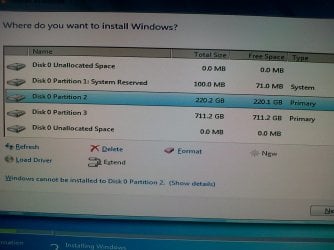
when im playing or using my pc in 15 minutes.. somethings pop-ups that something error on my hard disk.. and asking me to back up my files... and when i tried to re-install win-7 and make some partitions.. there are 2 unlocated partitions and i can delete it.. and why in my screen is it's disk 0
 

My Computer My Computer

At a glance

Microsoft Windows 7 Ultimate 32-bitIntel(R) Core(TM)2 Quad CPU Q6700 @ 2.66GHz2.00 GBAMD Radeon HD 6700 Series 1GB
OS
Microsoft Windows 7 Ultimate 32-bit
CPU
Intel(R) Core(TM)2 Quad CPU Q6700 @ 2.66GHz
Motherboard
ASUSTeK Computer INC.
Memory
2.00 GB
Graphics Card(s)
AMD Radeon HD 6700 Series 1GB
Sound Card
AMD High Definition Audio Device
Screen Resolution
1920x1080
Hard Drives
1TB WDC WD10EACS-00D6B1 ATA Device
Could be a failing hard disk. Find out your hard drive's maker and model and download the diagnostic utilities from their site. This tutorial tells you what to do to find out what hard drive you have (among other things).

As for the "disk 0", that's normal. Machines start to count with 0, not with 1 like humans do. So if you have 3 devices, for a machine you will have "device 0", "device 1" and "device 2".
 

My Computer My Computer

At a glance

Win 7 Pro 64-bit 7601AMD Phenom 9650 QuadCore, revision DR-B35 GB yes I run 2x 2GB and 1x 1GB, different b...NVIDIA GeForce 9800 GT 512 Mb, unknown manufa...
Computer type
PC/Desktop
Computer Manufacturer/Model Number
custom built
OS
Win 7 Pro 64-bit 7601
CPU
AMD Phenom 9650 QuadCore, revision DR-B3
Motherboard
ASUS M4A78
Memory
5 GB yes I run 2x 2GB and 1x 1GB, different brand, spank me.
Graphics Card(s)
NVIDIA GeForce 9800 GT 512 Mb, unknown manufacturer.
Sound Card
Crappy Realtek Integrated Audio
Monitor(s) Displays
Fujitsu Siemens P19-3P
Screen Resolution
1280 x 1024 x 32 bits @ 60 Hz Oh yeah, 4:3 rocks!
Hard Drives
(1) MAXTOR S TM3320613AS SATA Disk Device (2) STM35004 18AS SATA Disk Device (3) TOSHIBA USB 2.5"-HDD
PSU
whatever, around 450w
Case
Scavenged from old company PC, 10+ years old
Cooling
CPU fan, GPU fan, case fan, nothing fancy
Keyboard
Microsoft, PS/2, white.
Mouse
Optical, logitec.
Internet Speed
effective max speeds: 70-ish kB/s down 30-ish kB/s up
Antivirus
Avira, free edition.
Browser
Firefox with FXChrome to make it look like Google Chrome :P
Other Info
Was discarded by previous owner due to "horrible performance".
Was running Win Xp from a IDE drive. Yeah. Was a pain.
SATA II drive and Win7 and it zips away! Yay!
Please run CheckDisk on your drive:

  • Start > All Programs > Accessories
  • Right click on Command Prompt > click "Run As Administrator"
  • In the window that opens > type: chkdsk C: /f > press ENTER
  • You will be warned that chkdsk cannot run unless you restart > Restart
  • Let checkdisk run without interuption, do not disturb the process > Windows will load when it is done
Look for any errors in the list as it runs, if any, and make note of them.
 

My Computer My Computer

At a glance

Windows 7 64 Bit Home Premium SP1i7-3820GSkill F3-14900CL9Q - 16GBEVGA GeForce GTX660 - Driver 352.86
Computer type
PC/Desktop
Computer Manufacturer/Model Number
Home Built - Jan 2013
OS
Windows 7 64 Bit Home Premium SP1
CPU
i7-3820
Motherboard
Asus P9X79-PRO - Bios 4608
Memory
GSkill F3-14900CL9Q - 16GB
Graphics Card(s)
EVGA GeForce GTX660 - Driver 352.86
Sound Card
On board Realtek ALC898
Monitor(s) Displays
Acer S271HL
Screen Resolution
1920 x 1080
Hard Drives
#1- Samsung 840 Pro Series
#2- Western Digital WD1002FAEX Sata3 Black
#3- Western Digital WD1002FAEX Sata3 Black
PSU
Corsair CMPSU-850TX-V2 - 850 watt (by Seasonic)
Case
Corsair Obsidian 550D
Cooling
Standard 3 120mm case fans, Cooler Master Hyper 212 EVO
Keyboard
MS KC-0405
Mouse
Intellimouse 5-button
Internet Speed
56 Mbits/Sec (on a good day)
Antivirus
Avast & Malwarebytes
Browser
Firefox
Other Info
Asus DVD - DRW-24B1ST 24X
Can anyone help me with my problem please

IMG-20121201-00002.jpg
 
Last edited by a moderator:

My Computer My Computer

At a glance

Microsoft Windows 7 Ultimate 32-bitIntel(R) Core(TM)2 Quad CPU Q6700 @ 2.66GHz2.00 GBAMD Radeon HD 6700 Series 1GB
OS
Microsoft Windows 7 Ultimate 32-bit
CPU
Intel(R) Core(TM)2 Quad CPU Q6700 @ 2.66GHz
Motherboard
ASUSTeK Computer INC.
Memory
2.00 GB
Graphics Card(s)
AMD Radeon HD 6700 Series 1GB
Sound Card
AMD High Definition Audio Device
Screen Resolution
1920x1080
Hard Drives
1TB WDC WD10EACS-00D6B1 ATA Device
When you click "Show Details", do you get this?:
"Error: Windows cannot be installed to Disk 0 Partition 2. (Show details)
Details: Windows cannot be installed to this disk. The selected disk has an MBR partition table. On EFI systems, Windows can only be installed to GTP disks. Windows cannot be installed to this hard disk space. Windows must be installed to a partition formatted as NTFS"
If this is the case then you want to (from that install screen you show):

  • Delete all 3 partitions - have only one big unallocated space.
  • Restart, boot into the installation DVD, and begin the installation again.
  • When you get to the screen to install Windows, Choose "Custom (Advanced)"
  • Choose "Drive Options (Advanced)
  • Click on "New"
  • Use the size box to create a partition of 220GB (or 225,280MB) - or any size you want. Leave the remainder of the drive unallocated - you can create more partitions later.

The install should continue now.

WARNING: This procedure will delete everything from the hard disk! Be sure you have backed up any important files first.

Note: After deleting the partitions you could just click on "New" and continue from there. I only added the rest in case it is needed or for anyone else reading this thread.

More detailed instructions here:
http://www.sevenforums.com/tutorials/1649-clean-install-windows-7-a.html
 

My Computer My Computer

At a glance

Windows 7 64 Bit Home Premium SP1i7-3820GSkill F3-14900CL9Q - 16GBEVGA GeForce GTX660 - Driver 352.86
Computer type
PC/Desktop
Computer Manufacturer/Model Number
Home Built - Jan 2013
OS
Windows 7 64 Bit Home Premium SP1
CPU
i7-3820
Motherboard
Asus P9X79-PRO - Bios 4608
Memory
GSkill F3-14900CL9Q - 16GB
Graphics Card(s)
EVGA GeForce GTX660 - Driver 352.86
Sound Card
On board Realtek ALC898
Monitor(s) Displays
Acer S271HL
Screen Resolution
1920 x 1080
Hard Drives
#1- Samsung 840 Pro Series
#2- Western Digital WD1002FAEX Sata3 Black
#3- Western Digital WD1002FAEX Sata3 Black
PSU
Corsair CMPSU-850TX-V2 - 850 watt (by Seasonic)
Case
Corsair Obsidian 550D
Cooling
Standard 3 120mm case fans, Cooler Master Hyper 212 EVO
Keyboard
MS KC-0405
Mouse
Intellimouse 5-button
Internet Speed
56 Mbits/Sec (on a good day)
Antivirus
Avast & Malwarebytes
Browser
Firefox
Other Info
Asus DVD - DRW-24B1ST 24X
Back
Top