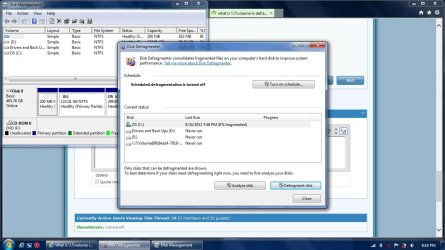
what is \\?\volume in defragment is it safe?

L0newolf

New member
Local time
5:20 PM
Messages
7
I have recently reformatted a lenovo laptop. I have done nothing except installing windows updates, anti virus and anti malware.

When I open the disk defragment I saw 2 drive C:\ and D:\ and a extra \\?\volume{} before I reformat the laptop it wasn't there it only appear after reformat. What is that and how do I make it such that it return to the former state like before I reformatted the laptop.

I am not saying that I want the laptop to be return to the former state just the \\?\volume{}.
 

My Computer My Computer

At a glance

Windows 7 Home Premium 64
OS
Windows 7 Home Premium 64
I have recently reformatted a lenovo laptop. I have done nothing except installing windows updates, anti virus and anti malware.

When I open the disk defragment I saw 2 drive C:\ and D:\ and a extra \\?\volume{} before I reformat the laptop it wasn't there it only appear after reformat. What is that and how do I make it such that it return to the former state like before I reformatted the laptop.

I am not saying that I want the laptop to be return to the former state just the \\?\volume{}.

Is it a 100 MB partition size? If so, that is your boot partition. It is fine. == If that is not what you see, post a screenshot of your Disk Management, expanding the colums so we can read all of the print. Use your Snipping Tool to post it. Use this tutorial if you need help. http://www.sevenforums.com/tutorials/9733-screenshots-files-upload-post-seven-forums.html
 

My Computer My Computer

At a glance

Windows 7 Home Premium 32-Bit - Build 7600 SP1Intel Core i3-2120 3.30GhzKingston 4 GB DDR3 1333 mhzAMD Radeon HD6670
Computer type
PC/Desktop
Computer Manufacturer/Model Number
Custom Build
OS
Windows 7 Home Premium 32-Bit - Build 7600 SP1
CPU
Intel Core i3-2120 3.30Ghz
Motherboard
Asus P8Z68-V LX Intel Z68 Socket H2 ATX
Memory
Kingston 4 GB DDR3 1333 mhz
Graphics Card(s)
AMD Radeon HD6670
Sound Card
Sound Blaster Audigy SE 24-Bit
Monitor(s) Displays
Asus VE228
Screen Resolution
1440 X 900
Hard Drives
OCZ Vertex 3 120 GB Sata 3 SSD ==
Kingston SH103/S3 120 G Hyper X 120 GB SSD ==
Western Digital 500 GB Caviar Green 7200 RPM ==
PSU
Corsair CX600M == 600 Watt
Case
NZXT Apollo - Silver with Clear Side Panel
Cooling
Three 120 mm Fans
Keyboard
Microsoft Natural 4000
Mouse
Microsoft Custom Optical 3000
Internet Speed
AT&T Fiber Optic Wireless Network
Antivirus
Microsoft Security Essentials
Browser
Chrome
Other Info
120 mm Blue LED Fan -- Three Blue LED Lazer Light Sticks
How do I know it's partition size its not written in the disk defragment and it's not shown in My Computer.

If it is truly the boot partition is it possible to make it such that it's not \\?\volume{}. It's a bit scary like something is not right with it or will it become another name after sometime?
 

My Computer My Computer

At a glance

Windows 7 Home Premium 64
OS
Windows 7 Home Premium 64
How do I know it's partition size its not written in the disk defragment and it's not shown in My Computer.

If it is truly the boot partition is it possible to make it such that it's not \\?\volume{}. It's a bit scary like something is not right with it or will it become another name after sometime?

Follow the instructions in Post #2 and you will get help.
 

My Computer My Computer

At a glance

Windows 7 Home Premium 32-Bit - Build 7600 SP1Intel Core i3-2120 3.30GhzKingston 4 GB DDR3 1333 mhzAMD Radeon HD6670
Computer type
PC/Desktop
Computer Manufacturer/Model Number
Custom Build
OS
Windows 7 Home Premium 32-Bit - Build 7600 SP1
CPU
Intel Core i3-2120 3.30Ghz
Motherboard
Asus P8Z68-V LX Intel Z68 Socket H2 ATX
Memory
Kingston 4 GB DDR3 1333 mhz
Graphics Card(s)
AMD Radeon HD6670
Sound Card
Sound Blaster Audigy SE 24-Bit
Monitor(s) Displays
Asus VE228
Screen Resolution
1440 X 900
Hard Drives
OCZ Vertex 3 120 GB Sata 3 SSD ==
Kingston SH103/S3 120 G Hyper X 120 GB SSD ==
Western Digital 500 GB Caviar Green 7200 RPM ==
PSU
Corsair CX600M == 600 Watt
Case
NZXT Apollo - Silver with Clear Side Panel
Cooling
Three 120 mm Fans
Keyboard
Microsoft Natural 4000
Mouse
Microsoft Custom Optical 3000
Internet Speed
AT&T Fiber Optic Wireless Network
Antivirus
Microsoft Security Essentials
Browser
Chrome
Other Info
120 mm Blue LED Fan -- Three Blue LED Lazer Light Sticks
I have uploaded the 2.
 

Attachments

  • DD.jpg
    DD.jpg
    40.1 KB · Views: 21
  • DM.jpg
    DM.jpg
    74.4 KB · Views: 32

My Computer My Computer

At a glance

Windows 7 Home Premium 64
OS
Windows 7 Home Premium 64
Don't worry about it. Disk Defragementer is just seeing the 200 MB "System Reserved" partition created when you clean install Windows 7. I too also have it. I use Auslogics Disk Defrag though instead of the built-in Disk Defragmenter
Untitled.jpg
 
Last edited:

My Computer My Computer

At a glance

Windows 7 Professional x64 SP1Intel® Pentium® 4 @ 2.26 GHz, Intel Core i7-2...512MB Dual channel DDR SDRAM @ 400MHz 2.5-3-3...Intel 82865G, Nvidia GeForce 520M Graphics
Computer type
Laptop
Computer Manufacturer/Model Number
Dell Optiplex SX270, Lenovo Z470
OS
Windows 7 Professional x64 SP1
CPU
Intel® Pentium® 4 @ 2.26 GHz, Intel Core i7-2670QM @ 2.20 GH
Motherboard
Dell, Lenovo
Memory
512MB Dual channel DDR SDRAM @ 400MHz 2.5-3-3-7, 8 GB DDR3
Graphics Card(s)
Intel 82865G, Nvidia GeForce 520M Graphics
Sound Card
SoundMax Integrated Audio, Integrated HD Audio
Monitor(s) Displays
LG W1952
Screen Resolution
1440x900, 1366 x 768
Hard Drives
40 GB 2.5" IDE 4200 RPM HDD, 500 GB 5400 RPM Sata 1.5 + 32 GB SSD
PSU
Dell 145 Watt, Lenovo 120 Watt Power Adapter
Case
Optiplex SX270 Small Form Factor, Laptop
Cooling
Dell Proprietary Air Cooling, Stock laptop cooling
Keyboard
Dell SK-8125 USB Keyboard
Mouse
Dell PS/2 2 button ball mouse with wheel scroll
Internet Speed
300 Mbit down / 20 Mbps up Time Warner Cable
Antivirus
MSE, Malwarebytes Scanner
Browser
Internet (Aizawa) Explorer 11
Other Info
Running Windows Server 2012 Datacenter on a virtual machine to run Metro Apps.
However I have reformatted my HP desktop as well and last I check it was nicely written as SYSTEM in the Disk Defragment....Is this by luck? If you are lucky it will become a word if not it is symbol :huh:
 

My Computer My Computer

At a glance

Windows 7 Home Premium 64
OS
Windows 7 Home Premium 64
However I have reformatted my HP desktop as well and last I check it was nicely written as SYSTEM in the Disk Defragment....Is this by luck? If you are lucky it will become a word if not it is symbol :huh:

I guess it just depends on the manufacturer and the windows DVD installation you use. In my case, I also use a Lenovo laptop, but I used the Retail Windows 7 DVD disc to clean install without formatting the entire HDD: install windows on top of the OEM windows (this creates the Windows.old folder). The 200 MB no name system reserved partition is preconfigured by Lenovo when I bought the laptop.
 
Last edited:

My Computer My Computer

At a glance

Windows 7 Professional x64 SP1Intel® Pentium® 4 @ 2.26 GHz, Intel Core i7-2...512MB Dual channel DDR SDRAM @ 400MHz 2.5-3-3...Intel 82865G, Nvidia GeForce 520M Graphics
Computer type
Laptop
Computer Manufacturer/Model Number
Dell Optiplex SX270, Lenovo Z470
OS
Windows 7 Professional x64 SP1
CPU
Intel® Pentium® 4 @ 2.26 GHz, Intel Core i7-2670QM @ 2.20 GH
Motherboard
Dell, Lenovo
Memory
512MB Dual channel DDR SDRAM @ 400MHz 2.5-3-3-7, 8 GB DDR3
Graphics Card(s)
Intel 82865G, Nvidia GeForce 520M Graphics
Sound Card
SoundMax Integrated Audio, Integrated HD Audio
Monitor(s) Displays
LG W1952
Screen Resolution
1440x900, 1366 x 768
Hard Drives
40 GB 2.5" IDE 4200 RPM HDD, 500 GB 5400 RPM Sata 1.5 + 32 GB SSD
PSU
Dell 145 Watt, Lenovo 120 Watt Power Adapter
Case
Optiplex SX270 Small Form Factor, Laptop
Cooling
Dell Proprietary Air Cooling, Stock laptop cooling
Keyboard
Dell SK-8125 USB Keyboard
Mouse
Dell PS/2 2 button ball mouse with wheel scroll
Internet Speed
300 Mbit down / 20 Mbps up Time Warner Cable
Antivirus
MSE, Malwarebytes Scanner
Browser
Internet (Aizawa) Explorer 11
Other Info
Running Windows Server 2012 Datacenter on a virtual machine to run Metro Apps.
I have recently reformatted a lenovo laptop. I have done nothing except installing windows updates, anti virus and anti malware.

When I open the disk defragment I saw 2 drive C:\ and D:\ and a extra \\?\volume{} before I reformat the laptop it wasn't there it only appear after reformat. What is that and how do I make it such that it return to the former state like before I reformatted the laptop.

I am not saying that I want the laptop to be return to the former state just the \\?\volume{}.

I don't see any drive that is labeled "\\?\volume{}". The 200 MB drive is needed to boot. The 14.75 GB drive appears to be empty and could be merged to another drive. Did that answer your question?
 

My Computer My Computer

At a glance

Windows 7 Home Premium 32-Bit - Build 7600 SP1Intel Core i3-2120 3.30GhzKingston 4 GB DDR3 1333 mhzAMD Radeon HD6670
Computer type
PC/Desktop
Computer Manufacturer/Model Number
Custom Build
OS
Windows 7 Home Premium 32-Bit - Build 7600 SP1
CPU
Intel Core i3-2120 3.30Ghz
Motherboard
Asus P8Z68-V LX Intel Z68 Socket H2 ATX
Memory
Kingston 4 GB DDR3 1333 mhz
Graphics Card(s)
AMD Radeon HD6670
Sound Card
Sound Blaster Audigy SE 24-Bit
Monitor(s) Displays
Asus VE228
Screen Resolution
1440 X 900
Hard Drives
OCZ Vertex 3 120 GB Sata 3 SSD ==
Kingston SH103/S3 120 G Hyper X 120 GB SSD ==
Western Digital 500 GB Caviar Green 7200 RPM ==
PSU
Corsair CX600M == 600 Watt
Case
NZXT Apollo - Silver with Clear Side Panel
Cooling
Three 120 mm Fans
Keyboard
Microsoft Natural 4000
Mouse
Microsoft Custom Optical 3000
Internet Speed
AT&T Fiber Optic Wireless Network
Antivirus
Microsoft Security Essentials
Browser
Chrome
Other Info
120 mm Blue LED Fan -- Three Blue LED Lazer Light Sticks
However, I just bought a new lenovo laptop but once I reach home and on the laptop and click the defragment \\?\volume is there. Is that something I should be worried as in the laptop is a used laptop?
 

My Computer My Computer

At a glance

Windows 7 Home Premium 64
OS
Windows 7 Home Premium 64
However, I just bought a new lenovo laptop but once I reach home and on the laptop and click the defragment \\?\volume is there. Is that something I should be worried as in the laptop is a used laptop?

You posted your Disk Management in Message #5. There is no volume labeled as you say. I don't follow what you are referring to.
 

My Computer My Computer

At a glance

Windows 7 Home Premium 32-Bit - Build 7600 SP1Intel Core i3-2120 3.30GhzKingston 4 GB DDR3 1333 mhzAMD Radeon HD6670
Computer type
PC/Desktop
Computer Manufacturer/Model Number
Custom Build
OS
Windows 7 Home Premium 32-Bit - Build 7600 SP1
CPU
Intel Core i3-2120 3.30Ghz
Motherboard
Asus P8Z68-V LX Intel Z68 Socket H2 ATX
Memory
Kingston 4 GB DDR3 1333 mhz
Graphics Card(s)
AMD Radeon HD6670
Sound Card
Sound Blaster Audigy SE 24-Bit
Monitor(s) Displays
Asus VE228
Screen Resolution
1440 X 900
Hard Drives
OCZ Vertex 3 120 GB Sata 3 SSD ==
Kingston SH103/S3 120 G Hyper X 120 GB SSD ==
Western Digital 500 GB Caviar Green 7200 RPM ==
PSU
Corsair CX600M == 600 Watt
Case
NZXT Apollo - Silver with Clear Side Panel
Cooling
Three 120 mm Fans
Keyboard
Microsoft Natural 4000
Mouse
Microsoft Custom Optical 3000
Internet Speed
AT&T Fiber Optic Wireless Network
Antivirus
Microsoft Security Essentials
Browser
Chrome
Other Info
120 mm Blue LED Fan -- Three Blue LED Lazer Light Sticks
What I mean is the \\?\volume in disk defragment. Why is the \\?\volume there.

I know there is no \\?\volume in the disk management if so why is there a \\?\volume in disk Defragment.

I thought disk defragment is suppose to show all the drive in a computer so why is there a \\?\volume
 

My Computer My Computer

At a glance

Windows 7 Home Premium 64
OS
Windows 7 Home Premium 64
Just thinking it might be the drive that is far right in Disk Management with no drive letter, 14.75 gb.
 

My Computer My Computer

At a glance

Windows 10 Pro. 64/ version 1709 Windows 7 Pr...Intel i7-6800K @ 4.3Corsair Platinum 16 gig @2400EVGA GTX 1070 OC
Computer type
PC/Desktop
Computer Manufacturer/Model Number
Home made Desktop
OS
Windows 10 Pro. 64/ version 1709 Windows 7 Pro/64
CPU
Intel i7-6800K @ 4.3
Motherboard
ASUS X-99 Deluxe II
Memory
Corsair Platinum 16 gig @2400
Graphics Card(s)
EVGA GTX 1070 OC
Monitor(s) Displays
Asus 27" LED LCD/VE278Q
Screen Resolution
1920-1080 or 1280-720 HDMI
Hard Drives
INTEL SSD 730-240 Gb Sata 3.0/
PSU
EVGA Platium 1200W
Case
Phanteks Luxe Tempered Glass 8 fans/ one radiator
Cooling
XSPC/ Water Cooled CPU
Keyboard
Das 4 Professional
Mouse
Logitech M705/MX Anywhere 2-S
Internet Speed
100 mbits
Antivirus
Microsoft Security Essentials/ Malwarebytes Premium 3.0/ SAS
Browser
I.E. 11 default/Firefox/ ISP Time Warner Cable/Spectrum
Other Info
LG BluRay Burner/
Sound system-KLipsch-THX/
Icy Dock ssd Hot Swap bays.
It is the volume's guid. You can see the guid of all the volumes by typing mountvol in cmd
 

My Computer My Computer

At a glance

Windows
OS
Windows
However, I just bought a new lenovo laptop.

Once I reach home and on the laptop and click the defragment, \\?\volume is there.

Is that something I should be worried as in the laptop is a used laptop?

I thought new laptop should all be properly set up hence it should not have the \\?\volume?
 

My Computer My Computer

At a glance

Windows 7 Home Premium 64
OS
Windows 7 Home Premium 64
However, I just bought a new lenovo laptop.

Once I reach home and on the laptop and click the defragment, \\?\volume is there.

Is that something I should be worried as in the laptop is a used laptop?

I thought new laptop should all be properly set up hence it should not have the \\?\volume?

Like I said in the previous post, it's most likely Lenovo's way of partitioning their laptops. I also have a Lenovo laptop and on the first time I opened disk defrag, the \\?\volume is also there. You can try to do a complete HDD formatting to remove all the partitions and data and clean install with retail Windows 7 DVD. You will surely not get that \\?\ volume, but you do get the 200MB partition. with the name "system reserved" or "system"
 

My Computer My Computer

At a glance

Windows 7 Professional x64 SP1Intel® Pentium® 4 @ 2.26 GHz, Intel Core i7-2...512MB Dual channel DDR SDRAM @ 400MHz 2.5-3-3...Intel 82865G, Nvidia GeForce 520M Graphics
Computer type
Laptop
Computer Manufacturer/Model Number
Dell Optiplex SX270, Lenovo Z470
OS
Windows 7 Professional x64 SP1
CPU
Intel® Pentium® 4 @ 2.26 GHz, Intel Core i7-2670QM @ 2.20 GH
Motherboard
Dell, Lenovo
Memory
512MB Dual channel DDR SDRAM @ 400MHz 2.5-3-3-7, 8 GB DDR3
Graphics Card(s)
Intel 82865G, Nvidia GeForce 520M Graphics
Sound Card
SoundMax Integrated Audio, Integrated HD Audio
Monitor(s) Displays
LG W1952
Screen Resolution
1440x900, 1366 x 768
Hard Drives
40 GB 2.5" IDE 4200 RPM HDD, 500 GB 5400 RPM Sata 1.5 + 32 GB SSD
PSU
Dell 145 Watt, Lenovo 120 Watt Power Adapter
Case
Optiplex SX270 Small Form Factor, Laptop
Cooling
Dell Proprietary Air Cooling, Stock laptop cooling
Keyboard
Dell SK-8125 USB Keyboard
Mouse
Dell PS/2 2 button ball mouse with wheel scroll
Internet Speed
300 Mbit down / 20 Mbps up Time Warner Cable
Antivirus
MSE, Malwarebytes Scanner
Browser
Internet (Aizawa) Explorer 11
Other Info
Running Windows Server 2012 Datacenter on a virtual machine to run Metro Apps.
If the volume neither has a name nor a drive letter, the guid will be shown. It is normal.
 

My Computer My Computer

At a glance

Windows
OS
Windows
OP could open disk management and by right clicking on mentioned partition,assign a new letter,which WILL appear in disk defragment feature,it did on mine,i didnt like that question mark either...
 

My Computer My Computer

At a glance

Microsoft Windows 7 Ultimate 64-bit Service P...Intel(R) Core(TM)2 Quad Q 9550 @ 2.83 GHz4x1024 GB DDR2 Corsair PC2-6400 800 MhzMSI TwiFrozer II 1024MB GDDR5
Computer type
PC/Desktop
Computer Manufacturer/Model Number
Homebuilt,Quadcore processor on Asus MB
OS
Microsoft Windows 7 Ultimate 64-bit Service Pack 1
CPU
Intel(R) Core(TM)2 Quad Q 9550 @ 2.83 GHz
Motherboard
ASUS P5B-Deluxe Wi-Fi Edition
Memory
4x1024 GB DDR2 Corsair PC2-6400 800 Mhz
Graphics Card(s)
MSI TwiFrozer II 1024MB GDDR5
Sound Card
Realtek ALC883 @ Intel 82801HB ICH8 - High Def
Monitor(s) Displays
Asus VW195 [19" LCD]
Screen Resolution
1440x860 pixels
Hard Drives
OCZ Vertex Plus Series SATA II 2.5" SSD 128GB-

Westarn Digital SATA II 250GB
PSU
Corsair CX600W
Case
Custom built,cut and painted
Cooling
Xigmatek Gaia 2x120mm fan
Keyboard
MS Generic
Mouse
MS Optical 6000
Internet Speed
never enough
Antivirus
ESET Smart Security 6.0.306.0
Back
Top