Solved One folder with files, inside a number of empty folders

Melita

New member
Power User
VIP
Local time
3:01 AM
Messages
293
Location
Canada
In one of my Windows 7 Libraries, I have a folder 'A'. When I click to open it, another folder 'B' opens. When I click on 'B', the real folder I need, 'C' opens. It is only 'C', that contain my files. A and B are empty folders. The result is that I have to make three clicks to get at my files. This mishap occurred when I was re-arranging my files and folders, probably due to finger trouble! :o

Could you please help me remove A and B.

Regards.
 

My Computer My Computer

At a glance

Windows 7 Home Premium 64bitAMD Dual Core C-502GB DDR3/320GB HDDAMD Radeon HD 6250
Computer Manufacturer/Model Number
Laptop - Acer Aspire 5250-BZ479
OS
Windows 7 Home Premium 64bit
CPU
AMD Dual Core C-50
Memory
2GB DDR3/320GB HDD
Graphics Card(s)
AMD Radeon HD 6250
Monitor(s) Displays
15.6" HD LED LCD
Internet Speed
ADSL
In one of my Windows 7 Libraries, I have a folder 'A'. When I click to open it, another folder 'B' opens. When I click on 'B', the real folder I need, 'C' opens. It is only 'C', that contain my files. A and B are empty folders. The result is that I have to make three clicks to get at my files. This mishap occurred when I was re-arranging my files and folders, probably due to finger trouble! :o

Could you please help me remove A and B.

Regards.

I would move the files in the "c" folder to a new temp folder on the desktop, then delete the tree, B C folders. Now the top level folder A should be empty, move the files there and remove the desktop folder.

HTH
 

My Computer My Computer

At a glance

Windows 7 Professional x64Intel i5 quad processor16 GBRadeon HD 5770
Computer type
PC/Desktop
Computer Manufacturer/Model Number
Custom Built
OS
Windows 7 Professional x64
CPU
Intel i5 quad processor
Motherboard
DP67BG
Memory
16 GB
Graphics Card(s)
Radeon HD 5770
Sound Card
Realtek High Definition Audio
Monitor(s) Displays
Samsung SyncMaster
Screen Resolution
1920X1080
Hard Drives
WD 2TB (SATA Internal)
WD 1TB (USB External)
PSU
Corsair GS800
Case
Tower (Generic)
Cooling
3 Internal Fans
Keyboard
MS Wireless
Mouse
MS Optical Wired
Internet Speed
54 mbps
Antivirus
Emsisoft
Browser
IE-Version 9, Palemoon-Version 24.2.0
I forgot to mention: this folder 'A' is in 'My documents'. Sorry about that.

In the 'C' folder I have two other folders with 'Microsoft word documents' and three 'word' documents without folders. I used the 'send to' method to send them all to a folder on the desk top. Everything got copied but the original folders and contents remained intact, where they are.

Regards.
 

My Computer My Computer

At a glance

Windows 7 Home Premium 64bitAMD Dual Core C-502GB DDR3/320GB HDDAMD Radeon HD 6250
Computer Manufacturer/Model Number
Laptop - Acer Aspire 5250-BZ479
OS
Windows 7 Home Premium 64bit
CPU
AMD Dual Core C-50
Memory
2GB DDR3/320GB HDD
Graphics Card(s)
AMD Radeon HD 6250
Monitor(s) Displays
15.6" HD LED LCD
Internet Speed
ADSL
I forgot to mention: this folder 'A' is in 'My documents'. Sorry about that.

In the 'C' folder I have two other folders with 'Microsoft word documents' and three 'word' documents without folders. I used the 'send to' method to send them all to a folder on the desk top. Everything got copied but the original folders and contents remained intact, where they are.

Regards.

Is there some reason you can't go back to the directory tree and remove the contents of the subfolders and the folders themselves? You need to start from the bottom up; i.e., remove contents from "c" them remove "c" folder, next remove the "b" folder. Is there a permissions issue or something that is causing a problem with removing contents as described?
 

My Computer My Computer

At a glance

Windows 7 Professional x64Intel i5 quad processor16 GBRadeon HD 5770
Computer type
PC/Desktop
Computer Manufacturer/Model Number
Custom Built
OS
Windows 7 Professional x64
CPU
Intel i5 quad processor
Motherboard
DP67BG
Memory
16 GB
Graphics Card(s)
Radeon HD 5770
Sound Card
Realtek High Definition Audio
Monitor(s) Displays
Samsung SyncMaster
Screen Resolution
1920X1080
Hard Drives
WD 2TB (SATA Internal)
WD 1TB (USB External)
PSU
Corsair GS800
Case
Tower (Generic)
Cooling
3 Internal Fans
Keyboard
MS Wireless
Mouse
MS Optical Wired
Internet Speed
54 mbps
Antivirus
Emsisoft
Browser
IE-Version 9, Palemoon-Version 24.2.0
No there is no permission issue. I am the administrator. When I open them from the directory tree and right click, I get the 'send to' option and it does not move but copy to desk top.

I will try to move the contents to a new folder in another library by 'drag and drop', see what happens and come back later with the results.

Best regards.
 

My Computer My Computer

At a glance

Windows 7 Home Premium 64bitAMD Dual Core C-502GB DDR3/320GB HDDAMD Radeon HD 6250
Computer Manufacturer/Model Number
Laptop - Acer Aspire 5250-BZ479
OS
Windows 7 Home Premium 64bit
CPU
AMD Dual Core C-50
Memory
2GB DDR3/320GB HDD
Graphics Card(s)
AMD Radeon HD 6250
Monitor(s) Displays
15.6" HD LED LCD
Internet Speed
ADSL
Hello Sir George,

Nothing is working. I removed everything to the desk top, leaving the folders empty. When I try to delete the folders I get a little pop up window saying "The action cannot be completed because the folder or file in it is open in another program. Close the folder or file and try again". I put them all back in the folders.

I tried opening the folders from 'My documents' and from the directory tree as well. Apart from moving the contents to the desk top, also tried moving them to another library always getting the same message above.

Regards.
 

My Computer My Computer

At a glance

Windows 7 Home Premium 64bitAMD Dual Core C-502GB DDR3/320GB HDDAMD Radeon HD 6250
Computer Manufacturer/Model Number
Laptop - Acer Aspire 5250-BZ479
OS
Windows 7 Home Premium 64bit
CPU
AMD Dual Core C-50
Memory
2GB DDR3/320GB HDD
Graphics Card(s)
AMD Radeon HD 6250
Monitor(s) Displays
15.6" HD LED LCD
Internet Speed
ADSL
Hello Sir George,

Nothing is working. I removed everything to the desk top, leaving the folders empty. When I try to delete the folders I get a little pop up window saying "The action cannot be completed because the folder or file in it is open in another program. Close the folder or file and try again". I put them all back in the folders.

I tried opening the folders from 'My documents' and from the directory tree as well. Apart from moving the contents to the desk top, also tried moving them to another library always getting the same message above.

Regards.

You can try using a file/folder unlocker program. I use LockHunter, but there are others. You can download LockHunter from;

LockHunter is a free 64/32 bit tool to delete files blocked by any processes

Let me know how it goes.
 

My Computer My Computer

At a glance

Windows 7 Professional x64Intel i5 quad processor16 GBRadeon HD 5770
Computer type
PC/Desktop
Computer Manufacturer/Model Number
Custom Built
OS
Windows 7 Professional x64
CPU
Intel i5 quad processor
Motherboard
DP67BG
Memory
16 GB
Graphics Card(s)
Radeon HD 5770
Sound Card
Realtek High Definition Audio
Monitor(s) Displays
Samsung SyncMaster
Screen Resolution
1920X1080
Hard Drives
WD 2TB (SATA Internal)
WD 1TB (USB External)
PSU
Corsair GS800
Case
Tower (Generic)
Cooling
3 Internal Fans
Keyboard
MS Wireless
Mouse
MS Optical Wired
Internet Speed
54 mbps
Antivirus
Emsisoft
Browser
IE-Version 9, Palemoon-Version 24.2.0
I was thinking about using the CMD Prompt. Is that a feasible option? If it is, I need to know what commands to enter.

Regards.
 

My Computer My Computer

At a glance

Windows 7 Home Premium 64bitAMD Dual Core C-502GB DDR3/320GB HDDAMD Radeon HD 6250
Computer Manufacturer/Model Number
Laptop - Acer Aspire 5250-BZ479
OS
Windows 7 Home Premium 64bit
CPU
AMD Dual Core C-50
Memory
2GB DDR3/320GB HDD
Graphics Card(s)
AMD Radeon HD 6250
Monitor(s) Displays
15.6" HD LED LCD
Internet Speed
ADSL
Last edited:

My Computer My Computer

At a glance

Windows 7 Professional x64Intel i5 quad processor16 GBRadeon HD 5770
Computer type
PC/Desktop
Computer Manufacturer/Model Number
Custom Built
OS
Windows 7 Professional x64
CPU
Intel i5 quad processor
Motherboard
DP67BG
Memory
16 GB
Graphics Card(s)
Radeon HD 5770
Sound Card
Realtek High Definition Audio
Monitor(s) Displays
Samsung SyncMaster
Screen Resolution
1920X1080
Hard Drives
WD 2TB (SATA Internal)
WD 1TB (USB External)
PSU
Corsair GS800
Case
Tower (Generic)
Cooling
3 Internal Fans
Keyboard
MS Wireless
Mouse
MS Optical Wired
Internet Speed
54 mbps
Antivirus
Emsisoft
Browser
IE-Version 9, Palemoon-Version 24.2.0
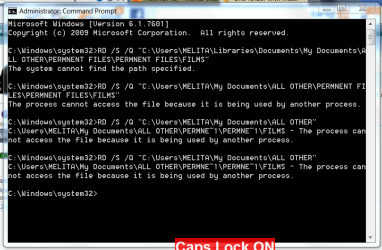
That is not working either. Please see the screen shot.

(1) ALL OTHER (2) PERMNENT FILES (3) PERMNENT FILES (A) FILMS (B) COMPUTER - not shown

All five are folders. (A) and (B) contained word documents only, and were individually inside (3), which is the way I wanted. (1) and (2) with no contents of their own, are the offenders. (3) got inside (2) and (2) got inside (1). Hence, 3 clicks to access (A) and (B).

I moved the contents of A and B to another library and both of them are empty. Sometime during the course of this morning, while I was trying this operation, folder B has disappeared, unknown to me. All the time, I was trying to delete A (just to start with one of them). A and B being separately inside (3), how this happened is a mystery!

The matter remains there with A refusing to budge. None of the documents it contained are open anywhere.

(By the way, the word permanent is wrongly spelled to fit the file name box)

Regards.
 

Attachments

  • Capture.PNG 2.PNG
    Capture.PNG 2.PNG
    29.7 KB · Views: 12

My Computer My Computer

At a glance

Windows 7 Home Premium 64bitAMD Dual Core C-502GB DDR3/320GB HDDAMD Radeon HD 6250
Computer Manufacturer/Model Number
Laptop - Acer Aspire 5250-BZ479
OS
Windows 7 Home Premium 64bit
CPU
AMD Dual Core C-50
Memory
2GB DDR3/320GB HDD
Graphics Card(s)
AMD Radeon HD 6250
Monitor(s) Displays
15.6" HD LED LCD
Internet Speed
ADSL
That is not working either. Please see the screen shot.

(1) ALL OTHER (2) PERMNENT FILES (3) PERMNENT FILES (A) FILMS (B) COMPUTER - not shown

All five are folders. (A) and (B) contained word documents only, and were individually inside (3), which is the way I wanted. (1) and (2) with no contents of their own, are the offenders. (3) got inside (2) and (2) got inside (1). Hence, 3 clicks to access (A) and (B).

I moved the contents of A and B to another library and both of them are empty. Sometime during the course of this morning, while I was trying this operation, folder B has disappeared, unknown to me. All the time, I was trying to delete A (just to start with one of them). A and B being separately inside (3), how this happened is a mystery!

The matter remains there with A refusing to budge. None of the documents it contained are open anywhere.

(By the way, the word permanent is wrongly spelled to fit the file name box)

Regards.

Are you familiar with "Process Explorer"? It provides the functionality of Windows Task Manager along with a rich set of features for collecting information about processes running on your system. I suggest downloading it from the following site;

http://technet.microsoft.com/en-us/sysinternals/bb896653.aspx

Post back after downloading and I believe it will provide a reasonably simple solution to the problem you are having.
 

My Computer My Computer

At a glance

Windows 7 Professional x64Intel i5 quad processor16 GBRadeon HD 5770
Computer type
PC/Desktop
Computer Manufacturer/Model Number
Custom Built
OS
Windows 7 Professional x64
CPU
Intel i5 quad processor
Motherboard
DP67BG
Memory
16 GB
Graphics Card(s)
Radeon HD 5770
Sound Card
Realtek High Definition Audio
Monitor(s) Displays
Samsung SyncMaster
Screen Resolution
1920X1080
Hard Drives
WD 2TB (SATA Internal)
WD 1TB (USB External)
PSU
Corsair GS800
Case
Tower (Generic)
Cooling
3 Internal Fans
Keyboard
MS Wireless
Mouse
MS Optical Wired
Internet Speed
54 mbps
Antivirus
Emsisoft
Browser
IE-Version 9, Palemoon-Version 24.2.0
I have downloaded it. Never seen it before. Seems awfully complicated.
 

My Computer My Computer

At a glance

Windows 7 Home Premium 64bitAMD Dual Core C-502GB DDR3/320GB HDDAMD Radeon HD 6250
Computer Manufacturer/Model Number
Laptop - Acer Aspire 5250-BZ479
OS
Windows 7 Home Premium 64bit
CPU
AMD Dual Core C-50
Memory
2GB DDR3/320GB HDD
Graphics Card(s)
AMD Radeon HD 6250
Monitor(s) Displays
15.6" HD LED LCD
Internet Speed
ADSL
I have downloaded it. Never seen it before. Seems awfully complicated.

From what I have gleened in your posts, I don't think you will have a problem. First of all, start Process Explorer. When you have it running, go to the problem folder and try to delete, then when the error message pops up do the following;

Left click to drag and drop the "crosshairs" icon on the error message.
(see image below for clarification)

PE Crosshairs image.jpg

1. You should see the program information that is preventing the action from being completed.
2. Kill the approiate process/program.
3. Delete the file/folder.

I hope this provides a solution, let me know.
 

My Computer My Computer

At a glance

Windows 7 Professional x64Intel i5 quad processor16 GBRadeon HD 5770
Computer type
PC/Desktop
Computer Manufacturer/Model Number
Custom Built
OS
Windows 7 Professional x64
CPU
Intel i5 quad processor
Motherboard
DP67BG
Memory
16 GB
Graphics Card(s)
Radeon HD 5770
Sound Card
Realtek High Definition Audio
Monitor(s) Displays
Samsung SyncMaster
Screen Resolution
1920X1080
Hard Drives
WD 2TB (SATA Internal)
WD 1TB (USB External)
PSU
Corsair GS800
Case
Tower (Generic)
Cooling
3 Internal Fans
Keyboard
MS Wireless
Mouse
MS Optical Wired
Internet Speed
54 mbps
Antivirus
Emsisoft
Browser
IE-Version 9, Palemoon-Version 24.2.0
It is my understanding Windows Libraries contain links to locations where contents are held, and do not actually contain contents themselves. Even so, if the Libraries' "contents" are backed up, why not restore the Libraries to the defaults via properties dialogue box? Any non-defaults should be removed by the restore and new ones can be (re)established.
 

My Computer My Computer

At a glance

Windows 7 Home Premium x64
OS
Windows 7 Home Premium x64
It is my understanding Windows Libraries contain links to locations where contents are held, and do not actually contain contents themselves. Even so, if the Libraries' "contents" are backed up, why not restore the Libraries to the defaults via properties dialogue box? Any non-defaults should be removed by the restore and new ones can be (re)established.

I believe the OP is just trying to move items within the tree. The following article seems to fit the situation under "What happens if I delete a library or the items in a library":

Libraries: frequently asked questions
 

My Computer My Computer

At a glance

Windows 7 Professional x64Intel i5 quad processor16 GBRadeon HD 5770
Computer type
PC/Desktop
Computer Manufacturer/Model Number
Custom Built
OS
Windows 7 Professional x64
CPU
Intel i5 quad processor
Motherboard
DP67BG
Memory
16 GB
Graphics Card(s)
Radeon HD 5770
Sound Card
Realtek High Definition Audio
Monitor(s) Displays
Samsung SyncMaster
Screen Resolution
1920X1080
Hard Drives
WD 2TB (SATA Internal)
WD 1TB (USB External)
PSU
Corsair GS800
Case
Tower (Generic)
Cooling
3 Internal Fans
Keyboard
MS Wireless
Mouse
MS Optical Wired
Internet Speed
54 mbps
Antivirus
Emsisoft
Browser
IE-Version 9, Palemoon-Version 24.2.0
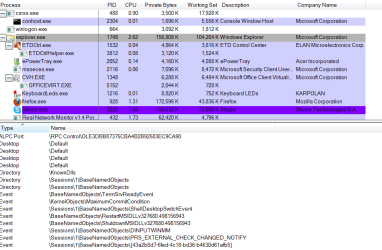
This seems fun! Before killing the program I am just checking with you. Is it OK to kill 'explorer.exe'? Please see screen shot.
 

Attachments

  • Capture.PNG 3.PNG
    Capture.PNG 3.PNG
    27.4 KB · Views: 7

My Computer My Computer

At a glance

Windows 7 Home Premium 64bitAMD Dual Core C-502GB DDR3/320GB HDDAMD Radeon HD 6250
Computer Manufacturer/Model Number
Laptop - Acer Aspire 5250-BZ479
OS
Windows 7 Home Premium 64bit
CPU
AMD Dual Core C-50
Memory
2GB DDR3/320GB HDD
Graphics Card(s)
AMD Radeon HD 6250
Monitor(s) Displays
15.6" HD LED LCD
Internet Speed
ADSL
explorer.exe can be restarted.

Have you tried rebooting to Safe Mode to do what you want to do with the Libraries? Maybe whatever is running the content in the Libraries folder won't start up in Safe Mode.
 

My Computer My Computer

At a glance

Windows 7 Home Premium x64
OS
Windows 7 Home Premium x64
Last edited:

My Computer My Computer

At a glance

Windows 7 Professional x64Intel i5 quad processor16 GBRadeon HD 5770
Computer type
PC/Desktop
Computer Manufacturer/Model Number
Custom Built
OS
Windows 7 Professional x64
CPU
Intel i5 quad processor
Motherboard
DP67BG
Memory
16 GB
Graphics Card(s)
Radeon HD 5770
Sound Card
Realtek High Definition Audio
Monitor(s) Displays
Samsung SyncMaster
Screen Resolution
1920X1080
Hard Drives
WD 2TB (SATA Internal)
WD 1TB (USB External)
PSU
Corsair GS800
Case
Tower (Generic)
Cooling
3 Internal Fans
Keyboard
MS Wireless
Mouse
MS Optical Wired
Internet Speed
54 mbps
Antivirus
Emsisoft
Browser
IE-Version 9, Palemoon-Version 24.2.0
The delay is not a problem at all sir.

When I kill explorer.exe with the Process Explorer using the method you described, if everything closes (as addictive tips says), I will not be able to access the folders I want to delete, before re-starting explorer.exe or am I missing some thing here?

"Select the Exit Explorer command. Start menu, Taskbar and "Desktop will the closed" and the other applications will continue to run in the background"
 

My Computer My Computer

At a glance

Windows 7 Home Premium 64bitAMD Dual Core C-502GB DDR3/320GB HDDAMD Radeon HD 6250
Computer Manufacturer/Model Number
Laptop - Acer Aspire 5250-BZ479
OS
Windows 7 Home Premium 64bit
CPU
AMD Dual Core C-50
Memory
2GB DDR3/320GB HDD
Graphics Card(s)
AMD Radeon HD 6250
Monitor(s) Displays
15.6" HD LED LCD
Internet Speed
ADSL
The delay is not a problem at all sir.

When I kill explorer.exe with the Process Explorer using the method you described, if everything closes (as addictive tips says), I will not be able to access the folders I want to delete, before re-starting explorer.exe or am I missing some thing here?

"Select the Exit Explorer command. Start menu, Taskbar and "Desktop will the closed" and the other applications will continue to run in the background"

Obviously a very good point and one I overlooked during a senior moment! :o

I forgot we were dealing with "explorer.exe" and there is no access to files or folders when it's terminated. I need to go back to the drawing board, now that I know explorer is causing the problem, and review how to handle it.
 

My Computer My Computer

At a glance

Windows 7 Professional x64Intel i5 quad processor16 GBRadeon HD 5770
Computer type
PC/Desktop
Computer Manufacturer/Model Number
Custom Built
OS
Windows 7 Professional x64
CPU
Intel i5 quad processor
Motherboard
DP67BG
Memory
16 GB
Graphics Card(s)
Radeon HD 5770
Sound Card
Realtek High Definition Audio
Monitor(s) Displays
Samsung SyncMaster
Screen Resolution
1920X1080
Hard Drives
WD 2TB (SATA Internal)
WD 1TB (USB External)
PSU
Corsair GS800
Case
Tower (Generic)
Cooling
3 Internal Fans
Keyboard
MS Wireless
Mouse
MS Optical Wired
Internet Speed
54 mbps
Antivirus
Emsisoft
Browser
IE-Version 9, Palemoon-Version 24.2.0
Back
Top