Is it safe to change the original Windows 7 themes?

Alexander Moore

New member
Member
VIP
Local time
7:41 PM
Messages
113
Location
Suzhou, China
What I mean is, is it safe to be messing with the Windows 7 theme as in, using programs that replace the normal look of Windows 7 menus etc with custom stuff, much like this website talks about?

You know, changing the start menu button, changing the inner menus, changing the password screen, etc. Swapping graphics, pretty much. All of it is done through third party softwares and I'm wondering what's safe and what isn't for a 64-bit Windows 7 operating system.

Also, any software recommendations in this field? What's the best and most accurate/stable software for doing these things? I already use rainmeter and sTabLauncher combined to make it look all cool but I was thinking of pushing it just that one last bit further into really feeling like my personalized theme.

Last time I did stuff like this I ran into some kind of registry issues with it. That was back when Vista was new though. Could've been just crappy unpredictable vista being crappy unpredictable vista.

Suggestions and comments?
 

My Computer My Computer

At a glance

Windows 7 Ultimate x64Intel i7 Extreme 2920XM Overclocked 4.1 (~4.8...16GB Kingston Hyper-X Dual Channel DDR3 @ 160...Overclocked 2GB NVIDIA 580M GTX
Computer type
PC/Desktop
Computer Manufacturer/Model Number
Origin EoN 17S
OS
Windows 7 Ultimate x64
CPU
Intel i7 Extreme 2920XM Overclocked 4.1 (~4.8Ghz Turbo Mode)
Motherboard
CLEVO P170HMx
Memory
16GB Kingston Hyper-X Dual Channel DDR3 @ 1600Mhz
Graphics Card(s)
Overclocked 2GB NVIDIA 580M GTX
Sound Card
Unknown - Uses Realtek Drivers
Monitor(s) Displays
FHD LED Display by LG
Screen Resolution
1920 x 1080
Hard Drives
OCZ Vertex 3 Max IOPS 240GB SDD||

750GB SATA III HDD
PSU
FSP220-ABAN1 (100-240V 50-60Hz, manufactured by FSP Group)
Case
CLEVO P150HM
Cooling
Dual fans (one for GPU, one for CPU)
Keyboard
Laptop keyboard
Mouse
Logitech Performance Mouse MX
Internet Speed
6mbps (locally). Often less internationally, even with VPN.
Antivirus
Microsoft Security Essentials
Browser
Google Chrome
Do you mean something like Tuneup Utilities ?

It`s safe to install themes, you can always uninstall them.

Why not just build your own? Everything is there in 7. Just download wallpaper.
 

My Computer My Computer

At a glance

Windows 10 Pro x64Intel Core i7 6700KGSkill TridentZ RGB 16GB 3600 16-16-16-36EVGA GTX 980 Ti SC x2
Computer type
PC/Desktop
Computer Manufacturer/Model Number
Skylake Special #666
OS
Windows 10 Pro x64
CPU
Intel Core i7 6700K
Motherboard
Asus Sabertooth Z170 Mark 1
Memory
GSkill TridentZ RGB 16GB 3600 16-16-16-36
Graphics Card(s)
EVGA GTX 980 Ti SC x2
Sound Card
Realtek High Definition
Monitor(s) Displays
AOC G2460PG
Screen Resolution
1920 x 1080 144Hz
Hard Drives
Samsung 860 Pro 256GB, Seagate Barracuda 4TB x2
PSU
EVGA 1000 P2, EVGA White Custom Braided Cables
Case
Corsair Vengeance C70 Gunmetal Black
Cooling
Corsair H100i v2, Corsair ML120 x2, Thermal Grizzly Kryonaut
Keyboard
Logitech G910 Orion Spectrum
Mouse
Logitech G700s
Internet Speed
Verizon Fios Quantum Gateway 75/75
Antivirus
Windows Defender, Malwarebytes Free 3.8.3
Browser
Chrome
Other Info
Corsair SP120 x4, LG Blu-ray Drive, Durabrand HT-395 100 Watt Dolby Digital Amp, Corsair H2100 Wireless 7.1 Headset
I'm not looking to change just the wallpaper.

Talking like the start menu button, task bar background, start menu background, lock screen, etc.


If all of these things are already fully custom in Windows 7 then I need to brush up on it. Link me to a place where I can teach myself in that case. I prefer not to use third party software where it's not necessary.
 

My Computer My Computer

At a glance

Windows 7 Ultimate x64Intel i7 Extreme 2920XM Overclocked 4.1 (~4.8...16GB Kingston Hyper-X Dual Channel DDR3 @ 160...Overclocked 2GB NVIDIA 580M GTX
Computer type
PC/Desktop
Computer Manufacturer/Model Number
Origin EoN 17S
OS
Windows 7 Ultimate x64
CPU
Intel i7 Extreme 2920XM Overclocked 4.1 (~4.8Ghz Turbo Mode)
Motherboard
CLEVO P170HMx
Memory
16GB Kingston Hyper-X Dual Channel DDR3 @ 1600Mhz
Graphics Card(s)
Overclocked 2GB NVIDIA 580M GTX
Sound Card
Unknown - Uses Realtek Drivers
Monitor(s) Displays
FHD LED Display by LG
Screen Resolution
1920 x 1080
Hard Drives
OCZ Vertex 3 Max IOPS 240GB SDD||

750GB SATA III HDD
PSU
FSP220-ABAN1 (100-240V 50-60Hz, manufactured by FSP Group)
Case
CLEVO P150HM
Cooling
Dual fans (one for GPU, one for CPU)
Keyboard
Laptop keyboard
Mouse
Logitech Performance Mouse MX
Internet Speed
6mbps (locally). Often less internationally, even with VPN.
Antivirus
Microsoft Security Essentials
Browser
Google Chrome
If you mean third-party custom themes then I would say yes they are safe to use if done properly. Do not install themes that are a .exe they have the potential to harm a lot of system files.
If you find a theme you like post a link to it and I will look at it and tell you if it's safe or not, I have been customizing my system for several years now and have no problems.

You will need to do 1 of these 2 ways of Enabling custom themes for them to work.
http://www.sevenforums.com/tutorials/34579-enabling-custom-themes-windows-7-a.html
Or
http://www.sevenforums.com/tutorials/28377-theme-how-apply-custom-themes.html?filter

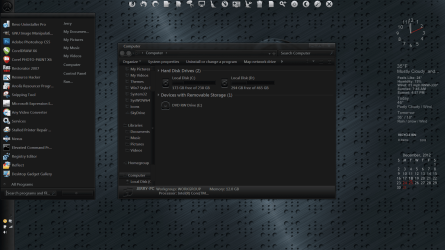
If you have any more questions let me know. Below is a screenshot of some of my customizing (that is not my theme someone else's theme I'm using from Browsing Windows 7 Utilities on deviantART )

Jerry

untitled6.PNG
 

My Computer My Computer

At a glance

Win 7 Pro x64 / Win 10 ProIntel(R) Core(TM) i7-3630QM CPU @ 2.40GHz12 GB(1) Intel(R) HD Graphics 4000 (2) NVIDIA GeFo...
Computer type
Laptop
Computer Manufacturer/Model Number
Sager NP9170
OS
Win 7 Pro x64 / Win 10 Pro
CPU
Intel(R) Core(TM) i7-3630QM CPU @ 2.40GHz
Motherboard
CLEVO P170EM
Memory
12 GB
Graphics Card(s)
(1) Intel(R) HD Graphics 4000 (2) NVIDIA GeForce GTX 675M
Sound Card
(1) Realtek High Definition Audio (2) Intel(R) Display Aud
Monitor(s) Displays
17.3
Screen Resolution
1920x1080
Hard Drives
(1) Samsung 860 EVO 500GB(OS) (1) Samsung 860 EVO 500GB(Data)
Keyboard
Backlite
Antivirus
MSE, Malwarebytes Pro
Browser
Firefox
Other Info
DESKTOP: Custom-built.
OS: Win 10 Pro x64.
CASE: Rosewill R5.
CPU: Intel I5 4670K CPU @ 3.40GHz.
CPU COOLER: Cool Master Hyper 212 EVO.
MOTHERBOARD: Asus Z87-A.
MEMORY: Kingston HyperX 2x4 GB.
GPU: Nvidia Geforce 650 TI.
PSU: Corsair TX750.
DRIVES: (1) Samsung 840 120 GB SSD (2) Western Digital blue 500 GB 7200 RPM.
It should be common sense not to run executables. Anyone who knows what they're doing will know that first you download and install the main theme managing program and then download theme files for being used with those programs, as many theme managers do.

But seriously, it should be well taught that running .exe files is dumb unless you know exactly what it is. Should be one of the first things people get educated about. Unfortunately they don't.

I'll read up on those links tomorrow.

I might download the third party editors out of sheer laziness anyway. I'm not a graphic artist so if unless I can easily find all the perfect graphics I need online and quickly educate myself on editing the windows graphics I'm probably going to want to go for the themes people have already made.

I just remember that back on Vista, the program wanted to change registry values to get the theme changes to work. I think it was changing the lock screen theme in particular that needed that. In the end that caused crap. But in retrospect, pretty much anything would cause crap with Vista back then. I probably shouldn't let that one bad experience ruin my trust in it.

Will be back tomorrow. Goodnight!
 

My Computer My Computer

At a glance

Windows 7 Ultimate x64Intel i7 Extreme 2920XM Overclocked 4.1 (~4.8...16GB Kingston Hyper-X Dual Channel DDR3 @ 160...Overclocked 2GB NVIDIA 580M GTX
Computer type
PC/Desktop
Computer Manufacturer/Model Number
Origin EoN 17S
OS
Windows 7 Ultimate x64
CPU
Intel i7 Extreme 2920XM Overclocked 4.1 (~4.8Ghz Turbo Mode)
Motherboard
CLEVO P170HMx
Memory
16GB Kingston Hyper-X Dual Channel DDR3 @ 1600Mhz
Graphics Card(s)
Overclocked 2GB NVIDIA 580M GTX
Sound Card
Unknown - Uses Realtek Drivers
Monitor(s) Displays
FHD LED Display by LG
Screen Resolution
1920 x 1080
Hard Drives
OCZ Vertex 3 Max IOPS 240GB SDD||

750GB SATA III HDD
PSU
FSP220-ABAN1 (100-240V 50-60Hz, manufactured by FSP Group)
Case
CLEVO P150HM
Cooling
Dual fans (one for GPU, one for CPU)
Keyboard
Laptop keyboard
Mouse
Logitech Performance Mouse MX
Internet Speed
6mbps (locally). Often less internationally, even with VPN.
Antivirus
Microsoft Security Essentials
Browser
Google Chrome

My Computer My Computer

At a glance

Win 7 Pro x64 / Win 10 ProIntel(R) Core(TM) i7-3630QM CPU @ 2.40GHz12 GB(1) Intel(R) HD Graphics 4000 (2) NVIDIA GeFo...
Computer type
Laptop
Computer Manufacturer/Model Number
Sager NP9170
OS
Win 7 Pro x64 / Win 10 Pro
CPU
Intel(R) Core(TM) i7-3630QM CPU @ 2.40GHz
Motherboard
CLEVO P170EM
Memory
12 GB
Graphics Card(s)
(1) Intel(R) HD Graphics 4000 (2) NVIDIA GeForce GTX 675M
Sound Card
(1) Realtek High Definition Audio (2) Intel(R) Display Aud
Monitor(s) Displays
17.3
Screen Resolution
1920x1080
Hard Drives
(1) Samsung 860 EVO 500GB(OS) (1) Samsung 860 EVO 500GB(Data)
Keyboard
Backlite
Antivirus
MSE, Malwarebytes Pro
Browser
Firefox
Other Info
DESKTOP: Custom-built.
OS: Win 10 Pro x64.
CASE: Rosewill R5.
CPU: Intel I5 4670K CPU @ 3.40GHz.
CPU COOLER: Cool Master Hyper 212 EVO.
MOTHERBOARD: Asus Z87-A.
MEMORY: Kingston HyperX 2x4 GB.
GPU: Nvidia Geforce 650 TI.
PSU: Corsair TX750.
DRIVES: (1) Samsung 840 120 GB SSD (2) Western Digital blue 500 GB 7200 RPM.
The problem with custom themes is that sometimes they make modifications to your system that cannot be easily undone when you delete the custom theme. So you may want to make an image before you venture into a custom theme. Then at least you can fix any possible problem.
 

My Computer My Computer

At a glance

Vista, Windows7, Mint Mate, Zorin, Windows 8from 1.6GHz Duo to i7
Computer Manufacturer/Model Number
HP, Dell, Gateway, Toshiba - 4 laptops and 2 desktops
OS
Vista, Windows7, Mint Mate, Zorin, Windows 8
CPU
from 1.6GHz Duo to i7
Monitor(s) Displays
2x HP w2207
Hard Drives
5x HDD, 7x SSD, 12x Externals
Keyboard
with trackball - no mices
Mouse
Trackball mice
Internet Speed
DSL 6000
Does this guy look legit? Seems to me like he just wants Ad-money so he's spamming Deviantart and might be adware / malware. I can deal with the ads before downloading I guess (considering I have AdBlock anyway) but if it has adware inside or something I'm not gonna go anywhere near him and probably report him as well.

Besides that, are there any programs that won't need to make registry changes to work? Last time I did that, there was problems with that step.


Edit : Yeah I'm pretty sure he's just a load of spam. Can anyone link me to a section that has good legit non-ad-spam themes?
 
Last edited:

My Computer My Computer

At a glance

Windows 7 Ultimate x64Intel i7 Extreme 2920XM Overclocked 4.1 (~4.8...16GB Kingston Hyper-X Dual Channel DDR3 @ 160...Overclocked 2GB NVIDIA 580M GTX
Computer type
PC/Desktop
Computer Manufacturer/Model Number
Origin EoN 17S
OS
Windows 7 Ultimate x64
CPU
Intel i7 Extreme 2920XM Overclocked 4.1 (~4.8Ghz Turbo Mode)
Motherboard
CLEVO P170HMx
Memory
16GB Kingston Hyper-X Dual Channel DDR3 @ 1600Mhz
Graphics Card(s)
Overclocked 2GB NVIDIA 580M GTX
Sound Card
Unknown - Uses Realtek Drivers
Monitor(s) Displays
FHD LED Display by LG
Screen Resolution
1920 x 1080
Hard Drives
OCZ Vertex 3 Max IOPS 240GB SDD||

750GB SATA III HDD
PSU
FSP220-ABAN1 (100-240V 50-60Hz, manufactured by FSP Group)
Case
CLEVO P150HM
Cooling
Dual fans (one for GPU, one for CPU)
Keyboard
Laptop keyboard
Mouse
Logitech Performance Mouse MX
Internet Speed
6mbps (locally). Often less internationally, even with VPN.
Antivirus
Microsoft Security Essentials
Browser
Google Chrome
There are a lot of legit themes on Deviantart you just need to look.
Besides that, are there any programs that won't need to make registry changes to work? Last time I did that, there was problems with that step.
What programs to do what?

Jerry
 

My Computer My Computer

At a glance

Win 7 Pro x64 / Win 10 ProIntel(R) Core(TM) i7-3630QM CPU @ 2.40GHz12 GB(1) Intel(R) HD Graphics 4000 (2) NVIDIA GeFo...
Computer type
Laptop
Computer Manufacturer/Model Number
Sager NP9170
OS
Win 7 Pro x64 / Win 10 Pro
CPU
Intel(R) Core(TM) i7-3630QM CPU @ 2.40GHz
Motherboard
CLEVO P170EM
Memory
12 GB
Graphics Card(s)
(1) Intel(R) HD Graphics 4000 (2) NVIDIA GeForce GTX 675M
Sound Card
(1) Realtek High Definition Audio (2) Intel(R) Display Aud
Monitor(s) Displays
17.3
Screen Resolution
1920x1080
Hard Drives
(1) Samsung 860 EVO 500GB(OS) (1) Samsung 860 EVO 500GB(Data)
Keyboard
Backlite
Antivirus
MSE, Malwarebytes Pro
Browser
Firefox
Other Info
DESKTOP: Custom-built.
OS: Win 10 Pro x64.
CASE: Rosewill R5.
CPU: Intel I5 4670K CPU @ 3.40GHz.
CPU COOLER: Cool Master Hyper 212 EVO.
MOTHERBOARD: Asus Z87-A.
MEMORY: Kingston HyperX 2x4 GB.
GPU: Nvidia Geforce 650 TI.
PSU: Corsair TX750.
DRIVES: (1) Samsung 840 120 GB SSD (2) Western Digital blue 500 GB 7200 RPM.
Back
Top