Asus K53TK - Dual Graphics And Overclock questions

AsusK53TK

New member
Local time
11:30 PM
Messages
11
Hello, everyone! I am all-new to Windows 7, AMD and ATI, so excuse me if I don't clarify my questions well enough - not too familiar with their software. On with the Q's: (three of them)

1.
So, there is an 6520G APU and the discrete HD7670. The 7670 kicks in while playing Crysis2, for example - not that it runs well, if u ask me. But, on Borderlands 2 it stays idle, although I'm not getting good performance from the APU, it won't switch to the more powerful 7670. How can I change that?
2.
There is this piece of software - AMD VISION Control Center. Going to Gaming-->3D Application Settings(high-performance graphics section)-->AMD Radeon Dual Graphics Mode for 3D Applications and I have a few options there. Not only that I don't know what to make of this (I don't understand its purpose), but there are pre-set AMD profiles with the titles of different games. What is that all about?
3.
Is it a good idea to overclock the 7670? I have a "really OK" cooling pad and don't go over 60 C(GPU temp) while playing Crysis2, so I guess heat is not going to be the issue. If there is a ready tutorial on how to overclock this particular GPU, please post a link - still browsing the Forum and it's going to take quite some time.

Two related q's -
* What is AMD Catalyst - do I need this software if I already have the AMD Vision Center?
* I downloaded GPU Tweak - should I use it? How do I know how much I can "push" the GPU in terms of Voltage, for example? Is there a limit and if yes - what is it?

I apologize for the long post and the piling of questions, guys. But I really want to get to know my lappy better and use it to its potential.|Thank you in advance!
 

My Computer My Computer

At a glance

Windows 7 Ultimate x64
OS
Windows 7 Ultimate x64
drop oc

OK, so **** the overclocking for now. What's up with that APU+GPU shit? I installed Far Cry and the HD7670 remains idle, so I can't play the game because of the weak APU?! ANY suggestions?
 

My Computer My Computer

At a glance

Windows 7 Ultimate x64
OS
Windows 7 Ultimate x64
Hey, I have an Asus K53TA, but the steps to using the dedicated GPU should be similar to the K53TK. If you right click anywhere on your desktop, do you get the option Configure Switchable Graphics? If you click on that, you'll see a list of applications and you can select either Power Saving or High Performance for each application. If you want to use the GPU inside the APU (in your case the 6520), then you select Power Saving. If you wanna use the 7670, select High Perfomance.

If you wanna overclock, download Sapphire TRIXX and MSI Afterburner. Install TRIXX, run it, then go to Settings, then make sure Load on Windows Startup and Disable ULPS are selected. Restart your computer and make sure TRIXX starts up automatically. Then install MSI Afterburner and run that. You then use Afterburner to change the clock speeds for your GPU. When overclocking with Afterburner, make sure you selected the right GPU (either the 6520 or the 7670).
 

My Computer My Computer

At a glance

Windows 7 Professional x64AMD A8-3870K8GB DDR3Radeon HD 6550D, Radeon HD 5850
OS
Windows 7 Professional x64
CPU
AMD A8-3870K
Motherboard
ECS A75F-M2
Memory
8GB DDR3
Graphics Card(s)
Radeon HD 6550D, Radeon HD 5850
Hard Drives
1TB
PSU
750W
First of all - thank you for your reply, mate! I thought I wouldn't get any response...
Well, nothing really happens when I click Configure Switchable Graphics - right-click on an empty area on the desktop.
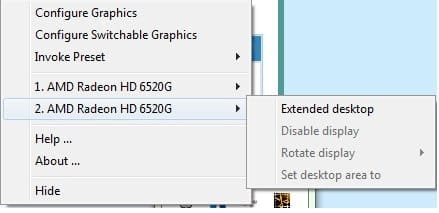
Only an icon shows up in the system tray and I can only right-click it. It shows me this:
SW Graph.jpg
If I click on Configure Switchable Graphics, it disappears in a few moments. I'm using the 12.11 beta from AMD's website - what version are you using?
Oh, btw, after I updated to 12.11beta, when I run GPU-Z it shows me HD7600series and not HD7670... donno what 2 make of it. And... I've noticed that sometimes it just shows me an error and nothing happens after that - but, I updated to 12.11 in the very beginning, so I'm thinkin drivers?

Also, are you happy with your lappy? So far, I've been mostly disappointed in the performance, but that's because of the fact that the HD7670 stays idle most of the freakin time, lol... Do you think it's a good idea to oc the CPU OR the GPU on this lapptop?
 
Last edited:

My Computer My Computer

At a glance

Windows 7 Ultimate x64
OS
Windows 7 Ultimate x64
You should see something like this when you click on Configure Switchable Graphics:
CBvNZ.png

I'm using AMD Cataylst 12.10, not the beta. They probably disabled Configure Switchable Graphics if there were many problems with that feature in the beta. Try uninstalling AMD Catalyst, then install 12.10 and see if that works. Also make sure you have ATI Powerplay set to Maximize Performance. Down in your taskbar, there should be an icon of a battery and a plug. Right click on that, then click Power options. Next to whatever power plan you have selected (usually it's Balanced by default), click on Change plan settings. Then look down and click on Change advanced power settings. A window should pop up, then you scroll down to ATI Graphics Power Settings. If you have your laptop plugged in, set Plugged in to Maximize Performance then click Apply. Doing this will prevent Windows 7 from throttling your GPU.

I looked up the Asus K53TK and it's basically the same specs as my Asus K53TA except for a slightly faster processor. The HD 7670M in the K53TK is the same chip as the HD 6550M in my K53TA, just renamed. So yeah to get the best framerates possible, you want the HD 7670M to kick in. At most I get about 3 times more frames using the dedicated GPU instead of the GPU inside the APU.

As for whether I'm happy with my laptop, I bought my laptop back a year ago when it was on sale for $349. Pretty much one of the best laptop deals ever, since you can't find any other laptop with a GPU as good as the one in my laptop plus with large overclocking capabilities (I can overclock my quad core processor from 1.4GHz to 2.4GHz without changing voltages for example) for around $300. IIRC, Best Buy and Newegg were selling these laptops at this price when I bought it and it sold out the next day. So yeah, for what I paid, I'm happy with it. I'm able to play Crysis 2 and Battlefield 3 on my $349 laptop with no problems. Used the money I saved and upgraded my laptop with a 4GB stick of RAM and a Seagate Momentus XT solid state hybrid. Cuts my boot up time in half. Been using my laptop for a year and it's still as snappy as the day I bought it.

You can try overclocking if you want. I'm pretty sure there's a lot of room for overclocking on the Asus K53TK, but you should try bumping up the clocks by small increments and see if the laptop remains stable. Right now, I got my processor overclocked at 2.2GHz from 1.4GHz using the K10STAT utility. Then when I'm playing a game, I use MSI Afterburner and crank my GPU from 600 to 750MHz. When I'm done, crank it back down to 600MHz. The cool thing with MSI Afterburner is that is shows you a real time graph of how much work the GPU is doing so you know whether you're using the right GPU.

EDIT: Installed Catalyst 12.11 beta 11 and the Configure Switchable Graphics still work for me. Maybe try uninstalling the beta, then try 12.10 and see what happens.
 
Last edited:

My Computer My Computer

At a glance

Windows 7 Professional x64AMD A8-3870K8GB DDR3Radeon HD 6550D, Radeon HD 5850
OS
Windows 7 Professional x64
CPU
AMD A8-3870K
Motherboard
ECS A75F-M2
Memory
8GB DDR3
Graphics Card(s)
Radeon HD 6550D, Radeon HD 5850
Hard Drives
1TB
PSU
750W
I can't see the pic, mate...
Anyway - I don't have the uninstall option when trying to uninstall (just Change and Repair) from Control Panel--->Unistall programs, so I used Drive Sweeper to do so for me. After having deleted all ATI software, I installed the 12.10 and hit Restart. Now, on a right-click I don't get the Switchable Graphics options (both). :D
I'm thinking about re-installing all the original drivers from the CD (or even re-install the Win7 entirely + the drivers) and update to 12.10 as you suggested. I already had tuned to Maximize Performance, but it made no difference for the GPU, just the CPU.
The K10STAT didn't work for me, for some reason it said "can't detect 10h family CPU" (I think the A6 3420M is 12h) but I'll put the oc on hold, until I get all the GPU-related problems sorted out. Still, isn't your CPU going to 2,0+ GHz by its self? I mean, isn't it supposed to do so? When I run CPU-Z and keep the CPU on 100% (from Power4Gear) it says 2400 Mhz at 24x. Doesn't that mean that all four cores have gone up to 2,4Ghz for that time?
 

My Computer My Computer

At a glance

Windows 7 Ultimate x64
OS
Windows 7 Ultimate x64
Hey, I edited the link above. The pic should show now.

Before you wipe your hard drive, there's another way to access the settings within the control center under the Power section. It should be there:
t57hP.png
 

My Computer My Computer

At a glance

Windows 7 Professional x64AMD A8-3870K8GB DDR3Radeon HD 6550D, Radeon HD 5850
OS
Windows 7 Professional x64
CPU
AMD A8-3870K
Motherboard
ECS A75F-M2
Memory
8GB DDR3
Graphics Card(s)
Radeon HD 6550D, Radeon HD 5850
Hard Drives
1TB
PSU
750W
For some reason, I don't really have the Vision Engine Control Center, even though I installed 12.10. Something must've got screwed up while I was using the Driver Sweeper and now I'm going to re-install Win7 and re-install the original software. Meanwhile, I hope you can get me the links with your specific versions of AMD and ATI software, so when I start updating, I'll be having something that absolutely works on a K53 lappy? I know it's too much to ask for, but I deleted the AMD Drivers, installed the 12.10 from their web-site and now don't have the AMD Vision Engine Control Center ANYWHERE on my lappy. Just old shortcuts in the Start-menu, lol. That is the only reason I am going to re-install Win7 as well - and the fact that for some reason I can't install the driver from the CD (witch says it's actually for K43T?!), because it says Installed on every single item.
Anyway - huge Thannk you! for your help, mate! I hope after the re-install I'll get to the screen you've sent me. If not - expect me here, haha

Oh. I almost forgot - I never had this option (Switchable Graphics Application Setting) in the Power menu... nor the wi-fi radio thing. Any idea if BIOS is involved? How can I update it, if necessary? I'll be looking into that also.
 

My Computer My Computer

At a glance

Windows 7 Ultimate x64
OS
Windows 7 Ultimate x64
Well, I re-installed Windows7 and the original drivers from the ASUS CD. Everything is accordingly well - I've regained access to Configure Switchable Graphics menu, haha... and can decide between two options - Power Saving and Performance.
Assassin's Creed is now using the 7670M, but the performance is - for some reason - extremely bad, worse than before, when GPU-Z detected only the 6520G to be running. I was also surprised to see that no matter what mode I choose from Graphic Properties--->Gaming--->3D Application Settings (High Performance Graphics) e.g. AFR, Default, etc. - the HD7670M was going over 80% let's say rarely. In power options everything is set to maximize performance.
I think updating to 12.10 might change some of these issues, but I'm going to wait and see if you(windows7user)/anyone gives me a link to your drivers, since they should be working.
I am also thinking I should wait and see if there will be any improvement after this update, before I mark this as Solved?
 

My Computer My Computer

At a glance

Windows 7 Ultimate x64
OS
Windows 7 Ultimate x64
Updated to 12.10 - same problem occurs. I click the Configure Switchable Graphics option and nothing happens. I try to access it the second way - from Switchable Graphics--->Power--->Switchable Graphics Application Settings and it just closes the current window... Nothing after that - I can't re-install the original drivers (witch seemed to work fine, other than that Assassin's Creed stutter). Tried Driver Sweep again - nothing worked, haha. I'm back to where I started from and I guess I might have to re-install Windows again?
So, any ideas? Anyone? :)
 

My Computer My Computer

At a glance

Windows 7 Ultimate x64
OS
Windows 7 Ultimate x64
What processor is included with that laptop?
APU's are fantastic, but hard to manage, and you might be demanding way too much from them.
 

My Computer My Computer

At a glance

Windows 7 professional X64AMD A10-5800K OC@ 4.4Ghz.8GB Kingston HyperX Blu 1333mhzXFX HD7870 2GB Core Edition
Computer type
PC/Desktop
OS
Windows 7 professional X64
CPU
AMD A10-5800K OC@ 4.4Ghz.
Motherboard
Gigabyte F2A85X-UP4
Memory
8GB Kingston HyperX Blu 1333mhz
Graphics Card(s)
XFX HD7870 2GB Core Edition
Monitor(s) Displays
Acer AL2216W
Screen Resolution
1680x1050
Hard Drives
Seagate Barracuda 500gb 7200rpm
Seagate Barracuda 1.5TB 7200rpm
PSU
Cooler Master Silent Pro M 850W
Case
Thermaltake Commander MS-I
Cooling
Cooler Master N520
Mouse
Logitech M504
Internet Speed
10Mbps
This is one of the biggest reason to stay away form the APU's in my opinion. First I don't understand the purpose and second I've seen nothing but bad reviews.
 

My Computer My Computer

At a glance

Windows 7 Ultimate 64 bitAMD Phenom II X4 965 Black EditionGSkill 4 X 2 GB PC 8500XFX Radeon HD 6790 D
Computer Manufacturer/Model Number
Custom built
OS
Windows 7 Ultimate 64 bit
CPU
AMD Phenom II X4 965 Black Edition
Motherboard
Gigabyte GA-MA790X-DS4
Memory
GSkill 4 X 2 GB PC 8500
Graphics Card(s)
XFX Radeon HD 6790 D
Sound Card
On board RealTek HD
Monitor(s) Displays
Dual monitors:Samsung SyncMaster S20B300
Screen Resolution
1600 X 900
Hard Drives
Seagate Barracuda 1TB (primary)
Seagate Barracuda 2 X 320 GB
PSU
Ultra X4 750 watt fully modular
Case
Thermaltake Overseer RX 1 full tower
Cooling
Core-Contact 92 mm CPU Cooler
Keyboard
Logitech G510
Mouse
Razor DeathAdder
Internet Speed
50/5 Mbps UL/DL
Other Info
Optical: Super Muliti DVD burner w/lightscribe, Hauppauge WinTV HVR-1800
This is one of the biggest reason to stay away form the APU's in my opinion. First I don't understand the purpose and second I've seen nothing but bad reviews.
Are you serious? Show me one legitimate bad review about APU's that do not involve pointless benchmarking that shows nothing to the potential average consumer.
Their purpose is to give a low budget and medium range performance for gamers, and other users, which is something AMD is known for.

I have both an FM1 A6-3670K and an FM2 A10-5800K and they perform beautifully at 3.4, and 4.5GHZ respectively.

However, FM1 did prove to be a dead case from part of AMD, making it very unstable when you don't understand what you are dealing with, but it does not mean it is a bad processor, it is more than capable to perform common tasks. You just need to know how to manage one.
 

My Computer My Computer

At a glance

Windows 7 professional X64AMD A10-5800K OC@ 4.4Ghz.8GB Kingston HyperX Blu 1333mhzXFX HD7870 2GB Core Edition
Computer type
PC/Desktop
OS
Windows 7 professional X64
CPU
AMD A10-5800K OC@ 4.4Ghz.
Motherboard
Gigabyte F2A85X-UP4
Memory
8GB Kingston HyperX Blu 1333mhz
Graphics Card(s)
XFX HD7870 2GB Core Edition
Monitor(s) Displays
Acer AL2216W
Screen Resolution
1680x1050
Hard Drives
Seagate Barracuda 500gb 7200rpm
Seagate Barracuda 1.5TB 7200rpm
PSU
Cooler Master Silent Pro M 850W
Case
Thermaltake Commander MS-I
Cooling
Cooler Master N520
Mouse
Logitech M504
Internet Speed
10Mbps
Well, an A6-3420M is what the CPU is. The APU is 6520G - not too bad, but nothing, compared to the HD7670M.
Right now, I have NO CONTROL over my lappy's performance, other than the Power4Gear and OverDrive... The stutter with Assassin's Creed III is gone, but so is the activity of my dGPU during that game, so it's not stuttering, yeah - it's lagging, hahaha; the 6520G is not handling the AC III too well.

@Erick Aguilar - have done any OC on these CPU's? 3.4 GHz sounds kinda like a far reach for me, don't you think? Is there any point in overclocking the CPU OR the GPU. I'm having doubts on both instances, although some people claim the A6 I got is VERY open to oc and I've seen the HD 7670M oc'ed at 150MHz+. Do you have any tips on general management with my lappy? I just want to use as much as I can from my laptop and I don't have the knowledge to so, yet.

I am reading a lot, but same problems on other manufacturers like HP or Toshiba are not helpful 2 me, since I have no options in my BIOS for the switch between the APU and dGPU.
Why can't I seem to find the drivers on the driver CD? No graphic-related titles there - just a few AMD stuff, but none related to my problem. That is actually the first reason I re-installed Windows. The second is that I can't find how to uninstall my drivers properly, so the CD from the manufacturer can detect I don't have it and install it automatically.

What does all of this mean to you? I mean, other than the fact that I have almost no idea what it means to me, haha. Pretty please? :D
 

My Computer My Computer

At a glance

Windows 7 Ultimate x64
OS
Windows 7 Ultimate x64
Ok, some of my noob questions got answers today.
I can uninstall the drivers only by clicking Uninstall when I try to update, for instance.
I found that the folder AMD UMA is the one with the video drivers.
And some other excruciatingly obvious stuff, that go along this line... My first laptop, although I'm 21, bought with my first real salary and so far, I only got angry by the fact I didn't do the research beforehand. I mean, it's really tearing my nerves apart, this laptop.
The stutter with Assassin's Creed is not resolved - if I Alt+Tab it starts doing it again. Only once the game ran with the APU - now, the dGPU is running, but at around 70% at best.
I don't expect much from the APU at all. My expectations were high only for the 7670M and if it's working at 100% (like with Crysis 2) I am absolutely satisfied with the performance.
The only reason I even consider over-clocking is to compensate for the shitty ordinary-user unfriendly driver-thing ATI and AMD got going on. How is nVidia handling EVERYTHING so smoothly? Is it because they're teamed up with Microsoft or something?
I want also to say that if the drivers were OK, the APU+GPU configuration beats everything on the market as far price-performance ratio is considered - at least that is how I feel right now.
 

My Computer My Computer

At a glance

Windows 7 Ultimate x64
OS
Windows 7 Ultimate x64
So, I un-installed Assassin's Creed... :D **** that shit. I decided to wait for the full 12.11 version and try to install it when it's time. Until then, I'll be rolling like this, in terms of drivers.
Next item on my agenda for the new lappy - Overclocking.
I am going to try out the GPU as suggested in page 1 and see what happens. Then, I might move on to CPU - in the meanwhile, I'm open for EVERY piece of information.
 

My Computer My Computer

At a glance

Windows 7 Ultimate x64
OS
Windows 7 Ultimate x64
So, I un-installed Assassin's Creed... :D **** that shit. I decided to wait for the full 12.11 version and try to install it when it's time. Until then, I'll be rolling like this, in terms of drivers.
Next item on my agenda for the new lappy - Overclocking.
I am going to try out the GPU as suggested in page 1 and see what happens. Then, I might move on to CPU - in the meanwhile, I'm open for EVERY piece of information.

Yeah, if you want to play games like the big boys, get a desktop.
 

My Computer My Computer

At a glance

Windows 7 professional X64AMD A10-5800K OC@ 4.4Ghz.8GB Kingston HyperX Blu 1333mhzXFX HD7870 2GB Core Edition
Computer type
PC/Desktop
OS
Windows 7 professional X64
CPU
AMD A10-5800K OC@ 4.4Ghz.
Motherboard
Gigabyte F2A85X-UP4
Memory
8GB Kingston HyperX Blu 1333mhz
Graphics Card(s)
XFX HD7870 2GB Core Edition
Monitor(s) Displays
Acer AL2216W
Screen Resolution
1680x1050
Hard Drives
Seagate Barracuda 500gb 7200rpm
Seagate Barracuda 1.5TB 7200rpm
PSU
Cooler Master Silent Pro M 850W
Case
Thermaltake Commander MS-I
Cooling
Cooler Master N520
Mouse
Logitech M504
Internet Speed
10Mbps
I already have one - and am not facing any troubles on that front, at least. Maybe you were right about the expectations - maybe the desktop PC did affect my demands in terms of performance, I don't know. I'll just stick to DoTA and Crysis2, when it comes to entertainment on the lappy, lol.
Thank you for the info, though.
Cheers. :)
 

My Computer My Computer

At a glance

Windows 7 Ultimate x64
OS
Windows 7 Ultimate x64
Back
Top