Random BSOD's and Screen Freezing/Crashing Please Help

Dakka

New member
Hi guys

I'm really hoping someone can help me out here as I am getting nowhere alone.
My build keeps crashing and I dont know why. I have attached the Dumps and my specs are or should be, in my sig

thank you very much for taking the time to look

EDIT: Here is a speccy log if it helps

Summary
Operating System
MS Windows 7 Ultimate 64-bit SP1
CPU
AMD Phenom II X2 555 31 °C
Callisto 45nm Technology
RAM
12.0GB Dual-Channel DDR3 @ 669MHz (9-9-9-24)
Motherboard
ASUSTeK Computer INC. M4A785TD-V EVO (AM3)
Graphics
Acer H223HQ @ 1920x1080
ATI Radeon HD 5800 Series
Hard Drives
733GB Western Digital WDC WD7500AADS-00M2B0 ATA Device (Unknown) 32 °C
Optical Drives
HL-DT-ST DVDRAM GH22LS50 ATA Device
Audio
VIA High Definition Audio
Operating System
MS Windows 7 Ultimate 64-bit SP1

I am sure one of you fine people can help me out with this! I built it a while ago but have not had time to fix it what with work and the kids!

Much appreciated
 
Last edited:

My Computer

Computer type
PC/Desktop
Computer Manufacturer/Model Number
Self Build
OS
Windows 7 Ultimate 64-bit
CPU
Intel Core i7 4770K @ 3.50GHz
Motherboard
ASUSTeK COMPUTER INC. Z87-K (SOCKET 1150)
Memory
8GB Ripjaws Dual-Channel DDR3 @ 799MHz (9-9-9-24)
Graphics Card(s)
4096MB ATI AMD Radeon R9 200 Series
Sound Card
N/A
Monitor(s) Displays
Acer H223HQ (1920x1080@60Hz) & S240HL (1920x1080@60Hz)
Screen Resolution
1920x1080
Hard Drives
238GB Crucial_ Crucial_CT256MX1 SCSI Disk Device (SSD)
931GB Hitachi HDT721010SLA360 SCSI Disk Device (SATA)
PSU
XFX Pro 650w Core Edition
Case
Halcones CL-86
Cooling
Corsair H100i
Keyboard
Nemesis
Mouse
Nemesis
Internet Speed
76mb
Browser
Chrome
run this and post back the dumps
 

My Computer

Computer Manufacturer/Model Number
aspire 5920
OS
Windows 8 Professional x64
CPU
core 2 duo T5550
Memory
4 GB
Graphics Card(s)
GMA X3100
Hard Drives
160 GB + 320 GB
Internet Speed
2 mbps
Thanks for your reply but run what? I have attached my dumps if that's what you mean!
 

My Computer

Computer type
PC/Desktop
Computer Manufacturer/Model Number
Self Build
OS
Windows 7 Ultimate 64-bit
CPU
Intel Core i7 4770K @ 3.50GHz
Motherboard
ASUSTeK COMPUTER INC. Z87-K (SOCKET 1150)
Memory
8GB Ripjaws Dual-Channel DDR3 @ 799MHz (9-9-9-24)
Graphics Card(s)
4096MB ATI AMD Radeon R9 200 Series
Sound Card
N/A
Monitor(s) Displays
Acer H223HQ (1920x1080@60Hz) & S240HL (1920x1080@60Hz)
Screen Resolution
1920x1080
Hard Drives
238GB Crucial_ Crucial_CT256MX1 SCSI Disk Device (SSD)
931GB Hitachi HDT721010SLA360 SCSI Disk Device (SATA)
PSU
XFX Pro 650w Core Edition
Case
Halcones CL-86
Cooling
Corsair H100i
Keyboard
Nemesis
Mouse
Nemesis
Internet Speed
76mb
Browser
Chrome
run this and post back the dumps

Thanks for your reply but run what? I have attached my dumps if that's what you mean!

Edit: I just got another BSOD 0x50

On Sun 23/12/2012 10:36:54 GMT your computer crashed
crash dump file: C:\Windows\Minidump\122312-29156-01.dmp
This was probably caused by the following module: ntoskrnl.exe (nt+0x7EFC0)
Bugcheck code: 0x50 (0xFFFFF8A011062C20, 0x1, 0xFFFFF8000414ABF4, 0x2)
Error: PAGE_FAULT_IN_NONPAGED_AREA

file path: C:\Windows\system32\ntoskrnl.exe
product: Microsoft® Windows® Operating System

company: Microsoft Corporation
description: NT Kernel & System
Bug check description: This indicates that invalid system memory has been referenced.
This appears to be a typical software driver bug and is not likely to be caused by a hardware problem.
The crash took place in the Windows kernel. Possibly this problem is caused by another driver that cannot be identified at this time.


I will add updated Dump files in this post
Thanks for your time
 

My Computer

Computer type
PC/Desktop
Computer Manufacturer/Model Number
Self Build
OS
Windows 7 Ultimate 64-bit
CPU
Intel Core i7 4770K @ 3.50GHz
Motherboard
ASUSTeK COMPUTER INC. Z87-K (SOCKET 1150)
Memory
8GB Ripjaws Dual-Channel DDR3 @ 799MHz (9-9-9-24)
Graphics Card(s)
4096MB ATI AMD Radeon R9 200 Series
Sound Card
N/A
Monitor(s) Displays
Acer H223HQ (1920x1080@60Hz) & S240HL (1920x1080@60Hz)
Screen Resolution
1920x1080
Hard Drives
238GB Crucial_ Crucial_CT256MX1 SCSI Disk Device (SSD)
931GB Hitachi HDT721010SLA360 SCSI Disk Device (SATA)
PSU
XFX Pro 650w Core Edition
Case
Halcones CL-86
Cooling
Corsair H100i
Keyboard
Nemesis
Mouse
Nemesis
Internet Speed
76mb
Browser
Chrome
Anybody able to help here?
 

My Computer

Computer type
PC/Desktop
Computer Manufacturer/Model Number
Self Build
OS
Windows 7 Ultimate 64-bit
CPU
Intel Core i7 4770K @ 3.50GHz
Motherboard
ASUSTeK COMPUTER INC. Z87-K (SOCKET 1150)
Memory
8GB Ripjaws Dual-Channel DDR3 @ 799MHz (9-9-9-24)
Graphics Card(s)
4096MB ATI AMD Radeon R9 200 Series
Sound Card
N/A
Monitor(s) Displays
Acer H223HQ (1920x1080@60Hz) & S240HL (1920x1080@60Hz)
Screen Resolution
1920x1080
Hard Drives
238GB Crucial_ Crucial_CT256MX1 SCSI Disk Device (SSD)
931GB Hitachi HDT721010SLA360 SCSI Disk Device (SATA)
PSU
XFX Pro 650w Core Edition
Case
Halcones CL-86
Cooling
Corsair H100i
Keyboard
Nemesis
Mouse
Nemesis
Internet Speed
76mb
Browser
Chrome
Uninstall Kaspersky: Removal tool for Kaspersky Lab products for troubleshooting purpose.
Code:
Start Menu\Programs\Kaspersky Internet Security 2012	Public:Start Menu\Programs\Kaspersky Internet Security 2012	Public
If you are overclocking any hardware, STOP. Reset any changed values back to default.

Make scans with the following:

-Kaspersky TDSSKiller
-ESET online scanner

Microsoft Security Essentials.
Recommended from a strict BSOD perspective, compatibility & stability compared to other antiviruses/internet security software. It is free and lightweight:-
:ar: Do not start the free trial of Malware Bytes; remember to deselect that option when prompted.

Run a full scan with both (separately) once downloaded, installed and updated.

Perform a System File Check:
  • Click on the start :orb:
  • Type CMD on Search
  • Left click and Run as Administrator
  • Type SFC /scannow
Full tutorial here:
Disk Check on your hard drive for file system errors and bad sectors on it:
Take memtest. Run for 8 passes and test each stick in a know good slot for an additional 6 passes.

The goal is to test all the RAM sticks and all the motherboard slots.

Check your motherboard manual to ensure the RAM sticks are in the recommended motherboard slots. Some motherboards have very specific slots required for the number of RAM sticks installed.

If you get errors, stop the test and continue with the next step.

1. Remove all but one stick of RAM from your computer (this will be RAM stick #1), and run Memtest86 again, for 7 passes.
*Be sure to note the RAM stick, use a piece of tape with a number, and note the motherboard slot.
If this stick passes the test then go to step #3.

2. If RAM stick #1 has errors, repeat the test with RAM stick #2 in the same motherboard slot.
*If RAM stick #2 passes, this indicates that RAM stick #1 may be bad. If you want to be absolutely sure, re-test RAM stick #1 in another known good slot.
*If RAM stick #2 has errors, this indicates another possible bad RAM stick, a possible motherboard slot failure or inadequate settings.
3. Test the next stick of RAM (stick #2) in the next motherboard slot.
*If this RAM stick has errors repeat step #2 using a known good stick if possible, or another stick.
*If this RAM stick has no errors and both sticks failed in slot#1, test RAM stick #1 in this slot.
4. If you find a stick that passes the test, test it in all the other motherboard slots.

If Part 2 testing shows errors, and all tests in Part 3 show errors, you will need to test the RAM sticks in another computer and/or test other RAM in your computer to identify the problem.

In this way, you can identify whether it is a bad stick of RAM, a bad motherboard, or incompatibility between the sticks.
   Information
Errors are sometimes found after 8 passes.

   Tip
Do this test overnight, before going to bed.
 

My Computer

Computer type
PC/Desktop
Computer Manufacturer/Model Number
Self assembled
OS
Windows 10 Home 64Bit
CPU
Intel Core i5 10400 @ 2.90GHz
Motherboard
Intel Corporation DG41WV (PROCESSOR)
Memory
8.00GB Single-Channel Unknown @ 1329MHz (16-20-20-38)
Sound Card
Realtek High Definition Audio
Monitor(s) Displays
DELL E170S
Screen Resolution
1280x1024 pixels
Hard Drives
931GB TOSHIBA DT01ACA100 (SATA)
238GB TEAM TM8PS7256G (SATA SSD)
Case
Nothing Fancy
Cooling
Fans
Keyboard
A4 Tech Co LTD
Mouse
A4 Tech Co Ltd/Logitech
Internet Speed
25 Mbps
Thank you for your reply koolkat77, just so you know I have already run memtest and there were no errors! I will do the other suggestions you made right now! Thanks and merry Christmas
 

My Computer

Computer type
PC/Desktop
Computer Manufacturer/Model Number
Self Build
OS
Windows 7 Ultimate 64-bit
CPU
Intel Core i7 4770K @ 3.50GHz
Motherboard
ASUSTeK COMPUTER INC. Z87-K (SOCKET 1150)
Memory
8GB Ripjaws Dual-Channel DDR3 @ 799MHz (9-9-9-24)
Graphics Card(s)
4096MB ATI AMD Radeon R9 200 Series
Sound Card
N/A
Monitor(s) Displays
Acer H223HQ (1920x1080@60Hz) & S240HL (1920x1080@60Hz)
Screen Resolution
1920x1080
Hard Drives
238GB Crucial_ Crucial_CT256MX1 SCSI Disk Device (SSD)
931GB Hitachi HDT721010SLA360 SCSI Disk Device (SATA)
PSU
XFX Pro 650w Core Edition
Case
Halcones CL-86
Cooling
Corsair H100i
Keyboard
Nemesis
Mouse
Nemesis
Internet Speed
76mb
Browser
Chrome
How many passes?
Have you tested each individually?

OK. And remove the following driver: AODDriver2.sys
AMD Overdrive; also in EasyTune6 for Gigabyte motherboard
Known BSOD issues in Win7

Code:
*******************************************************************************
*                                                                             *
*                        Bugcheck Analysis                                    *
*                                                                             *
*******************************************************************************

Use !analyze -v to get detailed debugging information.

BugCheck C4, {62, fffffa8006bde2b8, fffffa8006bde400, 18}

*** WARNING: Unable to verify timestamp for AODDriver2.sys
*** ERROR: Module load completed but symbols could not be loaded for AODDriver2.sys
Probably caused by : AODDriver2.sys

Followup: MachineOwner
---------

0: kd> !analyze -v
*******************************************************************************
*                                                                             *
*                        Bugcheck Analysis                                    *
*                                                                             *
*******************************************************************************

DRIVER_VERIFIER_DETECTED_VIOLATION (c4)
A device driver attempting to corrupt the system has been caught.  This is
because the driver was specified in the registry as being suspect (by the
administrator) and the kernel has enabled substantial checking of this driver.
If the driver attempts to corrupt the system, bugchecks 0xC4, 0xC1 and 0xA will
be among the most commonly seen crashes.
Arguments:
Arg1: 0000000000000062, A driver has forgotten to free its pool allocations prior to unloading.
Arg2: fffffa8006bde2b8, name of the driver having the issue.
Arg3: fffffa8006bde400, verifier internal structure with driver information.
Arg4: 0000000000000018, total # of (paged+nonpaged) allocations that weren't freed.
	Type !verifier 3 drivername.sys for info on the allocations
	that were leaked that caused the bugcheck.

Debugging Details:
------------------


BUGCHECK_STR:  0xc4_62

IMAGE_NAME:  AODDriver2.sys

DEBUG_FLR_IMAGE_TIMESTAMP:  4be0ee00

MODULE_NAME: AODDriver2

FAULTING_MODULE: fffff88008b74000 AODDriver2

VERIFIER_DRIVER_ENTRY: dt nt!_MI_VERIFIER_DRIVER_ENTRY fffffa8006bde400
Symbol nt!_MI_VERIFIER_DRIVER_ENTRY not found.

CUSTOMER_CRASH_COUNT:  1

DEFAULT_BUCKET_ID:  VERIFIER_ENABLED_VISTA_MINIDUMP

PROCESS_NAME:  AODAssist.exe

CURRENT_IRQL:  2

LAST_CONTROL_TRANSFER:  from fffff8000430b3dc to fffff80003e84d00

STACK_TEXT:  
fffff880`09410708 fffff800`0430b3dc : 00000000`000000c4 00000000`00000062 fffffa80`06bde2b8 fffffa80`06bde400 : nt!KeBugCheckEx
fffff880`09410710 fffff800`0431a54a : 00000000`00000001 00000000`00000000 fffff880`08b74000 00000000`00000001 : nt!VerifierBugCheckIfAppropriate+0x3c
fffff880`09410750 fffff800`03f6e380 : 00000000`00000000 00000000`00000000 fffff800`03ff7e80 00000000`00000000 : nt!VfPoolCheckForLeaks+0x4a
fffff880`09410790 fffff800`042342de : fffffa80`06bde200 00000000`00000000 00000000`00000000 00000000`00000018 : nt!VfTargetDriversRemove+0x160
fffff880`09410830 fffff800`04258d33 : 00000000`00000000 00000000`000e0082 00000000`00000000 00000000`00000001 : nt!VfDriverUnloadImage+0x2e
fffff880`09410860 fffff800`042591ad : 00000000`00000000 fffffa80`06bde200 00000000`00000000 00000000`00210200 : nt!MiUnloadSystemImage+0x283
fffff880`094108d0 fffff800`042fa6d1 : 00000000`00000000 00000000`00000000 fffffa80`04211de0 00000000`00000018 : nt!MmUnloadSystemImage+0x4d
fffff880`09410910 fffff800`03e8eb14 : 00000000`00000000 00000000`00000000 fffffa80`04211de0 fffff8a0`033da400 : nt!IopDeleteDriver+0x41
fffff880`09410940 fffff800`03efad02 : 00000000`00000000 fffffa80`0862a7c0 fffffa80`0807fc60 fffff800`03e6ca00 : nt!ObfDereferenceObject+0xd4
fffff880`094109a0 fffff800`04180aa7 : fffffa80`05e06b20 fffffa80`05e06b20 00000000`00000001 fffffa80`04211b40 : nt! ?? ::FNODOBFM::`string'+0x417ff
fffff880`09410a50 fffff800`03e8eb14 : fffff8a0`033dc420 fffffa80`076c37d0 fffffa80`04211b40 fffff800`04191a05 : nt!IopDeleteFile+0x1a7
fffff880`09410ae0 fffff800`0417b614 : fffffa80`076c37d0 00000000`00000000 fffffa80`076fdb60 00000000`00000000 : nt!ObfDereferenceObject+0xd4
fffff880`09410b40 fffff800`0417bbc4 : 00000000`00000108 fffffa80`076c37d0 fffff8a0`033da480 00000000`00000108 : nt!ObpCloseHandleTableEntry+0xc4
fffff880`09410bd0 fffff800`03e83f93 : fffffa80`076fdb60 fffff880`09410ca0 00000000`7efaa000 fffffa80`06ca62c0 : nt!ObpCloseHandle+0x94
fffff880`09410c20 00000000`77c6140a : 00000000`00000000 00000000`00000000 00000000`00000000 00000000`00000000 : nt!KiSystemServiceCopyEnd+0x13
00000000`004ae808 00000000`00000000 : 00000000`00000000 00000000`00000000 00000000`00000000 00000000`00000000 : 0x77c6140a


STACK_COMMAND:  kb

FOLLOWUP_NAME:  MachineOwner

FAILURE_BUCKET_ID:  X64_0xc4_62_VRF_LEAKED_POOL_IMAGE_AODDriver2.sys

BUCKET_ID:  X64_0xc4_62_VRF_LEAKED_POOL_IMAGE_AODDriver2.sys

Followup: MachineOwner
---------

0: kd> lmvm AODDriver2
start             end                 module name
fffff880`08b74000 fffff880`08ba5000   AODDriver2 T (no symbols)           
    Loaded symbol image file: AODDriver2.sys
    Image path: \??\C:\Program Files (x86)\AMD\OverDrive\amd64\AODDriver2.sys
    Image name: AODDriver2.sys
    Timestamp:        Wed May 05 10:03:12 2010 (4BE0EE00)
    CheckSum:         00013CCA
    ImageSize:        00031000
    Translations:     0000.04b0 0000.04e4 0409.04b0 0409.04e4
 

My Computer

Computer type
PC/Desktop
Computer Manufacturer/Model Number
Self assembled
OS
Windows 10 Home 64Bit
CPU
Intel Core i5 10400 @ 2.90GHz
Motherboard
Intel Corporation DG41WV (PROCESSOR)
Memory
8.00GB Single-Channel Unknown @ 1329MHz (16-20-20-38)
Sound Card
Realtek High Definition Audio
Monitor(s) Displays
DELL E170S
Screen Resolution
1280x1024 pixels
Hard Drives
931GB TOSHIBA DT01ACA100 (SATA)
238GB TEAM TM8PS7256G (SATA SSD)
Case
Nothing Fancy
Cooling
Fans
Keyboard
A4 Tech Co LTD
Mouse
A4 Tech Co Ltd/Logitech
Internet Speed
25 Mbps
I left it running for about 10 hours while I was at work. How do I uninstall AMD Overdrive as it seems to crash when I try
 

My Computer

Computer type
PC/Desktop
Computer Manufacturer/Model Number
Self Build
OS
Windows 7 Ultimate 64-bit
CPU
Intel Core i7 4770K @ 3.50GHz
Motherboard
ASUSTeK COMPUTER INC. Z87-K (SOCKET 1150)
Memory
8GB Ripjaws Dual-Channel DDR3 @ 799MHz (9-9-9-24)
Graphics Card(s)
4096MB ATI AMD Radeon R9 200 Series
Sound Card
N/A
Monitor(s) Displays
Acer H223HQ (1920x1080@60Hz) & S240HL (1920x1080@60Hz)
Screen Resolution
1920x1080
Hard Drives
238GB Crucial_ Crucial_CT256MX1 SCSI Disk Device (SSD)
931GB Hitachi HDT721010SLA360 SCSI Disk Device (SATA)
PSU
XFX Pro 650w Core Edition
Case
Halcones CL-86
Cooling
Corsair H100i
Keyboard
Nemesis
Mouse
Nemesis
Internet Speed
76mb
Browser
Chrome

My Computer

Computer type
PC/Desktop
Computer Manufacturer/Model Number
Self assembled
OS
Windows 10 Home 64Bit
CPU
Intel Core i5 10400 @ 2.90GHz
Motherboard
Intel Corporation DG41WV (PROCESSOR)
Memory
8.00GB Single-Channel Unknown @ 1329MHz (16-20-20-38)
Sound Card
Realtek High Definition Audio
Monitor(s) Displays
DELL E170S
Screen Resolution
1280x1024 pixels
Hard Drives
931GB TOSHIBA DT01ACA100 (SATA)
238GB TEAM TM8PS7256G (SATA SSD)
Case
Nothing Fancy
Cooling
Fans
Keyboard
A4 Tech Co LTD
Mouse
A4 Tech Co Ltd/Logitech
Internet Speed
25 Mbps
OK I have uninstalled Kaspersky and run the TDSSKiller and it came back clean. I am just running Eset Scanner now. Yes I used control panel and uninstall. Once again thank you for your help
 

My Computer

Computer type
PC/Desktop
Computer Manufacturer/Model Number
Self Build
OS
Windows 7 Ultimate 64-bit
CPU
Intel Core i7 4770K @ 3.50GHz
Motherboard
ASUSTeK COMPUTER INC. Z87-K (SOCKET 1150)
Memory
8GB Ripjaws Dual-Channel DDR3 @ 799MHz (9-9-9-24)
Graphics Card(s)
4096MB ATI AMD Radeon R9 200 Series
Sound Card
N/A
Monitor(s) Displays
Acer H223HQ (1920x1080@60Hz) & S240HL (1920x1080@60Hz)
Screen Resolution
1920x1080
Hard Drives
238GB Crucial_ Crucial_CT256MX1 SCSI Disk Device (SSD)
931GB Hitachi HDT721010SLA360 SCSI Disk Device (SATA)
PSU
XFX Pro 650w Core Edition
Case
Halcones CL-86
Cooling
Corsair H100i
Keyboard
Nemesis
Mouse
Nemesis
Internet Speed
76mb
Browser
Chrome
Hmm Ok.

When did you last reinstall windows?
How old is your PC?
Any hardware changes recently?
 

My Computer

Computer type
PC/Desktop
Computer Manufacturer/Model Number
Self assembled
OS
Windows 10 Home 64Bit
CPU
Intel Core i5 10400 @ 2.90GHz
Motherboard
Intel Corporation DG41WV (PROCESSOR)
Memory
8.00GB Single-Channel Unknown @ 1329MHz (16-20-20-38)
Sound Card
Realtek High Definition Audio
Monitor(s) Displays
DELL E170S
Screen Resolution
1280x1024 pixels
Hard Drives
931GB TOSHIBA DT01ACA100 (SATA)
238GB TEAM TM8PS7256G (SATA SSD)
Case
Nothing Fancy
Cooling
Fans
Keyboard
A4 Tech Co LTD
Mouse
A4 Tech Co Ltd/Logitech
Internet Speed
25 Mbps
I last reinstalled Windows about a month ago on a different HDD but it was still behaving the same way so I bought new RAM hoping it would just be a memory compatibility problem and put the original HDD back in. It's not very old, I built it myself but have not benn using it as I have been having these problems with it and have not had the time to fix it. There has not been any hardware changes, it is the same as when I built it apart from RAM, which by the way I have just take the kingston out and left the G-Skill in there just incase it was that. Eset has not found anything so far!
 

My Computer

Computer type
PC/Desktop
Computer Manufacturer/Model Number
Self Build
OS
Windows 7 Ultimate 64-bit
CPU
Intel Core i7 4770K @ 3.50GHz
Motherboard
ASUSTeK COMPUTER INC. Z87-K (SOCKET 1150)
Memory
8GB Ripjaws Dual-Channel DDR3 @ 799MHz (9-9-9-24)
Graphics Card(s)
4096MB ATI AMD Radeon R9 200 Series
Sound Card
N/A
Monitor(s) Displays
Acer H223HQ (1920x1080@60Hz) & S240HL (1920x1080@60Hz)
Screen Resolution
1920x1080
Hard Drives
238GB Crucial_ Crucial_CT256MX1 SCSI Disk Device (SSD)
931GB Hitachi HDT721010SLA360 SCSI Disk Device (SATA)
PSU
XFX Pro 650w Core Edition
Case
Halcones CL-86
Cooling
Corsair H100i
Keyboard
Nemesis
Mouse
Nemesis
Internet Speed
76mb
Browser
Chrome
Alright.

Perform these stress tests:

Hardware - Stress Test With Prime95
CPU - Stress Test Using IntelBurnTest
Video Card - Stress Test with Furmark
Monitor your temps with Speccy during these tests
Video Memory Test
 

My Computer

Computer type
PC/Desktop
Computer Manufacturer/Model Number
Self assembled
OS
Windows 10 Home 64Bit
CPU
Intel Core i5 10400 @ 2.90GHz
Motherboard
Intel Corporation DG41WV (PROCESSOR)
Memory
8.00GB Single-Channel Unknown @ 1329MHz (16-20-20-38)
Sound Card
Realtek High Definition Audio
Monitor(s) Displays
DELL E170S
Screen Resolution
1280x1024 pixels
Hard Drives
931GB TOSHIBA DT01ACA100 (SATA)
238GB TEAM TM8PS7256G (SATA SSD)
Case
Nothing Fancy
Cooling
Fans
Keyboard
A4 Tech Co LTD
Mouse
A4 Tech Co Ltd/Logitech
Internet Speed
25 Mbps
Thank you I will do these tests now!
 

My Computer

Computer type
PC/Desktop
Computer Manufacturer/Model Number
Self Build
OS
Windows 7 Ultimate 64-bit
CPU
Intel Core i7 4770K @ 3.50GHz
Motherboard
ASUSTeK COMPUTER INC. Z87-K (SOCKET 1150)
Memory
8GB Ripjaws Dual-Channel DDR3 @ 799MHz (9-9-9-24)
Graphics Card(s)
4096MB ATI AMD Radeon R9 200 Series
Sound Card
N/A
Monitor(s) Displays
Acer H223HQ (1920x1080@60Hz) & S240HL (1920x1080@60Hz)
Screen Resolution
1920x1080
Hard Drives
238GB Crucial_ Crucial_CT256MX1 SCSI Disk Device (SSD)
931GB Hitachi HDT721010SLA360 SCSI Disk Device (SATA)
PSU
XFX Pro 650w Core Edition
Case
Halcones CL-86
Cooling
Corsair H100i
Keyboard
Nemesis
Mouse
Nemesis
Internet Speed
76mb
Browser
Chrome
OK so I have run Prime95 for over an hour and no problems and I run intelliburn with no problems now I will run the furmark test!
 

My Computer

Computer type
PC/Desktop
Computer Manufacturer/Model Number
Self Build
OS
Windows 7 Ultimate 64-bit
CPU
Intel Core i7 4770K @ 3.50GHz
Motherboard
ASUSTeK COMPUTER INC. Z87-K (SOCKET 1150)
Memory
8GB Ripjaws Dual-Channel DDR3 @ 799MHz (9-9-9-24)
Graphics Card(s)
4096MB ATI AMD Radeon R9 200 Series
Sound Card
N/A
Monitor(s) Displays
Acer H223HQ (1920x1080@60Hz) & S240HL (1920x1080@60Hz)
Screen Resolution
1920x1080
Hard Drives
238GB Crucial_ Crucial_CT256MX1 SCSI Disk Device (SSD)
931GB Hitachi HDT721010SLA360 SCSI Disk Device (SATA)
PSU
XFX Pro 650w Core Edition
Case
Halcones CL-86
Cooling
Corsair H100i
Keyboard
Nemesis
Mouse
Nemesis
Internet Speed
76mb
Browser
Chrome
Just ran furmark for 20 minutes and it never went over 80c which is very good I understand.
 

My Computer

Computer type
PC/Desktop
Computer Manufacturer/Model Number
Self Build
OS
Windows 7 Ultimate 64-bit
CPU
Intel Core i7 4770K @ 3.50GHz
Motherboard
ASUSTeK COMPUTER INC. Z87-K (SOCKET 1150)
Memory
8GB Ripjaws Dual-Channel DDR3 @ 799MHz (9-9-9-24)
Graphics Card(s)
4096MB ATI AMD Radeon R9 200 Series
Sound Card
N/A
Monitor(s) Displays
Acer H223HQ (1920x1080@60Hz) & S240HL (1920x1080@60Hz)
Screen Resolution
1920x1080
Hard Drives
238GB Crucial_ Crucial_CT256MX1 SCSI Disk Device (SSD)
931GB Hitachi HDT721010SLA360 SCSI Disk Device (SATA)
PSU
XFX Pro 650w Core Edition
Case
Halcones CL-86
Cooling
Corsair H100i
Keyboard
Nemesis
Mouse
Nemesis
Internet Speed
76mb
Browser
Chrome
OK. BTW:
Code:
fffff880`0101a000 fffff880`0102e000   winhv      (deferred)             
[COLOR=Red]fffff880`01030000 fffff880`01156000   [B]sptd[/B]     [B]T[/B] ([B]no symbols[/B]) [/COLOR]          
fffff880`01156000 fffff880`0115f000   WMILIB     (deferred)

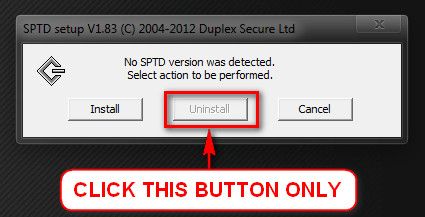
Daemon Tools, Alcohol 120% and Power Archiver Pro uses SCSI Pass Through Direct (SPTD), which is a well known BSOD causer. Uninstall the program at first, though I cannot determine it that with which particular program you have got it from the supplied MSINFO32.nfo. Then download SPTD standalone installer from Disk-Tools.com, and execute the downloaded file as guided below :

  • Double click to open it.
  • Click this button only:
  • 2012-12-13_224441.jpg
  • If it is grayed out, as in the picture, there is no more SPTD in your system, and you just close the window.
 

My Computer

Computer type
PC/Desktop
Computer Manufacturer/Model Number
Self assembled
OS
Windows 10 Home 64Bit
CPU
Intel Core i5 10400 @ 2.90GHz
Motherboard
Intel Corporation DG41WV (PROCESSOR)
Memory
8.00GB Single-Channel Unknown @ 1329MHz (16-20-20-38)
Sound Card
Realtek High Definition Audio
Monitor(s) Displays
DELL E170S
Screen Resolution
1280x1024 pixels
Hard Drives
931GB TOSHIBA DT01ACA100 (SATA)
238GB TEAM TM8PS7256G (SATA SSD)
Case
Nothing Fancy
Cooling
Fans
Keyboard
A4 Tech Co LTD
Mouse
A4 Tech Co Ltd/Logitech
Internet Speed
25 Mbps
I just got three BSOD's in the space of two minutes


Crash Dump Analysis
</B>
Crash dump directory: C:\Windows\Minidump

[FONT=Segoe UI, Arial]Crash dumps are enabled on your computer.[/FONT]

[FONT=Segoe UI, Arial]On Wed 26/12/2012 14:22:55 GMT your computer crashed[/FONT]
[FONT=Segoe UI, Arial]crash dump file: C:\Windows\Minidump\122612-22370-01.dmp[/FONT]
[FONT=Segoe UI, Arial]This was probably caused by the following module: [FONT=Segoe UI, Arial]ntoskrnl.exe[/FONT] (nt+0x7EFC0)
Bugcheck code: 0xA (0xF4, 0x2, 0x0, 0xFFFFF80003EDF65B)
Error: [FONT=Segoe UI, Arial]IRQL_NOT_LESS_OR_EQUAL[/FONT]
file path: C:\Windows\system32\ntoskrnl.exe
product: [FONT=Segoe UI, Arial]Microsoft® Windows® Operating System[/FONT]
company: [FONT=Segoe UI, Arial]Microsoft Corporation[/FONT]
description: NT Kernel & System
Bug check description: This indicates that Microsoft Windows or a kernel-mode driver accessed paged memory at DISPATCH_LEVEL or above.
This appears to be a typical software driver bug and is not likely to be caused by a hardware problem.
The crash took place in the Windows kernel. Possibly this problem is caused by another driver that cannot be identified at this time.


[/FONT]

[FONT=Segoe UI, Arial]On Wed 26/12/2012 14:22:55 GMT your computer crashed[/FONT]
[FONT=Segoe UI, Arial]crash dump file: C:\Windows\memory.dmp[/FONT]
[FONT=Segoe UI, Arial]This was probably caused by the following module: [FONT=Segoe UI, Arial]ntkrnlmp.exe[/FONT] (nt!KeBugCheckEx+0x0)
Bugcheck code: 0xA (0xF4, 0x2, 0x0, 0xFFFFF80003EDF65B)
Error: [FONT=Segoe UI, Arial]IRQL_NOT_LESS_OR_EQUAL[/FONT]
Bug check description: This indicates that Microsoft Windows or a kernel-mode driver accessed paged memory at DISPATCH_LEVEL or above.
This appears to be a typical software driver bug and is not likely to be caused by a hardware problem.
The crash took place in the Windows kernel. Possibly this problem is caused by another driver that cannot be identified at this time.


[/FONT]

[FONT=Segoe UI, Arial]On Wed 26/12/2012 14:20:40 GMT your computer crashed[/FONT]
[FONT=Segoe UI, Arial]crash dump file: C:\Windows\Minidump\122612-22885-01.dmp[/FONT]
[FONT=Segoe UI, Arial]This was probably caused by the following module: [FONT=Segoe UI, Arial]ntoskrnl.exe[/FONT] (nt+0x7EFC0)
Bugcheck code: 0x7F (0x8, 0x80050031, 0x6F8, 0xFFFFF80003EEC248)
Error: [FONT=Segoe UI, Arial]UNEXPECTED_KERNEL_MODE_TRAP[/FONT]
file path: C:\Windows\system32\ntoskrnl.exe
product: [FONT=Segoe UI, Arial]Microsoft® Windows® Operating System[/FONT]
company: [FONT=Segoe UI, Arial]Microsoft Corporation[/FONT]
description: NT Kernel & System
Bug check description: This bug check indicates that the Intel CPU generated a trap and the kernel failed to catch this trap.
The crash took place in the Windows kernel. Possibly this problem is caused by another driver that cannot be identified at this time.
[/FONT]

[FONT=Segoe UI, Arial]This is really annoying me! I will uninstall that driver now my friend.[/FONT]

Edit: It is greyed out as I have already uninstalled it.
 

My Computer

Computer type
PC/Desktop
Computer Manufacturer/Model Number
Self Build
OS
Windows 7 Ultimate 64-bit
CPU
Intel Core i7 4770K @ 3.50GHz
Motherboard
ASUSTeK COMPUTER INC. Z87-K (SOCKET 1150)
Memory
8GB Ripjaws Dual-Channel DDR3 @ 799MHz (9-9-9-24)
Graphics Card(s)
4096MB ATI AMD Radeon R9 200 Series
Sound Card
N/A
Monitor(s) Displays
Acer H223HQ (1920x1080@60Hz) & S240HL (1920x1080@60Hz)
Screen Resolution
1920x1080
Hard Drives
238GB Crucial_ Crucial_CT256MX1 SCSI Disk Device (SSD)
931GB Hitachi HDT721010SLA360 SCSI Disk Device (SATA)
PSU
XFX Pro 650w Core Edition
Case
Halcones CL-86
Cooling
Corsair H100i
Keyboard
Nemesis
Mouse
Nemesis
Internet Speed
76mb
Browser
Chrome
After completing all the tests, upload the latest .DMP files.
 

My Computer

Computer type
PC/Desktop
Computer Manufacturer/Model Number
Self assembled
OS
Windows 10 Home 64Bit
CPU
Intel Core i5 10400 @ 2.90GHz
Motherboard
Intel Corporation DG41WV (PROCESSOR)
Memory
8.00GB Single-Channel Unknown @ 1329MHz (16-20-20-38)
Sound Card
Realtek High Definition Audio
Monitor(s) Displays
DELL E170S
Screen Resolution
1280x1024 pixels
Hard Drives
931GB TOSHIBA DT01ACA100 (SATA)
238GB TEAM TM8PS7256G (SATA SSD)
Case
Nothing Fancy
Cooling
Fans
Keyboard
A4 Tech Co LTD
Mouse
A4 Tech Co Ltd/Logitech
Internet Speed
25 Mbps
Back
Top