A device is not working properly which was suggested from avgpc tuneup 2013.
Windows reports that the "cpuz133" is not working properly. Recommended solution to the problem
Use Windows Update to check whether new device drivers are available. Proceed as follows:
Open Device Manager
Search in the device manager for the device whose driver you would like to update and double-click on the device name. You may first have to enable the "Show hidden devices" entry in the "View" menu.
Switch to the Driver tab, click Update driver and follow the instructions
I have done the above but can't update or restore the driver. The device is located under "non PLUG and Play drivers". It does not have any updates available. I don't know where to get this cpuz133 so it can be fixed. Please leave any suggestions
I should also mention that my computer makes a sound that it use to not make when I first bought it. It make this high pitched sound, (can't exactly explain in words) only on the start up of the computer and then fades away once the computer has warmed up.
It had been making this sound before I got AVG tuneup. AVG suggested this problem cpuz133 is not working properly. "cpuz 133" is a service started automatically by the service control manager during system startup. This sounds like the only problem I could identify to make the funny sound when my computer starts up. I was suggested to uninstall pctuneup and also cpuz133.
AVG says, What are the effects of this problem? (cpuz133 NOT WORKING) This can have the following consequences:
The device may be unusable
The computer may crash often
The computer may go a long time without responding
Computer performance may be very poor
Do you have any other suggestions? I'm worried that if I uninstall this cpuz133 my computer won't start due to it not having the cpuz133 to start the computer. Although the cpuz133 is not starting and my computer is still turning on (along with the odd sound) do you know if there are any ways to get the cpuz133 working rather than eliminating it completely.
Last edited:
My Computer
At a glance
Windows 7 Home 64 bitIntel(R) Core(TM) i7-3770 CPU @ 3.40GHz16.00 GBNVIDIA GeForce GT 520
The first thing I would do if it was my computer is remove avgpc tuneup 2013.
Windows 7 doesn't need or want any Tune Up programs. Then I would remove cpuz 133. avgpc tuneup 2013 might of stopped it from installing properly.
Then run sfc /scannow as per instructions. http://www.sevenforums.com/tutorials/1538-sfc-scannow-command-system-file-checker.html
Then go to Filehippo and download cupz again.
My Computer
At a glance
Windows 10 Pro. 64/ version 1709 Windows 7 Pr...Intel i7-6800K @ 4.3Corsair Platinum 16 gig @2400EVGA GTX 1070 OC
Computer type
PC/Desktop
Computer Manufacturer/Model Number
Home made Desktop
OS
Windows 10 Pro. 64/ version 1709 Windows 7 Pro/64
CPU
Intel i7-6800K @ 4.3
Motherboard
ASUS X-99 Deluxe II
Memory
Corsair Platinum 16 gig @2400
Graphics Card(s)
EVGA GTX 1070 OC
Monitor(s) Displays
Asus 27" LED LCD/VE278Q
Screen Resolution
1920-1080 or 1280-720 HDMI
Hard Drives
INTEL SSD 730-240 Gb Sata 3.0/
PSU
EVGA Platium 1200W
Case
Phanteks Luxe Tempered Glass 8 fans/ one radiator
Cooling
XSPC/ Water Cooled CPU
Keyboard
Das 4 Professional
Mouse
Logitech M705/MX Anywhere 2-S
Internet Speed
100 mbits
Antivirus
Microsoft Security Essentials/ Malwarebytes Premium 3.0/ SAS
Browser
I.E. 11 default/Firefox/ ISP Time Warner Cable/Spectrum
Other Info
LG BluRay Burner/
Sound system-KLipsch-THX/
Icy Dock ssd Hot Swap bays.
I should also mention that my computer makes a sound that it use to not make when I first bought it. It make this high pitched sound, (can't exactly explain in words) only on the start up of the computer and then fades away once the computer has warmed up.
It had been making this sound before I got AVG tuneup. AVG suggested this problem cpuz133 is not working properly. "cpuz 133" is a service started automatically by the service control manager during system startup. This sounds like the only problem I could identify to make the funny sound when my computer starts up. I was suggested to uninstall pctuneup and also cpuz133.
AVG says, What are the effects of this problem? (cpuz133 NOT WORKING) This can have the following consequences:
The device may be unusable
The computer may crash often
The computer may go a long time without responding
Computer performance may be very poor
Do you have any other suggestions? I'm worried that if I uninstall this cpuz133 my computer won't start due to it not having the cpuz133 to start the computer. Although the cpuz133 is not starting and my computer is still turning on (along with the odd sound) do you know if there are any ways to get the cpuz133 working rather than eliminating it completely.
My Computer
At a glance
Windows 7 Home 64 bitIntel(R) Core(TM) i7-3770 CPU @ 3.40GHz16.00 GBNVIDIA GeForce GT 520
CPU-Z is NOT necessary to Start-up or Run your computer. It is just an added program that runs in Windows if you install it. Install the latest version as suggested
As for the noise you are hearing, is this a desktop or laptop? maybe a fan is going bad ?
My Computer
At a glance
Win7 Enterprise, Win7 x86 (Ult 7600), Win7 x6...AMD fx8350 4ghz, AMD-32 2400mhz, AMD-64 3200m...2gb, 4gb on the Ult 7600, 4gb on Technet RTM,...Draw my own Graphics, several nVidia cards
Computer type
PC/Desktop
Computer Manufacturer/Model Number
Built them myself, Science Experiments !
OS
Win7 Enterprise, Win7 x86 (Ult 7600), Win7 x64 Ult 7600, TechNet RTM on AMD x64 (2.8Ghz)
6 pata Ide HD's & 2 Sata HD's
added 80gb external on Ult 7600 computer,
numerous extra 1tb, 2TB, 3Tb SATA HD's
A collection of ext HD Docks w/ HDs
PSU
430w, 550w, 600w, 700, 800, etc
Case
All Generic Full Towers
Cooling
Open Air & a few fans, some w/ colored LEDs
Keyboard
Compaq & Dell recycled from GoodWill
Mouse
Made in China Optical Wired Mouse
Internet Speed
Fast Cable InterNet
Antivirus
AVG Free on 24 different Desktops, NO Problems!
Browser
IE 8 is preferred, but use FireFox sometimes
Other Info
Linksys Routers, switches, & Hubs
Too Many USB Flash Drives to count, Biggest is 64GB !
Eight computers in my home network.
Sixteen computers at my business network.
Linked via TeamViewer !
Lots of old used spare computer parts everywhere!
Don't worry about un installing the programs I mentioned. Your computer will will run without them. I would worry about the sound you are hearing. It's most likely a fan or something hitting a fan. It could also be a fan inside the power supply. DO NOT OPEN OR PROBE A POWER SUPPLY. IT CAN KILL YOU. If the sound is coming from the power supply replace it. I use CPUZ 1.62 without any problems.
My Computer
At a glance
Windows 10 Pro. 64/ version 1709 Windows 7 Pr...Intel i7-6800K @ 4.3Corsair Platinum 16 gig @2400EVGA GTX 1070 OC
Computer type
PC/Desktop
Computer Manufacturer/Model Number
Home made Desktop
OS
Windows 10 Pro. 64/ version 1709 Windows 7 Pro/64
CPU
Intel i7-6800K @ 4.3
Motherboard
ASUS X-99 Deluxe II
Memory
Corsair Platinum 16 gig @2400
Graphics Card(s)
EVGA GTX 1070 OC
Monitor(s) Displays
Asus 27" LED LCD/VE278Q
Screen Resolution
1920-1080 or 1280-720 HDMI
Hard Drives
INTEL SSD 730-240 Gb Sata 3.0/
PSU
EVGA Platium 1200W
Case
Phanteks Luxe Tempered Glass 8 fans/ one radiator
Cooling
XSPC/ Water Cooled CPU
Keyboard
Das 4 Professional
Mouse
Logitech M705/MX Anywhere 2-S
Internet Speed
100 mbits
Antivirus
Microsoft Security Essentials/ Malwarebytes Premium 3.0/ SAS
Browser
I.E. 11 default/Firefox/ ISP Time Warner Cable/Spectrum
Other Info
LG BluRay Burner/
Sound system-KLipsch-THX/
Icy Dock ssd Hot Swap bays.
Thanks for your comments. I uninstalled cpu133 but left avg pc tuneup for the moment. The computer restarted perfectly with no issues at all just as you said (without cpu133).
I also installed Cpuz 1.62. It shows all information about the computer but why do you use this?
I looked at sfc /scannow and it appears to be a complex process. I would of done the procedure I was suggested but the website says you need a windows 7 disk to install onto the computer. I don't have one nearby. Should I still go through this process as avg sees no errors and everything seems OK on the desktop at present.
My Computer
At a glance
Windows 7 Home 64 bitIntel(R) Core(TM) i7-3770 CPU @ 3.40GHz16.00 GBNVIDIA GeForce GT 520
You might want to run this program from our Tutorials section & it can automatically update your system specs, so we may have some better ideas how to help you. It is important that you know about your hardware
Win7 Enterprise, Win7 x86 (Ult 7600), Win7 x6...AMD fx8350 4ghz, AMD-32 2400mhz, AMD-64 3200m...2gb, 4gb on the Ult 7600, 4gb on Technet RTM,...Draw my own Graphics, several nVidia cards
Computer type
PC/Desktop
Computer Manufacturer/Model Number
Built them myself, Science Experiments !
OS
Win7 Enterprise, Win7 x86 (Ult 7600), Win7 x64 Ult 7600, TechNet RTM on AMD x64 (2.8Ghz)
6 pata Ide HD's & 2 Sata HD's
added 80gb external on Ult 7600 computer,
numerous extra 1tb, 2TB, 3Tb SATA HD's
A collection of ext HD Docks w/ HDs
PSU
430w, 550w, 600w, 700, 800, etc
Case
All Generic Full Towers
Cooling
Open Air & a few fans, some w/ colored LEDs
Keyboard
Compaq & Dell recycled from GoodWill
Mouse
Made in China Optical Wired Mouse
Internet Speed
Fast Cable InterNet
Antivirus
AVG Free on 24 different Desktops, NO Problems!
Browser
IE 8 is preferred, but use FireFox sometimes
Other Info
Linksys Routers, switches, & Hubs
Too Many USB Flash Drives to count, Biggest is 64GB !
Eight computers in my home network.
Sixteen computers at my business network.
Linked via TeamViewer !
Lots of old used spare computer parts everywhere!
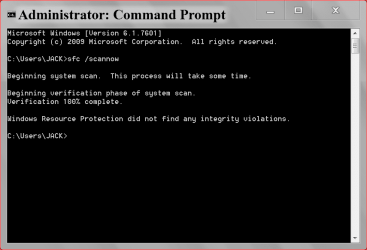
Running sfc /scannow is very simple. Follow this
Start Orb and type cmd or command prompt.
Right click on the results and select Run as Administrator.
In the page that opens type in sfc /scannow and hit enter.
Then just wait for it to finish. Hopefully you will get this.
As Doc Brown stated in post #8. That would help us help you.
My Computer
At a glance
Windows 10 Pro. 64/ version 1709 Windows 7 Pr...Intel i7-6800K @ 4.3Corsair Platinum 16 gig @2400EVGA GTX 1070 OC
Computer type
PC/Desktop
Computer Manufacturer/Model Number
Home made Desktop
OS
Windows 10 Pro. 64/ version 1709 Windows 7 Pro/64
CPU
Intel i7-6800K @ 4.3
Motherboard
ASUS X-99 Deluxe II
Memory
Corsair Platinum 16 gig @2400
Graphics Card(s)
EVGA GTX 1070 OC
Monitor(s) Displays
Asus 27" LED LCD/VE278Q
Screen Resolution
1920-1080 or 1280-720 HDMI
Hard Drives
INTEL SSD 730-240 Gb Sata 3.0/
PSU
EVGA Platium 1200W
Case
Phanteks Luxe Tempered Glass 8 fans/ one radiator
Cooling
XSPC/ Water Cooled CPU
Keyboard
Das 4 Professional
Mouse
Logitech M705/MX Anywhere 2-S
Internet Speed
100 mbits
Antivirus
Microsoft Security Essentials/ Malwarebytes Premium 3.0/ SAS
Browser
I.E. 11 default/Firefox/ ISP Time Warner Cable/Spectrum
Other Info
LG BluRay Burner/
Sound system-KLipsch-THX/
Icy Dock ssd Hot Swap bays.
Windows Resource Protection found corrupt files but was unable to fix some of them
I did the same process 4 times and still has not fixed the problem. I don't have backup for my computer either. What do I do.
My Computer
At a glance
Windows 7 Home 64 bitIntel(R) Core(TM) i7-3770 CPU @ 3.40GHz16.00 GBNVIDIA GeForce GT 520
Hvae you done all the important & crital updates In Control Panel > Windows Update ?
My Computer
At a glance
Win7 Enterprise, Win7 x86 (Ult 7600), Win7 x6...AMD fx8350 4ghz, AMD-32 2400mhz, AMD-64 3200m...2gb, 4gb on the Ult 7600, 4gb on Technet RTM,...Draw my own Graphics, several nVidia cards
Computer type
PC/Desktop
Computer Manufacturer/Model Number
Built them myself, Science Experiments !
OS
Win7 Enterprise, Win7 x86 (Ult 7600), Win7 x64 Ult 7600, TechNet RTM on AMD x64 (2.8Ghz)
6 pata Ide HD's & 2 Sata HD's
added 80gb external on Ult 7600 computer,
numerous extra 1tb, 2TB, 3Tb SATA HD's
A collection of ext HD Docks w/ HDs
PSU
430w, 550w, 600w, 700, 800, etc
Case
All Generic Full Towers
Cooling
Open Air & a few fans, some w/ colored LEDs
Keyboard
Compaq & Dell recycled from GoodWill
Mouse
Made in China Optical Wired Mouse
Internet Speed
Fast Cable InterNet
Antivirus
AVG Free on 24 different Desktops, NO Problems!
Browser
IE 8 is preferred, but use FireFox sometimes
Other Info
Linksys Routers, switches, & Hubs
Too Many USB Flash Drives to count, Biggest is 64GB !
Eight computers in my home network.
Sixteen computers at my business network.
Linked via TeamViewer !
Lots of old used spare computer parts everywhere!