
Office 2007 files will not open in Office 2010

OopsMS

New member
Local time
10:14 AM
Messages
10
Location
NYS
Recently installed Office 2010 (32 bit becuz it was recommended to do so my MS) and now when I send an Office 2007 file to that PC (both PCs are Win 7 64 it) it tries to open the file in Windows Media!!

What the heck am I doing wrong? I'm beginning to think I should not have purchased Office 2010 Pro and stayed with the Office 2007 on all my machines.

Any help would be greatly appreciated.:(
 

My Computer My Computer

At a glance

Windows 7 Professional 64 bitIntel Core i7 Processor i7-3770 3.4GHz 8MB QU...16GB (4 x 4GB) 240-Pin DDR3 1333MHz (PC3 1060...nVidia GeForce GTX570 2560MB DDR5 2DVI/HDMI P...
Computer Manufacturer/Model Number
Custom Built
OS
Windows 7 Professional 64 bit
CPU
Intel Core i7 Processor i7-3770 3.4GHz 8MB QUAD CORE
Motherboard
Asus P8Z77-V LE LGA1155/ Intel Z77/ DDR3/ Quad CrossFireX/ S
Memory
16GB (4 x 4GB) 240-Pin DDR3 1333MHz (PC3 10600) Quad Channel
Graphics Card(s)
nVidia GeForce GTX570 2560MB DDR5 2DVI/HDMI PCI-Express VC
Sound Card
REALTEK 10/100/1000 GB Network Card & external sound card
Monitor(s) Displays
Viewsonic 27 inch
Hard Drives
CORSAIR 180GB Solid State Drive SATA III (READ/WRITE 550MB/515MB) * OS *
Western Digital BLACK 500GB 7200 RPM 32MB CACHE SATA 6.0Gb/s
Multiple external mechanical drives.
Mouse
Logitech wireless
Other Info
Dell Inspiron 1750, Windows 7 64bit Pro
That is weird.
Could you please describe step by step how you are sending the file to another PC.
Also, please provide more details on what type of the file that is. And if you create a similar file on recipient PC, will it be opened in Windows Media as well?
 

My Computer My Computer

At a glance

Windows 8.1 ; Windows 7 x86 (Dec2008-Jan2013)
Computer type
PC/Desktop
OS
Windows 8.1 ; Windows 7 x86 (Dec2008-Jan2013)
Other Info
"The scale icon at the top right of a post or tutorial is how you can give rep to the member."
Neutron16,
I made the files in Excel 2007 and saved as a workbook, xlsx file format. It was then emailed. I also tried and saved a file on the machine where I had just loaded the new Office Pro 2010 and it did the same thing. It's almost like it does not recognize or associate the file type.
I'm wondering if I should do a 'repair' or go look to see what the file associations are. The last version of Excel (which I uninstalled) he had on the PC was Excel 95.

Both machines, mine which I sent from, are Win 7 64 bit and both have Office installed, mine is 2007 Pro and his is 2010 Pro (32 bit). Hope this is enough info.

OH, his software was a downloaded (then all the updates done) of the trial version with a purchased Product Key.

Thank much for any help you may be able to provide.
Oops
 

My Computer My Computer

At a glance

Windows 7 Professional 64 bitIntel Core i7 Processor i7-3770 3.4GHz 8MB QU...16GB (4 x 4GB) 240-Pin DDR3 1333MHz (PC3 1060...nVidia GeForce GTX570 2560MB DDR5 2DVI/HDMI P...
Computer Manufacturer/Model Number
Custom Built
OS
Windows 7 Professional 64 bit
CPU
Intel Core i7 Processor i7-3770 3.4GHz 8MB QUAD CORE
Motherboard
Asus P8Z77-V LE LGA1155/ Intel Z77/ DDR3/ Quad CrossFireX/ S
Memory
16GB (4 x 4GB) 240-Pin DDR3 1333MHz (PC3 10600) Quad Channel
Graphics Card(s)
nVidia GeForce GTX570 2560MB DDR5 2DVI/HDMI PCI-Express VC
Sound Card
REALTEK 10/100/1000 GB Network Card & external sound card
Monitor(s) Displays
Viewsonic 27 inch
Hard Drives
CORSAIR 180GB Solid State Drive SATA III (READ/WRITE 550MB/515MB) * OS *
Western Digital BLACK 500GB 7200 RPM 32MB CACHE SATA 6.0Gb/s
Multiple external mechanical drives.
Mouse
Logitech wireless
Other Info
Dell Inspiron 1750, Windows 7 64bit Pro
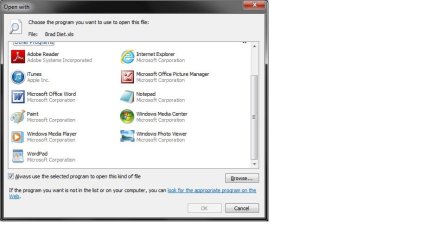
It sounds like that paticular file extension, is set to open in windows media player by default. We can change this by forcing it to open wth Excel

Find the Excel file - Right click on it: Select Open with:
Untitled.jpg

If you see Excel as an option, in the main Programs list, Then highlight it - Then press ok.

Untitled1.jpg


If you do not see it in the list, Click Browse: You will need to browse your programs directory to point it to Excel.
It should look somthing like this
Untitled3.jpg
 

My Computer My Computer

At a glance

Windows 7 Home Premium 64 BitCore I7 1155 3.4GHZ8GB DDR 1600
Computer Manufacturer/Model Number
Cooler Master
OS
Windows 7 Home Premium 64 Bit
CPU
Core I7 1155 3.4GHZ
Memory
8GB DDR 1600
Hard Drives
64 GB SSD - OS
1TB - DATA
PSU
340 Watt Corsair
Case
Cooler Master
Cooling
Cooler Master

My Computer My Computer

At a glance

Windows 7 Professional 64 bitIntel Core i7 Processor i7-3770 3.4GHz 8MB QU...16GB (4 x 4GB) 240-Pin DDR3 1333MHz (PC3 1060...nVidia GeForce GTX570 2560MB DDR5 2DVI/HDMI P...
Computer Manufacturer/Model Number
Custom Built
OS
Windows 7 Professional 64 bit
CPU
Intel Core i7 Processor i7-3770 3.4GHz 8MB QUAD CORE
Motherboard
Asus P8Z77-V LE LGA1155/ Intel Z77/ DDR3/ Quad CrossFireX/ S
Memory
16GB (4 x 4GB) 240-Pin DDR3 1333MHz (PC3 10600) Quad Channel
Graphics Card(s)
nVidia GeForce GTX570 2560MB DDR5 2DVI/HDMI PCI-Express VC
Sound Card
REALTEK 10/100/1000 GB Network Card & external sound card
Monitor(s) Displays
Viewsonic 27 inch
Hard Drives
CORSAIR 180GB Solid State Drive SATA III (READ/WRITE 550MB/515MB) * OS *
Western Digital BLACK 500GB 7200 RPM 32MB CACHE SATA 6.0Gb/s
Multiple external mechanical drives.
Mouse
Logitech wireless
Other Info
Dell Inspiron 1750, Windows 7 64bit Pro
Excellent. Glad it's now sorted.
 

My Computer My Computer

At a glance

Windows 7 Home Premium 64 BitCore I7 1155 3.4GHZ8GB DDR 1600
Computer Manufacturer/Model Number
Cooler Master
OS
Windows 7 Home Premium 64 Bit
CPU
Core I7 1155 3.4GHZ
Memory
8GB DDR 1600
Hard Drives
64 GB SSD - OS
1TB - DATA
PSU
340 Watt Corsair
Case
Cooler Master
Cooling
Cooler Master
Back
Top