
You are using an out of date browser. It may not display this or other websites correctly.
You should upgrade or use an alternative browser.
You should upgrade or use an alternative browser.
browsers'menu font suddenly became smaller than usual
- Thread starter 3night
- Start date


A Guy
Righteous Dude
Is it only the browsers menu font size that appears changed? Not the page font, or any other font sizes on your system? That would be quite odd. The first thing I would try is a System Restore point from before the problem.
http://www.sevenforums.com/tutorials/700-system-restore.html
A Guy
http://www.sevenforums.com/tutorials/700-system-restore.html
A Guy
My Computer
- Computer type
- PC/Desktop
- OS
- Windows 10 Home x64
- CPU
- INTEL Core i5-750 Quad-Core 3.37GHz
- Motherboard
- ASUS P7P55D
- Memory
- HyperX Fury Black Series 8GB (2 x 4GB) 1866Mhz
- Graphics Card(s)
- EVGA GeForce GTX 750 Superclocked 1GB 128-Bit GDDR5
- Monitor(s) Displays
- LG 32MA68HY 32" IPS
- Screen Resolution
- 1920 x 1080
- Hard Drives
- Samsung 840 Evo 120GB, SEAGATE 500GB Barracuda® 7200.12, SATA 3 Gb/s, 7200 RPM, 16MB cache
- PSU
- ANTEC TruePower New TP-550, 80 PLUS, 550W
- Case
- ANTEC Three Hundred Illusion
- Cooling
- COOLER MASTER Hyper 212 Plus, 4 x 120mm 1 x 140mm Noctua's
- Internet Speed
- 85 + Mbps
- Antivirus
- Avast
- Browser
- Vivaldi
As A GUY said, We need more information, As it would be very odd for just the tool bar menus font size to be " too small" yet the rest of the Explorer page is fine.
Try checking what your browsers Zoom size is set to. ( usully 100% )
In Internet Explorer, Click the Tools cog, check the Zoom size isnt any lower then 100%
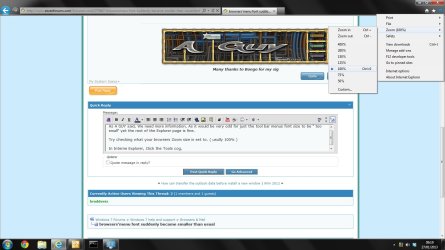
If the size is affecting you in other windows, ( not just Internet Browsers )
It could be a peronsalization setting:
Start Button, Control Panel - personalization settings, Display.
You will then see 3 options
Small (100%)
Medium (125%)
Large (150%)
However, Small (100%) is the default option in most cases and is usually the best option to have.
If your saying yours is showing lower then 100% then it must be a Internet browser setting.
Try checking what your browsers Zoom size is set to. ( usully 100% )
In Internet Explorer, Click the Tools cog, check the Zoom size isnt any lower then 100%
If the size is affecting you in other windows, ( not just Internet Browsers )
It could be a peronsalization setting:
Start Button, Control Panel - personalization settings, Display.
You will then see 3 options
Small (100%)
Medium (125%)
Large (150%)
However, Small (100%) is the default option in most cases and is usually the best option to have.
If your saying yours is showing lower then 100% then it must be a Internet browser setting.
My Computer
- Computer Manufacturer/Model Number
- Cooler Master
- OS
- Windows 7 Home Premium 64 Bit
- CPU
- Core I7 1155 3.4GHZ
- Memory
- 8GB DDR 1600
- Hard Drives
- 64 GB SSD - OS
1TB - DATA
- PSU
- 340 Watt Corsair
- Case
- Cooler Master
- Cooling
- Cooler Master
gigagiggles
New member
I had tried to set mine to smaller fonts operating system-wide a few months back. PaleMoon browser did not or could not apply the changes. This week, Norton sent out product patches and after they were applied the smaller fonts appeared in PaleMoon as intended.
My Computer
- OS
- Windows 7 Home Premium x64
Is it only the browsers menu font size that appears changed? Not the page font, or any other font sizes on your system? That would be quite odd. The first thing I would try is a System Restore point from before the problem.
http://www.sevenforums.com/tutorials/700-system-restore.html
A Guy
only browsers ,system fonts all remain normal .
 system restore was disable.
My Computer
- OS
- windows 7
As A GUY said, We need more information, As it would be very odd for just the tool bar menus font size to be " too small" yet the rest of the Explorer page is fine.
Try checking what your browsers Zoom size is set to. ( usully 100% )
In Internet Explorer, Click the Tools cog, check the Zoom size isnt any lower then 100%
View attachment 252342
If the size is affecting you in other windows, ( not just Internet Browsers )
It could be a peronsalization setting:
Start Button, Control Panel - personalization settings, Display.
You will then see 3 options
Small (100%)
Medium (125%)
Large (150%)
However, Small (100%) is the default option in most cases and is usually the best option to have.
If your saying yours is showing lower then 100% then it must be a Internet browser setting.
IE was set to 150%.personalization settings, Display. 150% large . same setting as before
My Computer
- OS
- windows 7