Solved Where are the .dll and .exe files responsible for the look of windows?

Digital64

New member
Hi
I'm trying to make my own advanced theme (Custom window textures and stuff) but I can not find the .dll and .exe files that contain the graphics I wish to change. Any help on the subject would be greatly appreciated.

P.S. I do not want a program to do this for me like windowblindes.
 

My Computer

OS
Windows 7 Home Premium x64

My Computer

Computer type
Laptop
Computer Manufacturer/Model Number
Sager NP9170
OS
Win 7 Pro x64 / Win 10 Pro
CPU
Intel(R) Core(TM) i7-3630QM CPU @ 2.40GHz
Motherboard
CLEVO P170EM
Memory
12 GB
Graphics Card(s)
(1) Intel(R) HD Graphics 4000 (2) NVIDIA GeForce GTX 675M
Sound Card
(1) Realtek High Definition Audio (2) Intel(R) Display Aud
Monitor(s) Displays
17.3
Screen Resolution
1920x1080
Hard Drives
(1) Samsung 860 EVO 500GB(OS) (1) Samsung 860 EVO 500GB(Data)
Keyboard
Backlite
Antivirus
MSE, Malwarebytes Pro
Browser
Firefox
Other Info
DESKTOP: Custom-built.
OS: Win 10 Pro x64.
CASE: Rosewill R5.
CPU: Intel I5 4670K CPU @ 3.40GHz.
CPU COOLER: Cool Master Hyper 212 EVO.
MOTHERBOARD: Asus Z87-A.
MEMORY: Kingston HyperX 2x4 GB.
GPU: Nvidia Geforce 650 TI.
PSU: Corsair TX750.
DRIVES: (1) Samsung 840 120 GB SSD (2) Western Digital blue 500 GB 7200 RPM.
What I want to figure out how to change are the less-customizable graphic components of windows, such as the actual bitmap images buried within the system that dictate how things are going to appear on the screen. Here are a few of the ones I am looking to figure out how to change:

WindowGraph.PNG

The texturing of the title bar of the window. I've seen customization that goes deeper than just changing the color.

IconBorder.PNG

The border that surrounds active applications on the taskbar.

(Couldn't get a picture for this one)
The overall appearance of the start menu, primarily just the graphical layout of the entire thing.

That's pretty much everything I want to know about, I've found out where the images are located for all of the other graphical components on my own.
 

My Computer

OS
Windows 7 Home Premium x64
OK all those images are in the aero.msstyles in C:\Windows\Resources\Themes\Aero folder

I would suggest that you create a custom theme from scratch so you did not corrupt the original, look at Post #38 of this thread http://www.sevenforums.com/customization/135985-start-menu-color-change-4.html#post1358071 it will show you how to start a new custom theme giving it a different name than Aero.

You will need to do 1 of these 2 ways of Enabling custom themes for it to work.
http://www.sevenforums.com/tutorials/34579-enabling-custom-themes-windows-7-a.html
Or
http://www.sevenforums.com/tutorials/28377-theme-how-apply-custom-themes.html?filter


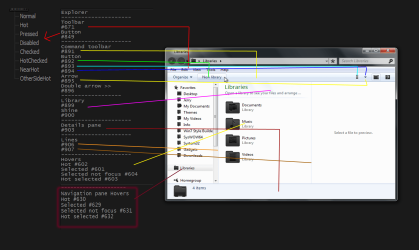
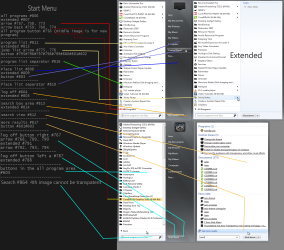
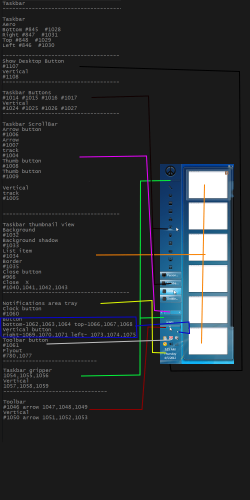
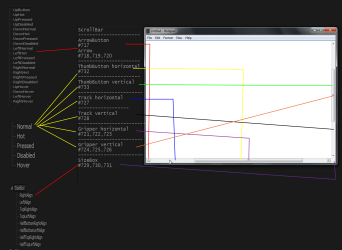
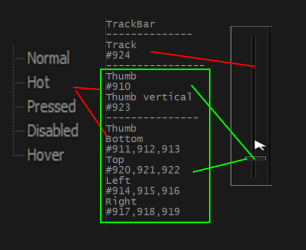
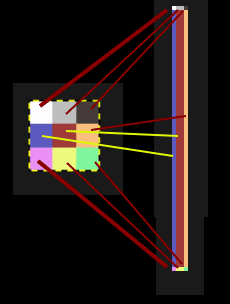
Here are some image numbers that I have made up in the past.
Explorer.pngStart Menu (2).png
taskbar.pngscroolbar_.png
th.png
Here is a breakdown of the track image.
Untitled.png
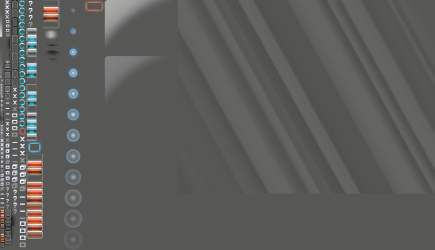
You'll find the frame and Close, minimize, maximize buttons in the Steam image 971 (I have applied a gray background layer so that the images can be seen)
971.png

If you are going to be doing a lot of customizing of the .msstyles I would recommend getting Ave's Windows7 Style Builder it is only about $22.50 US and makes editing very easy especially that Steam image 971 is all broken down into individual parts.
Jerry
 

My Computer

Computer type
Laptop
Computer Manufacturer/Model Number
Sager NP9170
OS
Win 7 Pro x64 / Win 10 Pro
CPU
Intel(R) Core(TM) i7-3630QM CPU @ 2.40GHz
Motherboard
CLEVO P170EM
Memory
12 GB
Graphics Card(s)
(1) Intel(R) HD Graphics 4000 (2) NVIDIA GeForce GTX 675M
Sound Card
(1) Realtek High Definition Audio (2) Intel(R) Display Aud
Monitor(s) Displays
17.3
Screen Resolution
1920x1080
Hard Drives
(1) Samsung 860 EVO 500GB(OS) (1) Samsung 860 EVO 500GB(Data)
Keyboard
Backlite
Antivirus
MSE, Malwarebytes Pro
Browser
Firefox
Other Info
DESKTOP: Custom-built.
OS: Win 10 Pro x64.
CASE: Rosewill R5.
CPU: Intel I5 4670K CPU @ 3.40GHz.
CPU COOLER: Cool Master Hyper 212 EVO.
MOTHERBOARD: Asus Z87-A.
MEMORY: Kingston HyperX 2x4 GB.
GPU: Nvidia Geforce 650 TI.
PSU: Corsair TX750.
DRIVES: (1) Samsung 840 120 GB SSD (2) Western Digital blue 500 GB 7200 RPM.
You're welcome
 

My Computer

Computer type
Laptop
Computer Manufacturer/Model Number
Sager NP9170
OS
Win 7 Pro x64 / Win 10 Pro
CPU
Intel(R) Core(TM) i7-3630QM CPU @ 2.40GHz
Motherboard
CLEVO P170EM
Memory
12 GB
Graphics Card(s)
(1) Intel(R) HD Graphics 4000 (2) NVIDIA GeForce GTX 675M
Sound Card
(1) Realtek High Definition Audio (2) Intel(R) Display Aud
Monitor(s) Displays
17.3
Screen Resolution
1920x1080
Hard Drives
(1) Samsung 860 EVO 500GB(OS) (1) Samsung 860 EVO 500GB(Data)
Keyboard
Backlite
Antivirus
MSE, Malwarebytes Pro
Browser
Firefox
Other Info
DESKTOP: Custom-built.
OS: Win 10 Pro x64.
CASE: Rosewill R5.
CPU: Intel I5 4670K CPU @ 3.40GHz.
CPU COOLER: Cool Master Hyper 212 EVO.
MOTHERBOARD: Asus Z87-A.
MEMORY: Kingston HyperX 2x4 GB.
GPU: Nvidia Geforce 650 TI.
PSU: Corsair TX750.
DRIVES: (1) Samsung 840 120 GB SSD (2) Western Digital blue 500 GB 7200 RPM.
Back
Top