Window 7 Pro and Windows 8 Pro Dual Boot (No option at boot up)

Limey57

New member
Local time
5:12 AM
Messages
6
I am not getting the screen asking me to choose which Operating system at boot up. It gives me no options and just Boots straight to the C drive where I have Windows 7 Pro.
In preparation I shrunk the Volume of the C drive and created a new partition (E) in which I made it a simple volume NTFS . I then installed Windows 8 Pro from the CD ROM and everything went fine. However when I re boot it just Boots straight into Windows 7 Pro and no mention of Windows 8.
I tried to use Easy BCD 2.2 and now I have three entries (1) Windows 7 (2) Microsoft Windows 7 (3) Microsoft Windows 8
When I select Windows 8 at boot up I then get an error telling me the boot Load EXE file is corrupt

I am really stumped, I have loaded windows 8 four times and still get the same result. My ultimate goal is to get the Windows Dual Boot Screen.
Capture.PNG
 

My Computer My Computer

At a glance

Windows 7 Pro and Windows 8 Pro
Computer Manufacturer/Model Number
Home Build
OS
Windows 7 Pro and Windows 8 Pro
Forgot to mention

Both are 64 Bit and sorry if I should have posted this in Windows 8 Forum. I am new here
 

My Computer My Computer

At a glance

Windows 7 Pro and Windows 8 Pro
Computer Manufacturer/Model Number
Home Build
OS
Windows 7 Pro and Windows 8 Pro
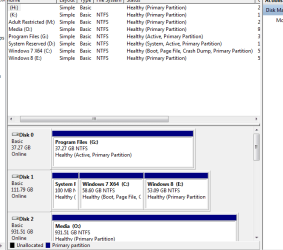
You are installing the Windows 8 boot files to G:.

Physically disconnect the G: & O: HDD drives.
Make the Windows 7 HD, disk0 & first HD boot in BIOS.Also connected to the first Sata port on the MOBO.
When Windows 8 & 7 are booting OK, Reconnect the other two HD, as Disk1 & Disk2.

Mark the G: HD Drive INACTIVE
http://www.sevenforums.com/tutorials/197157-partition-mark-inactive.html
 

My Computer My Computer

At a glance

ME/XP/Vista/Win7
OS
ME/XP/Vista/Win7
Thanks Theog

I got your response and I will try it tomorrow. Thanks for the information and I will give that a shot.

I thought the drives looked messy!!!
 

My Computer My Computer

At a glance

Windows 7 Pro and Windows 8 Pro
Computer Manufacturer/Model Number
Home Build
OS
Windows 7 Pro and Windows 8 Pro
What is Program Files G: and why is it marked active ?

Do as theog suggested and it will work.
 

My Computer My Computer

At a glance

Windows 10 Pro x64Intel Core i7 6700KGSkill TridentZ RGB 16GB 3600 16-16-16-36EVGA GTX 980 Ti SC x2
Computer type
PC/Desktop
Computer Manufacturer/Model Number
Skylake Special #666
OS
Windows 10 Pro x64
CPU
Intel Core i7 6700K
Motherboard
Asus Sabertooth Z170 Mark 1
Memory
GSkill TridentZ RGB 16GB 3600 16-16-16-36
Graphics Card(s)
EVGA GTX 980 Ti SC x2
Sound Card
Realtek High Definition
Monitor(s) Displays
AOC G2460PG
Screen Resolution
1920 x 1080 144Hz
Hard Drives
Samsung 860 Pro 256GB, Seagate Barracuda 4TB x2
PSU
EVGA 1000 P2, EVGA White Custom Braided Cables
Case
Corsair Vengeance C70 Gunmetal Black
Cooling
Corsair H100i v2, Corsair ML120 x2, Thermal Grizzly Kryonaut
Keyboard
Logitech G910 Orion Spectrum
Mouse
Logitech G700s
Internet Speed
Verizon Fios Quantum Gateway 75/75
Antivirus
Windows Defender, Malwarebytes Free 3.8.3
Browser
Chrome
Other Info
Corsair SP120 x4, LG Blu-ray Drive, Durabrand HT-395 100 Watt Dolby Digital Amp, Corsair H2100 Wireless 7.1 Headset
Program Files G

I wanted to speed up my computer so I just have the operating systems on a SSD and the program files I load to a separate drive (ie office, Adobe programs etc) Is this a mistake?
 

My Computer My Computer

At a glance

Windows 7 Pro and Windows 8 Pro
Computer Manufacturer/Model Number
Home Build
OS
Windows 7 Pro and Windows 8 Pro
Yes, it is, all your programs should be installed on C on the ssd. The whole purpose of using a ssd is for speed, correct. So by putting programs on another drive you are slowing it down. And what if you want to make a disk image of C. You can store your data on the other drive. Docs, pics etc but keep your OS and programs all on 1 drive/partition.
 

My Computer My Computer

At a glance

Windows 10 Pro x64Intel Core i7 6700KGSkill TridentZ RGB 16GB 3600 16-16-16-36EVGA GTX 980 Ti SC x2
Computer type
PC/Desktop
Computer Manufacturer/Model Number
Skylake Special #666
OS
Windows 10 Pro x64
CPU
Intel Core i7 6700K
Motherboard
Asus Sabertooth Z170 Mark 1
Memory
GSkill TridentZ RGB 16GB 3600 16-16-16-36
Graphics Card(s)
EVGA GTX 980 Ti SC x2
Sound Card
Realtek High Definition
Monitor(s) Displays
AOC G2460PG
Screen Resolution
1920 x 1080 144Hz
Hard Drives
Samsung 860 Pro 256GB, Seagate Barracuda 4TB x2
PSU
EVGA 1000 P2, EVGA White Custom Braided Cables
Case
Corsair Vengeance C70 Gunmetal Black
Cooling
Corsair H100i v2, Corsair ML120 x2, Thermal Grizzly Kryonaut
Keyboard
Logitech G910 Orion Spectrum
Mouse
Logitech G700s
Internet Speed
Verizon Fios Quantum Gateway 75/75
Antivirus
Windows Defender, Malwarebytes Free 3.8.3
Browser
Chrome
Other Info
Corsair SP120 x4, LG Blu-ray Drive, Durabrand HT-395 100 Watt Dolby Digital Amp, Corsair H2100 Wireless 7.1 Headset
Re SSD and program files

Okay so I have an issue. I split the drive into 2 partitions, the SSD is 120 GB, will I be able to fit both Operating systems and programs on this drive and still run fast? I was concerned the drive would fill up and then be slow.
 

My Computer My Computer

At a glance

Windows 7 Pro and Windows 8 Pro
Computer Manufacturer/Model Number
Home Build
OS
Windows 7 Pro and Windows 8 Pro
AddRAM gave you the reasons not to put Program files on another HD, and there's no reason to separate them out onto another partition either. They write keys to the registry which make them a part of the OS until uninstalled so should be on its partition for imaging purposes.

The System flag is on System Reserved partition signifying it is booting Win7. Try installing EasyBCD to Win7, then on Edit OS Menu tab highlight and Delete all but the Win7 entry. Then on the Add OS Entry tab add Win8 by name, type and drive letter as seen from Win7. This may resolve the problem. If not reinstall Win8 to the partition you made for it.
 
Last edited:
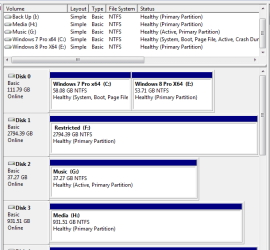
Theogg, AddRAM and gregrocker, Thank You all for your assistance after a long 3 days of doing complete re installs I have an Option screen at Boot for Win 7 and Win 8. I have also reconfigured all my hard drives and I am happy.
I also found out how to eliminate that darn system reserved 100MB file.

I have posted a picture of the new configuration. Please let me know if I should make any changes to my drives (ie Active etc)

And yes all my programs are on the 120GB ssd drive along with the OS as you suggested lets see if we see any change in speed for me.

Again Thank You all.
New Config.PNG
 

My Computer My Computer

At a glance

Windows 7 Pro and Windows 8 Pro
Computer Manufacturer/Model Number
Home Build
OS
Windows 7 Pro and Windows 8 Pro
Back
Top