Solved Red cross/Busy Blue circle sign on prefect working internet connection

tusharpatil001

New member
Local time
10:43 PM
Messages
24
Location
Nasik,India
Red cross/Busy Blue circle sign on perfect working internet connection

Respected Sir,
Sevenforums,

HARDWARE- I have Win 7,Home Premium,64bit,Dell Inspiron 15R N5010.
My network adapters are: Realtek PCIe FE Family controller & DW1501 Wireless-N WLAN Half miniport adapter.
My ADSL modem + WIFI router is Netgear DGN2200v3 latest version of firmware v1.1.00.10_1.001.

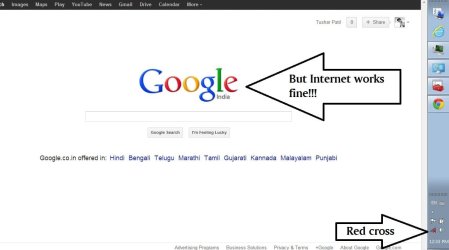
PROBLEM- My network connection icon in task bar shows Red cross disconnected or revolving Blue Busy circle network on wired and wireless connection. But my internet connection works perfectly fine. Please suggest solution to enable network notification correctly. I will carry out every possible advise to enable correct network notification. Problem arise when I personally fiddled with router's security option like changing WPA2-PSK[AES] to WPA-PSK[TKIP] + WPA2-PSK[AES] and again back.:picnic:
Right now is WPA-PSK[TKIP] + WPA2-PSK[AES]. I have connected my laptop to internet via LAN cable.

My Netgear DGN2200v3 provides WEP, WPA-PSK[TKIP], WPA2-PSK[AES], WPA-PSK[TKIP] + WPA2-PSK[AES], WPA/WPA2 Enterprise. Also please tell which type of network security option should I keep to avoid further conflict. So which should I choose? :confused:

I also have posted this issue in Microsoft community but didn't got expected reply nor solution, Please check this link about what Microsoft community answered:
Red X or Blue busy circle symbol on system tray connection icon even - Microsoft Community

I request Sevenforums to please clear my doubts and guide me till problem solves.
Thank you. :)
 

Attachments

  • red cross.JPG
    red cross.JPG
    54.3 KB · Views: 15
Last edited:

My Computer My Computer

At a glance

Windows 7 Home Premium 64 bitIntel(R) Core(TM) i5 CPU M 460 @ 2.53GHzDDR3-SDRAM-4GBATI Mobility Radeon HD 5650- 1 GB
Computer type
Laptop
Computer Manufacturer/Model Number
Dell Inspiron N5010-Laptop
OS
Windows 7 Home Premium 64 bit
CPU
Intel(R) Core(TM) i5 CPU M 460 @ 2.53GHz
Motherboard
Dell Inc. 0YXXJJ
Memory
DDR3-SDRAM-4GB
Graphics Card(s)
ATI Mobility Radeon HD 5650- 1 GB
Sound Card
IDT High Definition Audio Controller
Monitor(s) Displays
Generic PnP Monitor-1
Screen Resolution
1366 x 768 (32-bit) (60 Hz)
Hard Drives
Western Digital-500 GB
Cooling
1 CPU Fan
Keyboard
Standard PS/2 Keyboard
Mouse
Synaptics PS/2 Port TouchPad
Internet Speed
1 mbps
Other Info
Dell Wireless 365 Bluetooth Module;Network Card - Realtek RTL8102E/RTL8103E Family PCI-E Fast Ethernet NIC (NDIS 6.20);Network Card - DW1501 Wireless-N WLAN Half-Mini Card
I read through the posts on the Microsoft Community page.

I would like to add more of the events regarding above issue.
Today morning when I ran sfc/scannow program again I got following message-
Windows Resource Protection found corrupt files but was unable to fix some of them. Details are included in the CBS.Log windir\Logs\CBS\CBS.logs


But again same problem arised that after typing findstr /c:"[SR]" %windir%\Logs\CBS\CBS.log >"%userprofile%\Desktop\sfcdetails.txt" I got 0 bytes file on desktop and original CBS.log file was of 4.42 mb .


From my layman point of view their is some thing wrong with my Windows OS and I want to repair it without crashing my system or re-installing Win7. Also I want to tell that recently before getting wifi broadband connection I had deleted my old restore points, disabled hibernation, disable pagefile.sys because on C drive had only 2 gb free space. After deleting them, I ran CCleaner & removed junk files,many unused programs, update my old software with 2013 versions. Then I ran disc check, defragmentation, completing this I installed Netgear genie software to control my newly establish wifi broadband connection. Then I created system restore point, at that time this Red cross or Busy blue circle was not issue. It occur when I personally decided to choose WPA-PSK[TKIP] + WPA2-PSK[AES] from WPA2-PSK[AES] (which was default set my bsnl network technician) security option to ensure good safety measure, even after changing it networking icons were working perfectly good. But problem occur when I switch back with WPA2-PSK[TKIP] and some other setting were tamper by me. Now I want to my networking icons to function normally with optimum security measure for my wifi.
I request you to guide my out of this problem.
Thank you.
I must advise you to never use a 3rd party application for WiFi connection management. There are security risks, and Windows 7 does a great job of handling these things itself. Disabling/uninstalling that would be my first suggestion. The next point of interest is the output you received from running "sfc.exe /scannow". If you have a Windows 7 install disc, boot from that and run the System File Checker with your Windows install offline. You can type "sfc.exe /?" to get the proper syntax. It should be something like:

Code:
sfc.exe /scannow /OFFWINDIR=C:\Windows /OFFBOOTDIR=C:\
Also, there is nothing to be gained from using anything other than straight WPA or WPA2 (unless you want to go enterprise and set up a RADIUS server, but that's a project in itself), so if you think that change coincided with when you started experiencing this problem, I would switch back to whatever WPA setup was working for you before. I might get some bad feedback on this one, but from an attacker's perspective, it would be just as hard to crack your WPA2 TKIP+AES pre-shared key as it would be to crack your WPA key. The method of attack is exactly the same; they would have to capture the 4-way handshake intact, and do endless Pairwise Master Key computations, and likely end up getting nowhere. Go WPA2 with AES if you like, since the only people to break AES (AFAIK) is the NSA. But then, I haven't heard of anyone breaking TKIP or CCMP. Anyhow, as long as you're not WEPing, you're golden.
 

My Computer My Computer

At a glance

Windows 7/8/8.1 x64 &&& Debian-Based LinuxAlways AMDAlways G-SkillAlways ATi/AMD
Computer Manufacturer/Model Number
Always changing!
OS
Windows 7/8/8.1 x64 &&& Debian-Based Linux
CPU
Always AMD
Motherboard
Always Asus
Memory
Always G-Skill
Graphics Card(s)
Always ATi/AMD
Internet Speed
Never fast enough
Antivirus
MBAM, MBAR, MBAE, Outpost (WinDefender Disabled)
Browser
Firefox w/plugins galore
Thank you MSchild for your response and time! Also appreciate for your technical knowledge.
:)

I do not belong from technical background so please explain in complete layman style.:confused:
I have uninstall wifi management software like WeFi4.0,InSSIDer,Xirrus WiFi Inspector,Hotspot shield.

The default wifi management software is http://www.routerlogin.net/ (for Technical setting up internet connection,change security options,view device, maintenance etc. which is inbuilt provided with wifi router unit; I DID NOT INSTALLED THIS) & Netgear Genie ( its easy USER interface software for the same purpose but without advance settings as that of http://www.routerlogin.net/ ; I INSTALLED THIS)

"All that I want is to get working symbols of internet connection icon in taskbar. Not RED CROSS on network."
Now I have kept only WPA2-PSK[AES] security option, not WPA-PSK[TKIP] + WPA2-PSK[AES].
But does choosing any of above security option interferes with network icon representation in task bar?

Thank you all.
 

My Computer My Computer

At a glance

Windows 7 Home Premium 64 bitIntel(R) Core(TM) i5 CPU M 460 @ 2.53GHzDDR3-SDRAM-4GBATI Mobility Radeon HD 5650- 1 GB
Computer type
Laptop
Computer Manufacturer/Model Number
Dell Inspiron N5010-Laptop
OS
Windows 7 Home Premium 64 bit
CPU
Intel(R) Core(TM) i5 CPU M 460 @ 2.53GHz
Motherboard
Dell Inc. 0YXXJJ
Memory
DDR3-SDRAM-4GB
Graphics Card(s)
ATI Mobility Radeon HD 5650- 1 GB
Sound Card
IDT High Definition Audio Controller
Monitor(s) Displays
Generic PnP Monitor-1
Screen Resolution
1366 x 768 (32-bit) (60 Hz)
Hard Drives
Western Digital-500 GB
Cooling
1 CPU Fan
Keyboard
Standard PS/2 Keyboard
Mouse
Synaptics PS/2 Port TouchPad
Internet Speed
1 mbps
Other Info
Dell Wireless 365 Bluetooth Module;Network Card - Realtek RTL8102E/RTL8103E Family PCI-E Fast Ethernet NIC (NDIS 6.20);Network Card - DW1501 Wireless-N WLAN Half-Mini Card
I do not belong from technical background so please explain in complete layman style.
I'm sorry, I will try harder to explain myself more clearly

I have uninstall wifi management software like WeFi4.0,InSSIDer,Xirrus WiFi Inspector,Hotspot shield.
I am not familiar with some of those. Programs like InSSIDer are okay, but for the purpose of identifying the problem, you should not have any of these running, so that it will be easier to determine the cause of the problem. Make sure you disable/close completely all WiFi programs for the time being. As for Netgear Genie, I would suggest you exit that completely as well. I know that Netgear Genie has features that may be useful, but if you use it for connecting to wireless networks, it could be the cause of the problem. You should let Windows handle that. If I were you, I would uninstall it. WiFi connection programs are unsafe in my opinion - they can be a security risk. As far as I know, the built-in Windows wireless connection program has no known vulnerabilities, so it is the safest to use. Just disabling/closing Netgear Genie may fix the icon problem, as I have seen this icon problem fixed on other machines by removing wireless connection softwares.

Type "msconfig" in the start menu and hit enter. Under the "Startup" tab, make sure none of these WiFi programs are starting up and running hidden in the background.

You can also log in to your router directly by typing its IP address in the navigation bar on your web browser. You can find this IP address by first connecting to the Internet, opening up a command prompt (Start, Run, cmd, Enter), and typing "ipconfig /all". Your router's IP address is the entry that is labeled "Default Gateway".

"All that I want is to get working symbols of internet connection icon in taskbar. Not RED CROSS on network."
Now I have kept only WPA2-PSK[AES] security option, not WPA-PSK[TKIP] + WPA2-PSK[AES].
But does choosing any of above security option interferes with network icon representation in task bar?
No, the security setting shouldn't be an issue, as Windows 7 supports all of these options. Still, because the problem started right after you made the change, it is best to change it back to see whether or not its relevant.

Make sure you have Internet Connection sharing disabled (Network and Sharing > Change Adapter Settings > Right-click Adapter > Properties > Sharing), and also make sure that none of your adapters are bridged (Right-click adapter, the menu will say Add to Bridge or Remove from Bridge). Also, try running CCleaner and checking the tick box for the Tray Notifications Cache under the Windows tab. Many people are reporting that this problem is caused by wireless driver updates or other wireless utilities. If you've updated your drivers recently, try rolling back the driver to the last one that worked (Device Manager > Network Adapters > Right-Click wireless adapter > Properties > Driver > Roll back driver).

Also, Brink has some good suggestions on a similar thread:
https://www.sevenforums.com/network-sharing/134810-red-x-network-icon-2.html
To quote the man himself:
Double check to see if you have the Network Connections, Network List Service, Network Location Awareness, and Network Store Interface Service Services set to Started and Automatic.
Go to Start Menu, type in Services, hit Enter.

Assuming you have performed the sfc.exe operation, either from a Windows 7 install disc, or from within Windows, I'm betting it's no fault of Windows. You can boot in "Safe Mode with Networking" to confirm. Reboot and hit F8 repeatedly during startup to catch the menu.
 

My Computer My Computer

At a glance

Windows 7/8/8.1 x64 &&& Debian-Based LinuxAlways AMDAlways G-SkillAlways ATi/AMD
Computer Manufacturer/Model Number
Always changing!
OS
Windows 7/8/8.1 x64 &&& Debian-Based Linux
CPU
Always AMD
Motherboard
Always Asus
Memory
Always G-Skill
Graphics Card(s)
Always ATi/AMD
Internet Speed
Never fast enough
Antivirus
MBAM, MBAR, MBAE, Outpost (WinDefender Disabled)
Browser
Firefox w/plugins galore
Hey MSchild Don't be sorry, I'm glad that you simplified in such simplistic manner!!!:D


This is list of task I completed on following your commands.
*Instead of disabling from msconfig, I uninstalled all wifi related software.

*192.168.0.1 or www.routerlogin.net is basic wifi router interface medium.

*Internet Connection sharing was already disabled.

*Network adapters were not bridged.

*Ran CCleaner with checking the tick box for the Tray Notifications Cache and cleared all junk files.

*I did not recently installed or updated any network driver so rollback option was inactive.

*Network Connections, Network List Service, Network Location Awareness, and Network Store Interface Service were already in set to Started and Automatic mode, I manually stopped and again stated them in Automatic mode .

*When booted Win 7 Home Premium setup CD, I choose Repair>CMD> then I ran command as you said sfc.exe /scannow /OFFWINDIR=C:\Windows /OFFBOOTDIR=C:\ nothing came then sfc.exe /scannow /OFFWINDIR=D:\Windows /OFFBOOTDIR=D:\ (D its drive according to Win7 setup where windows files are stored) still nothing came.
Then I typed only sfc/scannow and pressed enter I got "There is a system repair pending which requires reboot to complete. Restart Windows and run sfc again" I again rebooted, performed whole process again and got SAME response from sfc.
Then after removing Win7 setup cd, turning laptop on I ran same process again but in normal mode, I got "Verification 100% complete Window Resource Protection found corrupt files but were unable to fix some of them. Details are included in the CBS.Log windir\Logs\CBS\CBS.log ."
So to open this file I took google help & got this syntax "notepad c:\windows\logs\cbs\cbs.log" and entered it next in CMD. Then I got 7.52MB file of highly technical terms enlisting problems in my laptop which I never knew!!! And now I want your help to get ridded of all them,right from root cause.
But consider my this request--> Please I don't want to format or re-install Win7 OS. I will be to hectic task for me.:sick:

*Also I am confused over command:-
sfc /SCANNOW /OFFBOOTDIR=c:\ /OFFWINDIR=c:\windows
and
sfc.exe /scannow /OFFWINDIR=C:\Windows /OFFBOOTDIR=C:\

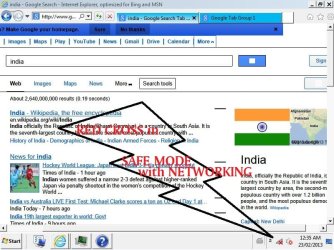
* Disappointingly "Safe Mode with Networking" neither showed the correct network status!


I am still getting Red cross over network icon whether I use WIFI or LAN cable to connect internet.:banghead:
I am blank now, please SEVENFORUMS help me to solve known (red cross over network icon) and unknown (7.52MB CBS.log report mentioning missing, corrupt & repaired files) problems...:doh:
Thank you again...
 

Attachments

  • red cross3.JPG
    red cross3.JPG
    98 KB · Views: 8

My Computer My Computer

At a glance

Windows 7 Home Premium 64 bitIntel(R) Core(TM) i5 CPU M 460 @ 2.53GHzDDR3-SDRAM-4GBATI Mobility Radeon HD 5650- 1 GB
Computer type
Laptop
Computer Manufacturer/Model Number
Dell Inspiron N5010-Laptop
OS
Windows 7 Home Premium 64 bit
CPU
Intel(R) Core(TM) i5 CPU M 460 @ 2.53GHz
Motherboard
Dell Inc. 0YXXJJ
Memory
DDR3-SDRAM-4GB
Graphics Card(s)
ATI Mobility Radeon HD 5650- 1 GB
Sound Card
IDT High Definition Audio Controller
Monitor(s) Displays
Generic PnP Monitor-1
Screen Resolution
1366 x 768 (32-bit) (60 Hz)
Hard Drives
Western Digital-500 GB
Cooling
1 CPU Fan
Keyboard
Standard PS/2 Keyboard
Mouse
Synaptics PS/2 Port TouchPad
Internet Speed
1 mbps
Other Info
Dell Wireless 365 Bluetooth Module;Network Card - Realtek RTL8102E/RTL8103E Family PCI-E Fast Ethernet NIC (NDIS 6.20);Network Card - DW1501 Wireless-N WLAN Half-Mini Card

My Computer My Computer

At a glance

Windows 7 Home Premium 64 bitIntel(R) Core(TM) i5 CPU M 460 @ 2.53GHzDDR3-SDRAM-4GBATI Mobility Radeon HD 5650- 1 GB
Computer type
Laptop
Computer Manufacturer/Model Number
Dell Inspiron N5010-Laptop
OS
Windows 7 Home Premium 64 bit
CPU
Intel(R) Core(TM) i5 CPU M 460 @ 2.53GHz
Motherboard
Dell Inc. 0YXXJJ
Memory
DDR3-SDRAM-4GB
Graphics Card(s)
ATI Mobility Radeon HD 5650- 1 GB
Sound Card
IDT High Definition Audio Controller
Monitor(s) Displays
Generic PnP Monitor-1
Screen Resolution
1366 x 768 (32-bit) (60 Hz)
Hard Drives
Western Digital-500 GB
Cooling
1 CPU Fan
Keyboard
Standard PS/2 Keyboard
Mouse
Synaptics PS/2 Port TouchPad
Internet Speed
1 mbps
Other Info
Dell Wireless 365 Bluetooth Module;Network Card - Realtek RTL8102E/RTL8103E Family PCI-E Fast Ethernet NIC (NDIS 6.20);Network Card - DW1501 Wireless-N WLAN Half-Mini Card
When booted Win 7 Home Premium setup CD, I choose Repair>CMD> then I ran command as you said sfc.exe /scannow /OFFWINDIR=C:\Windows /OFFBOOTDIR=C:\ nothing came then sfc.exe /scannow /OFFWINDIR=D:\Windows /OFFBOOTDIR=D:\ (D its drive according to Windows 7 setup where windows files are stored) still nothing came.
The default drive letter for a Windows install is C. If your Windows 7 is installed to the D drive, you will want to use that in the command instead of C. I probably should have been more clear.

Also I am confused over command:-
sfc /SCANNOW /OFFBOOTDIR=c:\ /OFFWINDIR=c:\windows
and
sfc.exe /scannow /OFFWINDIR=C:\Windows /OFFBOOTDIR=C:\
When you run this command from your Windows install, you only need to use "sfc /scannow", but since you were getting error messages, we had to boot from the Windows install disc to run the command (this way your Windows install was not being used while it was being scanned, hopefully to get around the error message). The reason the command has to be entered differently in this case, is that when you boot from the Windows install disc, your 'working directory' is the X drive (created temporarily by the install disc). Because of this, it requires us to tell it the drive letter and location of the Windows install that we want to scan. This is likely why you weren't able to run "sfc /scannnow" without the extra file paths while you were working from the install CD.

Disappointingly "Safe Mode with Networking" neither showed the correct network status!
Hmm!
I am sorry to tell you this sir, but considering that, it would seem that the corrupt files in your Windows install found by sfc.exe may very well be the cause of this icon issue (but whether it's the cause or not, it is something you should take care of as soon as possible). I know that reinstalling may seem like too much to fix such a small issue, and I agree, but I would be very worried about corrupt system files (especially when sfc.exe can not repair them).

Before any of that though, please attach a copy of the "CBS.log" file that sfc.exe created. That will likely hold some interesting information, which could point to a fix which would not require you to do something as extreme as a reinstall of Windows.
 
Last edited:

My Computer My Computer

At a glance

Windows 7/8/8.1 x64 &&& Debian-Based LinuxAlways AMDAlways G-SkillAlways ATi/AMD
Computer Manufacturer/Model Number
Always changing!
OS
Windows 7/8/8.1 x64 &&& Debian-Based Linux
CPU
Always AMD
Motherboard
Always Asus
Memory
Always G-Skill
Graphics Card(s)
Always ATi/AMD
Internet Speed
Never fast enough
Antivirus
MBAM, MBAR, MBAE, Outpost (WinDefender Disabled)
Browser
Firefox w/plugins galore
hmm,
I think, running sfc/scannow thru Win7 install CD may repair or replace corrupt file. But on running on install CD gave repair pending response.
So MSchild tell me exactly which syntax I should enter to run sfc/scannow test.

sfc /SCANNOW /OFFBOOTDIR=d:\ /OFFWINDIR=d:\windows
OR
sfc.exe /scannow /OFFWINDIR=d:\Windows /OFFBOOTDIR=d:\

I got this response "There is a system repair pending which requires reboot to complete. Restart Windows and run sfc again" when I typed only "sfc/scannow" and pressed enter. So if I enter correct syntax, that may initiate test & repair thru install CD. What you think?

Also I have attached CBS report in ms word file which was generated WITHOUT USING WIN7 INSTALL CD.
CBS report file in txt is 7.52MB, so I uploaded word doc file. But content of both is same. Please interpret it, but its vast technical going incomprehensible for me!!! Hope you decode it.
"You are take lots of efforts to help me by processing this into layman style. I am thankful for your perseverance with me :)"
 

My Computer My Computer

At a glance

Windows 7 Home Premium 64 bitIntel(R) Core(TM) i5 CPU M 460 @ 2.53GHzDDR3-SDRAM-4GBATI Mobility Radeon HD 5650- 1 GB
Computer type
Laptop
Computer Manufacturer/Model Number
Dell Inspiron N5010-Laptop
OS
Windows 7 Home Premium 64 bit
CPU
Intel(R) Core(TM) i5 CPU M 460 @ 2.53GHz
Motherboard
Dell Inc. 0YXXJJ
Memory
DDR3-SDRAM-4GB
Graphics Card(s)
ATI Mobility Radeon HD 5650- 1 GB
Sound Card
IDT High Definition Audio Controller
Monitor(s) Displays
Generic PnP Monitor-1
Screen Resolution
1366 x 768 (32-bit) (60 Hz)
Hard Drives
Western Digital-500 GB
Cooling
1 CPU Fan
Keyboard
Standard PS/2 Keyboard
Mouse
Synaptics PS/2 Port TouchPad
Internet Speed
1 mbps
Other Info
Dell Wireless 365 Bluetooth Module;Network Card - Realtek RTL8102E/RTL8103E Family PCI-E Fast Ethernet NIC (NDIS 6.20);Network Card - DW1501 Wireless-N WLAN Half-Mini Card
I think you need to put the OFFWINDIR before the OFFBOOTDIR, but don't worry about entering it wrong, it will tell you if you do, and you won't mess anything up.
You should enter:
sfc /scannow /offwindir=D:\Windows /offbootdir=D:\

I got this response "There is a system repair pending which requires reboot to complete. Restart Windows and run sfc again" when I typed only "sfc/scannow" and pressed enter. So if I enter correct syntax, that may initiate test & repair thru install CD. What you think?
The error message is to be expected when you run "sfc /scannow" only from the install CD/DVD. I tried to explain this in a previous post:
When you run this command from your Windows install, you only need to use "sfc /scannow", but since you were getting error messages, we had to boot from the Windows install disc to run the command (this way your Windows install was not being used while it was being scanned, hopefully to get around the error message). The reason the command has to be entered differently in this case, is that when you boot from the Windows install disc, your 'working directory' is the X drive (created temporarily by the install disc). Because of this, it requires us to tell it the drive letter and location of the Windows install that we want to scan. This is likely why you weren't able to run "sfc /scannnow" without the extra file paths while you were working from the install CD.
Basically what I meant is, from the install CD/DVD you need to type the longer version, which tells sfc.exe where your Windows is installed. When you are booted into Windows 7 though, Windows already knows where it is installed, so that's why you can just use "sfc.exe /scannow" in that situation.

CBS report file in txt is 7.52MB, so I uploaded word doc file. But content of both is same. Please interpret it, but its vast technical going incomprehensible for me!!! Hope you decode it.
I will give it a look over, but 7.52MB is about 10 times the size of 880KB. Please make sure you have copied and pasted everything from the log file, save it to a new word document, and check the file size again.
 

My Computer My Computer

At a glance

Windows 7/8/8.1 x64 &&& Debian-Based LinuxAlways AMDAlways G-SkillAlways ATi/AMD
Computer Manufacturer/Model Number
Always changing!
OS
Windows 7/8/8.1 x64 &&& Debian-Based Linux
CPU
Always AMD
Motherboard
Always Asus
Memory
Always G-Skill
Graphics Card(s)
Always ATi/AMD
Internet Speed
Never fast enough
Antivirus
MBAM, MBAR, MBAE, Outpost (WinDefender Disabled)
Browser
Firefox w/plugins galore
I have a Netgear R6300 router that I got a couple months ago. It came with a desktop genie that is a crap program that was the root cause of hassles I was having with wireless dropping and popups of disabled/enabled internet connections.
I had to go into msconfig and also in services to disable it from starting up and running and don't use the desktop genie at all. I didn't uninstall it just incase but I access the router through http://192.168.1.1/start.htm without using the desktop genie.
I've had no problems since disabling that lousy desktop genie so I assume your Netgear DGN2200v3 router also came with the genie so take a shot in the dark, disable it and see if your problem goes away.
 

My Computer My Computer

At a glance

Microsoft Windows 7 Ultimate 64-bitIntel(R) Pentium(R) CPU G2030 @ 3.00GHz12.00 GB Kingston DIMM 3x4 gig sticksAMD Radeon HD 5450
Computer Manufacturer/Model Number
Custom Build
OS
Microsoft Windows 7 Ultimate 64-bit
CPU
Intel(R) Pentium(R) CPU G2030 @ 3.00GHz
Motherboard
ASUSTeK COMPUTER INC. P8H77-V LE
Memory
12.00 GB Kingston DIMM 3x4 gig sticks
Graphics Card(s)
AMD Radeon HD 5450
Sound Card
AMD High Definition Audio Device
Monitor(s) Displays
Dual displays
Screen Resolution
1280 x 1024 x 4294967296 colors
Hard Drives
ST3500320AS 465.76 GB
WDC WD10EZEX-00BN5A0 931.51 GB
WDC WD10 EARS-00MVWB0 USB Device 931.51 GB
PSU
XION SuperNova 600 watt
Keyboard
Razer Tarantula Gaming Keyboard
Mouse
Razer Imperator Gaming Mouse
Internet Speed
DSL 6 down & 1 up with Netgear R6300 Wireless router
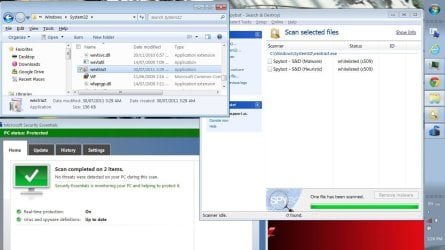
Well nonetheless, it's about 16,000 pages long. I did NOT read through all of it lol, but I searched for some key terms, and it seems that it found numerous problems with just a single file: wextract.exe

A quick search shows that a common cause of wextract.exe corruption is from viruses and malware. Whether you still have any viruses on your system is something I can not determine for you, but I would urge you to take all of the proper steps to make sure.

If this were my computer, I would download a copy of wextract.exe and replace the corrupt version in my C:\Windows\System32 folder manually. However, I don't feel quite comfortable telling you to do that. I can provide you with my copy of wextract.exe, but I do not know if there are differences between our versions (since I have Windows 7 Ultimate and you have Windows 7 Home Premium), so the decision is up to you. Perhaps someone on these forums who is more qualified can give you some better advice.

Also I am sorry you received such poor feedback on the Microsoft Community forums. This was quite a while ago.
https://answers.microsoft.com/en-us...e/1633b505-3a9e-4ab6-a92f-5ff7dd19a04c?page=1

(Mods, if posting this exe is against the rules, apologies, and please delete it.)
 

My Computer My Computer

At a glance

Windows 7/8/8.1 x64 &&& Debian-Based LinuxAlways AMDAlways G-SkillAlways ATi/AMD
Computer Manufacturer/Model Number
Always changing!
OS
Windows 7/8/8.1 x64 &&& Debian-Based Linux
CPU
Always AMD
Motherboard
Always Asus
Memory
Always G-Skill
Graphics Card(s)
Always ATi/AMD
Internet Speed
Never fast enough
Antivirus
MBAM, MBAR, MBAE, Outpost (WinDefender Disabled)
Browser
Firefox w/plugins galore
Hello AlterUrEgo!
Welcome to this discussion & my troubleshooting work.

Actually I downloaded Netgear Genie from Netgear Support site, the icon worked perfectly after instillation! To control Netgear router default interface is 192.168.0.1 or www.routerlogin.net or 192.168.1.1 which ever is comfortable, and its one and the same.
Even after controlling my wifi router by operating Netgear Genie was fine, network icon gave accurate representations. But problem arise when I fiddle with its security options and simultaneously installed some software.
Now even after uninstalling all wifi related software and following all instruction from techies (refer all above post to investigate my problem in detail) my network icon are not responding.


MSchild tell that, now I will run sfc from Win7 install cd by entering syntax- sfc /scannow /offwindir=D:\Windows /offbootdir=D:\
then where will its report will be stored? in laptop hard drive or in X drive (created temporarily by the install disc)?

I will upload that 7MB file after running CD based sfc test.
is it ok or you want to analysis it first?
 

My Computer My Computer

At a glance

Windows 7 Home Premium 64 bitIntel(R) Core(TM) i5 CPU M 460 @ 2.53GHzDDR3-SDRAM-4GBATI Mobility Radeon HD 5650- 1 GB
Computer type
Laptop
Computer Manufacturer/Model Number
Dell Inspiron N5010-Laptop
OS
Windows 7 Home Premium 64 bit
CPU
Intel(R) Core(TM) i5 CPU M 460 @ 2.53GHz
Motherboard
Dell Inc. 0YXXJJ
Memory
DDR3-SDRAM-4GB
Graphics Card(s)
ATI Mobility Radeon HD 5650- 1 GB
Sound Card
IDT High Definition Audio Controller
Monitor(s) Displays
Generic PnP Monitor-1
Screen Resolution
1366 x 768 (32-bit) (60 Hz)
Hard Drives
Western Digital-500 GB
Cooling
1 CPU Fan
Keyboard
Standard PS/2 Keyboard
Mouse
Synaptics PS/2 Port TouchPad
Internet Speed
1 mbps
Other Info
Dell Wireless 365 Bluetooth Module;Network Card - Realtek RTL8102E/RTL8103E Family PCI-E Fast Ethernet NIC (NDIS 6.20);Network Card - DW1501 Wireless-N WLAN Half-Mini Card
Wow MSchild!!! How you got that old thread from Microsoft Community forums!!!!
these Microsoft men don't co-operate as expected...
Its good that at lest you found out that wextract.exe issue from 16000 lines!!
I scanned wextract.exe with Microsoft Essential Anti-virus & Spybot software but none raised suspicion!
Oh MSchild..now what to do...?:confused: nor I am sure to replace your file with mine...
I dont know any one other than you more qualified to suggest this, can you please ask your senior or more expert for advice on my behalf? Please I request you.

Should I run any anti virus,anti-something scans to repair this? Or can I replace this wextract.exe file through Win7 install cd sfc scan?
If yes then let me run sfc scan once again...
or can I explore wextract.exe file in Win7 install cd? & then copy paste it in my laptop?
 

Attachments

  • red cross4.JPG
    red cross4.JPG
    117.5 KB · Views: 5

My Computer My Computer

At a glance

Windows 7 Home Premium 64 bitIntel(R) Core(TM) i5 CPU M 460 @ 2.53GHzDDR3-SDRAM-4GBATI Mobility Radeon HD 5650- 1 GB
Computer type
Laptop
Computer Manufacturer/Model Number
Dell Inspiron N5010-Laptop
OS
Windows 7 Home Premium 64 bit
CPU
Intel(R) Core(TM) i5 CPU M 460 @ 2.53GHz
Motherboard
Dell Inc. 0YXXJJ
Memory
DDR3-SDRAM-4GB
Graphics Card(s)
ATI Mobility Radeon HD 5650- 1 GB
Sound Card
IDT High Definition Audio Controller
Monitor(s) Displays
Generic PnP Monitor-1
Screen Resolution
1366 x 768 (32-bit) (60 Hz)
Hard Drives
Western Digital-500 GB
Cooling
1 CPU Fan
Keyboard
Standard PS/2 Keyboard
Mouse
Synaptics PS/2 Port TouchPad
Internet Speed
1 mbps
Other Info
Dell Wireless 365 Bluetooth Module;Network Card - Realtek RTL8102E/RTL8103E Family PCI-E Fast Ethernet NIC (NDIS 6.20);Network Card - DW1501 Wireless-N WLAN Half-Mini Card
You need to run the sfc/scannow file checker three times in a row, rebooting between each run. As an aside..... have you tried a system restore to a point before this happened? (Always start simple) As another aside I would lose the spybot myself as its bloated and unreliable. You don't have the tea timer function on do you? I'm late for an appointment right now and have to leave but will check back in soon.

http://www.sevenforums.com/tutorials/1538-sfc-scannow-command-system-file-checker.html
 

My Computer My Computer

At a glance

Windows 10x64 Build 1709Intel i7 7700HQ Kaby Lake16 GB DDR4 @2400Nvidia Geforce GTX 1060
Computer type
Laptop
Computer Manufacturer/Model Number
MSI GE72VR Apache Pro-416
OS
Windows 10x64 Build 1709
CPU
Intel i7 7700HQ Kaby Lake
Motherboard
Micro-Star Intl. MS-179B (U3C1)
Memory
16 GB DDR4 @2400
Graphics Card(s)
Nvidia Geforce GTX 1060
Screen Resolution
1920x1080 120Hz
Hard Drives
256 GB Nvme M.2 SSD

1TB HDD@7200
Cooling
Cooler Blast 4
Keyboard
Steel Series
Antivirus
Bit Defender Free
Browser
Edge
Have you tried this?

Right click on the network icon (the red x)> left click Open network and sharing center> Left click Change adapter settings. Only ONE connection should be enabled and others disabled.

Or this : From Network and Sharing Center > manage wireless networks. Delete all networks and restart your machine.
 

My Computer My Computer

At a glance

Windows 10x64 Build 1709Intel i7 7700HQ Kaby Lake16 GB DDR4 @2400Nvidia Geforce GTX 1060
Computer type
Laptop
Computer Manufacturer/Model Number
MSI GE72VR Apache Pro-416
OS
Windows 10x64 Build 1709
CPU
Intel i7 7700HQ Kaby Lake
Motherboard
Micro-Star Intl. MS-179B (U3C1)
Memory
16 GB DDR4 @2400
Graphics Card(s)
Nvidia Geforce GTX 1060
Screen Resolution
1920x1080 120Hz
Hard Drives
256 GB Nvme M.2 SSD

1TB HDD@7200
Cooling
Cooler Blast 4
Keyboard
Steel Series
Antivirus
Bit Defender Free
Browser
Edge
Respected Sir,
Sevenforums,

HARDWARE- I have Win 7,Home Premium,64bit,Dell Inspiron 15R N5010.
My network adapters are: Realtek PCIe FE Family controller & DW1501 Wireless-N WLAN Half miniport adapter.
My ADSL modem + WIFI router is Netgear DGN2200v3 latest version of firmware v1.1.00.10_1.001.

PROBLEM- My network connection icon in task bar shows Red cross disconnected or revolving Blue Busy circle network on wired and wireless connection. But my internet connection works perfectly fine. Please suggest solution to enable network notification correctly. I will carry out every possible advise to enable correct network notification. Problem arise when I personally fiddled with router's security option like changing WPA2-PSK[AES] to WPA-PSK[TKIP] + WPA2-PSK[AES] and again back.:picnic:
Right now is WPA-PSK[TKIP] + WPA2-PSK[AES]. I have connected my laptop to internet via LAN cable.

My Netgear DGN2200v3 provides WEP, WPA-PSK[TKIP], WPA2-PSK[AES], WPA-PSK[TKIP] + WPA2-PSK[AES], WPA/WPA2 Enterprise. Also please tell which type of network security option should I keep to avoid further conflict. So which should I choose? :confused:

I also have posted this issue in Microsoft community but didn't got expected reply nor solution, Please check this link about what Microsoft community answered:
Red X or Blue busy circle symbol on system tray connection icon even - Microsoft Community

I request Sevenforums to please clear my doubts and guide me till problem solves.
Thank you. :)

Hello tusharpatil, and welcome to Seven Forums.

Since the network is working just fine, you might see if resetting the notification area icons may help.

If not, then try deleting your network connection, and setting it back up from scratch will sort the icon issue.

Hope this may help, :)
Shawn
 

My Computer My Computer

At a glance

64-bit Windows 11 Pro for WorkstationsIntel i7-8700K OC'd to 5 GHz64 GB (4x16GB) G.SKILL TridentZ RGB DDR4 3600...ASUS ROG-STRIX-GTX1080TI-O11G-GAMING
Computer type
PC/Desktop
Computer Manufacturer/Model Number
Self built custom
OS
64-bit Windows 11 Pro for Workstations
CPU
Intel i7-8700K OC'd to 5 GHz
Motherboard
ASUS ROG Maximus XI Formula Z390
Memory
64 GB (4x16GB) G.SKILL TridentZ RGB DDR4 3600 MHz
Graphics Card(s)
ASUS ROG-STRIX-GTX1080TI-O11G-GAMING
Sound Card
Integrated
Monitor(s) Displays
2 x Samsung Odyssey G7 27"
Screen Resolution
2560x1440
Hard Drives
1TB Samsung 990 PRO M.2,
4TB Samsung 990 PRO PRO M.2,
TerraMaster F8 SSD Plus NAS
PSU
Seasonic Prime Titanium 850W
Case
Thermaltake Core P3
Cooling
Corsair Hydro H115i
Keyboard
Logitech wireless K800
Mouse
Logitech MX Master 4
Internet Speed
2 Gb/s Download and 100 Mb/s Upload
Antivirus
Malwarebyte Anti-Malware Premium
Browser
Google Chrome
Other Info
Logitech Z625 speaker system,
Logitech BRIO 4K Pro webcam,
HP Color LaserJet Pro MFP M477fdn,
APC SMART-UPS RT 1000 XL - SURT1000XLI,
Galaxy S23 Plus phone
Hello Indianacarnie & Brink-Shawn Sir,
I am very thankful to Sevenforums,MSchild,Indianacarnie & Brink-Shawn for your support.

Shawn yours last advise worked!!! I got functional network icon after deleting all network adapters & drivers. Then on restarting laptop, Realtek PCIe FE Family controller driver got installed by default & got updated in Windows Update(on connecting to internet,pop up came for update). But cannot install Microsoft driver update for Broadcom 802.11n Network Adapter. I tried many time but it didn't installed got code error 80070103. I did not Install official DELL drivers from DELL DRIVERS CD So "DO I HAVE INSTALL ORIGINAL DRIVERS FROM DELL?"

As Indianacarnie said running the sfc/scannow file checker three times in a row, rebooting between each run did not resolved the error, instead sfc/scannow said detected corrupt files but unable to fix it. Now WHAT to do sir?
CBS generated 9.86mb file, but I copied whole date & created ms word file of 1.17mb. I request Indianacarnie & Brink-Shawn Sir to open my ms word file,check last part of file where problem must have mention and decode technical data in layman way. Please point the files to me so that I can replace them after extracting setup cd by 7zip.
Also in my Spybot2-beta version tea timer function is absent. Something is better than nothing, So I kept spybot. Because Windows Defender cannot start & says "The system cannot find the path specified (Code Error:0x80070003)
System restore point was over righted with new restore points as I installed software,windows updates & uninstalled software. So last point of problem free state was gone.

I encounter strange behavior of my network adapters, explained below in different scenario, explained with attached labeled images:-

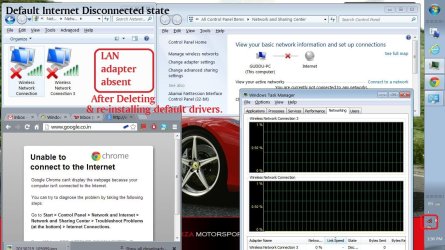
#Connecting Internet via LAN cable-(BEFORE DELETING network connection)CASE-1
In network & sharing center>change adapter settings>
I found Local Area Connection-Realtek PCIe FE Family controller,
Wireless Network Connection-DW1501 Wireless-N WLAN Half miniport adapter &
Wireless Network Connection 2-Microsoft VirtualWiFi miniport adapter.
When I connected internet via lan all adapter were shown & named, but red cross persisted.

#Connecting Internet via Wifi-(BEFORE DELETING network connection)CASE-2
I found only Wireless Network Connection-DW1501 Wireless-N WLAN Half miniport adapter &
Wireless Network Connection 2-Microsoft VirtualWiFi miniport adapter.
NO Local Area Connection-Realtek PCIe FE Family controller. LAN port/adapter was absent in the list. I was confuse on its absence & red cross persisted.

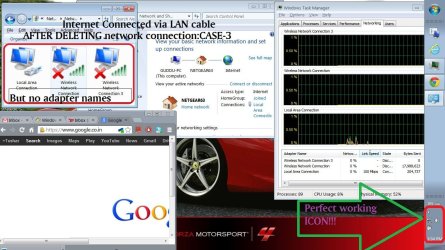
#Connecting Internet via LAN cable-(AFTER DELETING network connection)CASE-3
After deleting all network adapters with removing it drivers, I restarted laptop.Then LAN driver got automatic install from Windows update and got update from internet as I connected LAN cable. Then network icon worked perfectly fine.:) Problem solved. But name of adapters were absent.:huh: Wifi driver were got installed via internet when I clicked Check for updates in Windows Update via lan cable

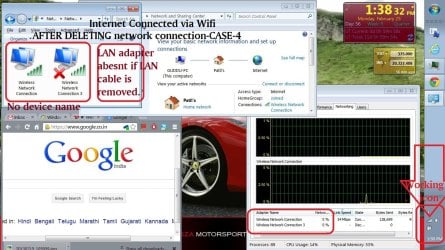
#Connecting Internet via Wifi-(AFTER DELETING network connection)CASE-4
To check my wifi adapter I disconnected LAN cable, the moment I removed LAN cable my LAN adapted was missing In Network Connections.:mad: What is this problem now ?

Why so, before deleting network connection, internet connection via wifi showed lan adapter in Network Connections, but after deleting network connection, internet connection via wifi DID NOT showed lan adapter in Network Connections
Why this happens?What should I do to maintain LAN adapter even after dis-connecting LAN cable?
Please help, my patial problem is solved, only sfc/scannow result interpretation & this missing LAN adapter is bugging me. Please help me Sir.

Thank you lot for getting me working icon...:D
 

Attachments

  • red cross6.JPG
    red cross6.JPG
    151.9 KB · Views: 3
  • red cross7.JPG
    red cross7.JPG
    160.7 KB · Views: 3
  • red cross10.JPG
    red cross10.JPG
    174.2 KB · Views: 3
  • red cross9.JPG
    red cross9.JPG
    168.9 KB · Views: 2
  • red cross11.JPG
    red cross11.JPG
    182.5 KB · Views: 3

My Computer My Computer

At a glance

Windows 7 Home Premium 64 bitIntel(R) Core(TM) i5 CPU M 460 @ 2.53GHzDDR3-SDRAM-4GBATI Mobility Radeon HD 5650- 1 GB
Computer type
Laptop
Computer Manufacturer/Model Number
Dell Inspiron N5010-Laptop
OS
Windows 7 Home Premium 64 bit
CPU
Intel(R) Core(TM) i5 CPU M 460 @ 2.53GHz
Motherboard
Dell Inc. 0YXXJJ
Memory
DDR3-SDRAM-4GB
Graphics Card(s)
ATI Mobility Radeon HD 5650- 1 GB
Sound Card
IDT High Definition Audio Controller
Monitor(s) Displays
Generic PnP Monitor-1
Screen Resolution
1366 x 768 (32-bit) (60 Hz)
Hard Drives
Western Digital-500 GB
Cooling
1 CPU Fan
Keyboard
Standard PS/2 Keyboard
Mouse
Synaptics PS/2 Port TouchPad
Internet Speed
1 mbps
Other Info
Dell Wireless 365 Bluetooth Module;Network Card - Realtek RTL8102E/RTL8103E Family PCI-E Fast Ethernet NIC (NDIS 6.20);Network Card - DW1501 Wireless-N WLAN Half-Mini Card
I wouldn't worry too much about the files mentioned in sfc/scannow results unless something else is wrong. If you have themes or any modifications to windows it will show as "corrupted" files. Example: I change my start button to different things at different times.When I run a sfc/scannow it says "corrupted" files.

You may have to go to the manufacturers website to download your lan adapter.
 

My Computer My Computer

At a glance

Windows 10x64 Build 1709Intel i7 7700HQ Kaby Lake16 GB DDR4 @2400Nvidia Geforce GTX 1060
Computer type
Laptop
Computer Manufacturer/Model Number
MSI GE72VR Apache Pro-416
OS
Windows 10x64 Build 1709
CPU
Intel i7 7700HQ Kaby Lake
Motherboard
Micro-Star Intl. MS-179B (U3C1)
Memory
16 GB DDR4 @2400
Graphics Card(s)
Nvidia Geforce GTX 1060
Screen Resolution
1920x1080 120Hz
Hard Drives
256 GB Nvme M.2 SSD

1TB HDD@7200
Cooling
Cooler Blast 4
Keyboard
Steel Series
Antivirus
Bit Defender Free
Browser
Edge
indianacarnie can you please see my sfc/scan report ?
Its attached to my previous post, please check it can tell which files it shows corrupt, so I can replace it manually.

Also tell why my LAN adapter get hidden after LAN disconnection?is it driver problem or other please help me on this matter.
I request Sevenforums to clear my above doubts which I posted with attached images.

Thank you very much.
 

My Computer My Computer

At a glance

Windows 7 Home Premium 64 bitIntel(R) Core(TM) i5 CPU M 460 @ 2.53GHzDDR3-SDRAM-4GBATI Mobility Radeon HD 5650- 1 GB
Computer type
Laptop
Computer Manufacturer/Model Number
Dell Inspiron N5010-Laptop
OS
Windows 7 Home Premium 64 bit
CPU
Intel(R) Core(TM) i5 CPU M 460 @ 2.53GHz
Motherboard
Dell Inc. 0YXXJJ
Memory
DDR3-SDRAM-4GB
Graphics Card(s)
ATI Mobility Radeon HD 5650- 1 GB
Sound Card
IDT High Definition Audio Controller
Monitor(s) Displays
Generic PnP Monitor-1
Screen Resolution
1366 x 768 (32-bit) (60 Hz)
Hard Drives
Western Digital-500 GB
Cooling
1 CPU Fan
Keyboard
Standard PS/2 Keyboard
Mouse
Synaptics PS/2 Port TouchPad
Internet Speed
1 mbps
Other Info
Dell Wireless 365 Bluetooth Module;Network Card - Realtek RTL8102E/RTL8103E Family PCI-E Fast Ethernet NIC (NDIS 6.20);Network Card - DW1501 Wireless-N WLAN Half-Mini Card
tusharpatil,

When you deleted network connections, they were reset and used a default name Windows gave them. If you like, you could just right click on the network connection, and click on "Rename" to name it what you like instead.
As far as your SFC results, we will need to see your sfcdetails.txt file created from OPTION THREE in the tutorial below instead.
 

My Computer My Computer

At a glance

64-bit Windows 11 Pro for WorkstationsIntel i7-8700K OC'd to 5 GHz64 GB (4x16GB) G.SKILL TridentZ RGB DDR4 3600...ASUS ROG-STRIX-GTX1080TI-O11G-GAMING
Computer type
PC/Desktop
Computer Manufacturer/Model Number
Self built custom
OS
64-bit Windows 11 Pro for Workstations
CPU
Intel i7-8700K OC'd to 5 GHz
Motherboard
ASUS ROG Maximus XI Formula Z390
Memory
64 GB (4x16GB) G.SKILL TridentZ RGB DDR4 3600 MHz
Graphics Card(s)
ASUS ROG-STRIX-GTX1080TI-O11G-GAMING
Sound Card
Integrated
Monitor(s) Displays
2 x Samsung Odyssey G7 27"
Screen Resolution
2560x1440
Hard Drives
1TB Samsung 990 PRO M.2,
4TB Samsung 990 PRO PRO M.2,
TerraMaster F8 SSD Plus NAS
PSU
Seasonic Prime Titanium 850W
Case
Thermaltake Core P3
Cooling
Corsair Hydro H115i
Keyboard
Logitech wireless K800
Mouse
Logitech MX Master 4
Internet Speed
2 Gb/s Download and 100 Mb/s Upload
Antivirus
Malwarebyte Anti-Malware Premium
Browser
Google Chrome
Other Info
Logitech Z625 speaker system,
Logitech BRIO 4K Pro webcam,
HP Color LaserJet Pro MFP M477fdn,
APC SMART-UPS RT 1000 XL - SURT1000XLI,
Galaxy S23 Plus phone
Back
Top