I've got a Samsung USB ONLY printer which I need to connect to the USB port of a TP-link N600 Router (this acts as a print server) only thing is I want to reserve the IP address of the printer on the router.
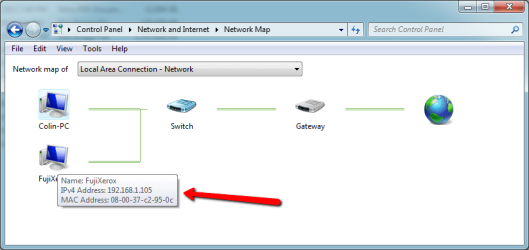
For this I need the mac address of the printer. The printer doesn't have the mac address on the sticker on the back nor do I have the manual and if I print out the printer status page is also doesn't show the mac, any one know of a cool tool to obtain the mac address ?
Thanks pal, but I have the CD that came with the router... problem is I don't want to go around the 30 computers and install the disc on every one. The printer was installed on a small usb print server that was connected to the old router, but we have replaced the router (and the need for the print server) with the N600. (print server built in)
The problem is that the old print server (IP 192.168.0.20) worked ok, but now the new router has assigned 192.168.0.3 and yesterday it re-assigned 192.168.0.4 and no one could print to it (even the 3 pc's that I installed the cd on), hence the reason I want to assign a reserved IP via mac address for the printer. This way all the clients will always print to the same IP no matter what IP the router dishes out ... hope this makes sense
I'm not entirely sure about this, but my understanding is that a printer would not have a MAC address unless it was a network(able) printer - with an ethernet port or a wireless port - and the firmware to deal with that chore. I don't think a USB only printer will have a MAC.
I would be happy to know if I am wrong about that.
My Computer
Computer type
PC/Desktop
Computer Manufacturer/Model Number
Home Built - Jan 2013
OS
Windows 7 64 Bit Home Premium SP1
CPU
i7-3820
Motherboard
Asus P9X79-PRO - Bios 4608
Memory
GSkill F3-14900CL9Q - 16GB
Graphics Card(s)
EVGA GeForce GTX660 - Driver 352.86
Sound Card
On board Realtek ALC898
Monitor(s) Displays
Acer S271HL
Screen Resolution
1920 x 1080
Hard Drives
#1- Samsung 840 Pro Series
#2- Western Digital WD1002FAEX Sata3 Black
#3- Western Digital WD1002FAEX Sata3 Black
PSU
Corsair CMPSU-850TX-V2 - 850 watt (by Seasonic)
Case
Corsair Obsidian 550D
Cooling
Standard 3 120mm case fans, Cooler Master Hyper 212 EVO
There's a HP USB colour printer which is also only USB and this is connected to the other USB port on the router, this has the mac address on a sticker on the back of the printer which I've already reserved on the router and is working fine
1*Samsung 840 EVO 120GB SSD;
1*OCZ Vertex 2 60GB SSD;
2*Samsung F3 SpinPoint 1TB in RAID0;
1*Samsung F1 SpinPoint 1TB;
2*Western Digital 1TB External USB 3.0
1*Western Digital 500GB External USB 3.0
1*Seagate 500GB External USB 2.0
PSU
Thermaltake ToughPower QFan 750W
Case
Thermaltake Element S VK60001W2Z
Cooling
Corsair H60 Water Cooling, 2*230mm and 2*80mm case fans