
You are using an out of date browser. It may not display this or other websites correctly.
You should upgrade or use an alternative browser.
You should upgrade or use an alternative browser.
Solved change explorer navigation area backround
- Thread starter Imold
- Start date


Bongo
Jerry ☮ 1956-2019 R.I.P.
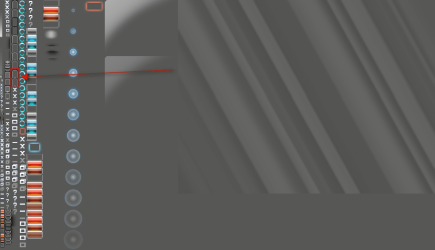
Image #'s for Basic they are in the aero.msstyles
Maximize Active 689
Inactive 688
Normal Active 686
Inactive 687
For aero they are in the Steam image #971 in the aero.msstyles
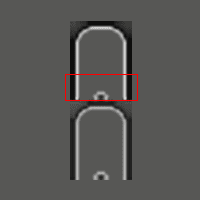
That image has several parts on it and is very transparent the screenshot below shows the location, I put it on a gray background so it could be seen better, that would be the entire top frame for the Explorer window outlined in red that is (Top) Active and (Bottom) Inactive window.
That image is 21 x 54 pixels so top half of that would be the active and the bottom half would be inactive.

To cover the area you want to do you may only need to edit the bottom half of each image or it will cover the whole top window frame.
Jerry
Maximize Active 689
Inactive 688
Normal Active 686
Inactive 687
For aero they are in the Steam image #971 in the aero.msstyles
That image has several parts on it and is very transparent the screenshot below shows the location, I put it on a gray background so it could be seen better, that would be the entire top frame for the Explorer window outlined in red that is (Top) Active and (Bottom) Inactive window.
That image is 21 x 54 pixels so top half of that would be the active and the bottom half would be inactive.
To cover the area you want to do you may only need to edit the bottom half of each image or it will cover the whole top window frame.
Jerry
My Computer
- Computer type
- Laptop
- Computer Manufacturer/Model Number
- Sager NP9170
- OS
- Win 7 Pro x64 / Win 10 Pro
- CPU
- Intel(R) Core(TM) i7-3630QM CPU @ 2.40GHz
- Motherboard
- CLEVO P170EM
- Memory
- 12 GB
- Graphics Card(s)
- (1) Intel(R) HD Graphics 4000 (2) NVIDIA GeForce GTX 675M
- Sound Card
- (1) Realtek High Definition Audio (2) Intel(R) Display Aud
- Monitor(s) Displays
- 17.3
- Screen Resolution
- 1920x1080
- Hard Drives
- (1) Samsung 860 EVO 500GB(OS) (1) Samsung 860 EVO 500GB(Data)
- Keyboard
- Backlite
- Antivirus
- MSE, Malwarebytes Pro
- Browser
- Firefox
- Other Info
- DESKTOP: Custom-built.
OS: Win 10 Pro x64.
CASE: Rosewill R5.
CPU: Intel I5 4670K CPU @ 3.40GHz.
CPU COOLER: Cool Master Hyper 212 EVO.
MOTHERBOARD: Asus Z87-A.
MEMORY: Kingston HyperX 2x4 GB.
GPU: Nvidia Geforce 650 TI.
PSU: Corsair TX750.
DRIVES: (1) Samsung 840 120 GB SSD (2) Western Digital blue 500 GB 7200 RPM.
 Just one thing tho, for aero is there a way that doesn't mess up the title bar for everything other then windows explorer? If it can't be done then oh well at least now I can do it in basic.
Bongo
Jerry ☮ 1956-2019 R.I.P.
No, with aero its all title bars. You can try only editing the bottom of the top frame image that I outlined in red in the 3rd image in the post above, it would be edit, try it, edit, try it, etc.
Jerry
Jerry
My Computer
- Computer type
- Laptop
- Computer Manufacturer/Model Number
- Sager NP9170
- OS
- Win 7 Pro x64 / Win 10 Pro
- CPU
- Intel(R) Core(TM) i7-3630QM CPU @ 2.40GHz
- Motherboard
- CLEVO P170EM
- Memory
- 12 GB
- Graphics Card(s)
- (1) Intel(R) HD Graphics 4000 (2) NVIDIA GeForce GTX 675M
- Sound Card
- (1) Realtek High Definition Audio (2) Intel(R) Display Aud
- Monitor(s) Displays
- 17.3
- Screen Resolution
- 1920x1080
- Hard Drives
- (1) Samsung 860 EVO 500GB(OS) (1) Samsung 860 EVO 500GB(Data)
- Keyboard
- Backlite
- Antivirus
- MSE, Malwarebytes Pro
- Browser
- Firefox
- Other Info
- DESKTOP: Custom-built.
OS: Win 10 Pro x64.
CASE: Rosewill R5.
CPU: Intel I5 4670K CPU @ 3.40GHz.
CPU COOLER: Cool Master Hyper 212 EVO.
MOTHERBOARD: Asus Z87-A.
MEMORY: Kingston HyperX 2x4 GB.
GPU: Nvidia Geforce 650 TI.
PSU: Corsair TX750.
DRIVES: (1) Samsung 840 120 GB SSD (2) Western Digital blue 500 GB 7200 RPM.