DVD drive noise, constant activity after sleep mode

blotsome

New member
There is something wrong with my DVD-drive after it comes out of sleep mode. I have the default power option of "balanced" which puts the computer to sleep after 30 minutes. However, when it wakes up, the DVD makes a sound like a disk spinning up (note: the drive is empty), and it keeps making the noise. Also the green light comes on. The only thing that I have found to stop the noise and activity on the drive is a reboot. I found this old post, Gotta say Im disapointed in the "Internet TV" - The Green Button, and it sounds similar, only my drive door isn't opening, just the noise (spin up?). However, I updated to my latest firmware, and that didn't fix it. I'm out of ideas. Do you have any?

The drive is a SONY Optiarc AD-7240S. Also, I thought this was just a bug in the RC 7100, but I've since updated to the official release, and it hasn't been fixed. Strange, especially that it seems like no one else is really experiencing the same thing when I've searched for fixes for the issue. Thanks!
 

My Computer

OS
W7 Pro x64
CPU
AMD|A64 X2 5400+ 2.8G
Motherboard
ASUS M3A78-EM AM2+ 780G
Memory
1Gx2|OCZ DII1066OCZ2N10662GK R
Graphics Card(s)
onboard Radeon 3200HD
Sound Card
M-Audio Revolution 7.1
Monitor(s) Displays
Dell 30" 3007wfp-HC
Hard Drives
320G WD3200AAKS
1T WD10EACS
1.5T SAMSUNG HD154UI
PSU
SEASONIC|SS-550HT 550W
Case
ANTEC|SOLO BK/SIL
Cooling
Scythe Ninja 2

My Computer

Computer Manufacturer/Model Number
self built
OS
7600.20510 x86
CPU
P4 550 3.4 GHz HT running at 3.5 GHz
Motherboard
MSI PM8M3-V (MS-7211 v1.x) Micro-ATX mainboard
Memory
OCZ 2 GB(2x1GB) DDR400mHz running @ 414 mHz
Graphics Card(s)
HIS Radeon HD 3850 IceQ 3 Turbo HDMI Dual DL-DVI AGP
Sound Card
MOTU Traveler firewire studio interface 192 kHz 24 bit
Monitor(s) Displays
22" widescreen Acer X223W LCD, 17" Compaq P75 CRT
Screen Resolution
1680x1050 and 1280x1024
Hard Drives
SATA I x2 WD, 400 GB and 120 GB, SATA 2 WD Caviar Black 1 TB
PSU
350W generic
Case
Cybertronpc, it glows blue
Cooling
stock cpu fan, Ice-Q 3 gpu and system, many case fans
Keyboard
Logitch Classical Keyboard 200
Mouse
Logitech Mediaplay cordless
Internet Speed
1792/448 kbits/sec
Other Info
SATA II PCI fake RAID adapter, 1 GB Readyboost, original ATI Remote Wonder (even works with WMC perfectly), Logitech Rumblepad 2 game controller x2
I recently flashed my bios to 2002 (because I was hoping they'd have upped the UMA buffer to 512, as I was having choppy playback, slow guide response in 7MC when overlaying the guide over live HD TV. But alas, the UMA buffer was not upped, even though the chip specifications support that much). Ok, I downloaded that other package as well.

When I double clicked "AsusSetup.exe" it went straight into the ATI Catalyst Install Manager. I already have the latest drivers for my onboard video installed (and the CCC), so I tried to skip that, but I couldn't find a way how. So I decided to just install the ATI stuff again, and take note if the version was older, newer, or the same. After ATI setup was complete, it asked me to reboot. I did. At no point did it seem like any other drivers were installed. I went through the zip file's directories, and tried out other installers. I couldn't access various .msi files by themselves. All the other installers (.exe) I could find would simply open the ATI installer again. So, at this point, I'm not sure if I have the latest motherboard drivers installed or not.

Anyway, I've tried putting the computer to sleep, and waking it up, and the problem hasn't been fixed. So I figure either the driver installation didn't complete, I'm doing something wrong regarding the installation, or it did install and the problem is something else. Any ideas? Thanks for the reply!
 

My Computer

OS
W7 Pro x64
CPU
AMD|A64 X2 5400+ 2.8G
Motherboard
ASUS M3A78-EM AM2+ 780G
Memory
1Gx2|OCZ DII1066OCZ2N10662GK R
Graphics Card(s)
onboard Radeon 3200HD
Sound Card
M-Audio Revolution 7.1
Monitor(s) Displays
Dell 30" 3007wfp-HC
Hard Drives
320G WD3200AAKS
1T WD10EACS
1.5T SAMSUNG HD154UI
PSU
SEASONIC|SS-550HT 550W
Case
ANTEC|SOLO BK/SIL
Cooling
Scythe Ninja 2
In your OP, I thought you meant you flashed the DVD drive. I misunderstood.

So ya, try that. It has decent chance of success. Flash your DVD drive to the latest from manufacturer's site. Follow their simple instructions.
 

My Computer

Computer Manufacturer/Model Number
self built
OS
7600.20510 x86
CPU
P4 550 3.4 GHz HT running at 3.5 GHz
Motherboard
MSI PM8M3-V (MS-7211 v1.x) Micro-ATX mainboard
Memory
OCZ 2 GB(2x1GB) DDR400mHz running @ 414 mHz
Graphics Card(s)
HIS Radeon HD 3850 IceQ 3 Turbo HDMI Dual DL-DVI AGP
Sound Card
MOTU Traveler firewire studio interface 192 kHz 24 bit
Monitor(s) Displays
22" widescreen Acer X223W LCD, 17" Compaq P75 CRT
Screen Resolution
1680x1050 and 1280x1024
Hard Drives
SATA I x2 WD, 400 GB and 120 GB, SATA 2 WD Caviar Black 1 TB
PSU
350W generic
Case
Cybertronpc, it glows blue
Cooling
stock cpu fan, Ice-Q 3 gpu and system, many case fans
Keyboard
Logitch Classical Keyboard 200
Mouse
Logitech Mediaplay cordless
Internet Speed
1792/448 kbits/sec
Other Info
SATA II PCI fake RAID adapter, 1 GB Readyboost, original ATI Remote Wonder (even works with WMC perfectly), Logitech Rumblepad 2 game controller x2
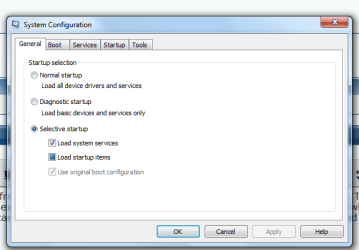
Hi, apart from what torrent said, can you do this, I would like to see something. Type into the searchbox MSCONFIG and click on it to open Then click on STARTUP and when it opens can you take a picture with the Snipping tool of what is there, and upload it here, it should look like this, Thanks.

System config.PNG
 

My Computer

Computer Manufacturer/Model Number
Self Build 64bit
OS
Vista Ult64, Win7600
CPU
Intel Core 2 Quad Q6600 @ 2400 MHz 64bit OS
Motherboard
Asus P5E3 Deluxe WiFi @p 64 bit OS
Memory
4096 MB DDR3-SDRAM
Graphics Card(s)
ATI Radeon HD 3870 Series x2 Crossfired
Sound Card
Realtek on board
Monitor(s) Displays
Samsung SyncMaster - 23 inches
Screen Resolution
1680x1050 pixels at 60 Hz in True Colors
Hard Drives
Hitachi (250 GB)/Samsung 750 GB. /Barracuda 160 GB.
My Book 1 TB external..
PSU
Cooler Master 1000w
Case
Cooler Master Cosmos 1000.
Cooling
Fans and fresh air,
Keyboard
Wireless
Mouse
Wireless
Internet Speed
Never fast enough
Other Info
I use a Magnum.
You didn't misunderstand. I've flashed both. However, the flashing of the motherboard was done a week ago due to another issue, while the flashing of the DVD drive was done more recently due to this issue. As for the screenshot, here it is:

What is missing is Rainmeter and Logitech SetPoint. Looks like I have some junk in there that I don't need.
 

Attachments

  • desktop start up.PNG
    desktop start up.PNG
    43.3 KB · Views: 26

My Computer

OS
W7 Pro x64
CPU
AMD|A64 X2 5400+ 2.8G
Motherboard
ASUS M3A78-EM AM2+ 780G
Memory
1Gx2|OCZ DII1066OCZ2N10662GK R
Graphics Card(s)
onboard Radeon 3200HD
Sound Card
M-Audio Revolution 7.1
Monitor(s) Displays
Dell 30" 3007wfp-HC
Hard Drives
320G WD3200AAKS
1T WD10EACS
1.5T SAMSUNG HD154UI
PSU
SEASONIC|SS-550HT 550W
Case
ANTEC|SOLO BK/SIL
Cooling
Scythe Ninja 2
Hi, sorry about that was away. now Uncheck all the boxes except the AntiVirus one that you use, and then press Apply and OK and then Restart, and we will see if it is one of those programs that is causing the problem.
 

My Computer

Computer Manufacturer/Model Number
Self Build 64bit
OS
Vista Ult64, Win7600
CPU
Intel Core 2 Quad Q6600 @ 2400 MHz 64bit OS
Motherboard
Asus P5E3 Deluxe WiFi @p 64 bit OS
Memory
4096 MB DDR3-SDRAM
Graphics Card(s)
ATI Radeon HD 3870 Series x2 Crossfired
Sound Card
Realtek on board
Monitor(s) Displays
Samsung SyncMaster - 23 inches
Screen Resolution
1680x1050 pixels at 60 Hz in True Colors
Hard Drives
Hitachi (250 GB)/Samsung 750 GB. /Barracuda 160 GB.
My Book 1 TB external..
PSU
Cooler Master 1000w
Case
Cooler Master Cosmos 1000.
Cooling
Fans and fresh air,
Keyboard
Wireless
Mouse
Wireless
Internet Speed
Never fast enough
Other Info
I use a Magnum.
I clicked "disable all", and restarted. Then once it booted up, I put it to sleep. Waited for it to power down, then started it up again. Drive noise is still there. So I guess it isn't any of the start up programs. Sorry. Any other ideas?
 

My Computer

OS
W7 Pro x64
CPU
AMD|A64 X2 5400+ 2.8G
Motherboard
ASUS M3A78-EM AM2+ 780G
Memory
1Gx2|OCZ DII1066OCZ2N10662GK R
Graphics Card(s)
onboard Radeon 3200HD
Sound Card
M-Audio Revolution 7.1
Monitor(s) Displays
Dell 30" 3007wfp-HC
Hard Drives
320G WD3200AAKS
1T WD10EACS
1.5T SAMSUNG HD154UI
PSU
SEASONIC|SS-550HT 550W
Case
ANTEC|SOLO BK/SIL
Cooling
Scythe Ninja 2
Go back into the startup and check to see if any of the boxes are reticked.
 

My Computer

Computer Manufacturer/Model Number
Self Build 64bit
OS
Vista Ult64, Win7600
CPU
Intel Core 2 Quad Q6600 @ 2400 MHz 64bit OS
Motherboard
Asus P5E3 Deluxe WiFi @p 64 bit OS
Memory
4096 MB DDR3-SDRAM
Graphics Card(s)
ATI Radeon HD 3870 Series x2 Crossfired
Sound Card
Realtek on board
Monitor(s) Displays
Samsung SyncMaster - 23 inches
Screen Resolution
1680x1050 pixels at 60 Hz in True Colors
Hard Drives
Hitachi (250 GB)/Samsung 750 GB. /Barracuda 160 GB.
My Book 1 TB external..
PSU
Cooler Master 1000w
Case
Cooler Master Cosmos 1000.
Cooling
Fans and fresh air,
Keyboard
Wireless
Mouse
Wireless
Internet Speed
Never fast enough
Other Info
I use a Magnum.
Also check in your bios to see that the harddrive is set to the Primary to start the OS.
and not the CD Drive.
 

My Computer

Computer Manufacturer/Model Number
Self Build 64bit
OS
Vista Ult64, Win7600
CPU
Intel Core 2 Quad Q6600 @ 2400 MHz 64bit OS
Motherboard
Asus P5E3 Deluxe WiFi @p 64 bit OS
Memory
4096 MB DDR3-SDRAM
Graphics Card(s)
ATI Radeon HD 3870 Series x2 Crossfired
Sound Card
Realtek on board
Monitor(s) Displays
Samsung SyncMaster - 23 inches
Screen Resolution
1680x1050 pixels at 60 Hz in True Colors
Hard Drives
Hitachi (250 GB)/Samsung 750 GB. /Barracuda 160 GB.
My Book 1 TB external..
PSU
Cooler Master 1000w
Case
Cooler Master Cosmos 1000.
Cooling
Fans and fresh air,
Keyboard
Wireless
Mouse
Wireless
Internet Speed
Never fast enough
Other Info
I use a Magnum.
A ha. That may be it! First, none of the boxes where re-ticked. However, the second thing you said sounds useful, indeed. I had changed the boot order when I was loading the Windows 7 DVD. I don't believe I've changed it back, and I have a feeling the boot order is set for DVD 1st, C: drive 2nd. I'm at work now, so cannot verify this, but it sounds promising. I'll try it out later on and post my results. Thanks!
 

My Computer

OS
W7 Pro x64
CPU
AMD|A64 X2 5400+ 2.8G
Motherboard
ASUS M3A78-EM AM2+ 780G
Memory
1Gx2|OCZ DII1066OCZ2N10662GK R
Graphics Card(s)
onboard Radeon 3200HD
Sound Card
M-Audio Revolution 7.1
Monitor(s) Displays
Dell 30" 3007wfp-HC
Hard Drives
320G WD3200AAKS
1T WD10EACS
1.5T SAMSUNG HD154UI
PSU
SEASONIC|SS-550HT 550W
Case
ANTEC|SOLO BK/SIL
Cooling
Scythe Ninja 2
Hope it is what we think.;)
 

My Computer

Computer Manufacturer/Model Number
Self Build 64bit
OS
Vista Ult64, Win7600
CPU
Intel Core 2 Quad Q6600 @ 2400 MHz 64bit OS
Motherboard
Asus P5E3 Deluxe WiFi @p 64 bit OS
Memory
4096 MB DDR3-SDRAM
Graphics Card(s)
ATI Radeon HD 3870 Series x2 Crossfired
Sound Card
Realtek on board
Monitor(s) Displays
Samsung SyncMaster - 23 inches
Screen Resolution
1680x1050 pixels at 60 Hz in True Colors
Hard Drives
Hitachi (250 GB)/Samsung 750 GB. /Barracuda 160 GB.
My Book 1 TB external..
PSU
Cooler Master 1000w
Case
Cooler Master Cosmos 1000.
Cooling
Fans and fresh air,
Keyboard
Wireless
Mouse
Wireless
Internet Speed
Never fast enough
Other Info
I use a Magnum.
I should have known better, because the RC had this same issue, and I hadn't changed the boot order back then. Anyway, first I tried changing the boot order, then I disabled the DVD drive in the boot sequence completely, and both did not affect the problem at all. Sorry. I got my hopes up.

Any other ideas?
 

My Computer

OS
W7 Pro x64
CPU
AMD|A64 X2 5400+ 2.8G
Motherboard
ASUS M3A78-EM AM2+ 780G
Memory
1Gx2|OCZ DII1066OCZ2N10662GK R
Graphics Card(s)
onboard Radeon 3200HD
Sound Card
M-Audio Revolution 7.1
Monitor(s) Displays
Dell 30" 3007wfp-HC
Hard Drives
320G WD3200AAKS
1T WD10EACS
1.5T SAMSUNG HD154UI
PSU
SEASONIC|SS-550HT 550W
Case
ANTEC|SOLO BK/SIL
Cooling
Scythe Ninja 2
Ok just one more thought , go to Control Panel/ Device Manager and Dvd/CD Drives, select your one, right click and uninstall, press ok and let it reboot.
 

My Computer

Computer Manufacturer/Model Number
Self Build 64bit
OS
Vista Ult64, Win7600
CPU
Intel Core 2 Quad Q6600 @ 2400 MHz 64bit OS
Motherboard
Asus P5E3 Deluxe WiFi @p 64 bit OS
Memory
4096 MB DDR3-SDRAM
Graphics Card(s)
ATI Radeon HD 3870 Series x2 Crossfired
Sound Card
Realtek on board
Monitor(s) Displays
Samsung SyncMaster - 23 inches
Screen Resolution
1680x1050 pixels at 60 Hz in True Colors
Hard Drives
Hitachi (250 GB)/Samsung 750 GB. /Barracuda 160 GB.
My Book 1 TB external..
PSU
Cooler Master 1000w
Case
Cooler Master Cosmos 1000.
Cooling
Fans and fresh air,
Keyboard
Wireless
Mouse
Wireless
Internet Speed
Never fast enough
Other Info
I use a Magnum.
Hmm... nope that's not it either. I guess for now, I'll just have to turn "sleep" off. Or maybe turn off the DVD drive in the bios when I'm not using it. Not sure which one is more important to me. Maybe I'll see if another firmware comes out for my drive. Do you think my motherboard drivers were not installed properly? Is there a way to manually install them, since the Asus package has a lot of directories and files in it. Just a thought (though not sure if that would help at this point).
 

My Computer

OS
W7 Pro x64
CPU
AMD|A64 X2 5400+ 2.8G
Motherboard
ASUS M3A78-EM AM2+ 780G
Memory
1Gx2|OCZ DII1066OCZ2N10662GK R
Graphics Card(s)
onboard Radeon 3200HD
Sound Card
M-Audio Revolution 7.1
Monitor(s) Displays
Dell 30" 3007wfp-HC
Hard Drives
320G WD3200AAKS
1T WD10EACS
1.5T SAMSUNG HD154UI
PSU
SEASONIC|SS-550HT 550W
Case
ANTEC|SOLO BK/SIL
Cooling
Scythe Ninja 2
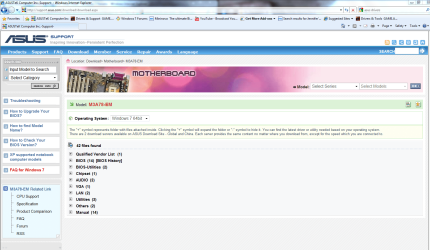
Mmmm that's a pity, Go to this page and check that you have installed EVERYTHING that is needed for your motherboard.

ASUSTeK Computer Inc.-Support-

mo.PNG
 

My Computer

Computer Manufacturer/Model Number
Self Build 64bit
OS
Vista Ult64, Win7600
CPU
Intel Core 2 Quad Q6600 @ 2400 MHz 64bit OS
Motherboard
Asus P5E3 Deluxe WiFi @p 64 bit OS
Memory
4096 MB DDR3-SDRAM
Graphics Card(s)
ATI Radeon HD 3870 Series x2 Crossfired
Sound Card
Realtek on board
Monitor(s) Displays
Samsung SyncMaster - 23 inches
Screen Resolution
1680x1050 pixels at 60 Hz in True Colors
Hard Drives
Hitachi (250 GB)/Samsung 750 GB. /Barracuda 160 GB.
My Book 1 TB external..
PSU
Cooler Master 1000w
Case
Cooler Master Cosmos 1000.
Cooling
Fans and fresh air,
Keyboard
Wireless
Mouse
Wireless
Internet Speed
Never fast enough
Other Info
I use a Magnum.
I have the same problem with my HP pavilion dv4, Win 7 Home Premium 64 bit. On top of this my Hard Drive died last week, which I think is result of this issue.

I uninstalled the DVD in the Device Manager and the problem was still there, which tells me that root cause is in OS, not in the device. It seems that something tries to check for CD/DVD when entering Sleep Mode - any idea what that can be?
 

My Computer

OS
7 Home Premium 64bit
Did some investigation and here are results:
1) The problem occurs only if the laptop is powered form the charger (no problem if it runs on battery)
2) In the CMD "Powercfg -devicequery wake_armed" and found out that only two devices are able to wake up from sleep mode (Infra Red and/or Mouse)
3) Removed mouse receiver form USB port and entered sleep mode
Voila - sleep mode works! => The problem is the mouse USB receiver!
(will try to update the driver and write results later)
 

My Computer

OS
7 Home Premium 64bit
Hmm... that doesn't help me. I don't have a USB mouse receiver or infrared mouse.
 

My Computer

OS
W7 Pro x64
CPU
AMD|A64 X2 5400+ 2.8G
Motherboard
ASUS M3A78-EM AM2+ 780G
Memory
1Gx2|OCZ DII1066OCZ2N10662GK R
Graphics Card(s)
onboard Radeon 3200HD
Sound Card
M-Audio Revolution 7.1
Monitor(s) Displays
Dell 30" 3007wfp-HC
Hard Drives
320G WD3200AAKS
1T WD10EACS
1.5T SAMSUNG HD154UI
PSU
SEASONIC|SS-550HT 550W
Case
ANTEC|SOLO BK/SIL
Cooling
Scythe Ninja 2
Back
Top